avatarKurtis Pykes

Free AI web copilot to create summaries, insights and extended knowledge, download it at here

3747

Abstract

="9b1d" type="7">“I help [WHO] [DO WHAT] [HOW — Optional].”</p><p id="d53c">Last but not least, the hashtags.</p><p id="647d">If your LinkedIn profile is not in <a href="https://www.linkedin.com/help/linkedin/answer/a522537/creator-mode?lang=en">creator mode</a></p><p id="83aa">Be in it ASAP.</p><p id="aacb">It helps LinkedIn members discover your content.</p><p id="756a">The concept is simple: you state what you talk about on LinkedIn, and it’s displayed in your profile introduction as hashtags.</p><h1 id="dab1">#2 Build trust fast</h1><p id="c32e">You must build trust with your customer fast.</p><p id="c835">There’s one effortless way to do this…</p><p id="18f4">With your headshot.</p><p id="4f2d">Forget what everybody says…</p><p id="73b0">Looks matter — not just in dating.</p><p id="f30e">Your headshot is the first encounter someone has with you when they land on your profile.</p><p id="70bc">I don’t care how much of a nice person you are when people get to know you…</p><p id="5bb7">If your headshot does not convey professionalism and trustworthiness, no one will part with their money for your products or services.</p><p id="61e0">Here’s two great examples of top-tier headshots from some people in my network — even though I don’t think Eric’s banner image is well optimized…</p><figure id="0c35"><img src="https://cdn-images-1.readmedium.com/v2/resize:fit:800/1*FntPJvXD4YqB8HbErQX46A.jpeg"><figcaption>Figure 2: Two examples of good headshots on LinkedIn</figcaption></figure><p id="2aed">It’s easy to overcomplicate the headshot — “Do I have to be in a suit,” “Am I supposed to smile?”</p><p id="f9dc">Let me share a few simple tips to help you out:</p><ul><li>Look genuine; There’s no need to be super serious in your headshot.</li><li>Profile images are non-clickable, so make sure you show your face.</li><li>Use a recent photo; The last thing you want is to hop on a call with a potential lead, and they’re questioning if you’re really you.</li><li>If you wear suits daily, be in a suit. If you rock plain tees, rock that. Don’t switch up your swag for your headshot.</li></ul><h1 id="f37e">#3 Make your customers take action</h1><p id="bbf0">Here’s a mistake many of us (including me, until recently) are making…</p><p id="ae7b">For starters, you’re “Featured” section should be activated — you’re missing out if not.</p><p id="9e6d">But what goes in there are <b>not </b>your most popular posts.</p><p id="6d5c">Please stop doing that.</p><p id="2c45">If a potential customer takes the time to analyze your LinkedIn page and scroll down to the Featured section…</p><p id="f65f">They are interested.</p><p id="66c5">These people want to know more about you — it’s only fitting you give them a chance to take action.</p><p id="a5d8">All they can do with your most popular tweet is like it, reshare it, and possibly leave a comment.</p><p id="452b">The last time I checked, getting your ego tickled doesn’t pay the bills.</p><p id="aac9">Get them into your funnel!</p><p id="745b">Let them pass you their email to join your newsletter, join a webinar, or receive an ebook.</p><p id="48ce">Let them have a chance to purchase one of your products without having to reach out.</p><p id="3945">The Featured section is the best place to put a call to action.</p><p id="efb3">Here’s how mine looks…</p><figure id="d440"><img src="https://cdn-images-1.readmedium.com/v2/resize:fit:800/1*v6NkzNitqU_br45GhArjuA.png"><figcaption>Figure 3: My Featured section on <a href="https://www.linkedin.com/in/kurtispykes/">LinkedIn</a>.</figcaption></figure><p id="c632">I’ll share a rule of thumb from, straight from the Justin Welsh playbook—</p><p id="e053" type="7">“Give something of value for free, or give away something at a low

Options

cost to acquire customers and build an install base.” — Justin Welsh</p><p id="87ac">It doesn’t matter what you use…</p><p id="3afb">Just get your customers into a controlled environment.</p><h1 id="99e6">#4 Close with social proof</h1><p id="9c0b">I must admit…</p><p id="06cc">Of all the tips, this is the one I struggle with the most.</p><p id="d328">I don’t know about you, but boasting about myself just doesn’t flow naturally…</p><p id="a799">If I were on dating apps, I’d be the kind of guy to leave my about section blank.</p><p id="31b2">But here’s the facts of the matter…</p><p id="95cd"><b>No one </b>will brag about you until you’ve built up a solid customer base and delivered them with life-changing — like I’m doing for Justin right now.</p><p id="9b1c">Until then…</p><p id="af7d"><b>You’re on your own.</b></p><p id="f851">Let’s go back to <a href="https://www.linkedin.com/in/raymondgreen/">Ray’s profile</a> and check out his about section.</p><figure id="52c7"><img src="https://cdn-images-1.readmedium.com/v2/resize:fit:800/1*UxUMmikjPpIVshn-waWwCQ.png"><figcaption>Figure 4: The first half of Ray’s About section</figcaption></figure><p id="696f">Believe it or not, that’s only the first part of Ray’s “About” section.</p><p id="f1c5">There’s more.</p><p id="036c">I love the way he casually talks about himself and throws in his achievements without it sounding like he’s bragging.</p><p id="a492">Maybe it’s an art.</p><p id="3d58">But we all need it to some degree.</p><h1 id="e913">Final Thoughts</h1><p id="34c1">Here’s a recap:</p><ul><li>Let your customers know what you do and how you can help them when they land on your page.</li><li>Build trust with a headshot that oozes trustworthiness and professionalism.</li><li>Make people take action on your profile.</li><li>Toot your own horn.</li></ul><p id="85da">If you like what you read in this article, I encourage you to take the entire <a href="https://www.justinwelsh.me/a/2147505019/V45JZNSm">LinkedIn Operating system course</a>.</p><p id="66d0">It’s done me good already, and I haven’t even scratched the surface.</p><p id="12fc"><i>Thanks for reading</i>.</p><p id="bcb3"><a href="https://mailchi.mp/d514e77a4c78/freelance-with-kp"><b>Join the Wisdom Wednesday mailing list to receive one tip per week on how you can level up your online business.</b></a></p><p id="a614"><b>Connect with me:</b> <a href="https://www.linkedin.com/in/kurtispykes/">LinkedIn</a> <a href="https://twitter.com/KurtisPykes">Twitter</a> <a href="https://www.instagram.com/kurtispykes/">Instagram</a></p><p id="45d3">If you enjoy reading stories like this and wish to support my writing, consider <a href="https://kurtispykes.medium.com/membership">becoming a Medium member</a>. With a $5 a month commitment, you unlock unlimited access to stories on Medium. If you use <a href="https://kurtispykes.medium.com/membership">my sign-up link</a>, I’ll receive a small commission.</p><p id="a54e">Already a member? <a href="https://kurtispykes.medium.com/subscribe">Subscribe</a> to be notified when I publish.</p><div id="cce4" class="link-block"> <a href="https://kurtispykes.medium.com/subscribe"> <div> <div> <h2>Get an email whenever Kurtis Pykes publishes.</h2> <div><h3>Get an email whenever Kurtis Pykes publishes. By signing up, you will create a Medium account if you don't already have…</h3></div> <div><p>kurtispykes.medium.com</p></div> </div> <div> <div style="background-image: url(https://miro.readmedium.com/v2/resize:fit:320/0*OgcAT4RksVAtGe5B)"></div> </div> </div> </a> </div></article></body>

4 Ways To Optimize Your LinkedIn For Lead Capture According To Justin Welsh

#1 Cut The Guesswork
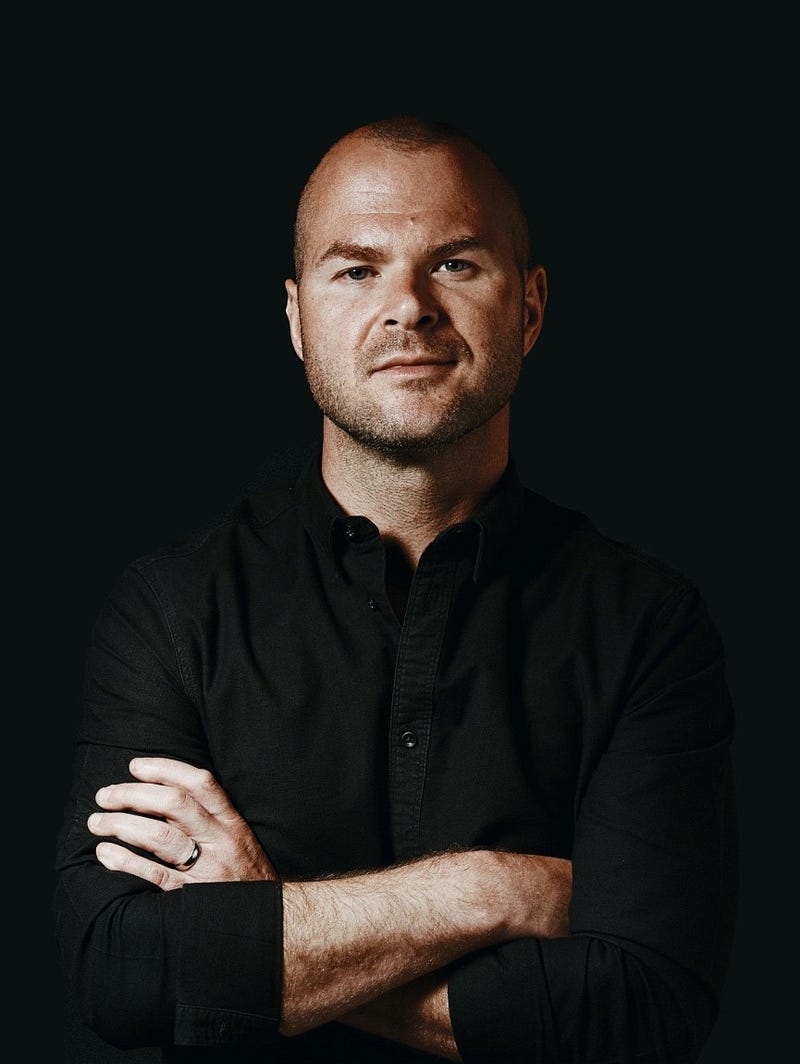
Image of Justin Welsh; [Source: justinwelsh.me/about]

You’ve probably never seen or heard of the guy in the main image.

That’s Justin Welsh

A former startup executive who helped build not one but two $50M annual recurring revenue companies and raised over $300M in venture capital.

The guy was living the life most people online claim to live…

Then he burned out.

He decided to step away from the hypergrowth startup companies and work for himself.

810 days later…

His “little one-person business,” as he calls it, had generated more than $1.3M in revenue with zero ad spend and a 98% margin.

Wanna know what his secret formula was?

Attention.

Getting lots of attention, which can later be converted into money.

He decided to use LinkedIn as his vehicle.

To be clear: I don’t know Justin personally, but I’ve taken his course.

Here are four ways to leverage the attention you generate and convert it into leads with LinkedIn based on the lessons I’ve learned from Justin…

#1 Cut the guesswork

Once you’ve got eyes on you, you must position yourself as the right person for your customer to part ways with their money for.

Who exactly do you help, and what do you help them do?

The people watching must know…

QUICKLY.

This is what the topmost level of your LinkedIn Profile is for…

Don’t let people guess what you do.
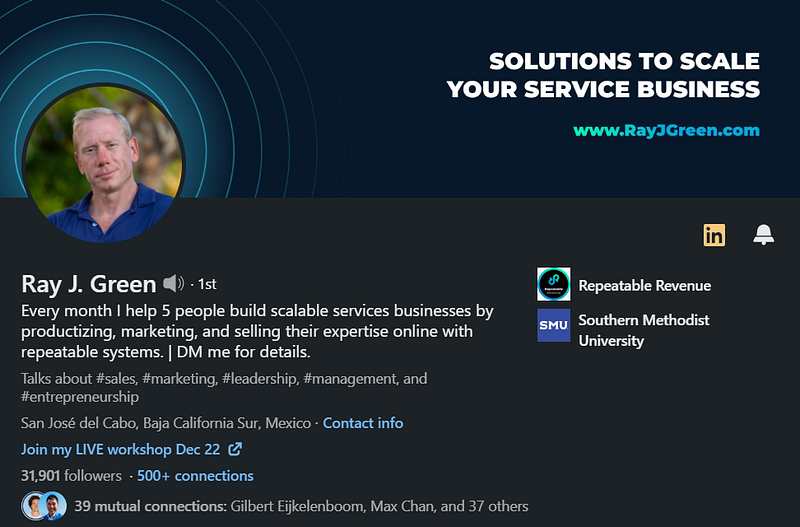
Figure 1: Image of Ray’s LinkedIn profile.

The fellow in Figure 1 is Ray — Justin used his profile as an example in the course, and we recently connected, so I’ll use him as well.

We can divide the topmost level of Ray’s profile into three sections: → Banner → Tagline → Hashtags

The banner should serve one of two purposes:

  • Tell people who you are and what you do
  • Tell people who you help and what problems you solve.

It doesn’t matter which one you pick, choose one — Ray used the latter.

Next is the tagline…

Ray states,

Every month I help 5 people build scalable services business by productionizing, marketing, and selling their expertise online with repeatable systems.

The tagline expands on his banner image by telling you directly, what he does, and what he has to offer.

As a rule of thumb, use your tagline to explain your business as if you’re speaking to a kindergartener.

Use the following template if you’re not sure:

“I help [WHO] [DO WHAT] [HOW — Optional].”

Last but not least, the hashtags.

If your LinkedIn profile is not in creator mode

Be in it ASAP.

It helps LinkedIn members discover your content.

The concept is simple: you state what you talk about on LinkedIn, and it’s displayed in your profile introduction as hashtags.

#2 Build trust fast

You must build trust with your customer fast.

There’s one effortless way to do this…

With your headshot.

Forget what everybody says…

Looks matter — not just in dating.

Your headshot is the first encounter someone has with you when they land on your profile.

I don’t care how much of a nice person you are when people get to know you…

If your headshot does not convey professionalism and trustworthiness, no one will part with their money for your products or services.

Here’s two great examples of top-tier headshots from some people in my network — even though I don’t think Eric’s banner image is well optimized…
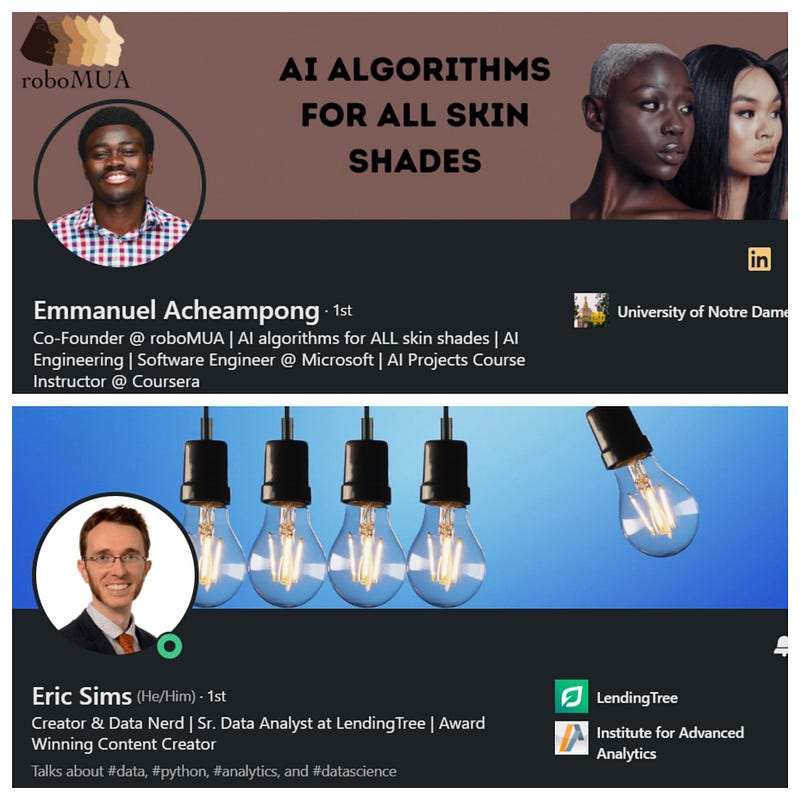
Figure 2: Two examples of good headshots on LinkedIn

It’s easy to overcomplicate the headshot — “Do I have to be in a suit,” “Am I supposed to smile?”

Let me share a few simple tips to help you out:

  • Look genuine; There’s no need to be super serious in your headshot.
  • Profile images are non-clickable, so make sure you show your face.
  • Use a recent photo; The last thing you want is to hop on a call with a potential lead, and they’re questioning if you’re really you.
  • If you wear suits daily, be in a suit. If you rock plain tees, rock that. Don’t switch up your swag for your headshot.

#3 Make your customers take action

Here’s a mistake many of us (including me, until recently) are making…

For starters, you’re “Featured” section should be activated — you’re missing out if not.

But what goes in there are not your most popular posts.

Please stop doing that.

If a potential customer takes the time to analyze your LinkedIn page and scroll down to the Featured section…

They are interested.

These people want to know more about you — it’s only fitting you give them a chance to take action.

All they can do with your most popular tweet is like it, reshare it, and possibly leave a comment.

The last time I checked, getting your ego tickled doesn’t pay the bills.

Get them into your funnel!

Let them pass you their email to join your newsletter, join a webinar, or receive an ebook.

Let them have a chance to purchase one of your products without having to reach out.

The Featured section is the best place to put a call to action.

Here’s how mine looks…
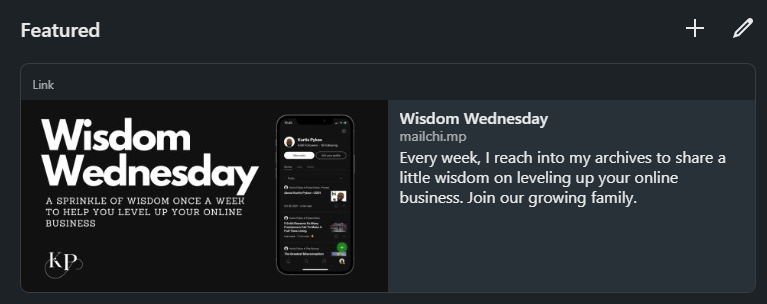
Figure 3: My Featured section on LinkedIn.

I’ll share a rule of thumb from, straight from the Justin Welsh playbook—

“Give something of value for free, or give away something at a low cost to acquire customers and build an install base.” — Justin Welsh

It doesn’t matter what you use…

Just get your customers into a controlled environment.

#4 Close with social proof

I must admit…

Of all the tips, this is the one I struggle with the most.

I don’t know about you, but boasting about myself just doesn’t flow naturally…

If I were on dating apps, I’d be the kind of guy to leave my about section blank.

But here’s the facts of the matter…

No one will brag about you until you’ve built up a solid customer base and delivered them with life-changing — like I’m doing for Justin right now.

Until then…

You’re on your own.

Let’s go back to Ray’s profile and check out his about section.
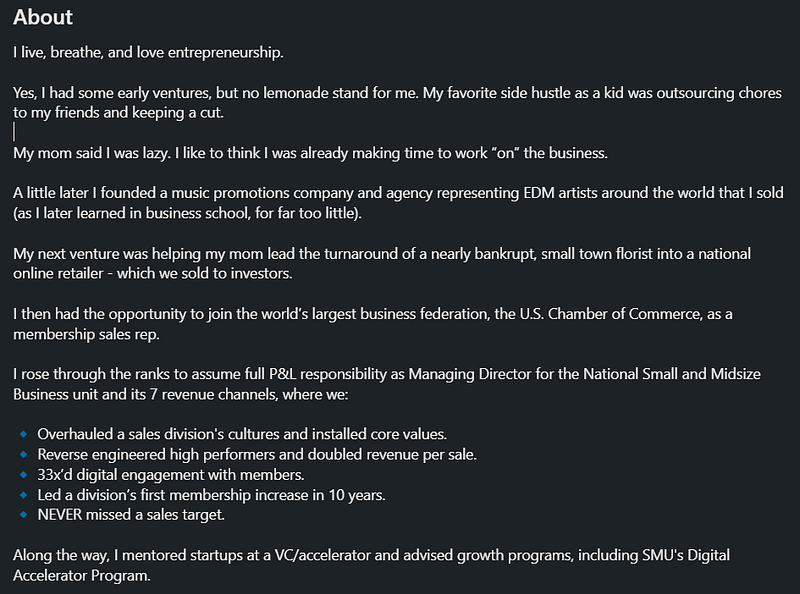
Figure 4: The first half of Ray’s About section

Believe it or not, that’s only the first part of Ray’s “About” section.

There’s more.

I love the way he casually talks about himself and throws in his achievements without it sounding like he’s bragging.

Maybe it’s an art.

But we all need it to some degree.

Final Thoughts

Here’s a recap:

  • Let your customers know what you do and how you can help them when they land on your page.
  • Build trust with a headshot that oozes trustworthiness and professionalism.
  • Make people take action on your profile.
  • Toot your own horn.

If you like what you read in this article, I encourage you to take the entire LinkedIn Operating system course.

It’s done me good already, and I haven’t even scratched the surface.

Thanks for reading.

Join the Wisdom Wednesday mailing list to receive one tip per week on how you can level up your online business.

Connect with me: LinkedIn Twitter Instagram

If you enjoy reading stories like this and wish to support my writing, consider becoming a Medium member. With a $5 a month commitment, you unlock unlimited access to stories on Medium. If you use my sign-up link, I’ll receive a small commission.

Already a member? Subscribe to be notified when I publish.

Business
Entrepreneurship
Marketing
Social Media
Self Improvement
Recommended from ReadMedium