
4 Useful Advanced Features in Locust
Step up your load testing game

Previously, I have covered a beginner’s guide to Locust in Introduction to Locust: An Open Source Load Testing Tool in Python. In this article, let’s explore a little more with four useful advanced features that are available in Locust:
- Execute tasks sequentially
- Generate custom load shapes (time-based stages)
- Use other custom clients
- Run tasks in parallel
In fact, all of the features mentioned above are not new and have been around in the Locust package for quite some time. Learning these features helps to improve your load testing and make your life easier.
Let’s proceed to the next section and start installing the necessary Python packages.
Setup
The installation steps for Locust are a lot easier now, but it requires Python version 3.6 and above. It is highly recommended to create a new virtual environment before you continue with the installation process.
Locust
Activate the virtual environment and run the following command to install Locust:
pip install locustThen validate your installation with the following command (capital V):
locust -VYou should see the version number as follows:
locust 1.6.0Execute Tasks Sequentially
By default, each generated user will:
- pick a task randomly
- execute it
- sleep for a while based on the
wait_time - rinse and repeat
If you are testing a website or an application that is structured in an orderly manner or hierarchical way, you will have to rely on loops and control statements to do so.
Alternatively, you can utilize SequentialTaskSet to do the trick for you. All you need to do is import SequentialTaskSetand create a class that inherits it inside your User class. Have a look at the following code snippet:
I will run all the tasks in order, starting from first_task and then second task.
In fact, you can specify weightage via the task decorator to execute the task multiple times.
# execute once
@task
# execute 5 times
@task(5)Let’s say that you have the following structure in your code:
It will execute the following sequentially:
first_taskoncesecond_taskfive timesthird_taskonce
Generate Custom Load Shapes
There are times where you might want to ramp up or ramp down the number of users at certain time to simulate different kinds of tests, such as a spike test. In this case, you can’t do so by changing just the user count and spawn rate. Fortunately, Locust provides a LoadTestShape class which can be used to control the user count and spawn rate based on your needs.
All you need to do is to create a new class that inherits LoadTestShape and define a function called tick that returns a tuple with the following items:
- user count
- spawn rate
Also, you can return None to stop the test. Have a look at the following example code:
Time-based stages
Besides Locust, I have also covered another load testing tool called k6 in the past.
It offers time-based stages when conducting the test, which allows you to perform different types of testing:
- Smoke test
- Load test
- Spike test
- Stress test
- Soak test
You can emulate the same time-based stages feature as follows:
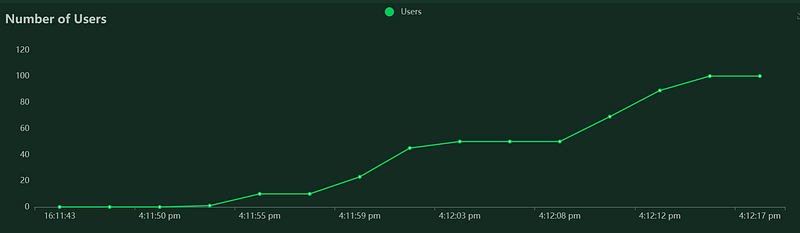
Please note that the duration here represents a timestamp (how many seconds have passed to advance to the next stage) instead of the duration length. In this case, it will:
- Start with 0 users and spawn rate of ten until the five-second mark
- Continue with a spawn rate of ten users and ramp up to 50 users until the 15-second mark
- Continue with a spawn rate of ten users and ramp up to 100 users until the 25-second mark
- End stages and ramp down to 0 user
You can test the script above by running the following command:
locust -f <file_name>.pyThe web user interface is accessible at:
http://localhost:8089The total user and hatch rate are disabled for a script with a custom load shape.
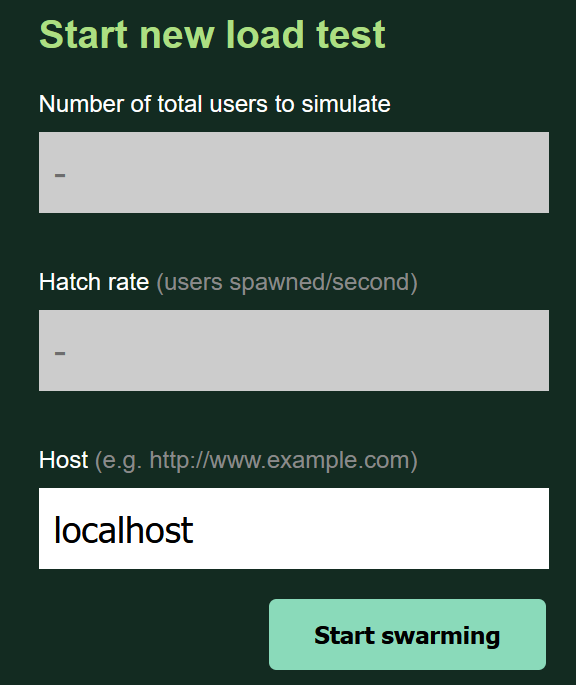
You should get the following output once you click on the “Start swarming” button.
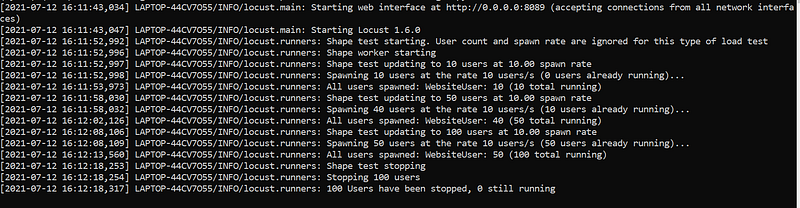
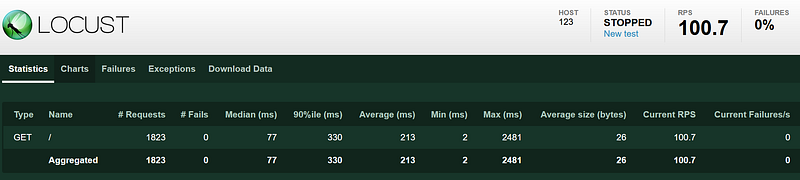
Unlike the normal load test, which runs continuously, it will stop on its own once the script goes through all the stages.
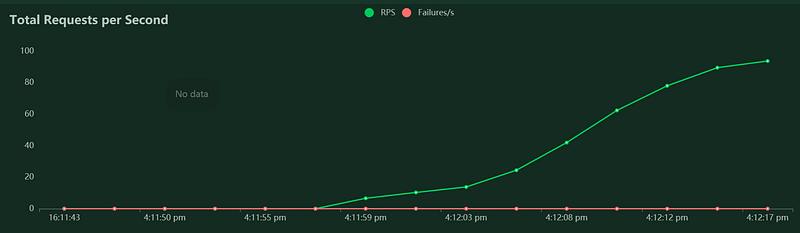
The total requests per the second graph should look like this:
Have a look at the Number of Users graph, which indicates that users are ramped up during specific interval as expected.
You can find more examples at the official GitHub repository.
Using Other Custom Clients
One of the core clients in Locust is the HTTPUser class, which meant to do load test API via HTTP. It is based on the requests module. In fact, you can extend it to test other systems. Having said that, you must use gevent-friendly libraries, else it will block the running Locust processes.
Please note that Locust does not support the standard Python async. As a result, you have to patch it to use gevent instead of an async-based module such as asyncio. Have a look at the following gRPC client example provided by the official documentation:
Let’s say that you wanted to create a new User class based on the HTTPX package to load test HTTP/2 API. All you need to do is to create the corresponding HttpxClient and HttpUser replacing requests with httpx.
Running Tasks in Parallel
Running tasks in parallel is not that straightforward in Locust as it does not support the standard async. If you are looking for a solution to run tasks in parallel, you can utilize gevent’s Pool or Group to create greenlet for you.
from gevent.pool import Groupgroup = Group()
group.spawn(lambda: print("1"))
group.spawn(lambda: print("2"))
group.join()gevent’s spawn function accepts:
- a callable function (You can use lambda expression as well.)
- args
- kwargs
The following code snippet illustrates how you can perform two calls to test HTTP API in parallel:
Conclusion
Let’s recap what you have learned today.
This article started with an introduction to four advanced features that are available in the Locust package.
It continued with steps on installing all the required Python packages via pip install.
After that, it moved on to the implementation process. It showed some examples of code snippets to execute tasks sequentially. Besides that, it explained in detail how to generate custom load shapes, such as time-based stage testing.
Moreover, this article also talked about how to implement your own custom clients for gRPC. Lastly, it provided a simple solution to run tasks via gevent.
Thanks for reading this piece! Kindly check out my other articles for more tutorials related to load testing.


