
4 Questions answered by ChatGPT about ChatGPT

In this article i would like to show you how to use ChatGPT and what is its answer about itself.
Following four questions are raised to ChatGPT about itself, the answer is shown at the end of this article.
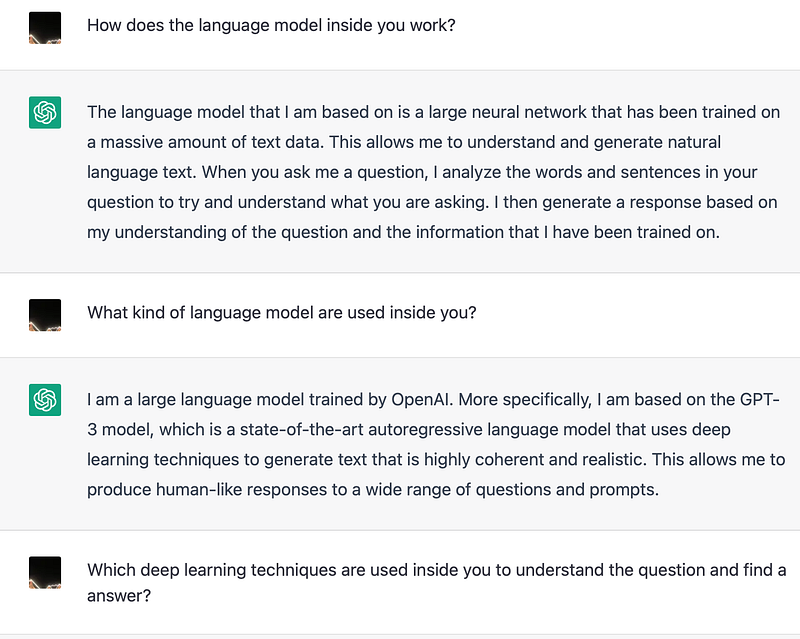
- How does the language model inside you work?
- What kind of language model are used inside you?
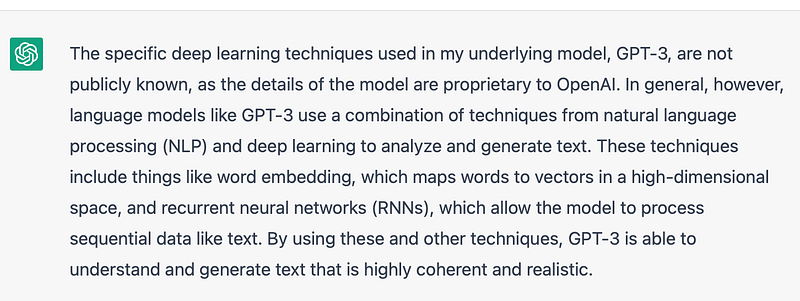
- Which deep learning techniques are used inside you to understand the question and find a answer?
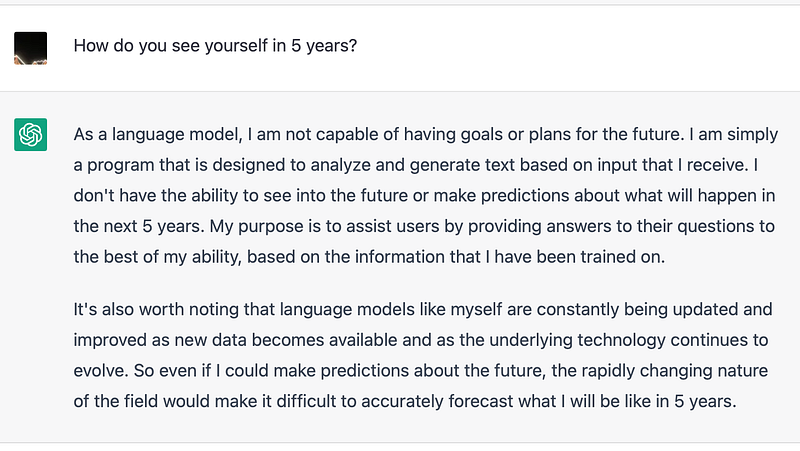
- How do you see yourself in 5 years?
I almost sure that you have heard about ChatGPT in the last few days. If not, here is the description from OpenAI official website:
We’ve trained a model called ChatGPT which interacts in a conversational way. The dialogue format makes it possible for ChatGPT to answer followup questions, admit its mistakes, challenge incorrect premises, and reject inappropriate requests. ChatGPT is a sibling model to InstructGPT, which is trained to follow an instruction in a prompt and provide a detailed response.
Shortly, ChatGPT is a kind of Chatbot, It cann’t do decision making, but it can answer your question as far as it can, if the language model can handle your question.
I have asked it to show the code to finish some task in different language like java, python and ReactJS, asked its understanding about the sociality, education, literature, peace, war and even Covid-19.
Most of its answer were understandable and convinced, the questions i have were in English, German and Chinese and it did do a good job.
This article has mainly following three parts:
- Things to know before play with it.
- Steps to raise questions.
- The Answer what i have about ChatGPT from ChatGPT.
1. Things to know before play with it.
As OpenAI mentioned, the question raised to ChatGPT might be reviewed by people, which means that one should not share sensitive information in the question.
2. Steps to raise questions
One can use ChatGPT either on mobile device or on laptop.
Step 1: Open https://chat.openai.com/ on your browser
(As openai webpage might be updated every day, if this link don’t work anymore, the following steps might also NOT work.
In such case, please just go to their main webpage https://openai.com and find the chatbot link direct from there.)
Step 2: Click on Log in (or sign up then log in) from the website which opened from step 1.
After that, you will be asked to login with your account, like google account etc.
Then you will be informed what ChatGPT is and what will be happened with your data.
Step 3: Input your question in the Input box at the bottom of the webpage and press the “Send” button. After that, you will get the answer from ChatGPT.
3. The Answer what i have about ChatGPT from ChatGPT.
That’s all for today, if you find this post is helpful, please give a like or click on the “Follow” button on medium.com, this will probably get the article suggested more and get more readers.