
4 Hidden Treasures to Take Your Python Skills to The Next Level
Learning these libraries will take your Python skill to the next level — no doubt.

Introduction
Python is undoubtedly one of the most used programming languages and provides a countless number of libraries for Programmers, Data Scientists, and Analysts.
With all these years of experience using Python in the industry, I still feel like there are always new hidden tools that I wish I discover earlier, and, believe me, no one is an exception to that feeling.
In this tutorial, I will share four interesting Python libraries that will take your skillsets to the next level.
Ready? Let’s get started 🔥!
1. Automate Dates and Time Extraction
Extracting dates and times can be challenging when we are dealing with unstructured text data. This issue can be solved using the datefinder library.
As the name suggests, datefinder can be used to find and extract times and dates written in different formats from textual information.
To install the library, run the following command:
$ pip install datefinder
Example task:
from datefinder import find_dates

text_data = """
I will meet the business team on August 1st, 2023 at 07 AM. The goal is
to discuss the budget planning for September, 20th 2023 at 10 AM
"""

all_dates = find_dates(text_data)

for match in all_dates:
    print(f"Date and time: {match}")
    print(f"Only Time: {match.strftime('%H:%M:%S')}")
    print(f"Only Day: {match.strftime('%d')}")
    print(f"Only Month: {match.strftime('%m')}")
    print("--"*5)
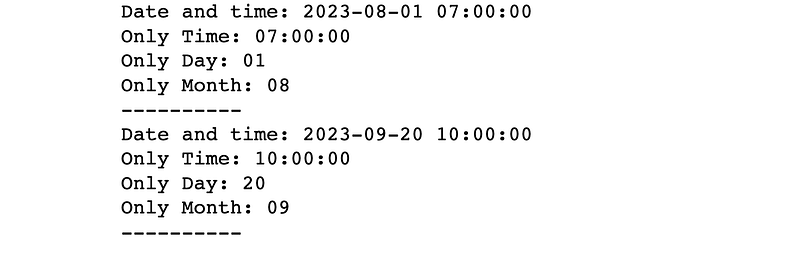
The find_dates function returns a list of all the dates and times in the following format: YYYY-MM-DD HH:MM:SS where:
YYYYis the yearMMis the monthDDis the dayHHis the hourMMrepresents the minutesSScorresponds to the two digits seconds
Here is the output from the above example:
2. Make your Regular Expression Human Readable
One can easily memorize metacharacters in regular expressions (regex). However, the most difficult part remains to build expressions that match complex patterns in a given text.
What if we can find a way to build more human-readable ones?
This is where the PRegEx library comes in handy!
It is installed as followed:
$ pip install pregex
Example task:
Let’s consider the following text data, where we would like to extract the date and the URL information.
text_data = """
I will meet the business team on the 01-08-2023 at 07 AM.
The meeting will be live on the company website at https://company.info.com/business/live
"""
This can be solved using PRegEx as follows:
First, we import the relevant modules which are all described below:
AnyButWhitespacematches any character but not whitespace.AnyDigitmatches any digit from 0 to 9.OneOrMorematches a character at least one time.Eithermatches one of the given patterns.Exactlymatches the exact number of characters repeatedntimes.
In the URL pattern, additional information such as .net , .fr , and .org have been added on purpose to make the pattern more general.
from pregex.core.classes import AnyButWhitespace, AnyDigit
from pregex.core.quantifiers import OneOrMore, Exactly
from pregex.core.operators import Either

two_digits = Exactly(AnyDigit(), 2)
four_digits = Exactly(AnyDigit(), 4)

# Define the two patterns

date_patter = (
    two_digits +
    "-" +
    two_digits +
    "-" +
    four_digits
)

# Added
url_pattern = (
          "https://"
          + OneOrMore(AnyButWhitespace())
          + Either(".com", ".fr", ".net", ".org")
          + OneOrMore(AnyButWhitespace())
)

# Get the matches
dates_match = date_patter.get_matches(text_data)
url_match = url_pattern.get_matches(text_data)

# Print the result
print(f"All Dates: {dates_match}")
print(f"URL: {url_match}")
Output:

This is what the overall pattern would look like if you had to use the re package:
dates_pattern = r'\b\d{2}-\d{2}-\d{4}\b'

# Regular expression pattern for URL
url_pattern = r'http[s]?://(?:[a-zA-Z]|[0-9]|[$-_@.&+]|[!*\\(\\),]|(?:%[0-9a-fA-F][0-9a-fA-F]))+'
I let you judge the ease of use between of PRegEx and re by yourself!
As you can see, using the re module is not beginner-friendly at all!
3. Code Debugging Made Easy with IceCream
Raise your hand ✋🏽 if you have used print or log statements to debug your Python code.
Of course, you do, but there is nothing wrong with it, and here is an example.
print(f"x: {x}")
print(f"y: {x}")
print(f"z: {x}")
Output:

This is a pretty nice output, right?
The downside of using print or log is that it can be time-consuming when dealing with larger programs, especially when you need to add text for better readability.
What if I told you that there is a better alternative?
→ By using IceCream 🍦instead. It is a Python library that makes the debugging process easier, and more readable.
To install the IceCream library, run this command:
$ pip install icecream
Let’s give it a try by displaying the value of both x, y, and z.
from icecream import ic

x = 10
y = 20
z = 30

ic(x)
ic(x)
ic(x)
Output:

With minimal code, we managed to have a more readable output.
Here is another example using a function that computes the area of a rectangle.
def compute_rectangle_area(length, width):

    ic(length, width)
    area = length * width
    return area

ic(compute_rectangle_area(5, 6))
Output:

IceCream provides a more readable result by giving details such as the function name, its parameters, and also the result! Isn’t that awesome?
4. Reload a Running Code Without Losing the Current State
Imagine that you have run the execution of a task, and forgot to print or log some important variables.
In such a situation, the ultimate solution would be to stop the execution, update the code, and rerun again.
This can be sometimes frustrating, especially when training machine learning models where you realized during the last epoch that not all the metrics were being logged 🤯.
Do not worry anymore, reloading is there to help!
As the name suggests, reloading is a Python utility that can be used to reload an already running code without interrupting its execution. That’s definitely game-changing!
The installation is done by running this command:
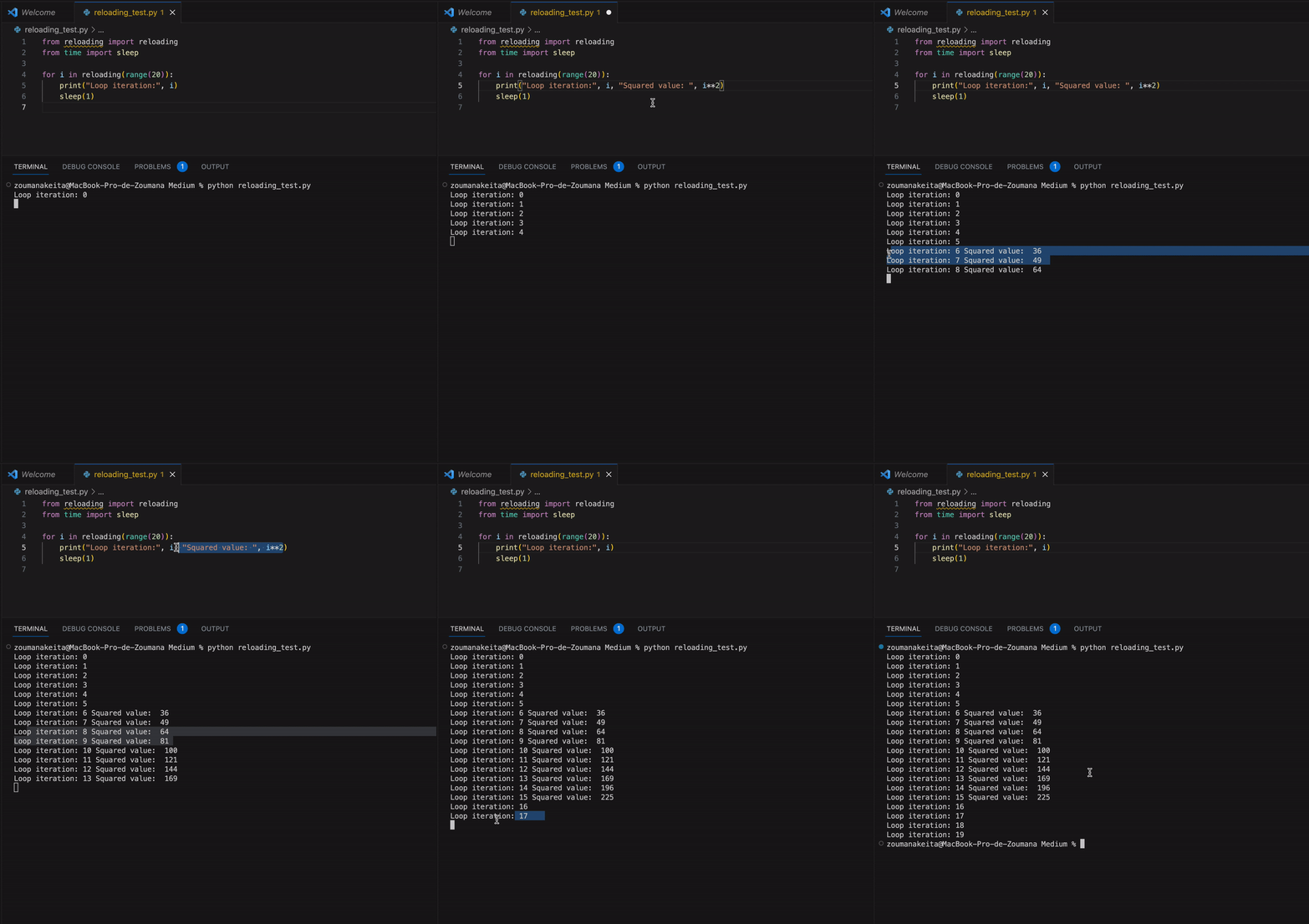
$ pip install reloadingImagine that you have executed a following for where you wanted to print both the value of i and it’s squared root.
Instead of stopping the program, you can simply add the missing piece of code as illustrated in the below animation:
The only thing required in this case is wrapping around the iterator the reloading function.
After making the change, the value of the squared root is automatically added from the 6th iteration. Then, after bringing back the initial state, the print statement was adapted as well from the 16th iteration.
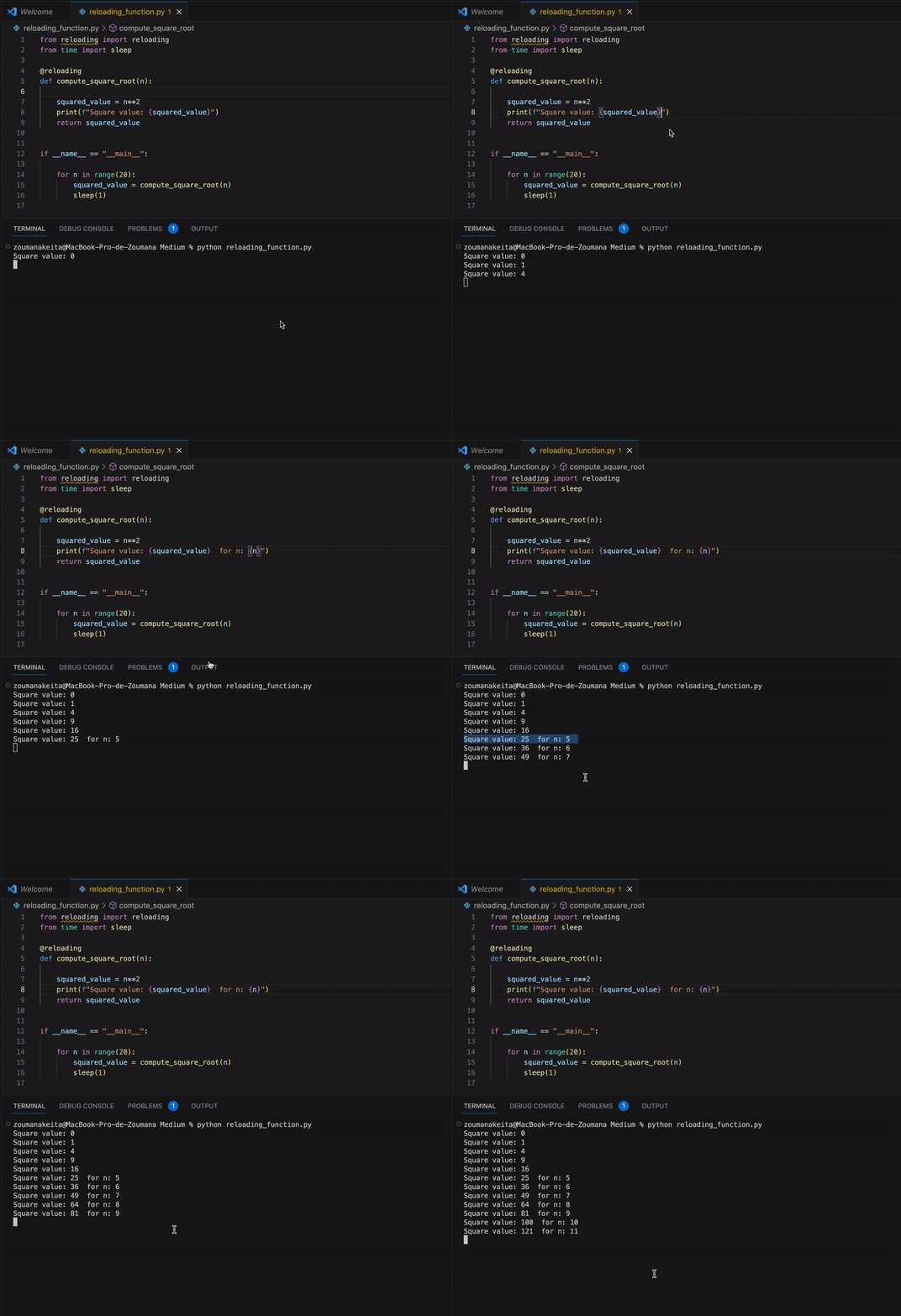
The same logic can be applied to a function by using it with the @reloading decorator instead.
Now, let’s consider the following compute_square_root function that implements the logic of the above for loop.
The function starts by printing the square root of n . After running the code the information for n: {n} is added to print the value of n as well.
Conclusion
Congratulations!!!🎉 — You have learned some of the most unknown Python libraries for date and time extraction, pattern matching, code debugging, and reloading your code without losing its state.
The complete code is available on my GitHub, and you can take your Python knowledge to the next level by experimenting with these libraries.
Also, If you enjoy reading my stories and wish to support my writing, consider becoming a Medium member. It’s $5 a month, giving you unlimited access to thousands of Python guides and Data science articles.
By signing up using my link, I will earn a small commission with no extra cost to you.
Feel free to follow me on Twitter, and YouTube, or say Hi on LinkedIn.
Before you leave, I have more hidden treasures for you, and freely available from the links below:
Pandas & Python Tricks for Data Science & Data Analysis — Part 1
Pandas & Python Tricks for Data Science & Data Analysis — Part 2
Pandas & Python Tricks for Data Science & Data Analysis — Part 3
Pandas & Python Tricks for Data Science & Data Analysis — Part 4
Pandas & Python Tricks for Data Science & Data Analysis — Part 5


