avatarChengzhi Zhao

Free AI web copilot to create summaries, insights and extended knowledge, download it at here

9395

Abstract

Date"</span>,ascending=<span class="hljs-literal">False</span>)
.groupby(<span class="hljs-string">"Vehicle Make"</span>)
.cumcount() + <span class="hljs-number">1</span> <span class="hljs-keyword">return</span> df

test_filter() <span class="hljs-comment"># # The median time is 0.416s</span> test_groupby() <span class="hljs-comment"># # The median time is 0.600s</span> test_self_join() <span class="hljs-comment"># # The median time is 4.159s</span> test_window_function() <span class="hljs-comment"># # The median time is 17.465s</span></pre></div><h1 id="65b3">DuckDb: Efficient OLAP In-Process DB</h1><p id="3f35"><a href="https://duckdb.org/">DuckDB</a> is gaining popularity as its columnar-vectorized engine powers analytical types of queries. It’s an analytical or OLAP version of <a href="https://sqlite.org/">SQLite</a>, a widely adopted simple embedded in-process DBMS.</p><p id="da77">Although it’s a DBMS, installation isn’t complex compared to Microsoft SQL Server or Postgres; Additionally, no external dependencies are required to run a query. I am astonished how easy it is to execute a SQL query with <a href="https://duckdb.org/docs/api/cli.html">DuckDb CLI</a>.</p><p id="3987">If you prefer SQL interface, DuckDb might be your best alternative to performing data analysis directly on CSV or Parquet file. Let’s continue with some code examples and simultaneously show how straightforward it is to work with SQL with DuckDb.</p><p id="8dfc">DuckDb has a magic <code>read_csv_auto</code> function to infer a CSV file and load that data into memory. At runtime, I found I have to change <code>SAMPLE_SIZE=-1</code> to skip sampling due some fields in my dataset isn’t inferred correctly, with sample is default as 1,000 rows.</p><div id="d6d3"><pre><span class="hljs-keyword">import</span> duckdb <span class="hljs-keyword">from</span> repeat_helper <span class="hljs-keyword">import</span> repeat_executor

con = duckdb.connect(database=<span class="hljs-string">':memory:'</span>) con.execute(<span class="hljs-string">"""CREATE TABLE parking_violations AS SELECT "Summons Number", "Vehicle Make", "Issue Date" FROM read_csv_auto('/Users/chengzhizhao/projects/pandas_alternatives/Parking_Violations_Issued_-_Fiscal_Year_2017.csv', delim=',', SAMPLE_SIZE=-1);"""</span>) con.execute(<span class="hljs-string">"""SELECT COUNT(1) FROM parking_violations"""</span>) <span class="hljs-built_in">print</span>(con.fetchall()) <span class="hljs-comment"># ## Filter on the Vehicle Make for BMW</span> <span class="hljs-meta">@repeat_executor(<span class="hljs-params">times=<span class="hljs-number">5</span></span>)</span> <span class="hljs-keyword">def</span> <span class="hljs-title function_">test_filter</span>(): con.execute(<span class="hljs-string">""" SELECT * FROM parking_violations WHERE "Vehicle Make" = 'BMW' """</span>) <span class="hljs-keyword">return</span> con.fetchall()

<span class="hljs-comment"># # ## Group By on the Vehicle Make and Count </span> <span class="hljs-meta">@repeat_executor(<span class="hljs-params">times=<span class="hljs-number">5</span></span>)</span> <span class="hljs-keyword">def</span> <span class="hljs-title function_">test_groupby</span>(): con.execute(<span class="hljs-string">""" SELECT COUNT("Summons Number") FROM parking_violations GROUP BY "Vehicle Make" """</span>) <span class="hljs-keyword">return</span> con.fetchall()

<span class="hljs-comment"># # # ## SELF join</span> <span class="hljs-meta">@repeat_executor(<span class="hljs-params">times=<span class="hljs-number">5</span></span>)</span> <span class="hljs-keyword">def</span> <span class="hljs-title function_">test_self_join</span>(): con.execute(<span class="hljs-string">""" SELECT a."Summons Number" FROM parking_violations a INNER JOIN parking_violations b on a."Summons Number" = b."Summons Number" """</span>) <span class="hljs-keyword">return</span> con.fetchall()

<span class="hljs-comment"># ## window function</span> <span class="hljs-meta">@repeat_executor(<span class="hljs-params">times=<span class="hljs-number">5</span></span>)</span> <span class="hljs-keyword">def</span> <span class="hljs-title function_">test_window_function</span>(): con.execute(<span class="hljs-string">""" SELECT *, ROW_NUMBER() OVER (PARTITION BY "Vehicle Make" ORDER BY "Issue Date") FROM parking_violations """</span>) <span class="hljs-keyword">return</span> con.fetchall()

test_filter() <span class="hljs-comment"># The median time is 0.410s</span> test_groupby() <span class="hljs-comment"># # The median time is 0.122s</span> test_self_join() <span class="hljs-comment"># # The median time is 3.364s</span> test_window_function() <span class="hljs-comment"># # The median time is 6.466s</span></pre></div><p id="74ca">The result on DuckDb is impressive. We have the filter test at parity but much better performance in the rest three tests compared with pandas.</p><p id="06ae">If you are not comfortable writing Python, you can use the DuckDb CLI with SQL interface in command line or <a href="https://duckdb.org/docs/guides/data_viewers/tad">TAD</a> easily.</p><figure id="bf08"><img src="https://cdn-images-1.readmedium.com/v2/resize:fit:800/1*Q1GvfscsAxvZ5VQCpHTtAQ.png"><figcaption>Author Shows how to use SQL to query DuckDB via CLI | Image By Author</figcaption></figure><h1 id="341e">Polars: Astonishing Fast Build On Rust + Arrow</h1><p id="ef0d"><a href="https://github.com/ritchie46">Ritchie Vink</a> created <a href="https://github.com/pola-rs/polars">Polars</a>. Ritchie also has a blog post, “<a href="https://www.ritchievink.com/blog/2021/02/28/i-wrote-one-of-the-fastest-dataframe-libraries/">I wrote one of the fastest DataFrame libraries</a>,” and it was well-received. The impressive part for Polars is that on the <a href="https://h2oai.github.io/db-benchmark/">Database-like ops benchmark</a> by h2oai, it ranked the top on the group by and join operations.</p><p id="00ee">Here are a few reasons Polars can replace Pandas:</p><ul><li>Polars starts with the parallelization of DataFrame from the beginning. It doesn’t restrict itself to single-core operation.</li><li>PyPolars is Rust-based with Python bindings, which has outstanding performance comparable to C, and “Arrow Columnar Format” is an excellent choice for the analytics OLAP type query.</li><li>Lazy evaluation: plan (not execute) the query until triggered. This can be used to optimize queries like additional pushdown further.</li></ul><div id="3cfb"><pre><span class="hljs-keyword">import</span> polars <span class="hljs-keyword">as</span> pl <span class="hljs-keyword">from</span> repeat_helper <span class="hljs-keyword">import</span> repeat_executor

df = pl.read_csv(<span class="hljs-string">"./Parking_Violations_Issued_-_Fiscal_Year_2017.csv"</span>) df = df.select([<span class="hljs-string">'Summons Number'</span>, <span class="hljs-string">'Vehicle Make'</span>, <span class="hljs-string">'Issue Date'</span>])

<span class="hljs-comment"># ## Filter on the Vehicle Make for BMW</span> <span class="hljs-meta">@repeat_executor(<span class="hljs-params">times=<span class="hljs-number">5</span></span>)</span> <span class="hljs-keyword">def</span> <span class="hljs-title function_">test_filter</span>(): <span class="hljs-keyword">return</span> df.<span class="hljs-built_in">filter</span>(pl.col(<span class="hljs-string">'Vehicle Make'</span>) == <span class="hljs-string">'BMW'</span>).select(<span class="hljs-string">'Summons Number'</span>)

<span class="hljs-comment"># # ## Group By on the Vehicle Make and Count </span> <span class="hljs-meta">@repeat_executor(<span class="hljs-params">times=<span class="hljs-number">5</span></span>)</span> <span class="hljs-keyword">def</span> <span class="hljs-title function_">test_groupby</span>(): <span class="hljs-keyword">return</span> df.groupby(<span class="hljs-string">"Vehicle Make"</span>).agg(pl.col(<span class="hljs-string">"Summons Number"</span>).count())

<span class="hljs-comment"># # # ## SELF join</span> <span class="hljs-meta">@repeat_executor(<span class="hljs-params">times=<span class="hljs-number">5</span></span>)</span> <span class="hljs-keyword">def</span> <span class="hljs-title function_">test_self_join</span>(): <span class="hljs-keyword">return</span> df.join(df, on=<span class="hljs-string">"Summons Number"</span>, how=<span class="hljs-string">"inner"</span>).select(<span class="hljs-string">'Summons Number'</span>)

<span class="hljs-comment"># ## window function</span> <span class="hljs-meta">@repeat_executor(<span class="hljs-params">times=<span class="hljs-number">5</span></span>)</span> <span class="hljs-keyword">def</span> <span class="hljs-title function_">test_window_function</span>(): <span class="hljs-keyword">return</span> df.select( [ <span class="hljs-string">'Summons Number'</span>, <span class="hljs-string">'Vehicle Make'</span>, <span class="hljs-string">'Issue Date'</span>, pl.col([<span class="hljs-string">'Issue Date'</span>]).sort(reverse=<span class="hljs-literal">True</span>).cumcount().over(<span class="hljs-string">"Vehicle Make"</span>).alias(<span class="hljs-string">"summon_rank"</span>) ] )

test_

Options

filter() <span class="hljs-comment"># # The median time is 0.0523s</span>

test_groupby() <span class="hljs-comment"># # # The median time is 0.0808s</span>

test_self_join() <span class="hljs-comment"># # # The median time is 1.343s</span>

test_window_function() <span class="hljs-comment"># # The median time is 2.705s</span></pre></div><p id="dfad">WOW, Polars is blazingly fast! Coding in Polars give you a feeling of mixed pySpark and Pandas, but the interface is so familiar, and it took less than 15 mins for me to write the query above with no experience with Polars API. You can refer <a href="https://pola-rs.github.io/polars/py-polars/html/reference/index.html">Polars documentation on Python</a> to comprehend it quickly.</p><h1 id="c0b1">Vaex: Out-of-Core DataFrames</h1><p id="099f">Vaex is another alternative that does the lazy evaluation, avoiding additional memory wastage for performance penalty. It uses memory mapping and will only execute when explicitly asked to. Vaex has a set of handy data visualizations, making it easier to explore the dataset.</p><p id="8122">Vaex has implemented parallelized group by, and it’s efficient on join.</p><div id="3855"><pre><span class="hljs-keyword">import</span> vaex <span class="hljs-keyword">from</span> repeat_helper <span class="hljs-keyword">import</span> repeat_executor

vaex.settings.main.thread_count = <span class="hljs-number">4</span> <span class="hljs-comment"># cores fit my macbook</span>

df = vaex.<span class="hljs-built_in">open</span>(<span class="hljs-string">'./Parking_Violations_Issued_-_Fiscal_Year_2017.csv'</span>) df = df[[<span class="hljs-string">'Summons Number'</span>, <span class="hljs-string">'Vehicle Make'</span>, <span class="hljs-string">'Issue Date'</span>]]

<span class="hljs-comment"># ## Filter on the Vehicle Make for BMW</span> <span class="hljs-meta">@repeat_executor(<span class="hljs-params">times=<span class="hljs-number">5</span></span>)</span> <span class="hljs-keyword">def</span> <span class="hljs-title function_">test_filter</span>(): <span class="hljs-keyword">return</span> df[df[<span class="hljs-string">'Vehicle Make'</span>] == <span class="hljs-string">'BMW'</span>][<span class="hljs-string">'Summons Number'</span>]

<span class="hljs-comment"># # ## Group By on the Vehicle Make and Count </span> <span class="hljs-meta">@repeat_executor(<span class="hljs-params">times=<span class="hljs-number">5</span></span>)</span> <span class="hljs-keyword">def</span> <span class="hljs-title function_">test_groupby</span>(): <span class="hljs-keyword">return</span> df.groupby(<span class="hljs-string">"Vehicle Make"</span>).agg({<span class="hljs-string">"Summons Number"</span>:<span class="hljs-string">'count'</span>})

<span class="hljs-comment"># # ## SELF join</span> <span class="hljs-meta">@repeat_executor(<span class="hljs-params">times=<span class="hljs-number">5</span></span>)</span> <span class="hljs-keyword">def</span> <span class="hljs-title function_">test_self_join</span>(): <span class="hljs-keyword">return</span> df.join(df, how=<span class="hljs-string">"inner"</span>, rsuffix=<span class="hljs-string">'_other'</span>, left_on=<span class="hljs-string">'Summons Number'</span>, right_on=<span class="hljs-string">'Summons Number'</span>)[<span class="hljs-string">'Summons Number'</span>]

test_filter() <span class="hljs-comment"># # The median time is 0.006s</span>

test_groupby() <span class="hljs-comment"># # The median time is 2.987s</span>

test_self_join() <span class="hljs-comment"># # The median time is 4.224s</span>

<span class="hljs-comment"># window function https://github.com/vaexio/vaex/issues/804</span></pre></div><p id="551c">However, I found the window function isn’t implemented, and <a href="https://github.com/vaexio/vaex/issues/804">open issue</a> tracked here. We can iterate by each group and assign each row a value with the suggestion mentioned in this <a href="https://github.com/vaexio/vaex/issues/250#issuecomment-491027460">issue</a>. However, I didn’t find the window function implemented out of the box for Vaex.</p><div id="6a79"><pre>vf[<span class="hljs-symbol">'rownr</span>`] = vaex.<span class="hljs-title function_ invoke__">vrange</span>(<span class="hljs-number">0</span>, <span class="hljs-title function_ invoke__">len</span>(vf))</pre></div><h1 id="25a0">Modin: Scale pandas by changing one line of code</h1><p id="37df">With a line of the code change, will Modin enable user better performance than Pandas? In Modin, it is to do the following change, replace the Pandas library with Modin.</p><div id="0b7c"><pre><span class="hljs-comment">## import pandas as pd</span> <span class="hljs-keyword">import</span> modin.pandas <span class="hljs-keyword">as</span> pd</pre></div><p id="790b">However, there is still <a href="https://modin.readthedocs.io/en/stable/supported_apis/dataframe_supported.html">a list of implementations</a> that still need to be done in Modin. Besides code change, we’d still need to set up its backend for scheduling. I tried to use <i>Ray</i> in this example.</p><div id="7706"><pre><span class="hljs-keyword">import</span> os os.environ[<span class="hljs-string">"MODIN_ENGINE"</span>] = <span class="hljs-string">"ray"</span> <span class="hljs-comment"># Modin will use Ray</span>

<span class="hljs-comment">#########################</span> <span class="hljs-comment">#######Same AS Pandas#######</span> <span class="hljs-comment">#########################</span>

test_filter() <span class="hljs-comment"># # The median time is 0.828s</span>

test_groupby() <span class="hljs-comment"># # The median time is 1.211s</span>

test_self_join() <span class="hljs-comment"># # The median time is 1.389s</span>

test_window_function() <span class="hljs-comment"># # The median time is 15.635s, </span> <span class="hljs-comment"># DataFrame.groupby_on_multiple_columns is not currently supported by PandasOnRay, defaulting to pandas implementation.</span></pre></div><p id="f669">The window function on Modin hasn’t been supported on Ray, so it still uses the Pandas implementation. The time spent is closer to Pandas on window function.</p><h1 id="019c">(py)datatable</h1><p id="c216">If you come from R community, <code>data.table</code> it shouldn’t be a unfamiliar package. As any package gets popular, its core idea will be brought to the other languages. (py)datatable is one the attempts to mimic R’s <code>data.table</code> core algorithms and API.</p><p id="4bd8">However, during testing, this doesn’t work well to qualify faster than pandas, given the syntax is similar to R’s <code>data.table</code> I think it’s nice to mention here as a Pandas alternative.</p><h1 id="29ff">Result</h1><figure id="b24a"><img src="https://cdn-images-1.readmedium.com/v2/resize:fit:800/1*JxgSlQkGCXPWbGfWLiMnZA.png"><figcaption>Final Comparison | Image By Author</figcaption></figure><h1 id="8b45">Final Thoughts</h1><p id="fb6e">Those are Pandas alternatives that gave users better performance for the cases I tested. At the same time, the API change is not significant to Pandas. If you consider one of those libraries, it should be a smooth transition. On the other hand, Pandas still hold the best coverage on functionality for APIs. The alternative solutions are short for advanced API support like window function.</p><p id="1090">Running Pandas on a single machine is still the best option for data analysis or ad-hoc queries. The alternative libraries may boost the performance in some cases, but only sometimes in all cases on a single machine.</p><p id="dbf1"><b>Let me know what you think is the best alternative to Pandas you’d choose by leaving comments.</b></p><p id="ae94">[1] NYC Parking Tickets Dataset, CITY OF NEW YORK, <a href="https://creativecommons.org/publicdomain/zero/1.0/">CC0: Public Domain</a>, <a href="https://www.kaggle.com/datasets/new-york-city/nyc-parking-tickets">https://www.kaggle.com/datasets/new-york-city/nyc-parking-tickets</a></p><p id="d3c1">I hope this story is helpful to you. This article is <b>part of a series</b> of my engineering & data science stories that currently consist of the following:</p><div id="c081" class="link-block"> <a href="https://chengzhizhao.medium.com/list/ddab37f718e7"> <div> <div> <h2>Data Engineering & Data Science Stories</h2> <div><h3>Storeis written by Chengzhi Zhao | Data Engineering & Data Science</h3></div> <div><p>chengzhizhao.medium.com</p></div> </div> <div> <div style="background-image: url(https://miro.readmedium.com/v2/resize:fit:320/0*e806119d66f7c9857ea1a7c503e74d5ebf2e0688.jpeg)"></div> </div> </div> </a> </div><p id="5963">You can also <a href="https://chengzhizhao.medium.com/subscribe"><b>subscribe to my new articles</b></a> or become a <a href="https://chengzhizhao.medium.com/membership"><b>referred Medium member</b></a><b> </b>who gets unlimited access to all the stories on Medium.</p><p id="fdbe">In case of questions/comments, <b>do not hesitate to write in the comments</b> of this story or <b>reach me directly </b>through <a href="https://www.linkedin.com/in/chengzhizhao/">Linkedin</a> or <a href="https://twitter.com/ChengzhiZhao">Twitter</a>.</p></article></body>

4 Faster Pandas Alternatives for Data Analysis

Performance Benchmark on Popular Data Analysis Tools

Photo by Mateusz Butkiewicz on Unsplash

Pandas is no doubt one of the most popular libraries in Python. Its DataFrame is intuitive and has rich APIs for data manipulation tasks. Many Python libraries integrated with Pandas DataFrame to increase their adoption rate.

However, Pandas doesn’t shine in the land of data processing with a large dataset. It is predominantly used for data analysis on a single machine, not a cluster of machines. In this article, I will try to measure performance for Polars, DuckDB, Vaex, and Modin as alternatives to compare with Pandas.

Database-like ops benchmark published by h2oai inspires the idea of this post. The benchmark experiment was conducted in May 2021. This article is to review this field after two years with many feature and improvements.

Why is Pandas slow on large datasets?

The main reason is that Pandas wasn’t designed to run on multiple cores. Pandas uses only one CPU core at a time to perform the data manipulation tasks and takes no advantage on modern PC with multiple cores on parallelism.

How to mitigate the issue when data size is large (still can fit on one machine) but Pandas takes time to execute? One solution is to leverage a framework like Apache Spark to perform data manipulation tasks utilizing clusters. But sometimes, data analysis can be done more efficiently by sampling data and analyze on a single machine.

If you prefer to stay on a single machine, let’s review Polars, DuckDB, Vaex, and Modin as alternatives to compare with Pandas in this article. To measure how long it takes to process extensive data, I will share the performance benchmark on a single machine.

Performance Evaluation Preparation

The specs of the tested machine

MacBook Pro (13-inch, 2020, Four Thunderbolt 3 ports)

  • CPU: 2 GHz Quad-Core Intel Core i5 (4 cores)
  • Memory: 16 GB 3733 MHz LPDDR4X
  • OS: MacOS Monterey 12.2

The test dataset

In this case, a medium-large dataset for the process would be good enough to show the differences. The NYC Parking Tickets[1] are a good dataset for this evaluation. It has 42.3M rows from Aug 2013-June 2017 with 51 columns including Registration State, Vehicle Make, and Vehicle Color that are interesting to know the insights. We will use the fiscal 2017 dataset with 10.8M rows, and the file size is about 2.09G.

The evaluation process

  • Due to the entire running time that includes reading the data into memory, it is necessary to consider the data loading separately.
  • We’d process the same call 5x times to avoid edge cases and use the median value to report as our final performance result.

Helper function to repeat and compute the median

from itertools import repeat
from statistics import median
import functools
import time

durations = []

## repeat a given function multiple times, append the execution duration to a list
def record_timer(func, times = 5):
    for _ in repeat(None, times):
        start_time = time.perf_counter()
        value = func()
        end_time = time.perf_counter()
        run_time = end_time - start_time
        print(f"Finished {func.__name__!r} in {run_time:.10f} secs")
        durations.append(run_time)
    return value

## Decorator and compute the median of the function
def repeat_executor(times=5):
    def timer(func):
        """Print the runtime of the decorated function"""
        @functools.wraps(func)
        def wrapper_timer(*args, **kwargs):
            value = record_timer(func, times=times)
            print(f'{median(list(durations))}')
            return value
        return wrapper_timer
    return timer

Warning: we will show a lot of code, so it’s easier for readers on what I did instead of either not showing the process or pointing you to a GitHub. If you don’t bother about the process, please skip and proceed to the result at the bottom.

Pandas: The Baseline

To set up the baseline for comparison, we shall examine the famous use cases for daily analytics jobs: filter, aggregation, joins, and window function.

  • filter: find the Vehicle Make is BMW
  • aggregation: group by Vehicle Make and perform count
  • join: SELF join on Summons Number
  • window function: rank the Vehicle Make based on the count of the

I selected on only the used fields for our testing, which are ‘Summons Number’, ‘Vehicle Make’, ‘Issue Date’ . Note if I choose to select everything, the last two queries run significantly slower.

import pandas as pd
from repeat_helper import repeat_executor

df = pd.read_csv("./Parking_Violations_Issued_-_Fiscal_Year_2017.csv")
df = df[['Summons Number', 'Vehicle Make', 'Issue Date']]

# ## Filter on the Vehicle Make for BMW
@repeat_executor(times=5)
def test_filter():
    return df[df['Vehicle Make'] == 'BMW']['Summons Number']

# # ## Group By on the Vehicle Make and Count 
@repeat_executor(times=5)
def test_groupby():
    return df.groupby("Vehicle Make").agg({"Summons Number":'count'})

# # ## SELF join
@repeat_executor(times=5)
def test_self_join():
    return df.set_index("Summons Number").join(df.set_index("Summons Number"), how="inner", rsuffix='_other').reset_index()['Summons Number']

## window function
@repeat_executor(times=5)
def test_window_function():
    df['summon_rank'] = df.sort_values("Issue Date",ascending=False) \
        .groupby("Vehicle Make") \
        .cumcount() + 1
    return df


test_filter()
# # The median time is 0.416s
test_groupby()
# # The median time is 0.600s
test_self_join()
# # The median time is 4.159s
test_window_function()
# # The median time is 17.465s

DuckDb: Efficient OLAP In-Process DB

DuckDB is gaining popularity as its columnar-vectorized engine powers analytical types of queries. It’s an analytical or OLAP version of SQLite, a widely adopted simple embedded in-process DBMS.

Although it’s a DBMS, installation isn’t complex compared to Microsoft SQL Server or Postgres; Additionally, no external dependencies are required to run a query. I am astonished how easy it is to execute a SQL query with DuckDb CLI.

If you prefer SQL interface, DuckDb might be your best alternative to performing data analysis directly on CSV or Parquet file. Let’s continue with some code examples and simultaneously show how straightforward it is to work with SQL with DuckDb.

DuckDb has a magic read_csv_auto function to infer a CSV file and load that data into memory. At runtime, I found I have to change SAMPLE_SIZE=-1 to skip sampling due some fields in my dataset isn’t inferred correctly, with sample is default as 1,000 rows.

import duckdb
from repeat_helper import repeat_executor

con = duckdb.connect(database=':memory:')
con.execute("""CREATE TABLE parking_violations AS SELECT "Summons Number", "Vehicle Make", "Issue Date" FROM read_csv_auto('/Users/chengzhizhao/projects/pandas_alternatives/Parking_Violations_Issued_-_Fiscal_Year_2017.csv', delim=',', SAMPLE_SIZE=-1);""")
con.execute("""SELECT COUNT(1) FROM parking_violations""")
print(con.fetchall())
# ## Filter on the Vehicle Make for BMW
@repeat_executor(times=5)
def test_filter():
    con.execute("""
        SELECT * FROM parking_violations WHERE "Vehicle Make" = 'BMW'
        """)
    return con.fetchall()

# # ## Group By on the Vehicle Make and Count 
@repeat_executor(times=5)
def test_groupby():
    con.execute("""
        SELECT COUNT("Summons Number") FROM parking_violations GROUP BY "Vehicle Make"
        """)
    return con.fetchall()

# # # ## SELF join
@repeat_executor(times=5)
def test_self_join():
    con.execute("""
        SELECT a."Summons Number"
        FROM parking_violations a
        INNER JOIN parking_violations b on a."Summons Number" = b."Summons Number"
        """)
    return con.fetchall()

# ## window function
@repeat_executor(times=5)
def test_window_function():
    con.execute("""
        SELECT *, ROW_NUMBER() OVER (PARTITION BY "Vehicle Make" ORDER BY "Issue Date")
        FROM parking_violations 
        """)
    return con.fetchall()

test_filter()
# The median time is 0.410s
test_groupby()
# # The median time is 0.122s
test_self_join()
# # The median time is 3.364s
test_window_function()
# # The median time is 6.466s

The result on DuckDb is impressive. We have the filter test at parity but much better performance in the rest three tests compared with pandas.

If you are not comfortable writing Python, you can use the DuckDb CLI with SQL interface in command line or TAD easily.
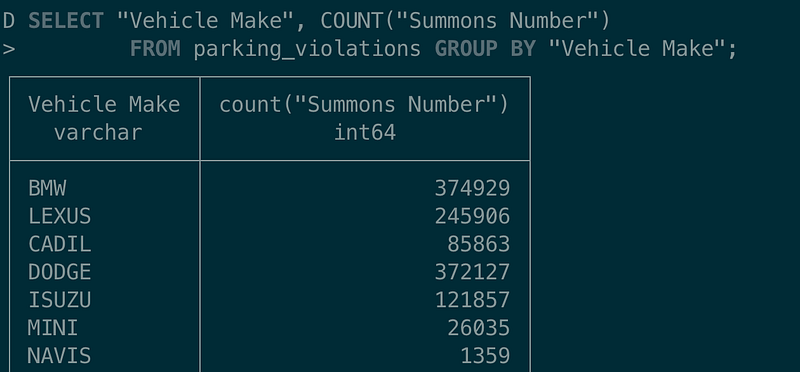
Author Shows how to use SQL to query DuckDB via CLI | Image By Author

Polars: Astonishing Fast Build On Rust + Arrow

Ritchie Vink created Polars. Ritchie also has a blog post, “I wrote one of the fastest DataFrame libraries,” and it was well-received. The impressive part for Polars is that on the Database-like ops benchmark by h2oai, it ranked the top on the group by and join operations.

Here are a few reasons Polars can replace Pandas:

  • Polars starts with the parallelization of DataFrame from the beginning. It doesn’t restrict itself to single-core operation.
  • PyPolars is Rust-based with Python bindings, which has outstanding performance comparable to C, and “Arrow Columnar Format” is an excellent choice for the analytics OLAP type query.
  • Lazy evaluation: plan (not execute) the query until triggered. This can be used to optimize queries like additional pushdown further.
import polars as pl
from repeat_helper import repeat_executor

df = pl.read_csv("./Parking_Violations_Issued_-_Fiscal_Year_2017.csv")
df = df.select(['Summons Number', 'Vehicle Make', 'Issue Date'])

# ## Filter on the Vehicle Make for BMW
@repeat_executor(times=5)
def test_filter():
    return df.filter(pl.col('Vehicle Make') == 'BMW').select('Summons Number')

# # ## Group By on the Vehicle Make and Count 
@repeat_executor(times=5)
def test_groupby():
    return df.groupby("Vehicle Make").agg(pl.col("Summons Number").count())

# # # ## SELF join
@repeat_executor(times=5)
def test_self_join():
    return df.join(df, on="Summons Number", how="inner").select('Summons Number')

# ## window function
@repeat_executor(times=5)
def test_window_function():
    return df.select(
        [
            'Summons Number',
            'Vehicle Make',
            'Issue Date',
            pl.col(['Issue Date']).sort(reverse=True).cumcount().over("Vehicle Make").alias("summon_rank")
        ]
    )   


test_filter()
# # The median time is 0.0523s

test_groupby()
# # # The median time is 0.0808s

test_self_join()
# # # The median time is 1.343s

test_window_function()
# # The median time is 2.705s

WOW, Polars is blazingly fast! Coding in Polars give you a feeling of mixed pySpark and Pandas, but the interface is so familiar, and it took less than 15 mins for me to write the query above with no experience with Polars API. You can refer Polars documentation on Python to comprehend it quickly.

Vaex: Out-of-Core DataFrames

Vaex is another alternative that does the lazy evaluation, avoiding additional memory wastage for performance penalty. It uses memory mapping and will only execute when explicitly asked to. Vaex has a set of handy data visualizations, making it easier to explore the dataset.

Vaex has implemented parallelized group by, and it’s efficient on join.

import vaex
from repeat_helper import repeat_executor

vaex.settings.main.thread_count = 4 # cores fit my macbook

df = vaex.open('./Parking_Violations_Issued_-_Fiscal_Year_2017.csv')
df = df[['Summons Number', 'Vehicle Make', 'Issue Date']]

# ## Filter on the Vehicle Make for BMW
@repeat_executor(times=5)
def test_filter():
    return df[df['Vehicle Make'] == 'BMW']['Summons Number']

# # ## Group By on the Vehicle Make and Count 
@repeat_executor(times=5)
def test_groupby():
    return df.groupby("Vehicle Make").agg({"Summons Number":'count'})

# # ## SELF join
@repeat_executor(times=5)
def test_self_join():
    return df.join(df, how="inner", rsuffix='_other', left_on='Summons Number', right_on='Summons Number')['Summons Number']


test_filter()
# # The median time is 0.006s

test_groupby()
# # The median time is 2.987s

test_self_join()
# # The median time is 4.224s

# window function https://github.com/vaexio/vaex/issues/804

However, I found the window function isn’t implemented, and open issue tracked here. We can iterate by each group and assign each row a value with the suggestion mentioned in this issue. However, I didn’t find the window function implemented out of the box for Vaex.

vf['rownr`] = vaex.vrange(0, len(vf))

Modin: Scale pandas by changing one line of code

With a line of the code change, will Modin enable user better performance than Pandas? In Modin, it is to do the following change, replace the Pandas library with Modin.

## import pandas as pd
import modin.pandas as pd

However, there is still a list of implementations that still need to be done in Modin. Besides code change, we’d still need to set up its backend for scheduling. I tried to use Ray in this example.

import os
os.environ["MODIN_ENGINE"] = "ray"  # Modin will use Ray

#########################
#######Same AS Pandas#######
#########################

test_filter()
# # The median time is 0.828s

test_groupby()
# # The median time is 1.211s

test_self_join()
# # The median time is 1.389s

test_window_function()
# # The median time is 15.635s, 
# `DataFrame.groupby_on_multiple_columns` is not currently supported by PandasOnRay, defaulting to pandas implementation.

The window function on Modin hasn’t been supported on Ray, so it still uses the Pandas implementation. The time spent is closer to Pandas on window function.

(py)datatable

If you come from R community, data.table it shouldn’t be a unfamiliar package. As any package gets popular, its core idea will be brought to the other languages. (py)datatable is one the attempts to mimic R’s data.table core algorithms and API.

However, during testing, this doesn’t work well to qualify faster than pandas, given the syntax is similar to R’s data.table I think it’s nice to mention here as a Pandas alternative.

Result
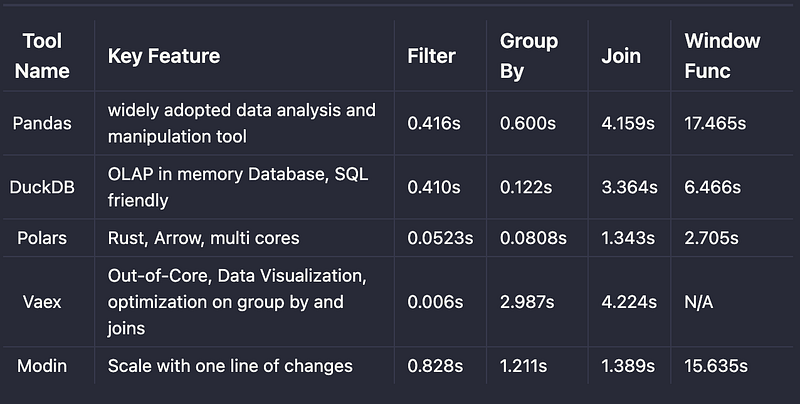
Final Comparison | Image By Author

Final Thoughts

Those are Pandas alternatives that gave users better performance for the cases I tested. At the same time, the API change is not significant to Pandas. If you consider one of those libraries, it should be a smooth transition. On the other hand, Pandas still hold the best coverage on functionality for APIs. The alternative solutions are short for advanced API support like window function.

Running Pandas on a single machine is still the best option for data analysis or ad-hoc queries. The alternative libraries may boost the performance in some cases, but only sometimes in all cases on a single machine.

Let me know what you think is the best alternative to Pandas you’d choose by leaving comments.

[1] NYC Parking Tickets Dataset, CITY OF NEW YORK, CC0: Public Domain, https://www.kaggle.com/datasets/new-york-city/nyc-parking-tickets

I hope this story is helpful to you. This article is part of a series of my engineering & data science stories that currently consist of the following:

You can also subscribe to my new articles or become a referred Medium member who gets unlimited access to all the stories on Medium.

In case of questions/comments, do not hesitate to write in the comments of this story or reach me directly through Linkedin or Twitter.

Data Science
Pandas
Programming
Machine Learning
Data Analysis
Recommended from ReadMedium