
4 Examples to Compare the Speed of Pandas and Vaex
Performance matters more as the data size increases.

I admire Pandas. It’s one of the first tools I learned in my data science journey and I have been using it frequently ever since.
Pandas was the only tool I needed to do data cleaning, manipulation, and analysis until I had to work with very large datasets.
Pandas starts to slow down when the data size becomes very large because it does in-memory analytics. Hence, if the dataset is larger than memory, it becomes very difficult, or impossible, to use Pandas.
I wrote about some tips for making Pandas more efficient when working with large datasets. In this article, we will learn about an alternative tool to Pandas when working with large datasets: Vaex.
What is Vaex?
Vaex is also a Python library and can be used for data analysis and manipulation. The key features of Vaex makes it outperform Pandas when working with large datasets.
Some of these key features:
- Memory-mapping
- With lazy execution, calculations are performed only when needed. Vaxes uses expression objects to keep track of the executions.
- Virtual columns which are treated as regular columns but do not occupy memory
- Filtering and selection operations do not make a copy of data.
These features come together to bring a performance-boost as we will see in the following examples.
Reading data
I prepared a dataset with 10 million rows and 51 columns, which is a little over 1 GB of data. It is not too much and the files can easily go up to 1 billion rows but 10 million rows are enough to demonstrate our case.
Let’s start with reading the dataset into Pandas and Vaex DataFrames. Both libraries have the read_csv function to create a DataFrame from a CSV file.
import vaex
vdf = vaex.read_csv("very_large_dataset.csv")
vdf.shape
# output
(10000000, 51)

import pandas as pd
df = pd.read_csv("very_large_dataset.csv")
df.shape
# output
(10000000, 51)
As we see in the output, the dataset has 10 million rows and 51 columns.
I think here is a good place to mention that Vaex’s syntax is quite similar to that of Pandas, which makes it easier to adopt for Pandas users.
By the way, if you’d like to generate this dataset and play around with it, here is the code to do it:
import pandas as pd
import numpy as np

df = pd.DataFrame(np.random.randint(0, 100, size=(10000000, 50)))
df = df.rename(columns={i:f"x_{i}" for i in range(50)})
df["category"] = ["A", "B", "C", "D"] * 2500000
The first 50 columns contain integers between 0 and 100 and the last column contains string values of A, B, C, and D.
Example 1
Let’s do a filtering operation by selecting rows that belong to category A. We will be timing the operations so that we can compare the performance of Vaex and Pandas.
# Pandas
%time df_a = df[df["category"]=="A"]
CPU times: user 518 ms, sys: 826 ms, total: 1.34 s

# Vaex
%time vdf_a = vdf[vdf["category"]=="A"]
CPU times: user 4.03 ms, sys: 6.55 ms, total: 10.6 ms
It took Pandas 1.3 seconds whereas Vaex performs the same operation in 10 milliseconds. This is a highly significant difference, which will even be higher when working with datasets of bigger size.
Example 2
In the second example, we will sort the DataFrame by the values in a column.
# Pandas
%time df_sorted = df.sort_values(by="x_1", ascending=False)
CPU times: user 2.2 s, sys: 1.3 s, total: 3.5 s

# Vaex
%time vdf_sorted = vdf.sort(by=["x_1"], ascending=["False"])
CPU times: user 110 ms, sys: 57.7 ms, total: 168 ms
Vaex was able to sort the rows in 168 milliseconds whereas it took Pandas over 3.5 seconds. Again, this is a significant difference.
Example 3
Let’s take the previous example one step further and sort the rows by two columns.
# Pandas
%time df_sorted = df.sort_values(by=["x_1", "x_2"], ascending=[False, True])
CPU times: user 2.92 s, sys: 1.33 s, total: 4.25 s

# Vaex
%time vdf_sorted = vdf.sort(by=["x_1", "x_2"], ascending=["False", "True"])
CPU times: user 1.14 s, sys: 90.1 ms, total: 1.23 s
Vaex still outperforms Pandas with 1.23 seconds compared to 4.25 seconds.
Example 4
In the last example, we will create new columns by using other columns.
# Pandas
%time df["new"] = df["x_1"]**2 + df["x_2"]**2
CPU times: user 34.8 ms, sys: 114 ms, total: 149 ms

# Vaex
%time vdf["new"] = vdf["x_1"]**2 + vdf["x_2"]**2
CPU times: user 3.25 ms, sys: 5.97 ms, total: 9.22 ms
The new column contains the sum of the square of values in the x_1 and x_2 columns. Vaex did much better than Pandas in this operation too.
Conclusion
We did 4 examples and Vaex was much faster than Pandas in all of them:
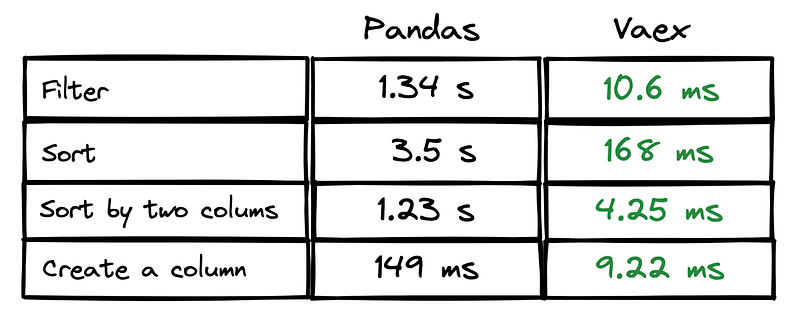
The difference in performance will be more when we work with larger datasets (e.g. 1 billion rows).
The examples we did cover only a simple set of operations. Just like Pandas, Vaex is capable of performing more complex operations. It’s also quite simple to create data visualizations with Vaex, which comes in handy for analyzing large tabular datasets.
I will write more articles and tutorials on Vaex so stay tuned if you want to learn more about handling big data.
You can become a Medium member to unlock full access to my writing, plus the rest of Medium. If you already are, don’t forget to subscribe if you’d like to get an email whenever I publish a new article.
Thank you for reading. Please let me know if you have any feedback.


