

LiveData with Coroutines and Flow — Part II: Launching coroutines with Architecture Components
This article is part II of a summary of the talk I gave with Yigit Boyar at the Android Dev Summit 2019.
Part II: Launching coroutines with Architecture Components (this post)
Part III: LiveData and Coroutines patterns
Jetpack’s Architecture Components provide a bunch of shortcuts so you don’t have to worry about Jobs and cancellation. You simply have to choose the scope of your opeations:
ViewModel scope
This is one of the most common ways to launch a coroutine because most data operations begin in the ViewModel. With the viewModelScope extension, jobs are cancelled automatically when the ViewModel is cleared. Use viewModelScope.launch to start coroutines.
Activity and Fragment scopes
Similarly, you can scope an operation to a specific instance of a view if you use lifecycleScope.launch.
You can even have a narrower scope if you limit the operation to a certain lifecycle state with launchWhenResumed, launchWhenStarted or launchWhenCreated.
Application scope
There are good use cases for an application-wide scope (read all about it here) but, first, you should consider using WorkManager if your job must be executed eventually.
ViewModel + LiveData
So far we’ve seen how to start a coroutine but not how to receive a result from it. You could use a MutableLiveData like so:
But, since you will be exposing this result to your view, you can save some typing by using the liveData coroutine builder which launches a coroutine and lets you expose results through an immutable LiveData. You use emit() to send updates to it.
LiveData Coroutine builder with a switchMap
In some cases you want to start a coroutine whenever the value of a LiveData changes. For example when you need an ID before starting a data load operation. There’s a handy pattern for that using Transformations.switchMap:
result is an immutable LiveData that will be updated with the result from calling the fetchItem suspend function, whenever itemId has a new value.
Emit all items from another LiveData
This feature is less common but can also save some boilerplate: you can use emitSource passing a LiveData source. Useful when you want to emit an initial value first and a succession of values later.
Cancelling coroutines
If you use any of the patterns above you don’t have to explicitly cancel jobs. However, there’s an important thing to remember: coroutine cancellation is cooperative.
This means that you have to help Kotlin stop a job if the calling coroutine is cancelled. Let’s say you have a suspend function that starts an infinite loop. Kotlin has no way of stopping that loop for you, so you need to cooperate, checking if the job is active regularly. You can do that by checking the isActive property.
By the way if you use any of the functions in kotlinx.coroutines (like delay), you should know they’re all cancellable, meaning that they do that check for you.
That said, I recommend you add the check regardless, since it could happen that someone removes that delay call in the future, introducing a subtle bug in your code.
One-shot vs multiple values
To understand coroutines (and reactive UIs for that matter) we need to make an important distinction between:
- One-shot operations: They run once and can return a result
- Operations that return multiple values: Subscriptions to a source of data that can emit multiple values over time.
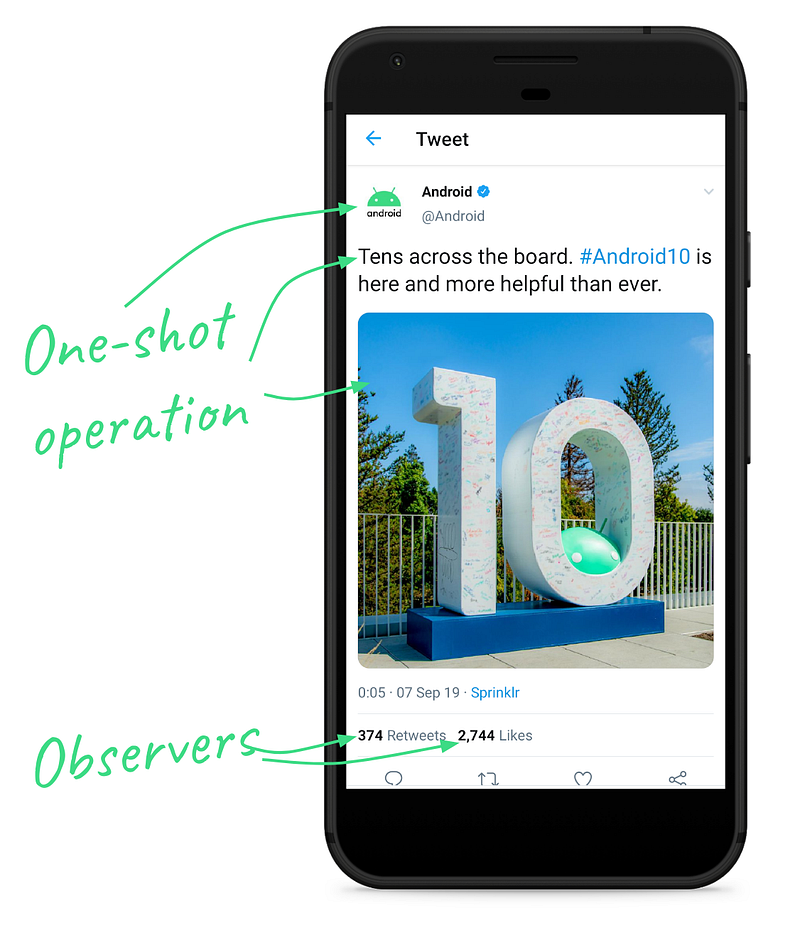
One-shot operations with coroutines
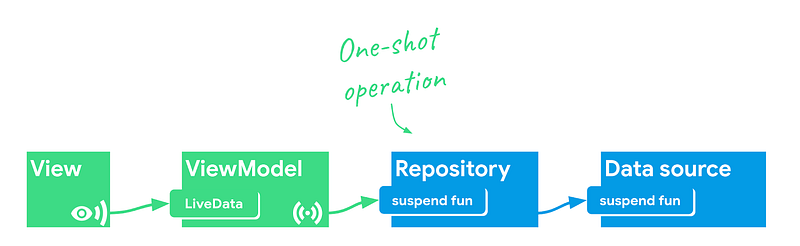
Using suspend functions and calling them with viewModelScope or liveData{} is a very convenient way to run non-blocking operations.
However, things get a bit more complicated when we’re listening to changes.
Receiving multiple values with LiveData
I covered this topic in LiveData beyond the ViewModel (2018), where I talked about patterns you could use to work around the fact that LiveData was never designed as a fully-featured streams builder.
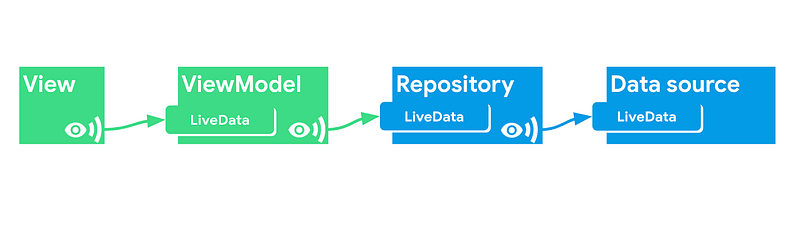
Nowadays, a better approach is to use Kotlin’s Flow (warning: some parts are still experimental). Flow is similar to the reactive streams features within RxJava.
However, while coroutines make non-blocking one-shot operations way easier, this is not the same case for Flow. Streams are still hard to grasp. Still, if you want to create fast and solid reactive UIs, I’d say it’s worth the time investment. Since it’s part of the language and a small dependency, many libraries are starting to add Flow support (such as Room).
So, instead of LiveData, we can expose Flows from the Data Source and the Repository but the ViewModel still exposes LiveData because it’s lifecycle-aware.



