
Spring Security Series
What is Springboot Security and How to Setup?
My articles are free for everyone. Non-members can read this full article for free here.
To secure the APIs, we need to have authentication and authorization systems in place. This will help protect our APIs against unauthorised access and common attacks like Cross-site Request Forgery.
Spring boot simplifies the process of adding authentication and authorisations in our projects.
What are the features of Spring Security?
- Authentication: It helps to verify that the user exists in the system.
- Authorisation: Users have access to resources based on some permissions. Prevents users from accessing unauthorised resources.
- CSRF Protection
- Session Management
- Password Encoders and Decoders for storing and getting passwords securely.
- Support for JWT and OAuth Tokens.
What is the architecture of a Springboot App?
Springboot is based on Spring Architecture. So we have various components like FilterChain, DispatcherServlet and Handlers.
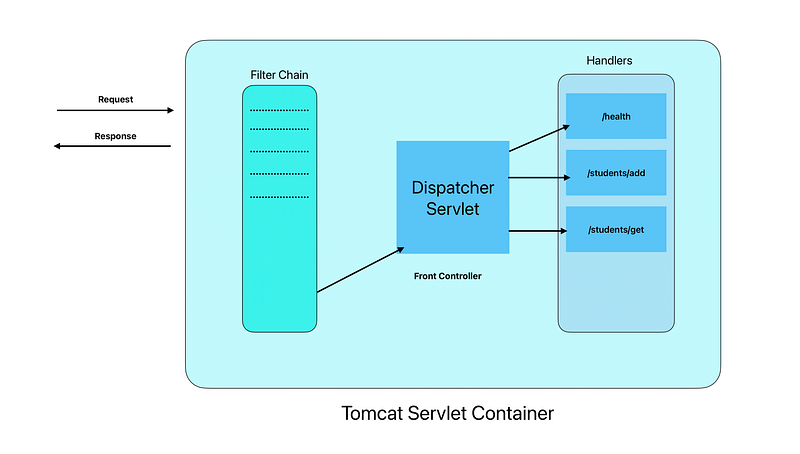
Filter Chain
The request goes through a list of filters in order, before it reaches Dispatcher Servlet. Filters can transform the request or response. These filters can operate on incoming requests by validating or modifications. We can also write our filters and inject them into the Filter Chain.
Dispatcher Servlet
This is responsible for intercepting requests and dispatching them to appropriate handlers. It uses HandlerMappings to decide which controller is responsible for handling the request.
Initial Springboot Setup
Initial Dependencies
<parent>
  <groupId>org.springframework.boot</groupId>
  <artifactId>spring-boot-starter-parent</artifactId>
  <version>3.3.4</version>
 <relativePath/> <!-- lookup parent from repository -->
</parent>

<dependencies>
 <dependency>
   <groupId>org.springframework.boot</groupId>
   <artifactId>spring-boot-starter-web</artifactId>
 </dependency>
 <dependency>
   <groupId>org.projectlombok</groupId>
   <artifactId>lombok</artifactId>
   <optional>true</optional>
 </dependency>
</dependencies>
Health Controller
@RestController
@RequestMapping("/health")
public class HealthController {

    @GetMapping
    public String checkHealth() {
        return "Server is up and running";
    }
}
application.properties
spring.application.name=security-poc
server.servlet.context-path=/security-poc
server.port=9095
Student Entity
@Data
public class Student {
    private String name;
    private Integer id;
    private String course;
}
Create a Example Student Data
public class StudentData {

    private static List<Student> studentList = Arrays.asList(new Student("Dan", 1, "Mathematics"),
            new Student("Maddy", 2, "Physics")
            );
    public static void addStudents(Student student){
        studentList.add(student);
    }

    public static List<Student> getStudents(){
        return studentList;
    }
}
Now Let us Create Student Controller
@RestController
@RequestMapping("/students")
public class StudentController {

    @GetMapping("/get")
    public List<Student> getStudentList() {
        return StudentData.getStudents();
    }

    @PostMapping("/add")
    public String addStudent(@RequestBody Student student) {
        StudentData.addStudents(student);
        //This is just an example, APIs should have all the handling and proper response  and error messages returned
        return "SUCCESS";
    }
}
This is initial setup. All the APIs are accessible without any authentication.
Now Let us add Spring Security
What dependencies do we need?
For simple spring security we need only below dependency.
Maven
<dependency>
    <groupId>org.springframework.boot</groupId>
    <artifactId>spring-boot-starter-security</artifactId>
</dependency>
Gradle
implementation 'org.springframework.boot:spring-boot-starter-security'We will require more dependencies as per requirements. For example — Oauth, JWT or Spring JPA and MySQL for DB integration.
What happens now?
As soon as we add this dependency and restart our application, we see something unusual in logs. We see that a password in generated.
2024-09-28T01:45:59.001+05:30  INFO 5956 --- [security-poc] [           main] w.s.c.ServletWebServerApplicationContext : Root WebApplicationContext: initialization completed in 489 ms
2024-09-28T01:45:59.056+05:30  WARN 5956 --- [security-poc] [           main] .s.s.UserDetailsServiceAutoConfiguration :

Using generated security password: ad1f45ff-70e2-4fed-ae8c-1184b095eeac

This generated password is for development use only. Your security configuration must be updated before running your application in production.

2024-09-28T01:45:59.069+05:30  INFO 5956 --- [security-poc] [           main] r$InitializeUserDetailsManagerConfigurer : Global AuthenticationManager configured with UserDetailsService bean with name inMemoryUserDetailsManager
2024-09-28T01:45:59.243+05:30  INFO 5956 --- [security-poc] [           main] o.s.b.w.embedded.tomcat.TomcatWebServer  : Tomcat started on port 9095 (http) with context path '/security-poc'
2024-09-28T01:45:59.249+05:30  INFO 5956 --- [security-poc] [           main] d.s.security_poc.SecurityPocApplication  : Started SecurityPocApplication in 0.987 seconds (process running for 1.188)
This is because we have not specified any password in properties file. Let us define username and password as below in application.properties file:
spring.security.user.name=user
spring.security.user.password=user123
When we try to access any end-points we are presented with login form for username and password.
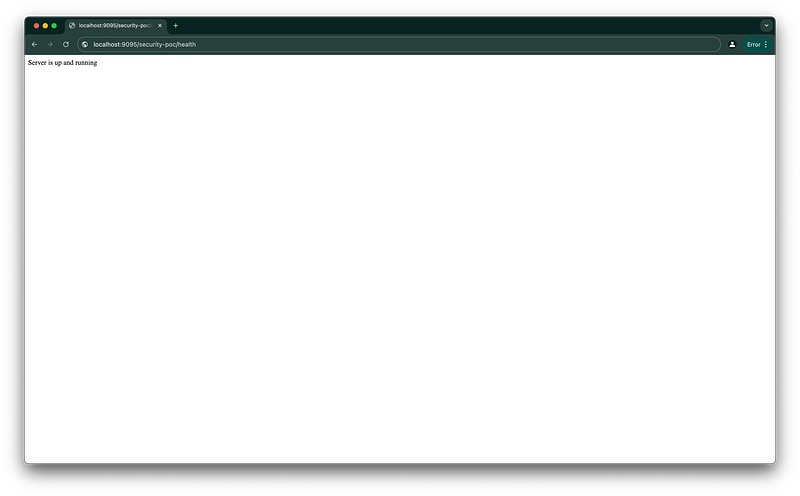
URL : http://localhost:9095/security-poc/health
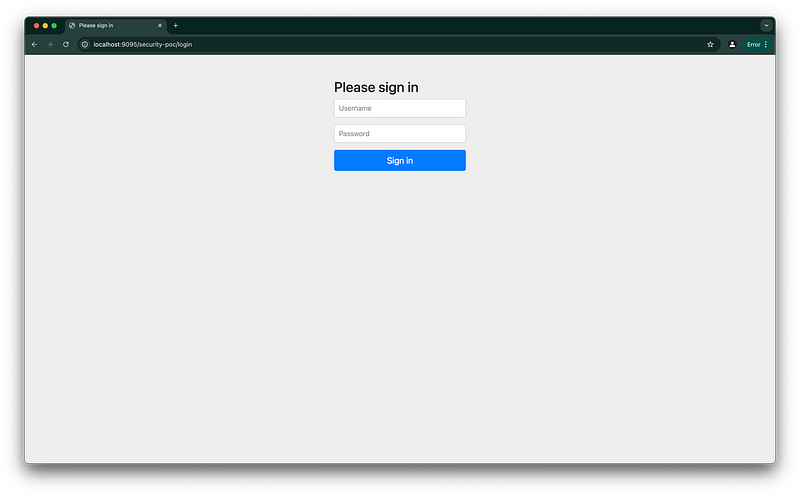
We can only access the resource when we provide username and password.
How Security is enabled by just adding a dependency?
Spring Security adds filters to the filter chain. All HTTP requests go through these filters. Each filter performs a specific task and passes control to the next filter.
These are some filters added when we add Spring Security dependency:
- SecurityContextPersistenceFilter
- UsernamePasswordAuthenticationFilter
- BasicAuthenticationFilter
- ExceptionTranslationFilter
- BearerTokenAuthenticationFilter
- SessionManagementFilter
- CsrfFilter
- RequestCacheAwareFilter
- AuthorizationFilter
and more..
That is it for this article. This was a basic tutorial on how to enable spring security.
In the next parts, we will cover the following:
- How to configure paths for which authentication needs to be disabled?
- What is CSRF? How to disable it on particular paths? What are its alternatives?
- How to authenticate users from the database?
- What is JWT and how to use it?
- What is the difference between BasicAuth and Form-Based Login?
- How to use Password Encoders and Decoders?
Thanks for reading. If you enjoy my content and want to show support, you can check out my other articles, give a few claps and follow for more such content. I write on Java, Productivity and Technology.
Until Next Time Saquib Aftab


