
Implementing a“Flood Fill” / “Bucket Fill” algorithm
If you’ve ever worked with a graphic design tool, you may be familiar with the term “flood fill.” Essentially, this tool allows you to color in a “connected” block of an image into the same color.
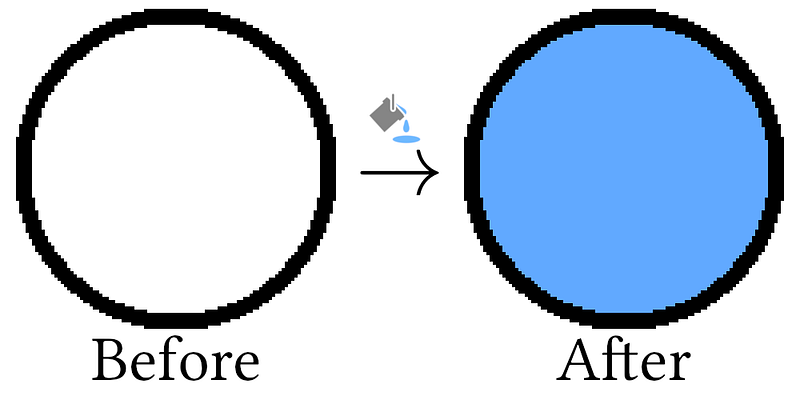
Here’s our problem description:
An image is represented by an m x n integer grid image where image[i][j] represents the pixel value of the image.
You are also given three integers sr, sc, and newColor. You should perform a flood fill on the image starting from the pixel image[sr][sc].
To perform a flood fill, consider the starting pixel, plus any pixels connected 4-directionally to the starting pixel of the same color as the starting pixel, plus any pixels connected 4-directionally to those pixels (also with the same color), and so on. Replace the color of all of the aforementioned pixels with newColor.
Return the modified image after performing the flood fill.
So how do we implement this? Let’s walk through it!
First, we’re given a *grid* to explore, so we’ll need some way of maintaining the coordinates we want to explore, and then some way of navigating those coordinates. Explicitly, this means we want to process a coordinate at a time, do something with that coordinate, and then determine the *next* coordinates to process.
We could use a stack or queue to implement this, but I’m going to use a stack simply because in Python we won’t need to import another data structure for the queue (deque).
I’ll break this down into a few pieces then annotate the code accordingly — the ordering is a bit out of order because there’s a realization that comes after exploring the problem a bit more.
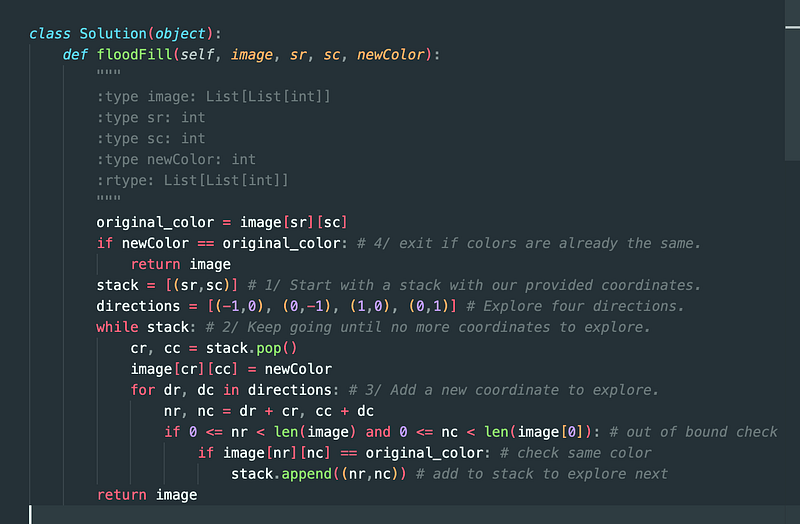
1/ Since we’re given a pair of coordinates to start with, that’s all our stack (the coordinates we’ll explore) will start with.
2/ We want to keep running our processing operation until the stack is empty.
3/ For each of the “connected” coordinates (directly above, below, or to the left or right of), we want to set that coordinate’s color to the new color, *if* the color is the same as the original coordinate’s color.
Now, an important realization: if the original coordinate’s color is *already* the same as the new color, we should immediately return. What happens if we don’t? We might encounter an infinite loop! Say there are only two cells in the grid, one on the left and one on the right. If we say the left cell is the one to start on, and we see that the right cell has the same color as the left, we’ll want to explore the right cell. Then when we explore the right cell, we’ll see that the left cell also has the same color as the original color, so we’ll want to explore the left cell… and so on, in an infinite loop!
So 4/ return if the new color is the same as the current color.
And here’s the code:
You can submit your code here: https://leetcode.com/problems/flood-fill
Let me know if you have any questions or want me to explain another coding problem!
For more articles like this, follow me on Medium. Not a member yet? Join the community. Want more software engineering interview guides and coding question tips? Check out all of my writing organized by topic in this article.
If you have any requests for what I should write, please let me know!


