
3 ways to clean your HTML text for NLP text pre-processing
How to remove the HTML tags from your corpus for building your NLP data-set

This article is part of the supporting material for the story — ‘Understanding NLP — from TF-IDF to transformers’
Background
Most of the times when you want to process a tonne of html files in your corpus, you would have to think about cleaning the HTML as a pre-processing step. Here are 3 ways to do the same.
1. Using Regex
Regular expressions are the most popular and powerful method for any of the complex string extraction process you want to carry out. Widely used in data mining and string matching algorithms, regex can be easily employed in searching for string patters between HTML tags.
html_text = "<HTML><HEAD> This is HEAD <INSIDE> The is inside tag </INSIDE></HEAD> <BODY> This is BODY </BODY></HTML>"
#the html text you want to process
We will use the above text stored in the variable html_text and try to parse out the text elements ( highlighted in bold )
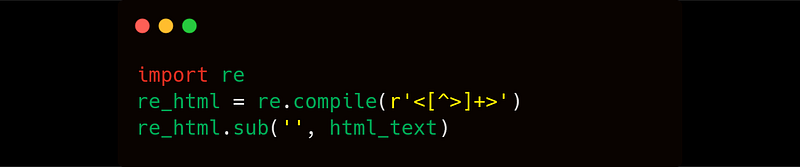
The output :
This is HEAD The is inside tag This is BODY2. Using Beautiful Soup
Beautiful Soup is a package widely used to scrape text from webpages. It has very powerful methods that can parse different DOM structures. Here we will use that to parse the HTML formatted text.

3. Using XML’s ElementTree
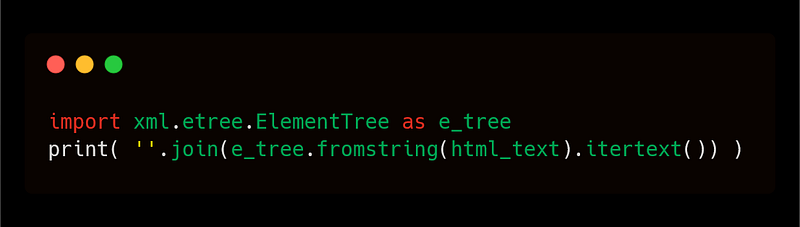
The itertext() method in XML’s ElementTree module can be used to pull out any text as long as it conforms to an XML structure.
Note : This method is very sensitive to the correctness of the structure of data and may not work if the data does not conform to the right tree structure as expected in an XML format.
This article is part of the supporting material for the story — ‘Understanding NLP — from TF-IDF to transformers’. For other pre-processing steps, please follow the above story.


