
3 Ways of Adding Styles In React Applications
A Beginner’s Guide with an example project

React is one of the popular Javascript libraries and it’s going to be more popular in 2021 and beyond. React is released first in 2013 and it gained a lot of popularity over the years. It’s a declarative, component-based, and efficient javascript library for building user interfaces.
React is a simple javascript UI library for building efficient and faster user interfaces. It’s a lightweight library which makes it popular. It follows the component design pattern, declarative programming paradigm, and functional programming concepts to make the front end apps efficient. It uses Virtual DOM to efficiently manipulates DOM. It follows one-way data flow from higher-order components to lower-order components.
In this post, we will see how many ways you can apply styles in React applications.
- Prerequisites
- Example Project
- External Stylesheet
- Inline Style
- With Objects
- Summary
- Conclusion
Prerequisites
There are some prerequisites for this article. You need to have nodejs installed on your laptop. If you want to practice and run this on your laptop you need to have these on your machine.
Example Project
This is a simple project which demonstrates developing and running a React application with NodeJS. We have a simple app in which we can add users, count, and display them at the side, and retrieve them whenever you want.

Here is a Github link to this project. You can clone it and run it on your machine.
// clone the project
git clone https://github.com/bbachi/react-nodejs-example.git
// strat the api
cd api
npm install
npm run dev// start the react appcd my-app
npm install
npm startExternal Stylesheet
In this method, you can import an external stylesheet into your component use classes. But you should use className instead of class to apply styles for the React elements.
The external style can be anything here. You can have separate CSS files based on your components and features. It doesn't matter how many CSS files you have, importing CSS files into components have the same pattern. If your component needs styles from multiple CSS files you can import those in the component. For example, we have a CSS file called App.css that contains styles for the entire application.
We imported this CSS file in the App.js as below at line number 3.
we need to notice one thing here. We have imported the CSS file in the parent component so all the child components can get these CSS files. You don’t have to import again in the child components. The child component here is Header, CreaetUser, DisplayBoard, etc.
Inline Style
In this method, we can directly pass props to the HTML elements with the property called style. Here is an example. The important thing we should notice here is that we are passing javascript object to the style prop that’s why we are using backgroundColor instead of CSS way background-color.
We will test the DisplayBoard Component with an inline style. We have this component and it appears the following way.
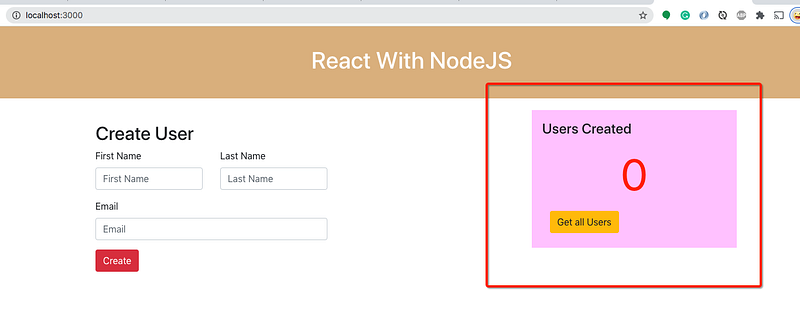
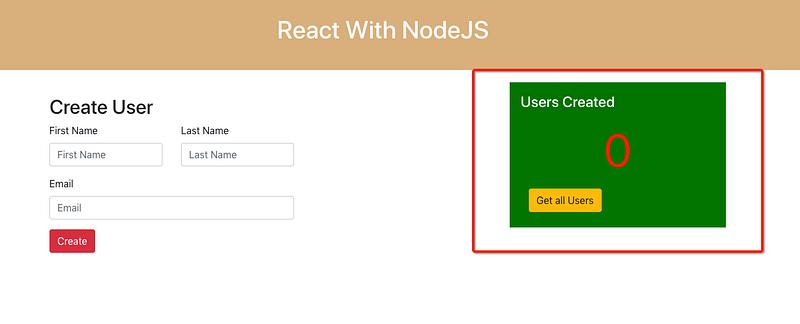
Now, I want to change the background color of the Display board to green and the heading color of the text to white. Let’s achieve that with the help of the inline style. You need to add the inline styles with the help of a style object to any element.
Notice the lines 6 and 7 for the inline styles. It takes the object and all the hyphens in the CCS properties are converted to the camel case.
With Objects
Since we are passing the javascript object to the style property, we can define a style object in the component and use it. Here is an example and you can pass this object down the component tree as props as well.
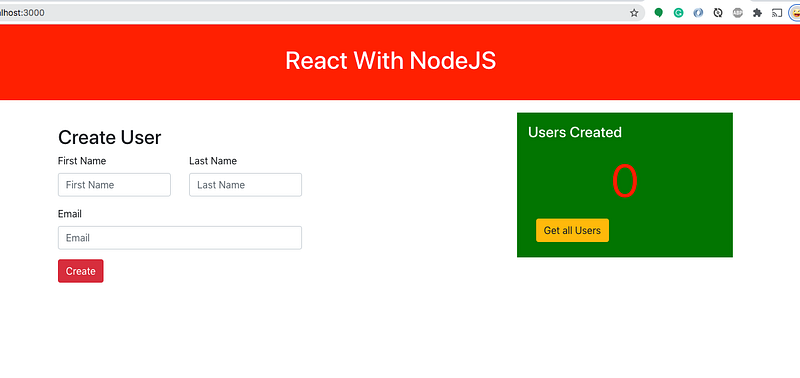
Let’s see we have a header component as below and we have a header class coming from the App.css file.
We have removed the className and use the style object as below.
The background color of the header is changed and the style object is defined in the component takes precedence.
Summary
- React is a simple javascript UI library for building efficient and faster user interfaces.
- We can apply styles in three ways in React applications.
- You can import an external stylesheet into your component. But you should use
classNameinstead ofclassto apply styles for the React elements. - If your component needs styles from multiple CSS files you can import those in the component.
- We can directly pass props to the HTML elements with the property called
style.Here is an example. The important thing we should notice is that we are passing the javascript object to thestyleprop. - Since we are passing the javascript object to the
stylethe property, we can define a style object in the component and use it. - The style object is defined in the component or inline styles take precedence over external stylesheets.
Conclusion
- The style object is defined in the component or inline styles take precedence over external stylesheets. Use whatever suits your requirement.


