
Data Science
3 Ultimate Ways To Find Unique Records In SQL
Stop using DISTINCT! Start using these quick alternatives to avoid confusions!

Get Unique Records Without Using DISTINCT Keyword! 🏆
In your data analysis projects, whenever you need to extract unique records from the database, a simple answer is to use DISTINCT!!
No doubt, DISTINCT is made for returning unique rows and it does its job pretty well. But, it does not tell you if the JOINs and filters you used are correct or incorrect which are actually the cause of duplicates.
Hence, I’ve summarized 3 best, safe and time-saving alternatives which returns same output at DISTINCT does and still keeps the code clean and easy to maintain. 💯
You can jump to your favorite part using the below index.
· UNION()
· INTERSECT()
· ROW_NUMBER()
· GROUP BY
📍 Note: I’m using SQLite DB Browser and a self created Dummy_Employees which you can get on my Github repo for Free!
Okay, here we go…🚀
First, let me show you how does the data look like.
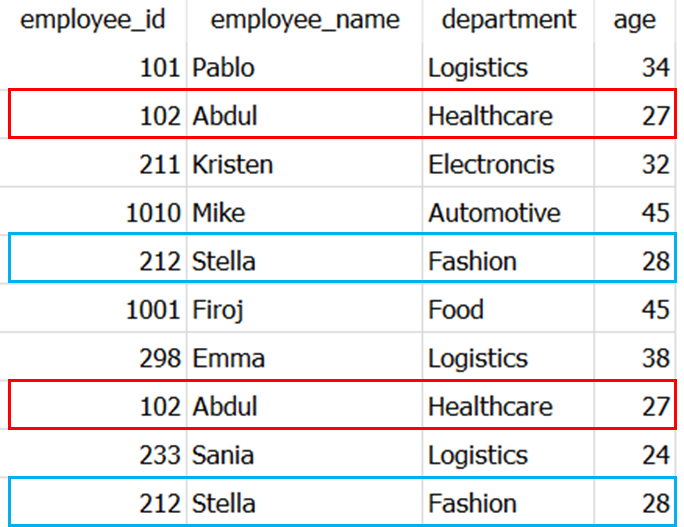
It is a simple 10x4 Dataset which I created as a part of my article Faker: An Amazing and Insanely Useful Python Library. 📚
The rows highlighted in Blue and Red in above picture are duplicated in the dataset.
📚 You can use this SQLite Database to follow along the queries in this article.
As mentioned in my last article, 5 Practical SQL Queries You Should Know In 2022, before looking for unique records, you must define which column or combination columns forms the unique row.
For finding unique values in a single column, DISTINCT is always more convenient. However, for retrieving unique rows from dataset, these alternatives keep code clean and efficient.
for example, let’s get unique combinations of employee_id, employee_name and department from the dataset using DISTINCT.
SELECT DISTINCT employee_id,
                employee_name,
                department
FROM Dummy_employees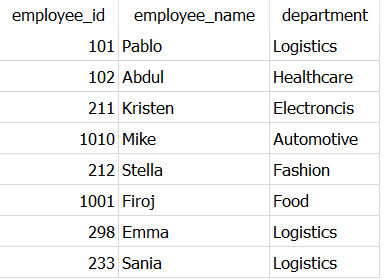
As expected, it returns only one occurrence of the duplicated rows belonging to employee_id 102 and 212 to ultimately result in 8 rows.
Now, let’s see how exactly same results can be obtained without using DISTINCT exclusively.
UNION()
In SQL, UNION is an operator which is used to combine the results of two SELECT statements. It is similar to UNION operation on Sets.
Additionally, it remove the multiple occurrences of the rows in the resulting dataset and keeps only single occurrence of each row. ✅
All you need to do write two exactly same SELECT statements and join them with the operator UNION, as shown below.
SELECT employee_id,
       employee_name,
       department
FROM Dummy_employeesUNIONSELECT employee_id,
employee_name,
department
FROM Dummy_employees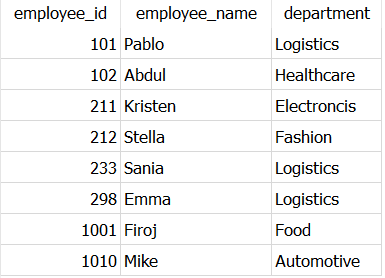
This shows same output as you got with DISTINCT, only the order of records is different.
Now, let me show you what just happened in the backend.🛠️
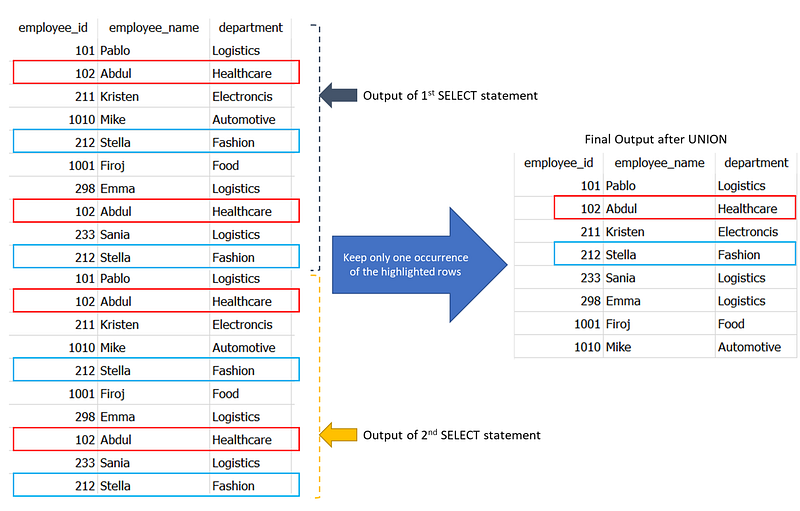
In this way, UNION simply joins the outputs of two separate SELECT statements and retains only one occurrence of the duplicated rows.
Next interesting way to select unique records is to use another operator — INTERSECT.
INTERSECT()
Similar to the previous operator, INTERSECT is also used to join the results of two SELECT queries, and returns only those records which are common in the output of both SELECT queries. It is same as Intersection of two sets.
INTERSECT also removes the multiple occurrences of the rows in the resulting dataset and keeps only single occurrence of each row. ✅
All you need to do write two exactly same SELECT statements and join them with INTERSECT, as shown below.
SELECT employee_id,
       employee_name,
       department
FROM Dummy_employeesINTERSECTSELECT employee_id,
employee_name,
department
FROM Dummy_employees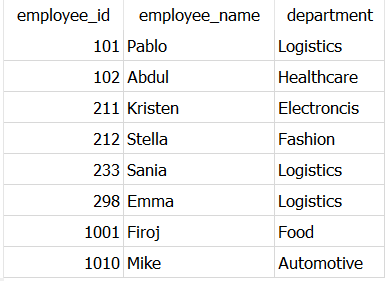
As both SELECT queries are yielding same output, the join will result 10 rows of the data. And then by the INTERSECTs inherent property of returning unique rows, only one occurrence of duplicated rows will be returned, resulting in final output of 8 rows.
🚩 Note: While using
UNIONandINTERSECT, there must be same number and order of columns in both the SELECT statements.
Moving on to the next way to get unique records..
ROW_NUMBER()
In SQL, ROW_NUMBER() is a window function to assign a sequential integer to each row within the partition of a result set.
Window function: An SQL function where the input values are taken from a “window” of one or more rows in the results set of a
SELECTstatement. This usesOVERclause followed byPARTITION BYandORDER BYclauses to make a window of one or more rows.
Therefore, in each partition row number 1 is assigned to the first row.✅
Here is how it works..
SELECT employee_id,
employee_name,
department,
ROW_NUMBER() OVER(PARTITION BY employee_name,
department,
employee_id) as row_count
FROM Dummy_employees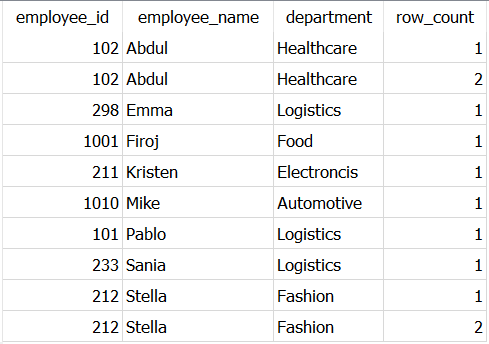
As you can see, there are two rows in each partition when employee_name is Abdul and Stella. And hence the row number 2 is assigned to each of these duplicated rows.
Hence, to get unique records you need to select all the rows where row number is 1 i.e. value of row_count in above table is 1.
❓ However, here is a catch!!
You can not use window function in WHERE clause, because in SQL query execution, WHERE clause is processed before calculating window functions. You can read more about SQL query execution order in this article by Agnieszka.
Ultimately, you need to create a temporary table which will store output of above mentioned query and need another SELECT statement to get distinct records. You can use WITH clause or CTEs (Common Table Expressions) to create temporary table. 💯
Let’s see how this can be used to get unique combinations of employee_id, employee_name and department from the dataset.
WITH temporary_employees as
(
SELECT
employee_id,
employee_name,
department,
ROW_NUMBER() OVER(PARTITION BY employee_name,
department,
employee_id) as row_count
FROM Dummy_employees
)SELECT *
FROM temporary_employees
WHERE row_count = 1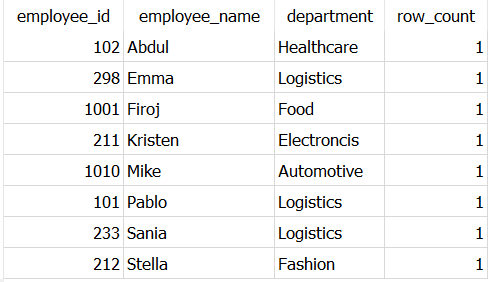
In this way, you can see only those records are present in the output which has row_count = 1
Here, the last column — row_count is generated just for information. The query still works even if you do not include this column.
Apart from operators and window function, there is still an easy and convenient way to get unique rows — GROUP BY
GROUP BY
In SQL, the GROUP BY clause is used to group rows by one or more columns. It is often used with aggregate functions such as COUNT(), MAX(), MIN(), SUM(), AVG() to get aggregated calculation for grouped rows.
However, it can be used without any aggregate functions to get distinct or unique records as shown below,
SELECT employee_id,
       employee_name,
       department
FROM Dummy_employees
GROUP BY employee_id,
employee_name,
department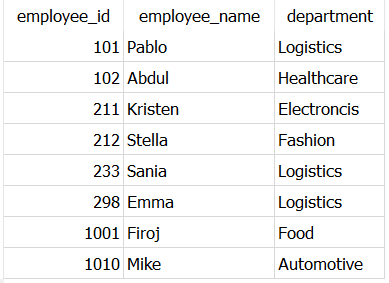
Simply, you need to mention all the column names in the GROUP BY clause to get unique records.
Almost 90% of the times, I find GROUP BY more convenient as I always wanted to do some other calculation using aggregate functions.
That’s all!
I hope you finished this article quickly and found it refreshing and useful.
I’m using SQL since past 3 years, and I found these alternative are quite time-saving, and powerful especially when working with large datasets. Also, I found some of these queries as good interview questions.
Interested in reading unlimited stories on Medium??
💡 Consider Becoming a Medium Member to access unlimited stories on medium and daily interesting Medium digest. I will get a small portion of your fee and No additional cost to you.
💡 Don’t forget to Sign-up to my Email list to receive a first copy of my articles.
Thank you for reading!


