

3 Memory Techniques to Help You Remember Anything
Break the cycle of learning and forgetting
Have you ever felt like your life is a continuous cycle of learning and forgetting?
In college, we joke about how we quickly forget our professor’s lectures after taking their final exam.
In professional life, we consume articles, reports, webinars, and pay tons of money to attend seminars, then can hardly remember the material the next day.
In personal life, we pore over book after book, but by the time we finish one, we can’t even remember the content of the previous one.
Does this sound like an effective way to live and learn? Not at all.
When I recently noticed this pattern in my own life, I began searching for techniques to improve my memory retention. Some techniques I developed on my own (specifically a text-based reminder app), other techniques I learned from memory grandmaster Kevin Horsley. Below is a compilation of some of the techniques I learned and now use on a daily basis to remember more. Take the time now to learn the techniques and start improving your memory immediately.
Note: The first two tips draw heavily on ideas found in Kevin Horsley’s book Unlimited Memory, which I highly recommend.
Technique #1: Use associative thinking
If you’re a fan of The Office, you’re likely familiar with the concept of associative thinking, as satirized by the show’s obnoxious boss Michael Scott during his lecture circuit:
While Michael’s methodology is pretty crass, the general idea of associative thinking is there. Associative thinking involves drawing connections between information that is difficult to remember (like a name) and information that is easy to remember or that is immediately at your disposal (like a face).
Recently, I got on the bus with a coworker from a different department at my company and couldn’t remember his name. I had just learned the technique of associative thinking for names, so when I asked the coworker’s name again (Spencer), I looked for a mnemonic connection (a spinster) and made an association (I imagined him as an old pioneer woman spinning yarn on a spinning wheel). I never forgot his name again. (Though I was a little wiser than Michael and decided not to reveal this association to my coworker.)
Associative thinking goes far beyond remembering names. As Kevin Horsley explains in his book, making associations to improve retention is about incorporating short-term information into long-term memory. Key to doing so is finding a place or thing that is deep in your long-term memory and using it as a visual framework to organize information.
Let me demonstrate how this works.
Using familiar locations as frameworks for memory
I recently memorized a list of the elements of web design that a marketer or CRO professional should consider during a website redesign. Here is the list:
- Navigation
- Trust symbols (e.g. customer logos, awards, testimonials)
- Buttons
- Colors
- Images
- Videos
- Forms
- Phone numbers
In order to memorize this list, I started by choosing a familiar place. In this case, I chose a religious institute I visited almost daily during college to study. I chose this place because:
- I can easily visualize the location because of how often I visited
- This building is where I created my first website, so there is an association there with the subject matter of the list I’m memorizing.
Okay, now how did I use the religious institute as a framework for remembering? I imagined I was taking a tour through the building, and each section of the building had an association. The easiest way to explain is for me to walk you through the same tour.
In my mind’s eye, I see myself walking up to the building for the first time.
- I have my phone in my hand because I had to use Google Maps for NAVIGATION to get there.
- When I walk up, I see a sign outside with the church’s logo — a TRUST SYMBOL for me.
- I go up to the door and I press the BUTTON for the doorbell.
- Someone answers the door and I’m welcomed in by several happy people wearing COLORful clothing.
- Each one is dancing around holding signs with IMAGES of themselves.
- I walk into the main meeting room and find everyone sitting around a TV watching a cheesy, infomercial-style VIDEO about how to fill out a donation FORM.
- At the end of the video, there’s a PHONE NUMBER you can call if you need additional help (again, cheesy informercial).
Get the idea? Using a place I know well, I am able to remember each of the website elements. I can now recall each with ease, which might seem trivial, but as Ken Jennings said:
When you make a decision, you need facts. If those facts are in your brain, they’re at your fingertips. If they’re all in Google somewhere, you may not make the right decision on the spur of the moment.
Another associative technique that Horsley walks through in his book is using a combination of numbers and rhyming words as “pegs.”
Using “pegs” for memory
Pegs are mnemonic devices that are fixed in your long-term memory and that you can attach other pieces of information to. One of my favorites that Horsley describes is the number-rhyme technique for remembering lists.
The number-rhyme technique involves finding a rhyme for each number in a list, and then drawing an association between the rhyming word and the item on the list.
I used this method to memorize a list of best practices for online forms. Here is the list:
- Remove unnecessary form fields
- Have the cursor blinking in the first form field
- Create contrast on the form with different colors or a border to make it stand out
- Include a strong call-to-action
- Highlight that the form won’t take long to fill out
- Remind the visitor what they will receive by filling out the form
- Make sure the buttons stand out
- Test the form’s properties using A/B testing
- Create some sort of feedback or confirmation page when the visitor successfully fills out the form
- Use cookies to pre-fill the form if possible
And here is the breakdown of my number-rhymes:
- TON. Don’t have a TON of form fields.
- SHOE. I think of those blinking SHOES that five-year-old boys wear. And then I remember the blinking cursor.
- FREE. I think of FREE-standing, and then remember that the form needs to stand out.
- DOOR. I think of a DOOR as an invitation to enter — a call to action.
- DIVE. You want people to DIVE right in, so I remember that you should remind them that the form won’t take long to fill out.
- CHOPSTICKS. This one is silly, but I imagine that if you fill out a form, you’ll get a free pair of CHOPSTICKS. (Later I’ll talk about how the silly examples are almost better.)
- HEAVEN. Click a button to get to HEAVEN.
- TRAIT. When you go to HEAVEN, they have lots of animals with crazy TRAITS. So I remember that you need to test the properties or traits of the form.
- SIGN. People in heaven are holding a SIGN telling you that you made it.
- For this last one, I just think of a plate full of ten cookies, which make you full (like pre-filling a form).
The rhymes are basically unlimited (except seven, that one has often eluded new rhymes for me).
Recap: Associative thinking is about incorporating short-term information into long-term memory. Some ways to do so include using familiar places and natural connections like rhymes.
Technique #2: Create a story
Did you ever hear that urban legend about the gang that would drive around at night with their headlights off and if you flashed your lights at them, they’d follow you home and kill you?
Or about that man who accepted a drink from an attractive woman in a bar and next thing he knew, he woke up in a hotel bathroom full of ice with one of his kidneys missing?
If you’ve heard these stories before, you almost certainly will remember them. Why?As brothers Chip and Dan Heath discuss in their book Made to Stick, our brains love stories — the more vivid, the better. Because these urban legends are shocking, vivid stories, our brains just eat them up and lodge them deep in our long-term memory.
Story is great for memory because it captures our attention — an essential factor in improving memory. To paraphrase Donald Miller from his book Building a StoryBrand, our brains love to wander, except when we’re watching, reading, or listening to a story.
I used the power of story to remember a concept I learned in a business strategy class about how managers can develop simple rules to manage their company. (Simple rules are like rules of thumb that managers and their teams can apply quickly to make decisions.) Here is the information:
Building simple management rules:
- Identify bottlenecks that are both strategic and specific.
- Let data trump opinion.
- Let the users make the rules.
- The rules should be concrete.
- The rules should evolve.
The above list contains simple but effective management principles, so I felt they were worth remembering. Here is a story I built to remember these principles:
- I imagine I am walking up to my CEO’s office (I associate this location with management). In the office, I notice that the CEO’s NECK has grown extremely long and skinny, and his bulbous head is bobbing around on the skinny neck. Eventually he can’t support his head anymore, which falls face first on his desk.
- Right next to his head, I see a tiny little wrestling ring sitting on the desk. In one corner of the ring is DATA, and in the other corner is OPINION. Data throws an action figure of Donald TRUMP at Opinion, and Opinion withers away.
- Zoom in on the judges make the RULES, and I notice that all of them are bottom-level USERS (individual contributors) at the company I work for. To make the image more memorable, they’re all females wearing bowler hats, mustaches, and smoking cigars.
- As Data goes marching around the ring with his hands in the air, one of the judges gets annoyed and picks up a CONCRETE block and throws it at Data’s head. Data collapses to the ground alongside the brick.
- The concrete block then transforms (EVOLVES) into a gigantic, Godzilla-like creature and lets out a terrible roar.
That’s the story. You might be thinking, “Wow, that’s a really long story to remember 5 bullet points. It might just be better to remember the bullet points, Jack…” But the word count here on the page is misleading. In my head, these images pass through in seconds, and I’m able to spout off each bullet point from the list with ease.
The SEE Principle
You’ll notice that my story is excessively silly and even nonsensical. The silliness is by design! As Kevin Horsley discusses in his book, the more ridiculous the imagery, the better, because imagery that is ridiculous sticks better (think of urban legends).
Kevin Horsley outlines the importance of vivid imagery with his SEE principle.
The SEE principle stands for:
- Senses. Make the images appeal to all 5 of your senses.
- Exaggerate. Make it excessive. If you’re thinking of a long, thin neck on your boss, make it really long and goofy.
- Energize. Put some movement into the images to give them life.
Applying these techniques to your images will make your stories stick longer and increase your retention.
Recap: Create memorable stories (tied to relevant locations) whose images quickly bring back the information you need.
Technique #3: Review, review, review (preferably with technology)
This technique is probably the hardest as well as the most important step. You’ve put in a lot of work making associations, but now you need a system to review the information several times to really get that info to stick.
Here’s a solution I developed.
A System to Review and Remember
In my experience, notes are where information goes to die. In school, we take notes, look at them once before our test, and then shortly forget them. When we read books, we mark up the pages or underline sections we find important, but then never look at our notes again.
Notes are not the place to store long-term information. You should treat notes as a temporary location to place information worth remembering before you transfer that information to the 9-lb mass between your ears.
In order to make the review process easier, I decided to capitalize on a common habit people have: Texting themselves information they want to remember. But instead of texting themselves, they text Fred.
Who is Fred? Fred is a text-based app I developed for myself and decided to share with others. The concept is simple: all you do is text Fred information you want to review, and then he’ll send that information back to you on a schedule over time, slowly spacing out the reminders.
Here’s a short video a friend of mine put together about how Fred is helpful for students, but Fred’s uses extend beyond studying for school:
I use Fred daily, always adding new information to remember as well as reviewing reminders. Here are a few examples of what my messages to and from Fred look like:
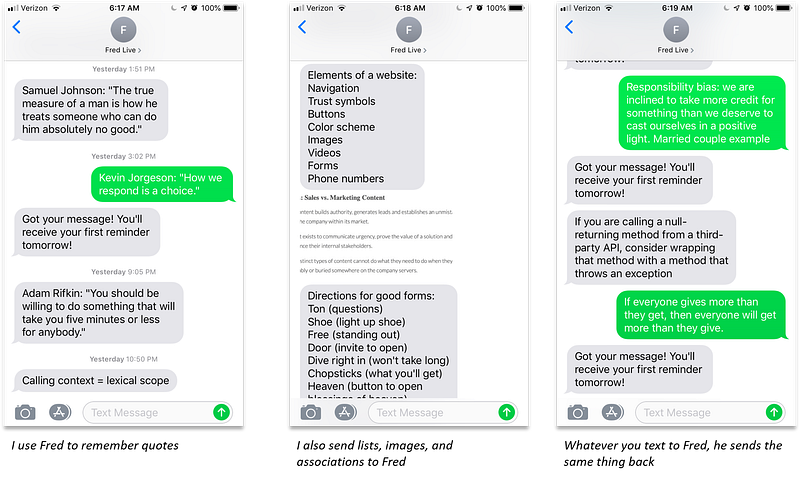
Right now, Fred is available to anyone for free — just go to HeyFred.co and fill out the short form with your phone number to receive a short tutorial via text. I currently cover the cost of the SMS messages out of pocket (I estimate the cost at about $8/month per user), so if you find some value in using Fred, please consider supporting the project on Patreon.
In the future, if enough people are interested, I would like to move from a texting interface to a mobile app where you can upload new bits of information and swipe left or right to archive or receive the next round of reminders. If an app like that sounds interesting to you, check us out on Patreon!
Make Your Brain Work for You
As Bruno Furst said, “You know as well as I do that it is entirely false to assume that any subject matter which we once learned and mastered will remain our mental property forever.” (Thanks to Kevin Horsley for showing me and helping me memorize this quote.)
Good memory takes practice. The more you exercise your associative thinking, create stories, and review the topics, the better your memory will be. You’ll find yourself able to quote research studies, reference authors, and remember where your keys are. These small techniques have made my professional pursuits that much more possible because I can access information quickly and accurately.
I would love to hear your feedback about these techniques. Comment below!


