
3 Simple Ways For Web Scraping Without Getting Blocked
A guide to handle anti-scraping mechanisms.
Many businesses today depend on access to public data to be able to function. Regardless of the industry you work in, sooner or later, you’ll have to extract data from the internet to carry out a task. Obtaining that data could be as simple as copying and pasting it, but when it comes to large data, web scraping is the best solution.
Unfortunately, not all websites would like to be scraped; that’s why they’ll do anything in their hands to detect your scraper and ban you. In this article, I’ll show you 3 ways to avoid getting blocked while scraping websites.
3 ways to avoid getting blocked while scraping websites
1. Use a Proxy Server
Your computer has a unique Internet Protocol (IP) that you can think of as the computer’s street address. The internet uses this IP address to send the correct data to your computer every time you navigate.
A proxy server is a computer on the internet with its own IP address. When you send a request to the web, this goes to the proxy server first, then the proxy server makes the request on your behalf, collects the response and then forwards you to the web page so you can interact with it.
If you keep scraping with the same IP over and over again, your computers’ IP would be easily detected by anti-scraping tools. For this reason, you should rotate your IP with proxy servers; so the website thinks that requests are being generated from different places. Even companies such as HiQ used proxy services to mask IP addresses for scraping websites like LinkedIn and avoiding IP ban.
Although there are many free proxies available, they involve some issues such as the collection of your data and low performance. Besides, many people use these free proxies, which means that the proxies are already flagged or banned. Instead, you should consider paying a proxy provider that can guarantee you privacy, security and great performance. Some of them are Smartproxy, GeoSurf, Netnut.
2. Rotate User Agents
A user agent helps identify which browser is being used, what version, and its operating system. It also facilitates interaction with websites’ content. For example, a Chrome user agent on iPhone looks like this:
Mozilla/5.0 (iPhone; CPU iPhone OS 10_3 like Mac OS X)
AppleWebKit/602.1.50 (KHTML, like Gecko) CriOS/56.0.2924.75
Mobile/14E5239e Safari/602.1
To find your user agent, just type on Google ‘what is my user agent.’
However, apart from the user agent, other headers are sent by browsers. Some headers are: accept, accept encoding, accept language, dnt, host, referer and upgrade-insecure-requests.You can create a dictionary headersand include them when scraping websites:
You can find different user-agent strings of some browsers here. Build a list with several user agents to rotate them later.
Keep in mind that if you only rotate the user agent, but the other headers remain the same, the scraper might still be detected.
To rotate all headers associated with each user agent, do this:
- Open an incognito window, go to the website you want to scrape and then open the network tab in developer tools.
2. Right-click a request and select Copy as cURL
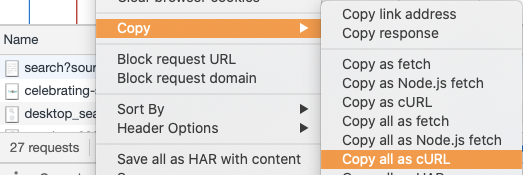
3. Paste it in the curl command box to convert the cURL syntax to your favorite programming language.
Once the cURL is converted, look for the variable headers. Once you found it copy the elements in the dictionary, except for the headers that start with X-
That’s it! You now have the correct headers for a user agent on a specific website. Now follow the same steps to collect headers for the user-agent strings you previously obtained.
3. Follow Best Practices
Bad scraping practices can impact the performance of the site; that’s the reason why websites block your scraper. However, scraping responsibly doesn’t harm the web, so you can keep scraping without getting blocked.
The following are the best web scraping practices to follow:
- Read the robot.txt: You should always check the ‘robots.txt’ file to know how the site should be crawled. To access the file, just add the words ‘robots.txt’ to the root of the site like in ‘http://example.com/robots.txt’ The file has rules such as how frequently you can scrape and the pages you’re allowed to scrape. If you find
User-agent: * Disallow:it means that the website doesn’t want to be scraped, whileUser-agent: * Disallow: allows scraping in the website. - Imitate human behavior: If you want to increase the chances of your scraper to be unnoticed, then write code that would imitate human surfing behavior on the internet. You can add a random delay between requests to go unnoticed. Also, follow different crawling patterns by including random clicks on the page and mouse movements.
- Avoid scraping data behind a login: If you need to log in to a website, the scraper would have to send information or cookies along with each request to view the page. As a result, they can easily identify you’re using a scraper and your account would be blocked.
- Think like the security system: Research the last approaches and tools websites use to detect scrapers. Here you can find 7 Ways to Protect Website from Scraping. If you know exactly what companies use to protect their website, you can figure out a way to bypass them.
Would you like to make money from web scraping? If so, check this article I wrote:
Summary
Now you know 3 ways to avoid getting blocked while scraping websites. Rotation of proxies and headers would make it hard for anti-scraping systems to detect your scraper, while the best practices will decrease your chances of getting blocked.


