
3 Rookie Mistakes to Avoid with Python Lists
How to fix small mistakes which can lead to major headaches

Of all the coding languages, Python is probably the most beginner-friendly. It’s intuitive, well-documented, and easy to learn. However, all languages have quirks, which can be difficult to spot especially as a beginner. They won’t produce errors or terminate the run. Rather, they blend right in with the other code.
Many data science projects use lists as way to store ordered data. However, failure to use them correctly could lead to inefficiencies, incorrect conclusions, and even missing data.
Here are 3 mistakes to watch out for when working with lists:
1. Creating Copies of Lists with Equals Operator
Mistake:
When copying a list, do not use =. This is very counterintuitive because = is used for assigning variables. However, the = operator does not create a copy, but rather an alias. Both original and new_copy point to the same data location as shown below.
Instead of duplicating the data, new_copy just created another way to access original.
Fix:
To avoid this error, use copy, a built-in method on lists. This method stores the data in two separate places in memory. As a result, changes to one list will not affect the other.
2. Changing List Size While Iterating
Mistake:
The example above attempts to remove all entries that start with ‘t’ from nums. However, ‘three’ remains. This is because the length of the nums changed while in the loop. For loops rely on an internal, zero-indexed counter which remembers its index in the loop. That counter determines the value of num for each iteration.
For example, in the first iteration of the loop, the counter was 0 and num was ‘zero’ because nums[0] = ‘zero’. For the second iteration, the counter equaled 1 making num = ‘one’. For the third iteration, num = ‘two’ and was removed from nums. For the fourth iteration, the internal counter equaled 3 and nums[3] = ‘four’. As a result, the loop skipped over the ‘three’ value.
At the beginning of the second iteration, nums[3] = ‘three’. By the end it, the list size changed and the ‘three’ value slid back into the nums[2] position. In short, the loop changes the list, but does not update the internal counter.
Fix:
To avoid this mistake, create a copy of the list and use the copy to define the for loop. Then, use the original list (in this case, nums) in the body of the loop.
Since the length of copy_nums never changes, the loop iterates through each value in the list.
3. Not Using List Comprehension to Create Lists
Mistake:
For loops provide a straightforward, well-documented solution to constructing lists. However, Python has a more concise approach — list comprehension. List comprehension takes the functionality of a for loop and collapses it into one line of code making it more concise and easier to understand.
Unlike the other two mistakes, this mistake won’t produce an incorrect solution, just a less efficient one. For instance:
Fix:
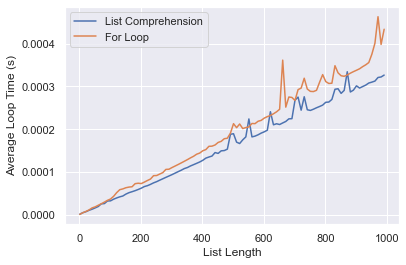
Use list comprehension instead of a for loop. Both produce the same output, but list comprehensions are cleaner and quicker in most cases. The plot below compares the times for the two methods as the length of the list increases.
Conclusion
The code for this article can be found here.
Thank you for reading my article. If you enjoy my content, please consider following me. Also, all feedback is welcome. I am always eager to learn new or better ways of doing things. Feel free to leave a comment or reach out to me at [email protected].


