avatarAmit @ Auto Sapiens

Free AI web copilot to create summaries, insights and extended knowledge, download it at here

1456

Abstract

s-1.readmedium.com/v2/resize:fit:800/1*C3GXstyCjAFYd4U6lDsuSw.png"><figcaption></figcaption></figure><p id="2403">This automation allows you to share key information from important meetings with all members of your team.</p><p id="0d90" type="7">How it works:</p><p id="6719" type="7">1) The trigger: A new recording is created in Zoom.</p><p id="5cce" type="7">2) Open AI’s Whisper creates a transcription of the recording.</p><p id="1151" type="7">3) ChatGPT creates a summary of the keys points.</p><p id="d9ce" type="7">4) ElevenLabs creates a speech synthesis of the summary.</p><p id="83ff" type="7">5) This file is uploaded in Slack.</p><h2 id="dd7a">2) Post directly on social media from a blog</h2><figure id="cde1"><img src="https://cdn-images-1.readmedium.com/v2/resize:fit:800/1*He2fyBYZK0iU_QYP-QIQfQ.png"><figcaption></figcaption></figure><p id="18d3">This automation allows you to instantly share new blog content across all your social media profiles, saving time while expanding reach.</p><p id="dbaf" type="7">How it works:</p><p id="a1ad" type="7">1) The trigger: A new blog post is posted on your Wordpress website.</p><p id="b38e" type="7">2) The blog post gets sent to ChatGPT.</p><p id="66c2" type="7">3) ChatGPT converts that content to a Facebook, Twitter and LinkedIn Post.</p><p id="90db" type="7">4) The content is then posted on each of those platforms.</p><h2 id="5687">3) Categorise support tickets and allocate based on agen

Options

t expertise</h2><figure id="a569"><img src="https://cdn-images-1.readmedium.com/v2/resize:fit:800/1*QeipFGpbfltl3oY3HgtgRQ.png"><figcaption></figcaption></figure><p id="f456">This automation allows you to boost your customer support experience by allocating tickets to agents with the relevant expertise.</p><p id="b42f" type="7">How it works:</p><p id="cffa" type="7">1) The trigger: A new ticket is created in Zendesk.</p><p id="777f" type="7">2) The ticket gets sent to ChatGPT which then allocates it into a particular category (which is pre-defined by the user).</p><p id="cebf" type="7">3) Zendesk will identify all agents associated with the relevant category.</p><p id="13e0" type="7">4) Zendesk will randomly select a user within that category and allocate the ticket to them.</p><p id="57da">The 3 automations showcased above are just a glimpse of what becomes possible when Make.com and ChatGPT join forces. These AI tools are game-changers that can help any business unlock efficiency, innovation and growth.</p><p id="5942">Make.com and ChatGPT eliminate technological barriers and democratise AI, allowing companies of all sizes to benefit. The time is now to start experimenting with these cutting-edge platforms.</p><p id="a96d">If you’re ready to dive into the world of AI, schedule a free consultation at <a href="https://autosapiens.io">https://autosapiens.io</a> and let’s explore how AI can transform your business.</p></article></body>

3 Powerful Make.com and ChatGPT Automations

The past year has seen an explosion of new applications and use cases for AI. Forward-thinking companies are baking conversational AI like ChatGPT into customer service interactions and using no-code platforms like Make.com to eliminate repetitive tasks. With the right strategy, AI automation can drive major improvements in efficiency, decision-making, personalisation and innovation.

Make.com is a no-code platform that enables anyone to build workflows, apps and automations without coding.
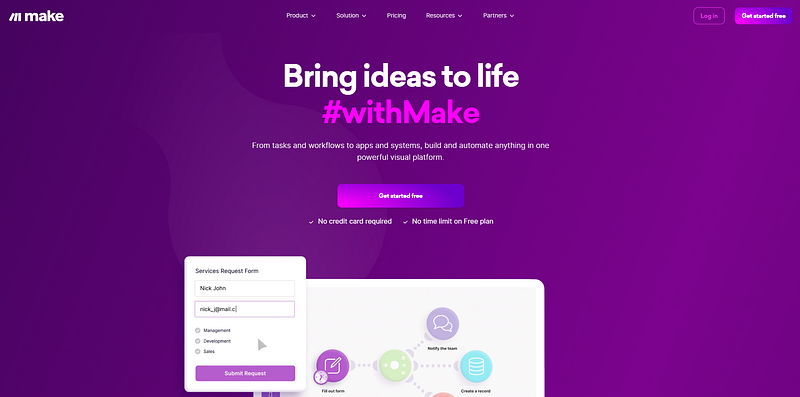
make.com

ChatGPT is a conversational AI system that can understand natural language and generate human-like text (you probably already knew that one).

Together, Make.com and ChatGPT make it easy for businesses to leverage AI to gain a distinct competitive advantage. This article will highlight 3 powerful automations that are now possible using Make.com and ChatGPT.

1) Transcribe Zoom calls, summarise them, create audio files and share via Slack

This automation allows you to share key information from important meetings with all members of your team.

How it works:

1) The trigger: A new recording is created in Zoom.

2) Open AI’s Whisper creates a transcription of the recording.

3) ChatGPT creates a summary of the keys points.

4) ElevenLabs creates a speech synthesis of the summary.

5) This file is uploaded in Slack.

2) Post directly on social media from a blog
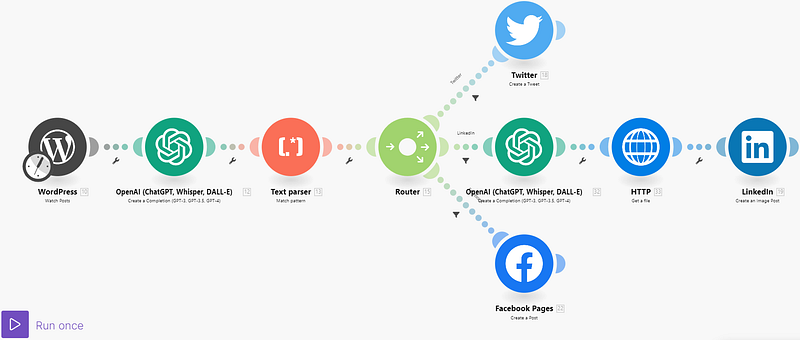
This automation allows you to instantly share new blog content across all your social media profiles, saving time while expanding reach.

How it works:

1) The trigger: A new blog post is posted on your Wordpress website.

2) The blog post gets sent to ChatGPT.

3) ChatGPT converts that content to a Facebook, Twitter and LinkedIn Post.

4) The content is then posted on each of those platforms.

3) Categorise support tickets and allocate based on agent expertise

This automation allows you to boost your customer support experience by allocating tickets to agents with the relevant expertise.

How it works:

1) The trigger: A new ticket is created in Zendesk.

2) The ticket gets sent to ChatGPT which then allocates it into a particular category (which is pre-defined by the user).

3) Zendesk will identify all agents associated with the relevant category.

4) Zendesk will randomly select a user within that category and allocate the ticket to them.

The 3 automations showcased above are just a glimpse of what becomes possible when Make.com and ChatGPT join forces. These AI tools are game-changers that can help any business unlock efficiency, innovation and growth.

Make.com and ChatGPT eliminate technological barriers and democratise AI, allowing companies of all sizes to benefit. The time is now to start experimenting with these cutting-edge platforms.

If you’re ready to dive into the world of AI, schedule a free consultation at https://autosapiens.io and let’s explore how AI can transform your business.

ChatGPT
Make
Automation
No Code
AI
Recommended from ReadMedium