avatarSamer Sallam

Free AI web copilot to create summaries, insights and extended knowledge, download it at here

3469

Abstract

">To create a new class in Python, we just use the keyword <b>class </b>then we give our class a name then a <b>colon</b>, as follows:</p><div id="d012"><pre><span class="hljs-keyword">class</span> <span class="hljs-symbol">ClassName:</span></pre></div><div id="fbe2"><pre><span class="hljs-attribute"> pass</span></pre></div><p id="4b86"><b>The details of Class Syntax are:</b></p><ol><li>Keyword: <b>class</b></li></ol><p id="7fdc">2. Give the class a name <b>ClassName</b></p><p id="f1cf">3. <b>Colon (:):</b> It’s quite important to use a colon after the class name, otherwise, the interpreter will throw a syntax error.</p><p id="b40e">4.<b> Space:</b> Do not forget to keep some spaces before the keyword pass.</p><p id="64d2">5. Keyword <b>pass</b> because for now, I do not want to add any methods or attributes.</p><p id="f498">After we have a class, its name, ClassName, we are ready to create an <b>object </b>or an <b>instance </b>from this class. let’s see...</p><h2 id="8911">3. How to Create a Simple Object in Python?</h2><p id="9076">To create an object or an instance from this class, type the following:</p><div id="feaa"><pre><span class="hljs-attr">class_obj</span> = ClassName()</pre></div><p id="71c1"><b>So, you must follow these steps when you create an object in Python:</b></p><ol><li>Give a name for your object <b>(class_obj)</b></li></ol><p id="7445">2. Use the assignment operator, which is equal to <b>(=)</b></p><p id="417a">3. Use the class name with the parentheses to define an object <b>ClassName()</b>.</p><p id="4cf4">Refer to Figure 2.</p><figure id="ee74"><img src="https://cdn-images-1.readmedium.com/v2/resize:fit:800/1*ez7livNN2A6K_QUbt8l5NA.png"><figcaption>Figure 2: Create an object or an instance from a class (Image By Author).</figcaption></figure><p id="0905">Now, let us get a real example using Python by answering the following questions:</p><ol><li>How to create a class and how to name a class?</li><li>How to create an object from the class and how to name the object?</li><li>How to check the object type?</li></ol><h2 id="cff5">1. How to create a class and how to name a class?</h2><p id="662f">Let me assume that I want to create a “student” class.</p><p id="4650"><b>Input:</b></p><div id="8b7f"><pre><span class="hljs-keyword">class</span> <span class="hljs-symbol">Student:</span></pre></div><div id="4a1c"><pre><span class="hljs-attribute"> pass</span></pre></div><p id="6040">Once I run this code, the class will be defined inside the interpreter.</p><p id="07ad">Be attention that when I give my class a name, I’ll use the camel case standard to make our code more readable for other developers.</p><p id="9bdc">In the camel case, we make the first letter of each word, a capital letter, and we don’t use any underscore between successive words, like, for example, if I want to say:</p><div id="194f"><pre><span class="hljs-keyword">class</span> <span class="hljs-symbol">NewStudent:</span></pre></div><div id="29c8"><pre><span class="hljs-attribute"> pass</span></pre></div><p id="68bb">You can find that there is no underscore, the letter of each word is capitalized.</p><h2 id="a54d">2. How to create an object from the class and how to name the object?</h2><div id="f398"><pre><span class="hljs-keyword">new</span><span class="hljs-type">_student</span> = Student()</pre></div><p id="77c6">In this case, when I defined an object I give the variable the name<b> “new_student”</b>, I don’t u

Options

se the camel case. So, I used another standard to represent the variable name in which all the words are small letters and there is an underscore between successive words.</p><h2 id="4097">3. How to check the object type?</h2><p id="4891">To know the type for any variable in Python, we use the function <b>type</b> as follows.</p><p id="bcb8"><b>Input:</b></p><div id="1c87"><pre><span class="hljs-title">print</span>(<span class="hljs-keyword">type</span>(new_student))</pre></div><p id="bce0"><b>Output:</b></p><div id="2578"><pre><<span class="hljs-keyword">class</span> <span class="hljs-string">'main.Student'</span>></pre></div><p id="4cd3">As we see, the type of the “new_student” object is from the class “student”.</p><p id="2e84">So, in shortcuts in Python, you can define new types and create instances from these types.</p><p id="3fa6"><b>Now, let us summarize what we have learned in this article:</b></p><figure id="643f"><img src="https://cdn-images-1.readmedium.com/v2/resize:fit:800/1*EORD1Dzoyk968fA4bZmCig.jpeg"><figcaption>Photo by <a href="https://www.pexels.com/@ann-h-45017/">Ann H</a> on <a href="https://www.pexels.com/">pexels</a></figcaption></figure><ul><li>We use the <b>class </b>keyword to define a new class in Python.</li><li>To define an object, we use the class name with the parentheses <b>ClassName()</b></li></ul><p id="988d"><b><i>P.S.</i></b><i>: A million thanks for your time reading my story. Before you leave let me mention quickly two points:</i></p><ul><li><i>First, to get my posts in your inbox directly, would you please subscribe <a href="https://medium.com/@samersallam92/subscribe"><b>here</b></a></i>, <i>and you can follow me <a href="https://medium.com/@samersallam92"><b>here</b></a>.</i></li><li><i>Second, writers made thousands of <b>$$</b> on Medium. To get unlimited access to Medium stories and start earning,<a href="https://medium.com/@samersallam92/membership"><b> sign up now for Medium membership</b></a><b> </b>which<b> </b>only costs $5 per month. By signing up <a href="https://medium.com/@samersallam92/membership"><b>with this link</b></a>, you can directly support me at no extra cost to you.</i></li></ul><div id="6e28" class="link-block"> <a href="https://medium.com/@samersallam92/list/7b54126a7f4e"> <div> <div> <h2>The Complete Course in Object-Oriented Programming in Python</h2> <div><h3>undefined</h3></div> <div><p>undefined</p></div> </div> <div> <div style="background-image: url(https://miro.readmedium.com/v2/resize:fit:320/0*b6dafc214a69dfd2756a0318444115a37f9c154e.jpeg)"></div> </div> </div> </a> </div><p id="b5d4">To get back to the previous article, you can use the following link:</p><p id="ac77"><a href="https://readmedium.com/2-introduction-to-oop-5afb2df9af57">Part 2:Introduction to OOP</a></p><p id="9c6c">To move on to the next article, you can use the following link:</p><p id="ca98"><a href="https://readmedium.com/4-instance-attributes-and-instance-methods-in-python-oop-b850bd03b17c">Part 4:Instance Attributes and Instance Methods</a></p><h2 id="f527">Resources:</h2><ul><li>GitHub <a href="https://github.com/samersallam/The-Complete-Course-in-Object-Oriented-Programming-in-Python/tree/main/Introduction%20to%20Classes%20and%20Objects"><b>here.</b></a></li></ul></article></body>

Introduction to Classes and Objects: Python OOP Complete Course — Part 3

Photo by Tatiana Syrikova on Pexels

Before we start let me tell you that:

  • This article is a part of The Complete Course in Object Oriented Programming in Python which you can find it here.
  • All resources are available in the “Resources” section below.
  • This article is also available as a YouTube video here.

Introduction

After we have understood what a class and an object are, let’s learn how to define our first class in Python.

This article will cover the following outlines:

  1. Class and Object
  2. Class Syntax
  3. How to Create a Simple Object in Python

1. Class and Object

Class is just a new data type or it can be seen as a blueprint or prototype which has: attributes and methods. In other words, class is the umbrella that below we will find attributes and methods.

Once we have this blueprint or prototype, we should be able to create as many as copies we want. We call them copies, instances or (the formal word to be used in this context) objects.

Therefore, an object is just an actual instance of a class that has real values for the class attributes and can call the methods of that class.

For example, the bank account class and the John Smith bank account object. Refer to Figure 1. ( If you would like to remember the full example from the previous article, Just click here).
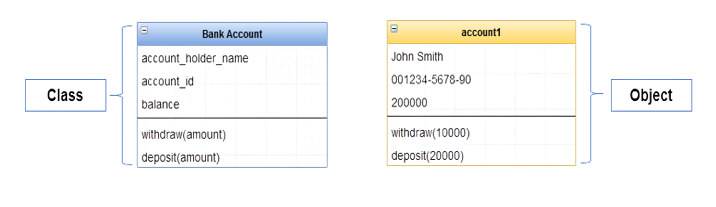
Figure 1: Bank account class and object (Image By Author)

Now, let us learn how we can do this in Python.

2. Class Syntax

Photo by Sergey Shulgin on Unsplash

To create a new class in Python, we just use the keyword class then we give our class a name then a colon, as follows:

class ClassName:
    pass

The details of Class Syntax are:

  1. Keyword: class

2. Give the class a name ClassName

3. Colon (:): It’s quite important to use a colon after the class name, otherwise, the interpreter will throw a syntax error.

4. Space: Do not forget to keep some spaces before the keyword pass.

5. Keyword pass because for now, I do not want to add any methods or attributes.

After we have a class, its name, ClassName, we are ready to create an object or an instance from this class. let’s see...

3. How to Create a Simple Object in Python?

To create an object or an instance from this class, type the following:

class_obj = ClassName()

So, you must follow these steps when you create an object in Python:

  1. Give a name for your object (class_obj)

2. Use the assignment operator, which is equal to (=)

3. Use the class name with the parentheses to define an object ClassName().

Refer to Figure 2.
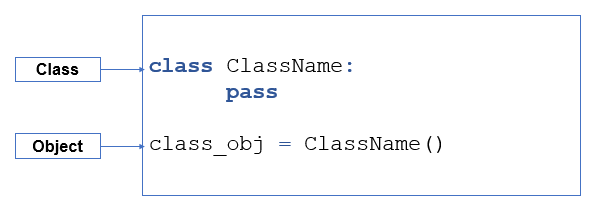
Figure 2: Create an object or an instance from a class (Image By Author).

Now, let us get a real example using Python by answering the following questions:

  1. How to create a class and how to name a class?
  2. How to create an object from the class and how to name the object?
  3. How to check the object type?

1. How to create a class and how to name a class?

Let me assume that I want to create a “student” class.

Input:

class Student:
    pass

Once I run this code, the class will be defined inside the interpreter.

Be attention that when I give my class a name, I’ll use the camel case standard to make our code more readable for other developers.

In the camel case, we make the first letter of each word, a capital letter, and we don’t use any underscore between successive words, like, for example, if I want to say:

class NewStudent:
     pass

You can find that there is no underscore, the letter of each word is capitalized.

2. How to create an object from the class and how to name the object?

new_student = Student()

In this case, when I defined an object I give the variable the name “new_student”, I don’t use the camel case. So, I used another standard to represent the variable name in which all the words are small letters and there is an underscore between successive words.

3. How to check the object type?

To know the type for any variable in Python, we use the function type as follows.

Input:

print(type(new_student))

Output:

<class '__main__.Student'>

As we see, the type of the “new_student” object is from the class “student”.

So, in shortcuts in Python, you can define new types and create instances from these types.

Now, let us summarize what we have learned in this article:

Photo by Ann H on pexels
  • We use the class keyword to define a new class in Python.
  • To define an object, we use the class name with the parentheses ClassName()

P.S.: A million thanks for your time reading my story. Before you leave let me mention quickly two points:

  • First, to get my posts in your inbox directly, would you please subscribe here, and you can follow me here.
  • Second, writers made thousands of $$ on Medium. To get unlimited access to Medium stories and start earning, sign up now for Medium membership which only costs $5 per month. By signing up with this link, you can directly support me at no extra cost to you.

To get back to the previous article, you can use the following link:

Part 2:Introduction to OOP

To move on to the next article, you can use the following link:

Part 4:Instance Attributes and Instance Methods

Resources:

Object Oriented
Python
Programming
Classes
Objects
Recommended from ReadMedium
avatarAbhay Kumar
OOPs in Python

An easy guide

10 min read