
3 Essential Tools for New YouTubers
Save time and energy
I started YouTube in 2017. Still editing everything on my own. And these are my go-to apps and tools I can’t create without.
If you are a beginner in the online world and super excited to be in front of the camera but not such a techie person, then this guide is for you. I really wish I knew these tools were right for me and they could make my life so much easier back in 2017, but you know I had to learn from my own mistakes. Don’t make the same ones.
When I first started I only had a laptop that was always crashing while editing on a very professional program, I think it’s called SonyVegas, which required a much more powerful RAM and more knowledge by me. The editing process was time-consuming and sometimes my laptop was crashing while rendering the video and I had to start all over again. But I did it again and again. This way I managed to grow my channel and hit by 2021 the milestone of 1.5 million views.
The reason I kept ongoing is that I loved the creating process, and I was always looking for ways to make this YouTube thing work. After watching a hundred YouTube tutorials on video editing and upgrading to a much more powerful smartphone (Huawei P20 Pro) I left my laptop and focus only on creating on my phone. Editing videos, making thumbnails, sending emails, making content research. Everything.
And now (finally) I have set my YouTube workflow up to an easy and enjoyable way that doesn't feel like struggling. So, this is why I wanted you to have this list and start your journey easier. Are you ready?
1. TubeBuddy
TubeBuddy is a FREE browser extension & mobile app that integrates directly into YouTube to help you run your channel with ease.
tubeBuddy.com
The first tool couldn’t be other than TubeBuddy. It helps me with every single video and even though it provides too many tools to make your YouTube life easier, I love and use every time the Keyword Explorer.
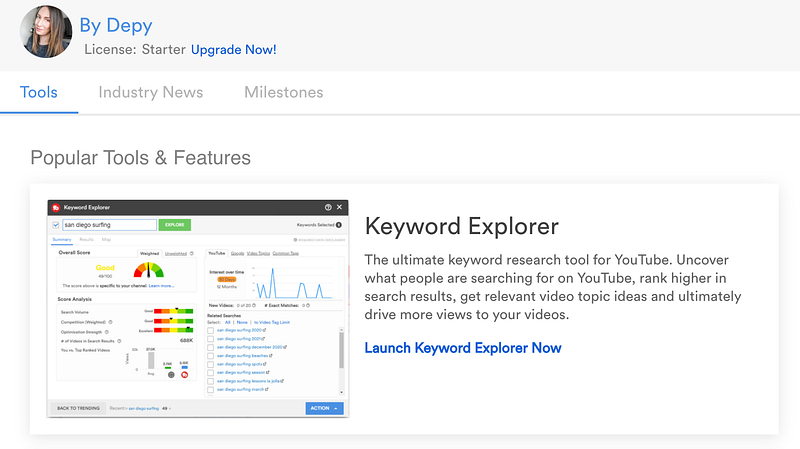
Keyword Explorer helps you uncover what people are searching for on Youtube, what keywords are getting more traction and will help you rank higher in the search results. I have tried other methods too but this is by far the most accurate and from my analytics, I can tell that when I include these keywords, my videos do get discovered by the Youtube search. What you are looking for here are keywords with the highest score (>90/100) and not too many videos in the search results.
Of course, there are many other factors affecting your ranking in the search results, like the Audience Retention, but this is a good starting point.
2.InShot Video Editing App
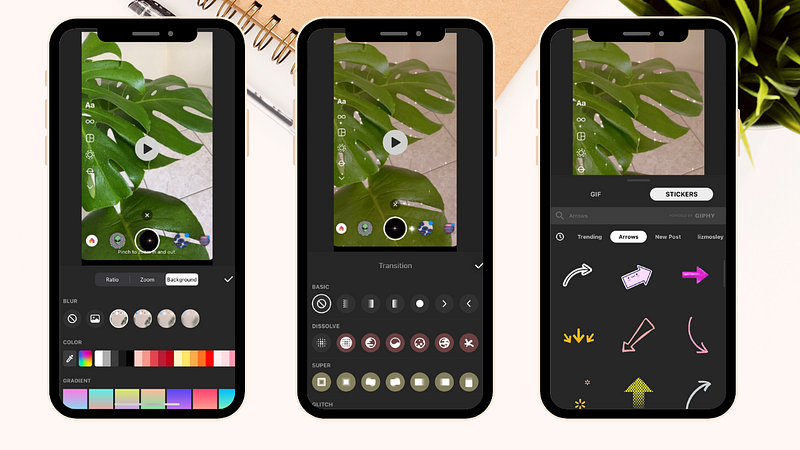
I don't know what editing would be without Inshot. Occasionally, I have used other video editing apps, you know the big names, but I always go back to this easy and friendly to use video editing app that is installed on my phone at least for the last three years. First of all, it’s free to use and after every update, the app gets better and better. More than 80% of my 110 videos were edited in InShot app and I have no intention to switch to another one in the near future. Especially if you are filming on your phone this app will be a lifesaver.
3.Canva
You have successfully filmed and edited your first video ( hope it didn’t take days) and it’s time to upload it. The next thing you have to edit and plays a major role in your video's success is the thumbnail. If you are familiar with graphic design then most probably you must have heard about Canva, but if you don’t it’s time to give it a try. It provides ready-to-use templates, specifically made for Youtube thumbnails, leaving you only with your creativity without having to worry about the right photo ratio and file format. You gonna love the easy-to-use drag and drop features, the beautiful layouts and the customizable templates. And it’s free. Yeah, all these goodies for free.
Still with me?
Great.
Because I have one last thing before I leave you to explore the tools mentioned.
Don’t forget that these all are just tools that need your creativity to transform something into magic. Be patient. Youtube is definitely a platform that if you put some serious work on it, it pays off all your efforts.
Wishing you a good and easy Youtube beginning.