avatarJoel Oughton

Free AI web copilot to create summaries, insights and extended knowledge, download it at here

1861

Abstract

f you struggle with making up good headlines, there is an amazing tool out there that can work wonders. Introducing <a href="https://headlines.sharethrough.com/">Sharethrough Headline Analyser</a>.</p><p id="b308">All you need to do is enter your desired headline and the algorithm will give you a score out of 100. This score is determined by headline length, use of words, context and how relatable it is to the reader.</p><figure id="3a3d"><img src="https://cdn-images-1.readmedium.com/v2/resize:fit:800/1*V39AeCOYKk8h5oh33NXc4g.png"><figcaption>Image by Author. See how handy the suggestions are?</figcaption></figure><p id="89a9">The tool also gives you advice on how to improve the headline. Some of the suggestions I received including using context words, power words and humanising the subject.</p><p id="ecc6">This tool is free for unlimited uses and I recommend you give it a try and see how it works out for you.</p><h1 id="d306">Tool #2: Hemingwayapp.com</h1><figure id="2fcd"><img src="https://cdn-images-1.readmedium.com/v2/resize:fit:800/1*E3PJKA5xHS5AdpQU-AFF3Q.png"><figcaption>Image by Author</figcaption></figure><p id="55e3">This tool is amazing for sharpening your writing skills and clearing up any mistakes in your writing.</p><p id="4a3c">Unlike other editors such as Grammarly, Hemingway does more than a cursory spell-check.</p><p id="64dd">On the right sidebar next to your writing, you will see some important metrics.</p><p id="5220">First up is the word count. Next to that is the readability level, which indicates what grade level your writing is readable at.</p><p id="e959">It also shows you if any of your sentences are too hard to read, or if they are too long.</p><p id="493c">This is handy as it makes sure that the reader does not become confused by long or complex sentences.</p><p id="e5c6">Despite this, there is nothin

Options

g wrong with having a few longer sentences as it can be handy to vary the length of your sentences.</p><p id="14be">It will also show you where you have written in the passive voice and where you have used adverbs.</p><p id="d60e">You can then click on the adverbs and it will remove them for you.</p><p id="87b5">Hemingway also indicates where you have used complex language and you then have the option to simplify this. For example, you can change ‘utilise’ into ‘use’.</p><p id="e266">All-in-all, this tool is amazing and it is handy, particularly if you are a new writer. It will help you to develop your writing style while ensuring that you are not making any silly mistakes.</p><h1 id="bfd6">Tool #3: Grammarly</h1><p id="6e1a">Last but not least, how could I not mention Grammarly? This free spell-checking tool has worked wonders for me and it is packed full of amazing features.</p><p id="1884">It works well alongside Hemingway as a way to pick up on silly spelling mistakes.</p><p id="e2aa">The AI feature is also able to detect what tone your writing is written in and you can use this information to correct your writing tone if needs be.</p><p id="75b2">It can tell you if your writing is authoritative, formal, informal, confident, optimistic and so on.</p><p id="fc57">It can also remove unnecessary words in sentences and add in words that the AI believes may be helpful.</p><p id="9b22">This is definitely a tool I recommend to you and better yet, it is free.</p><p id="f6ae"><i>Have you used these tools? Are there any other tools that you would recommend? Feel free to give me a shout in the comments below and I’ll get back to you.</i></p><p id="1100"><i>If you enjoyed this article, please take a minute or 2 to give me a follow of more content like this including entrepreneurship, tech, science and photography.</i></p></article></body>

3 Epic Tools I use to Polish my Drafts
Photo by Aaron Burden on Unsplash

As a writer, it is important to make sure that your work is free of errors and grammatical mistakes.

That is why I have a set of tools that I use to make sure that my writing is ready to publish to the world.

Whether you need your grammar, sentences or your headline checking over, here are 3 epic tools that I use to polish my drafts.

What’s even better is that all these are free to use as well, so you don’t need to make any hefty financial commitments.

Tool #1: Sharethrough Headline Analyser
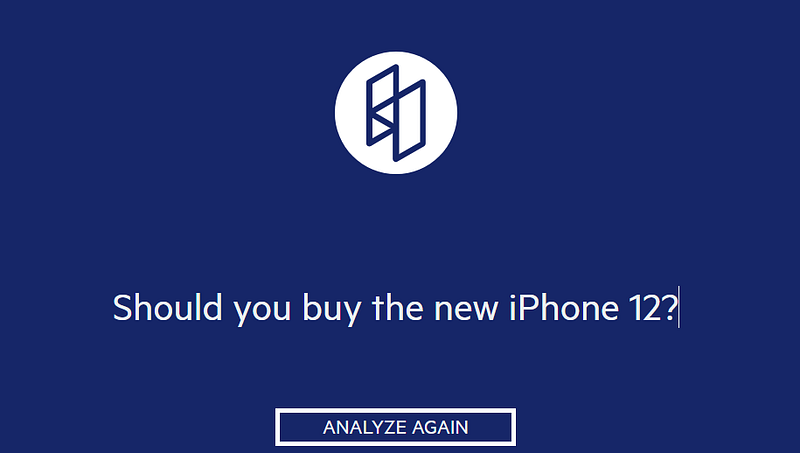
Image by Author

The first thing you must think about when writing is your headline. It is the first sentence your viewer will see and it will determine whether they click on to read the rest of your article.

If you fail to create a convincing headline that attracts clicks, your article may as well not exist.

After all, a whopping 8 out of 10 people read your headline but only 2 out of 10 will go on to read the rest (Copyblogger).

This is why it is so important to nail down your headline as it can determine how successful the rest of your article is.

If you struggle with making up good headlines, there is an amazing tool out there that can work wonders. Introducing Sharethrough Headline Analyser.

All you need to do is enter your desired headline and the algorithm will give you a score out of 100. This score is determined by headline length, use of words, context and how relatable it is to the reader.
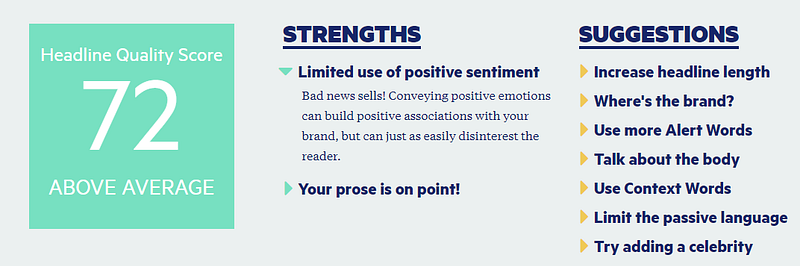
Image by Author. See how handy the suggestions are?

The tool also gives you advice on how to improve the headline. Some of the suggestions I received including using context words, power words and humanising the subject.

This tool is free for unlimited uses and I recommend you give it a try and see how it works out for you.

Tool #2: Hemingwayapp.com
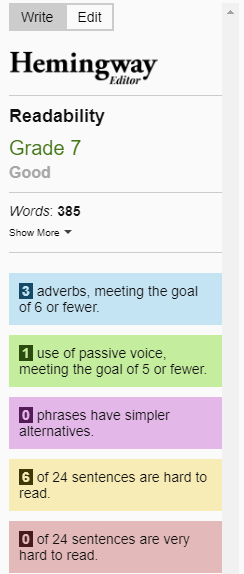
Image by Author

This tool is amazing for sharpening your writing skills and clearing up any mistakes in your writing.

Unlike other editors such as Grammarly, Hemingway does more than a cursory spell-check.

On the right sidebar next to your writing, you will see some important metrics.

First up is the word count. Next to that is the readability level, which indicates what grade level your writing is readable at.

It also shows you if any of your sentences are too hard to read, or if they are too long.

This is handy as it makes sure that the reader does not become confused by long or complex sentences.

Despite this, there is nothing wrong with having a few longer sentences as it can be handy to vary the length of your sentences.

It will also show you where you have written in the passive voice and where you have used adverbs.

You can then click on the adverbs and it will remove them for you.

Hemingway also indicates where you have used complex language and you then have the option to simplify this. For example, you can change ‘utilise’ into ‘use’.

All-in-all, this tool is amazing and it is handy, particularly if you are a new writer. It will help you to develop your writing style while ensuring that you are not making any silly mistakes.

Tool #3: Grammarly

Last but not least, how could I not mention Grammarly? This free spell-checking tool has worked wonders for me and it is packed full of amazing features.

It works well alongside Hemingway as a way to pick up on silly spelling mistakes.

The AI feature is also able to detect what tone your writing is written in and you can use this information to correct your writing tone if needs be.

It can tell you if your writing is authoritative, formal, informal, confident, optimistic and so on.

It can also remove unnecessary words in sentences and add in words that the AI believes may be helpful.

This is definitely a tool I recommend to you and better yet, it is free.

Have you used these tools? Are there any other tools that you would recommend? Feel free to give me a shout in the comments below and I’ll get back to you.

If you enjoyed this article, please take a minute or 2 to give me a follow of more content like this including entrepreneurship, tech, science and photography.

Writing
Creativity
Art
Content Marketing
Content Creation
Recommended from ReadMedium