avatarLucy Dan 蛋小姐 (she/her/她)

Free AI web copilot to create summaries, insights and extended knowledge, download it at here

2716

Abstract

you wanted a bit more design control but not too much that you could get overwhelmed, <a href="https://carrd.co/">caard.co</a> is the way to go. This is what I personally use because I like that I can have more control on colour choices but not too much control that I make it ugly with my lacking visual design skills.</p><p id="fe7f">It has the flexibility of a real website without the complexity, allowing for subpages and sections. The key drag and drop features make it really easy to set up with needing to know website design.</p><p id="c197">You also have more control over the URL you can choose. Whereas linktr.ee takes your Instagram username and automatically imposes this as part of the URL, here I was able to change the “username” portion that appears before “<a href="https://carrd.co/">caard.co</a>” to anything not already taken.</p><p id="a7ba">Here’s a live example of my <a href="https://ramyeonjpg.carrd.co/">caard profile</a>:</p><div id="10ba" class="link-block"> <a href="https://ramyeonjpg.carrd.co/"> <div> <div> <h2>the egg girl</h2> <div><h3>Lucy's Shenanigans</h3></div> <div><p>ramyeonjpg.carrd.co</p></div> </div> <div> <div style="background-image: url(https://miro.readmedium.com/v2/resize:fit:320/0*3t9qG5KCrwMpDCcB)"></div> </div> </div> </a> </div><h1 id="ecea">Level 3: Individual Links for Individual Posts</h1><figure id="adfa"><img src="https://cdn-images-1.readmedium.com/v2/resize:fit:800/1*GLhV2aXIlPzkTV6SFr7ohA.png"><figcaption><a href="https://www.planoly.com/ramyeonjpg">screenshot by author</a></figcaption></figure><p id="4ff5">Finally, because you can’t include links in the description of an Instagram post, there are a few post-scheduling websites out there that allow you to link specific posts to specific links.</p><p id="0327">What does that mean?</p><p id="7eb6">It means that I can share a picture of a specific post (e.g., screencap “Goji Berries: What are they to you?) and encourage them to go to the link in my profile to click the exact same picture to access that link.</p><p id="a9ed">Rather than having to change your profile link every time you have a new piece to promote, each post then points to a specific link. That way, anyone coming across old posts (via niche tags!) can still access older links you want to promote.</p><p id="ce96">I use this most often for sharing Medium pieces, but also to share shop items and reward links.</p><p id="293c">In addition to Planoly (which I personally use just because it’s the first one I heard about), there are other websites th

Options

at do exactly the same thing.</p><p id="445f">Here’s a live example from <a href="http://instagram.com/ramyeonjpg">my personal Instagram</a> with Planoly.</p><div id="2db0" class="link-block"> <a href="https://www.planoly.com/ramyeonjpg"> <div> <div> <h2>SELLIT gives your business a storefront for your social media visitors to explore your best…</h2> <div><h3>By adding a link in your Instagram bio or any other social network, blog or email, you will be able to send your…</h3></div> <div><p>www.planoly.com</p></div> </div> <div> <div style="background-image: url(https://miro.readmedium.com/v2/resize:fit:320/)"></div> </div> </div> </a> </div><p id="0fef">There’s also <a href="https://www.tailwindapp.com/">Tailwindapp</a> (<a href="https://smart.bio/goaldiggerpodcast">live demonstration</a> with The Goal Digger Podcast).</p><p id="8101">And finally, there’s <a href="https://later.com/linkinbio/">link.bio</a> (<a href="https://linkin.bio/thefinancialdiet">live demonstration</a> with The Financial Diet).</p><h1 id="72af">Takeaway</h1><p id="e5cd">Don’t be intimidated about sharing links on your Instagram! There are so many products (usually with free plans to start with) that offer beautiful displays of your multiple links without needing website building experience. Here are just a few that I’ve come across (from spending an embarrassing amount of time on Instagram):</p><ul><li><b>Linktr.ee</b>: Simple and minimalistic, most popular.</li><li><b>Caard.co</b>: Simple to use but more control over design; an “easy” version of website design.</li><li><b>Planoly / Tailwind / Linkin.bio</b> <b>(1:1 post link redirects)</b>: These websites are designed specifically to work with Instagram posts, which don’t allow linking within posts. Their design allows you to encourage followers to click on the specific post and be able to access a variety of links.</li></ul><p id="8ace"><i>Disclaimer: </i>I’m a paying customer for Planoly and have used both Caard.co and Linktree in the past, but are not affiliated in any way. These are all suggestions based on lurking on the internet and discovering all these different ways that Instagram accounts have used to promote products.</p><p id="9b74"><a href="undefined">Lucy Dan 蛋小姐 (she/her/她)</a> wants to thank <a href="undefined">Aimée Gramblin</a> for asking what a <b><i>caard</i></b> was, possibly last year! It inspired this draft, which has embarrassingly been sitting in my drafts for all this time. Very glad that it’s finally been birthed into the world.</p></article></body>

3 Different Ways to Showcase Your Links on Instagram

How do you promote your projects when there’s only one golden promotional spot on your Instagram profile?

On many social media platforms, you can only share one link to encompass all of the potential projects you might want to share with anyone coming across your profile.

It limits you to share only one link, when you might also want to share:

  • your other social media accounts
  • personal and company websites
  • blog and shop links

Short of setting up your own website for all of this information — which can be daunting to many — here are some other potential ways to experiment with this single link dilemma!

Level 1: Minimalist and Simple
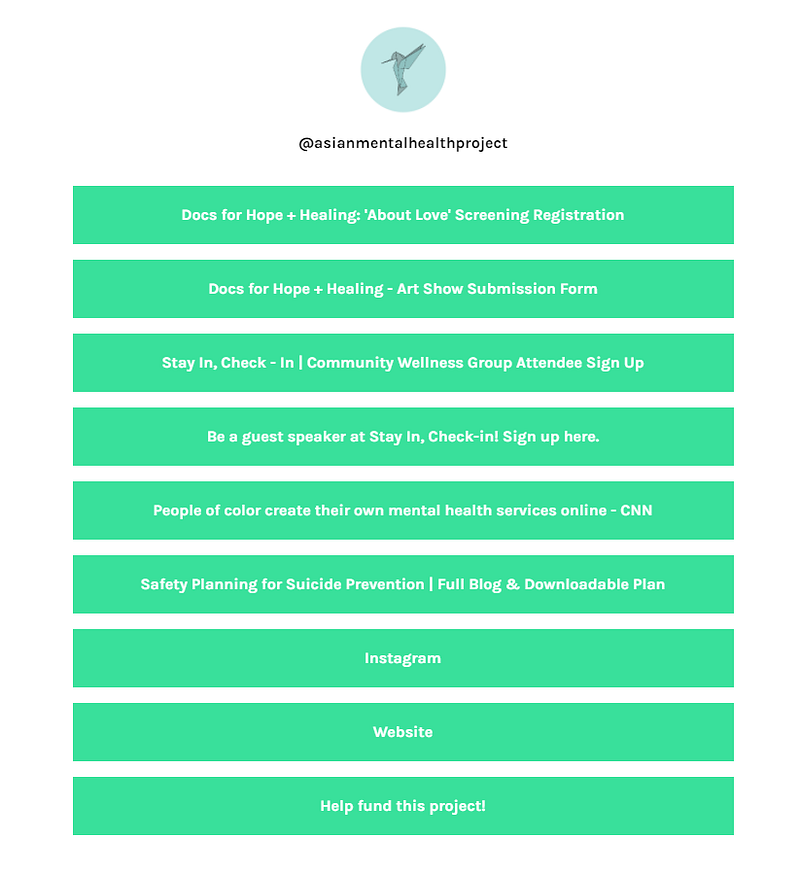
screenshotted from Asian Mental Health Project

If the idea of creating a website for you is daunting and you only have five seconds to set these links up, then something like linktr.ee would be perfect for you.

To set this page up, all you need is to login through your existing Instagram account. Once your account with linktree is created, it’s quite easy to drop the title and links as simply as you might do in an email.

If you’re feeling fancy, you can choose from one of few free colour schemes to help customize your profile. The limited number colour choices really help those of us who are not talented in visual design.

Check out a live example from the Asian Mental Health Project here:

Level 2: Fancier but still simple
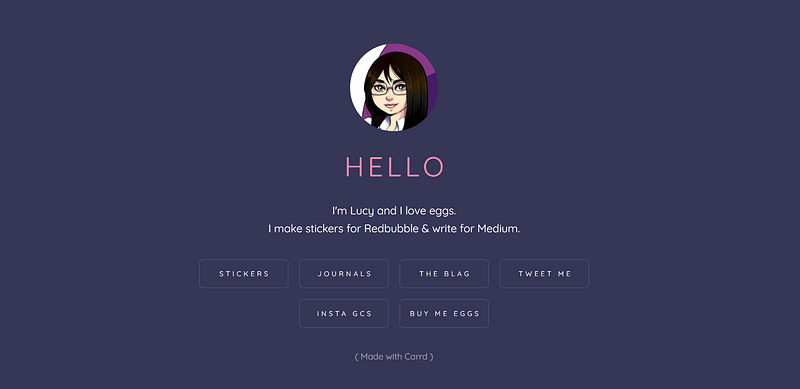
screenshot by author

If you wanted a bit more design control but not too much that you could get overwhelmed, caard.co is the way to go. This is what I personally use because I like that I can have more control on colour choices but not too much control that I make it ugly with my lacking visual design skills.

It has the flexibility of a real website without the complexity, allowing for subpages and sections. The key drag and drop features make it really easy to set up with needing to know website design.

You also have more control over the URL you can choose. Whereas linktr.ee takes your Instagram username and automatically imposes this as part of the URL, here I was able to change the “username” portion that appears before “caard.co” to anything not already taken.

Here’s a live example of my caard profile:

Level 3: Individual Links for Individual Posts
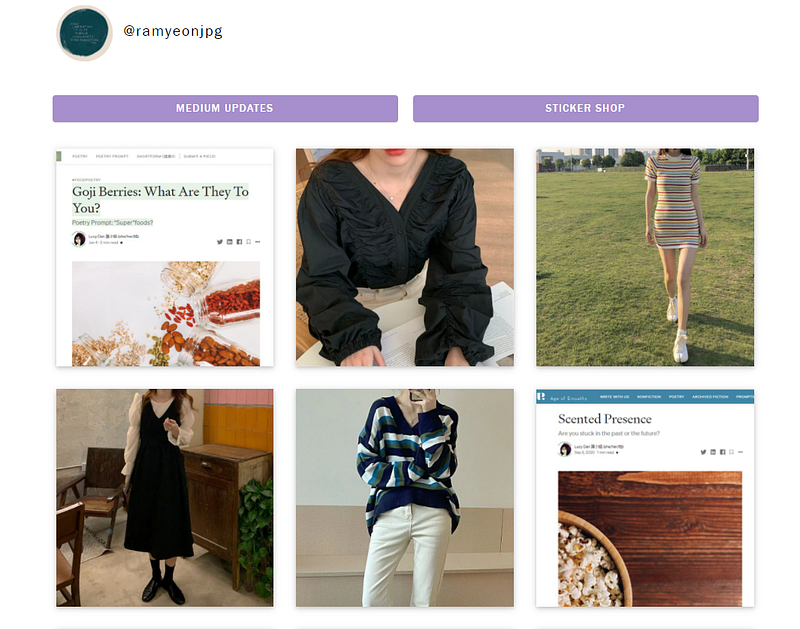
screenshot by author

Finally, because you can’t include links in the description of an Instagram post, there are a few post-scheduling websites out there that allow you to link specific posts to specific links.

What does that mean?

It means that I can share a picture of a specific post (e.g., screencap “Goji Berries: What are they to you?) and encourage them to go to the link in my profile to click the exact same picture to access that link.

Rather than having to change your profile link every time you have a new piece to promote, each post then points to a specific link. That way, anyone coming across old posts (via niche tags!) can still access older links you want to promote.

I use this most often for sharing Medium pieces, but also to share shop items and reward links.

In addition to Planoly (which I personally use just because it’s the first one I heard about), there are other websites that do exactly the same thing.

Here’s a live example from my personal Instagram with Planoly.

There’s also Tailwindapp (live demonstration with The Goal Digger Podcast).

And finally, there’s link.bio (live demonstration with The Financial Diet).

Takeaway

Don’t be intimidated about sharing links on your Instagram! There are so many products (usually with free plans to start with) that offer beautiful displays of your multiple links without needing website building experience. Here are just a few that I’ve come across (from spending an embarrassing amount of time on Instagram):

  • Linktr.ee: Simple and minimalistic, most popular.
  • Caard.co: Simple to use but more control over design; an “easy” version of website design.
  • Planoly / Tailwind / Linkin.bio (1:1 post link redirects): These websites are designed specifically to work with Instagram posts, which don’t allow linking within posts. Their design allows you to encourage followers to click on the specific post and be able to access a variety of links.

Disclaimer: I’m a paying customer for Planoly and have used both Caard.co and Linktree in the past, but are not affiliated in any way. These are all suggestions based on lurking on the internet and discovering all these different ways that Instagram accounts have used to promote products.

Lucy Dan 蛋小姐 (she/her/她) wants to thank Aimée Gramblin for asking what a caard was, possibly last year! It inspired this draft, which has embarrassingly been sitting in my drafts for all this time. Very glad that it’s finally been birthed into the world.

Marketing
Social Media
Freelance
Work
Instagram
Recommended from ReadMedium