
3 Best Practices and Activities for Effective Team Retrospectives
Facilitating team retrospectives
Team retrospectives, often referred to simply as “retros,” are meetings held by teams at the end of a project iteration, sprint, or specific period to reflect on their recent work and discuss how they can improve their processes, collaboration, and outcomes going forward.
The main purpose of retrospectives is to facilitate continuous improvement within the team.
It’s important that teams not only run retros but also make the collective decision to improve, add or keep testing “an action” or “team habit”. If there are no action items, team retros may end up feeling like a “waste of time.”
During a retrospective, team members typically discuss 4 things:
- What went well: Identifying successes, achievements, and things that worked smoothly during the period under review.
- What didn’t go well: Recognizing challenges, obstacles, and areas where the team faced difficulties or encountered problems.
- Lessons learned: Reflecting on insights gained from both successes and failures, and determining how to apply these lessons in future work.
- Action items: Deciding on specific actions or changes to implement in order to improve team performance, productivity, communication, or any other relevant aspect.
Retrospectives are often conducted in a structured format, with facilitators guiding the discussion and ensuring that all team members have the opportunity to contribute their perspectives. There are multiple ways in which you can run team retros, with many different tools available for it.
During live meetings or workshops you can use any of these two:
- Sailboat retrospective
- KALM retrospective
During live meetings or asynchronous meetings you can use any of the following:
- Start/Stop retro
- Quick team retro
- Astronaute meeting
Let’s go over the details!
The Sailboat.
Here is the sailboat retrospective template.
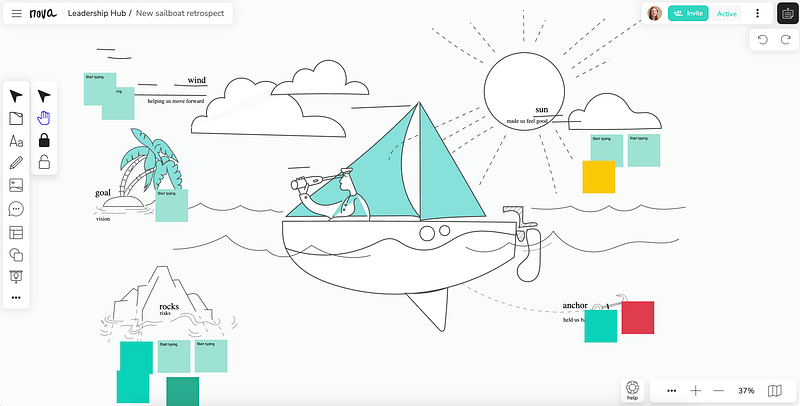
You start by discussing the goal, and if it needed more clarity or if it was well defined. You also discuss if the goal was achieved and what the current indicators show about the results of your actions. Then you can continue by discussing the winds. The winds are all those things that helped you move forward and made things easy for you. Maybe how well organized everything was, maybe someone provided templates ready to use, maybe the designer was really informative, etc. These are things you want to keep doing or even improve.
Discuss these details further.
Then move to the rocks. In here, you are discussing all the risks. Then move into what has held you back. Think about things that slow you down, that made things confusing, or more difficult than they should have been. Often in here, what you are discussing are expectations.
Finalize it by asking everyone to add things on the board that made them feel good and excited.
KALM
A similar example to this tool is the KALM tool.
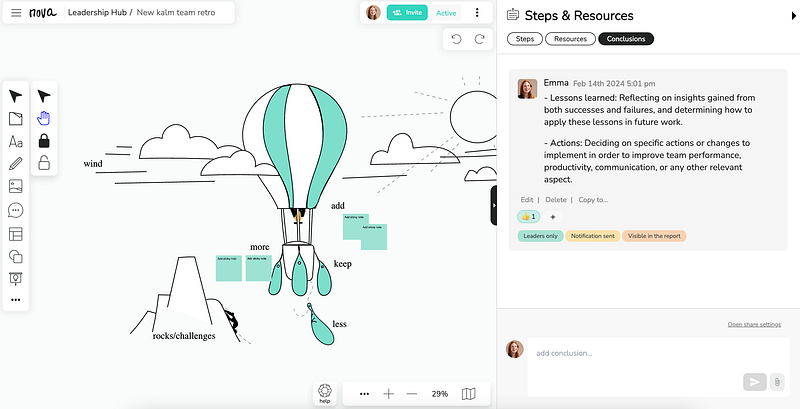
This tool sometimes can be easier for those new to team retrospectives as you will be discussing things to add, things to keep, things to do more or less.
Lessons Learned and Action items
In both cases, final decisions on future actions can be added here in the conclusion section. Everyone in the team will be notified with all the decisions as a reminder.
Asynchronous options.
These are just two tools that you can use during a meeting. Now you may be having this often enough that you want to do this asynchronously.
For that, we have multiple tools that can be used both during meetings or asynchronously. But we have to say that if you haven’t tried running these asynchronously, they work like magic.
The first option is the start and stop team retrospective.
Start/Stop
Facilitating a start-stop-continue retrospective meeting involves guiding your team through a structured discussion aimed at identifying what aspects of your work processes should be started, stopped, or continued. Here’s a step-by-step guide to facilitate such a meeting:
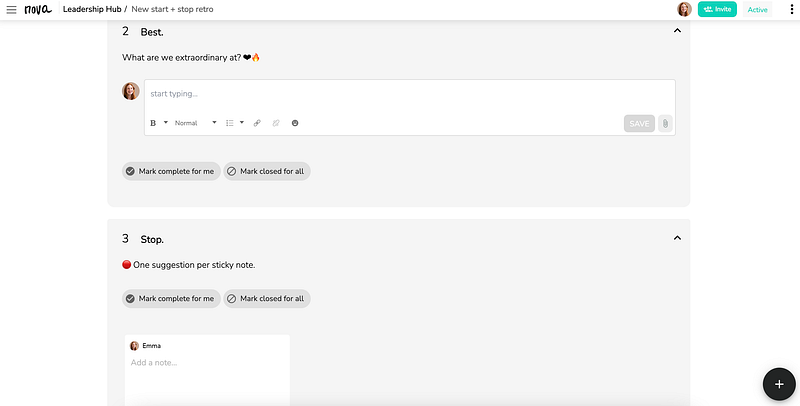
Set the Stage:
- Explain the purpose of the retrospective: to reflect on recent work and identify areas for improvement.
- Emphasize the importance of honest and constructive feedback.
Review the Timeline: Recap the timeframe that the retrospective covers (e.g., the last sprint, the previous month).
Generate Ideas: Ask the team members to individually jot down ideas for things to start, stop, and continue. Encourage everyone to think about specific actions or behaviors.
- For each prioritized item, determine specific actions that need to be taken.
- Assign responsibilities to team members or teams.
- Set deadlines for implementing changes.
Summarize and Close: Recap the key points discussed during the retrospective & review the action items and confirm understanding.
- Thank the team for their participation and insights.
Remember, the success of the start-stop-continue retrospective depends on the active participation of all team members and a commitment to implementing the identified improvements. As a facilitator, your role is to guide the discussion, ensure that everyone’s voice is heard, and facilitate consensus on the actions to be taken. If you are running this session async, add instructions and tips.
Other tools are available. Check all the available options at Nova.
These are just a few tools that you can use.
It is important that you are aware of how to best facilitate these meetings even if you run them asynchronously, but more importantly, is that you make a decision collectively into what changes or improvements will be tested.
Retrospectives serve several crucial purposes:
- Reflection: They provide a dedicated space for the team to reflect on recent work and outcomes.
- Learning: They encourage learning from both successes and failures.
- Continuous Improvement: They drive actionable changes that lead to improved processes and outcomes.
Setting the Stage: Before diving into a retrospective, it’s essential to set the stage properly:
- Establish Trust: Create a safe and open environment where team members feel comfortable sharing their thoughts and ideas. Use tools like Miro or Nova.
- Define Objectives: Clearly communicate the goals of the retrospective and what you hope to achieve.
- Choose the Right Format: Select a retrospective format that suits your team’s needs and preferences (e.g., Start-Stop-Continue, 4Ls, Sailboat) and choose when and how you will run it (async or live meeting).
Be open to experimentation and trying new approaches to improve team dynamics and processes.
Team retrospectives are invaluable for teams striving to improve their processes, communication, and overall effectiveness. By creating a culture of reflection and continuous improvement, teams can adapt to challenges, capitalize on opportunities, and achieve greater success in their endeavors.
Remember: The true power of retrospectives lies not just in the act of reflecting but in the actions that follow. By implementing actionable changes and fostering a culture of continuous improvement, teams can unlock their full potential and achieve greater heights of success.
The conversation doesn’t end here. Your insights, experiences, and questions are vital to enriching this discussion. We want to hear from you:
- Leave a comment: Share your thoughts on team retrospectives. Have you had any particularly impactful experiences? What strategies have worked well for your team?
- Watch the video: Dive deeper into the world of retrospectives by watching our video companion. Gain additional insights and practical tips to enhance your retrospective sessions.
- Clap for this post: If you found this guide helpful or insightful, show your appreciation by giving it a round of applause. Your support encourages us to continue creating valuable content for you.
Remember: The true power of retrospectives lies not just in the act of reflecting but in the actions that follow!
Let’s keep the conversation going and collectively elevate our teams to new levels of excellence!
The Nova team.


