avatarSarah Willey

Free AI web copilot to create summaries, insights and extended knowledge, download it at here

2856

Abstract

er available for, you’ll get 25 points minimum for any receipt you scan. Every time I get gas, groceries, pet supplies, office supplies, or anything else I make sure to snap that receipt before I toss it!</p><figure id="abcf"><img src="https://cdn-images-1.readmedium.com/v2/resize:fit:800/1*QWpMPIX_0tSct1Nb_SjV7Q.jpeg"><figcaption>Author’s screenshot of Fetch Rewards App home screen.</figcaption></figure><p id="0be0">When you’re ready to redeem, simply choose a gift card. 10,000 points equate to a 10 gift card. Their list of choices is very comprehensive; you will definitely find something that works for you. They include Amazon, Starbucks, Columbia Sportswear, Lowe’s, numerous restaurants, and more. They also offer the option of making a charitable donation.</p><p id="d7c3">What to try <a href="https://fetchrewards.onelink.me/vvv3/referralemail?code=P2N64H">Fetch</a> for yourself? Sign up using my referral code P2N64H and you’ll get a bonus (currently 2,000 points — that’s worth 2.00!).</p><p id="14bc"><b>UPSIDE</b></p><p id="144d">When I learned about Upside, I was a little skeptical, but after trying it out I am an enthusiastic fan of the app! You can use Upside for cash back on gas, groceries, and restaurants. I’ve made just shy of 40 in the two months I’ve been using Upside.</p><p id="a4de">What made me unsure was that I had to enter part of my credit card number to use it. However, you only enter a portion of the card number, so they never have your full card number. I’ve also been using it for a few months now and monitoring my accounts for fraud with zero issues.</p><figure id="fc1a"><img src="https://cdn-images-1.readmedium.com/v2/resize:fit:800/1*UAax7pWcwpmegyGKR_RG_w.jpeg"><figcaption>Author screenshot of Upside App search for offers in St. Louis, Missouri.</figcaption></figure><p id="c6a8">As you can see from my screenshot, there are a lot of opportunities to save with Upside! There are offers all over my city, and probably yours, too.</p><p id="a23d">The amount of work needed to use Upside is minimal. There are three steps to earning money. First, select an offer for a local gas station, grocery store, or restaurant. Second, check in using the app when you arrive — you must do this BEFORE you make a purchase. The app will ask you what credit card you plan to use for your purchase. The third step is to check out using that card. That’s it! No need to scan or upload your receipt. Within a few days, the funds will be available in your account.</p><p id="7fc0">There are a lot of options for cashing out with Upside. You can link a bank account to get funds deposited directly or use a PayPal account (that’s what I’m doing). There are also a lot of gift card options available, including Amazon, Target, and Google Play. There is just a 1.00 minimum to cash out to a bank or PayPal, but you’ll pay

Options

a penalty if you withdraw less than 15. There’s an exception — if you have at least one person you’ve referred who is an active user, they waive that and you can withdraw smaller amounts in real time without penalty.</p><p id="2f25">Ready to try <a href="https://upside.app.link/SARAH63988">Upside</a>? Use my referral code SARAH63988 for an extra 15 cents off each gallon of gas next time you fill your tank.</p><p id="9e72"><b>IBOTTA</b></p><p id="1c47">The first coupon app I remember learning about was Ibotta. I downloaded it in 2014 and never really used it. (I could kick myself for that oversight!) This year I logged back in and started using it. I’ve gotten about 30 back in two months by clipping coupons and shopping strategically to earn bonuses.</p><figure id="db7c"><img src="https://cdn-images-1.readmedium.com/v2/resize:fit:800/1*RcJ5t6gRAimJVIG3dIurjw.jpeg"><figcaption>Author screenshot of the Ibotta app home screen.</figcaption></figure><p id="9f3c">Ibotta takes a little more time to use than Fetch and Upside, but it’s worth it. You’ll want to log in weekly and review what coupons are available where you like to shop. Select the ones you want to be able to use before you hit the store. I will look at what’s available as I build my grocery list for the week; sometimes knowing what I can get a good deal on will help me with meal planning!</p><p id="8c89">You can also do some of your online shopping through Ibotta. I have four cats and can get cash back on their supplies by ordering at Chewy.com. I just have to launch the website from the Ibotta app. Last time I ordered food for them I got 2.19 back.</p><p id="e458">There are numerous options for how to withdraw earnings, but you will have to reach a minimum of 20 before you can pull your cash out. I like to disburse mine to my PayPal account, but you can also choose to link a bank account directly or redeem for gift cards.</p><p id="a551">If you want to download <a href="https://ibotta.onelink.me/iUfE/8cc13c64?friend_code=hunaiqi">Ibotta</a>, I’ve got a referral code you can use for an extra bonus! Enter HUNAIQI when prompted for a referral code.</p><p id="3f58"><b>Bringing it all together…</b></p><p id="0e1b">The really nice thing is that you can combine these apps for maximum savings. I review Ibotta for offers before shopping, use Upside at the store, and scan the receipt to Ibotta and Fetch after I’m done.</p><p id="0498">Good luck with your savings goals, especially during inflation. I hope these apps help!</p><p id="aa97"><i>Thank you for reading! For just $5 a month you can <a href="https://sarah-nicole838.medium.com/membership">join Medium</a> — it gives you full access to articles and it supports writers like me. Want to support me even more? <a href="https://www.buymeacoffee.com/SarahWilley">Buy me a coffee!</a></i></p></article></body>

3 Apps That Will Help You Beat Inflation

Keep more money in your pocket
Photo by Braňo on Unsplash

Inflation sucks. I keep watching prices go up, and my income isn’t rising at that rate. I love a good side hustle, and I’m working on a few of those to ensure I bring in the amount of money my family needs.

(Check out these articles if you’re interested in side hustles!)

But it’s also very important to hold on to the money we bring in. I guess if you have a thriving passive income empire you may not need to worry about it. That just isn’t the reality for most of us! So I’ve turned to a handful of apps on my phone to help me keep more of my money. I’ll share three with you today — I consider these inflation must-haves.

Note: I am not sure if these apps are available outside of the United States.

FETCH

I only recently learned about Fetch. It is hands-down the easiest rewards app I’ve ever used. It provides points for your shopping that can be redeemed for gift cards.

Unlike many coupon apps, there is no need to review and choose offers before shopping. You just scan your receipt and it automatically applies any relevant offers. Even if your shopping list didn’t include items that they had an offer available for, you’ll get 25 points minimum for any receipt you scan. Every time I get gas, groceries, pet supplies, office supplies, or anything else I make sure to snap that receipt before I toss it!
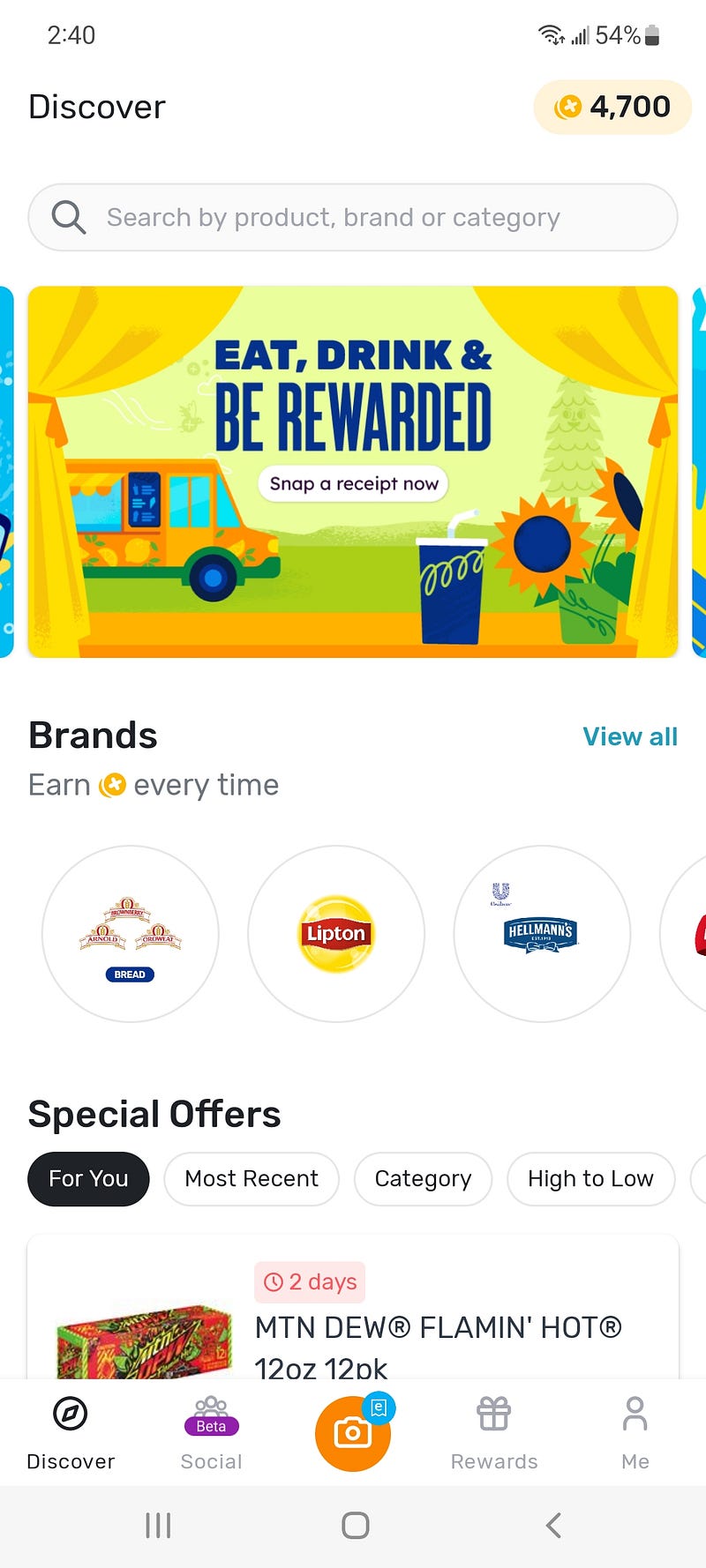
Author’s screenshot of Fetch Rewards App home screen.

When you’re ready to redeem, simply choose a gift card. 10,000 points equate to a $10 gift card. Their list of choices is very comprehensive; you will definitely find something that works for you. They include Amazon, Starbucks, Columbia Sportswear, Lowe’s, numerous restaurants, and more. They also offer the option of making a charitable donation.

What to try Fetch for yourself? Sign up using my referral code P2N64H and you’ll get a bonus (currently 2,000 points — that’s worth $2.00!).

UPSIDE

When I learned about Upside, I was a little skeptical, but after trying it out I am an enthusiastic fan of the app! You can use Upside for cash back on gas, groceries, and restaurants. I’ve made just shy of $40 in the two months I’ve been using Upside.

What made me unsure was that I had to enter part of my credit card number to use it. However, you only enter a portion of the card number, so they never have your full card number. I’ve also been using it for a few months now and monitoring my accounts for fraud with zero issues.
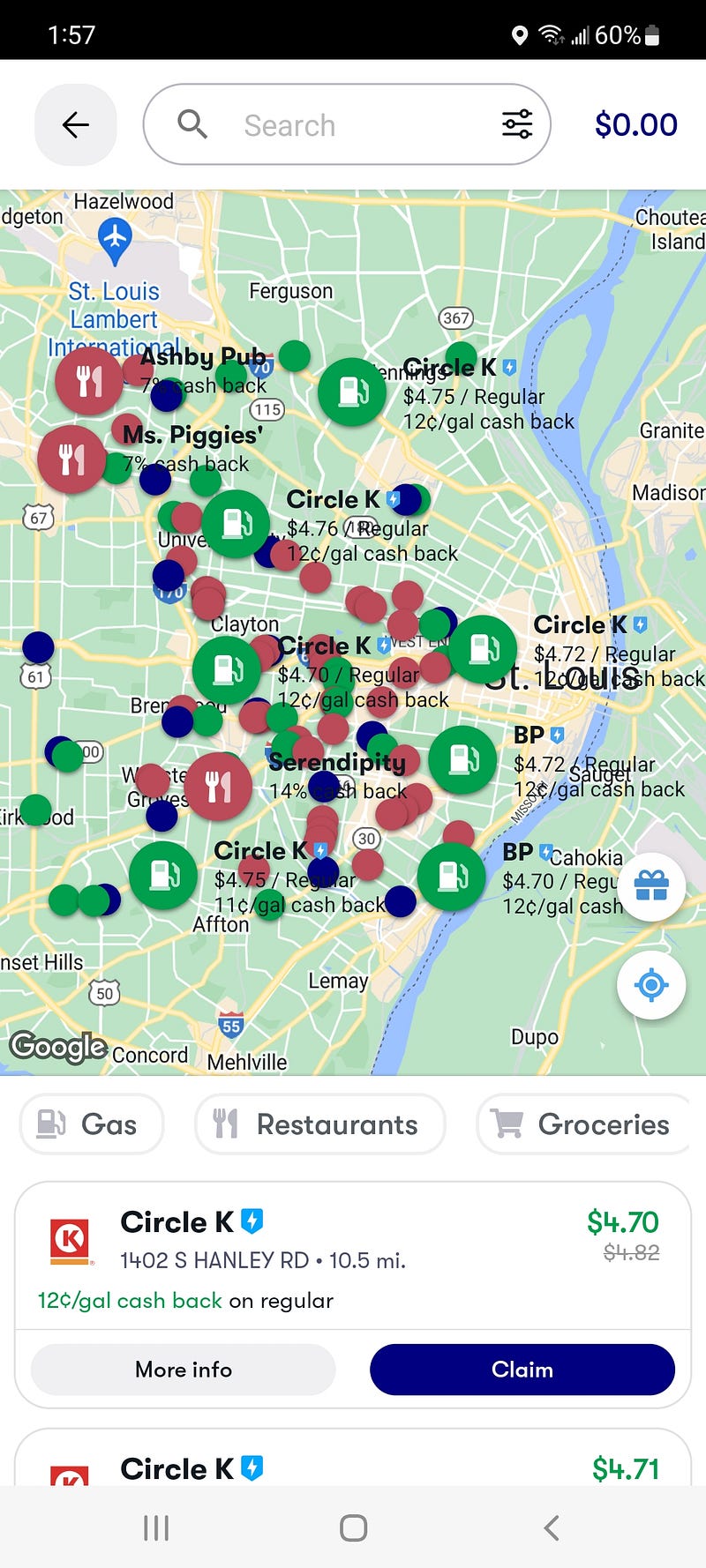
Author screenshot of Upside App search for offers in St. Louis, Missouri.

As you can see from my screenshot, there are a lot of opportunities to save with Upside! There are offers all over my city, and probably yours, too.

The amount of work needed to use Upside is minimal. There are three steps to earning money. First, select an offer for a local gas station, grocery store, or restaurant. Second, check in using the app when you arrive — you must do this BEFORE you make a purchase. The app will ask you what credit card you plan to use for your purchase. The third step is to check out using that card. That’s it! No need to scan or upload your receipt. Within a few days, the funds will be available in your account.

There are a lot of options for cashing out with Upside. You can link a bank account to get funds deposited directly or use a PayPal account (that’s what I’m doing). There are also a lot of gift card options available, including Amazon, Target, and Google Play. There is just a $1.00 minimum to cash out to a bank or PayPal, but you’ll pay a penalty if you withdraw less than $15. There’s an exception — if you have at least one person you’ve referred who is an active user, they waive that and you can withdraw smaller amounts in real time without penalty.

Ready to try Upside? Use my referral code SARAH63988 for an extra 15 cents off each gallon of gas next time you fill your tank.

IBOTTA

The first coupon app I remember learning about was Ibotta. I downloaded it in 2014 and never really used it. (I could kick myself for that oversight!) This year I logged back in and started using it. I’ve gotten about $30 back in two months by clipping coupons and shopping strategically to earn bonuses.
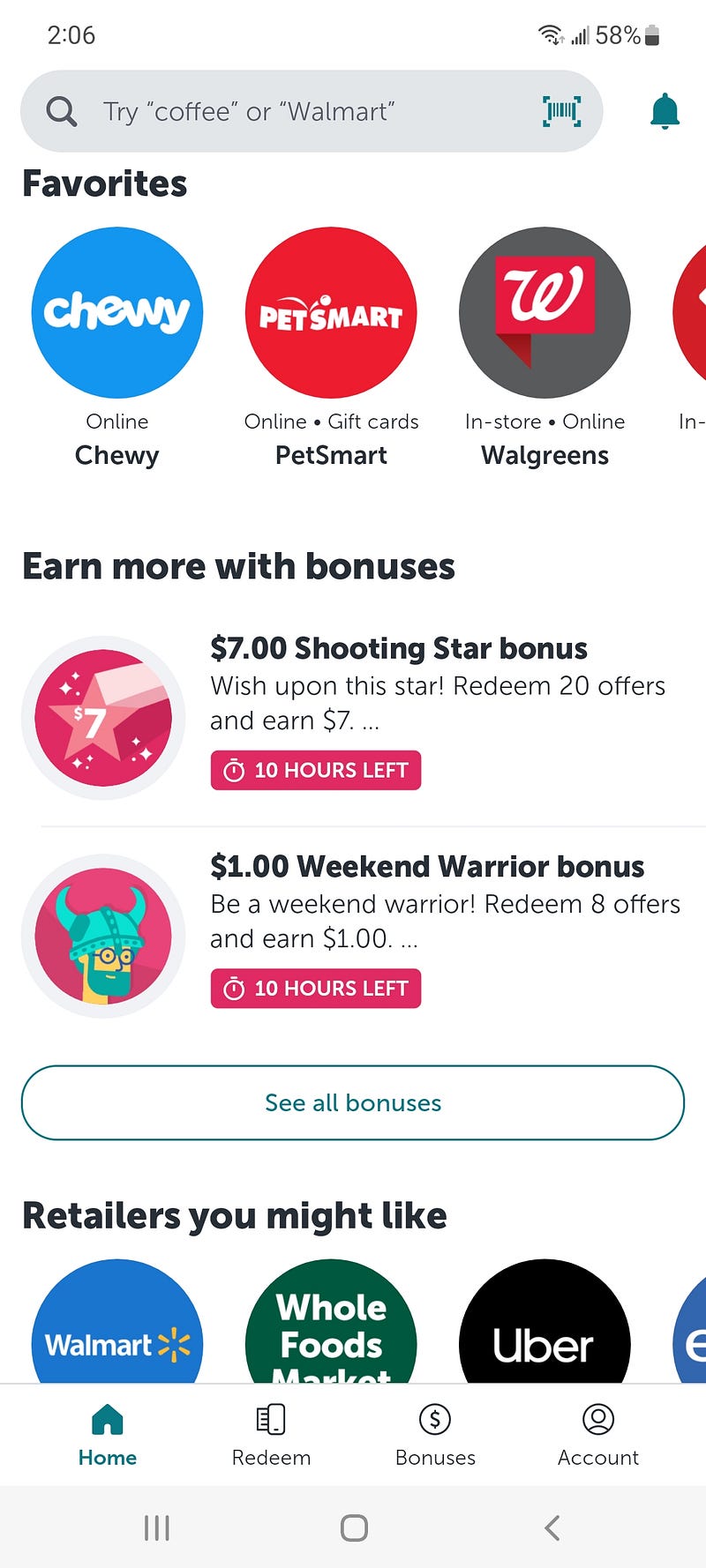
Author screenshot of the Ibotta app home screen.

Ibotta takes a little more time to use than Fetch and Upside, but it’s worth it. You’ll want to log in weekly and review what coupons are available where you like to shop. Select the ones you want to be able to use before you hit the store. I will look at what’s available as I build my grocery list for the week; sometimes knowing what I can get a good deal on will help me with meal planning!

You can also do some of your online shopping through Ibotta. I have four cats and can get cash back on their supplies by ordering at Chewy.com. I just have to launch the website from the Ibotta app. Last time I ordered food for them I got $2.19 back.

There are numerous options for how to withdraw earnings, but you will have to reach a minimum of $20 before you can pull your cash out. I like to disburse mine to my PayPal account, but you can also choose to link a bank account directly or redeem for gift cards.

If you want to download Ibotta, I’ve got a referral code you can use for an extra bonus! Enter HUNAIQI when prompted for a referral code.

Bringing it all together…

The really nice thing is that you can combine these apps for maximum savings. I review Ibotta for offers before shopping, use Upside at the store, and scan the receipt to Ibotta and Fetch after I’m done.

Good luck with your savings goals, especially during inflation. I hope these apps help!

Thank you for reading! For just $5 a month you can join Medium — it gives you full access to articles and it supports writers like me. Want to support me even more? Buy me a coffee!

Inflation
Money
Saving
Coupon
Finance
Recommended from ReadMedium