avatarJim Clyde Monge

Free AI web copilot to create summaries, insights and extended knowledge, download it at here

1978

Abstract

or example, you could use ChatGPT to generate a text description of a scene and then use Dall-E2 to create a realistic image of that scene. Or, you could use ChatGPT to translate a text from one language to another, and then use Dall-E2 to create an image of the translated text.</p><p id="b614">Imagine the possibilities!</p><h1 id="d7a9">How to Use Dall-E2 in ChatGPT</h1><h2 id="aec2">Step 1: Enable plugins</h2><p id="e070">Login to <a href="https://chat.openai.com/">ChatGPT</a> and navigate to your settings page. Find the Beta Features tab and toggle the switch for plugins.</p><figure id="70ee"><img src="https://cdn-images-1.readmedium.com/v2/resize:fit:800/1*_P5EwyygW_ANLoTKBZIoQw.png"><figcaption>ChatGPT Settings Page</figcaption></figure><h2 id="25e1">Step 2: Install Dall-E2</h2><p id="0b39">In the Plugins store, look for Dall-E and click on the Install button.</p><figure id="16f7"><img src="https://cdn-images-1.readmedium.com/v2/resize:fit:800/1*cVLD_r1xaaCO5xGRWXn8aQ.png"><figcaption>ChatGPT Plugins</figcaption></figure><h2 id="3596">Step 3: Generate sample image</h2><p id="2bc9">Now for the fun part. Give your creative muscles a stretch and create an image. Maybe start with this prompt:</p><div id="fe63"><pre>Prompt: An image <span class="hljs-keyword">of</span> <span class="hljs-keyword">a</span> dog astronaut riding <span class="hljs-keyword">a</span> horse <span class="hljs-keyword">in</span> <span class="hljs-literal">space</span></pre></div><figure id="4360"><img src="https://cdn-images-1.readmedium.com/v2/resize:fit:800/1*M1cfr8gyj6rN2yjMl_8pIg.png"><figcaption></figcaption></figure><p id="f702">What’s even cooler is that, if you expand the Dall-E dropdown above the image, you’ll notice that the plugin creates a custom text prompt for us.</p><figure id="8e4c"><img src="https://cdn-images-1.readmedium.com/v2/resize:fit:800/1*SWQDMdZnn9OQ6F4ZNPOqJQ.png"><figcaption></figcaption></figure><p id="dc51">Here’s the full text:</p><div id="5

Options

f8c"><pre>{ <span class="hljs-string">"n"</span>: 1, <span class="hljs-string">"prompts"</span>: [ <span class="hljs-string">"A brave canine astronaut, dressed in a custom-fitted space suit, is riding a majestic horse that seems to defy the laws of physics by galloping freely in the vast expanse of space. Stars twinkle in the background, and distant galaxies add a splash of color to the scene. The dog, with a determined look in its eyes, holds onto the reins, navigating through the cosmic landscape."</span> ] }</pre></div><p id="1c99">Now that’s incredibly useful.</p><p id="5389">I wonder if there’s any sort of limitation on the number of images you can generate with this plugin. In case you’re wondering about the cost of Dall-E2, it’s $15 for 115 generation credits.</p><figure id="b96c"><img src="https://cdn-images-1.readmedium.com/v2/resize:fit:800/1*8A7rbSXuxrNfQCmvrAeGuQ.png"><figcaption></figcaption></figure><p id="3e13">So there you have it, friends. Dall-E2 and ChatGPT, together at last, are ready to bring your wildest ideas to life. Any questions or thoughts you want to share? Drop them in the comments.</p><p id="dc59"><i>Please support my work on Medium and get unlimited access by becoming a member using my referral link <a href="https://jimclydemonge.medium.com/membership"><b>here</b></a></i><b>. </b><i>Have a nice day!”</i></p><figure id="2e00"><img src="https://cdn-images-1.readmedium.com/v2/resize:fit:800/0*Z9QVupv1H0mgcyPq.png"><figcaption></figcaption></figure><p id="910d"><b>This story is published on <a href="https://generativeai.pub/">Generative AI</a>. Connect with us on <a href="https://www.linkedin.com/company/generative-ai-publication">LinkedIn</a> to get the latest AI stories and insights right in your feed. Let’s shape the future of AI together!</b></p><figure id="daed"><img src="https://cdn-images-1.readmedium.com/v2/resize:fit:800/0*kBbwX4hlK7CxWmt0.png"><figcaption></figcaption></figure></article></body>

Dall-E2 Is Now Accessible In ChatGPT
Image by Jim Clyde Monge

Today, I got exciting news from OpenAI: Dall-E2, the AI image generator that’s been turning heads since its release in 2022, is now accessible directly within ChatGPT.
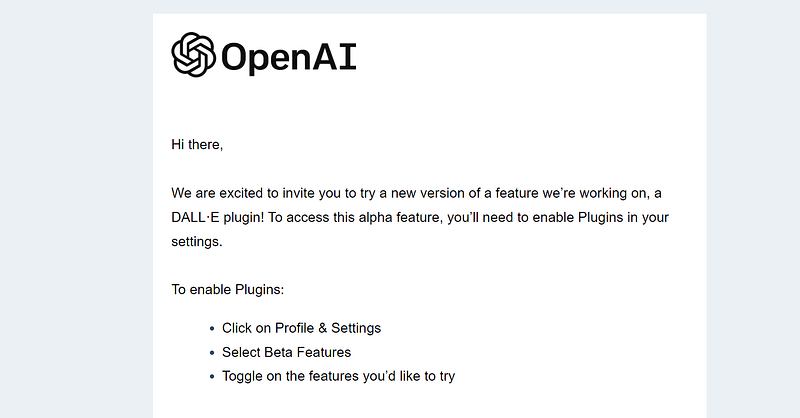
Image by Jim Clyde Monge

I won’t pretend to be shocked; I saw it coming. But let me tell you, the anticipation doesn’t make it any less exciting.

What is Dall-E2?

For those who might be new to the party, let’s rewind. Dall-E2 is a powerful AI image generator that can create realistic and detailed images from a simple text description.

Dall-E2 quickly became one of the most popular AI image generator tools, alongside MidJourey and Stable Diffusion.

What are ChatGPT plugins?

These ingenious add-ons are the brainchild of independent developers who have harnessed the potential of ChatGPT by enhancing its capabilities and extending its functionalities.

Plugins are tools designed to help ChatGPT access up-to-date information, run computations, or use third-party services.

Now, with Dall-E2 integrated into ChatGPT, users can harness the power of both AI tools to create even more amazing things.

For example, you could use ChatGPT to generate a text description of a scene and then use Dall-E2 to create a realistic image of that scene. Or, you could use ChatGPT to translate a text from one language to another, and then use Dall-E2 to create an image of the translated text.

Imagine the possibilities!

How to Use Dall-E2 in ChatGPT

Step 1: Enable plugins

Login to ChatGPT and navigate to your settings page. Find the Beta Features tab and toggle the switch for plugins.
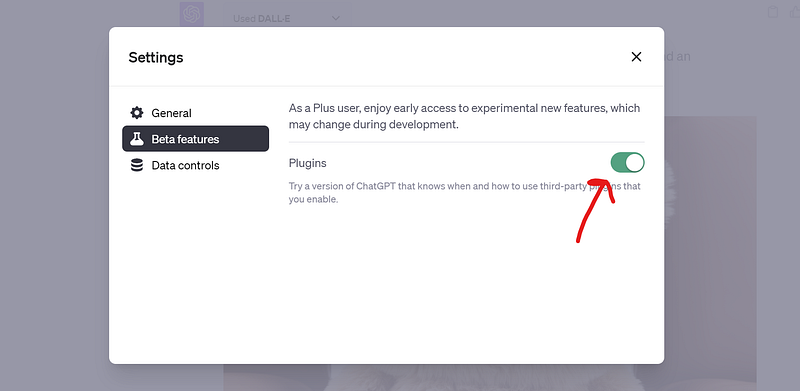
ChatGPT Settings Page

Step 2: Install Dall-E2

In the Plugins store, look for Dall-E and click on the Install button.
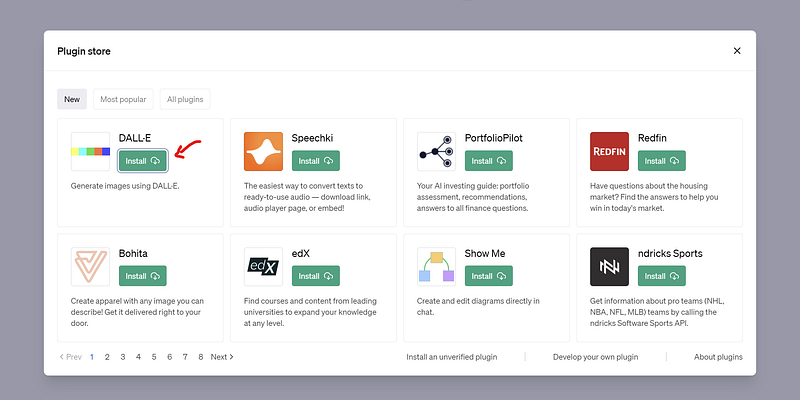
ChatGPT Plugins

Step 3: Generate sample image

Now for the fun part. Give your creative muscles a stretch and create an image. Maybe start with this prompt:

Prompt: An image of a dog astronaut riding a horse in space
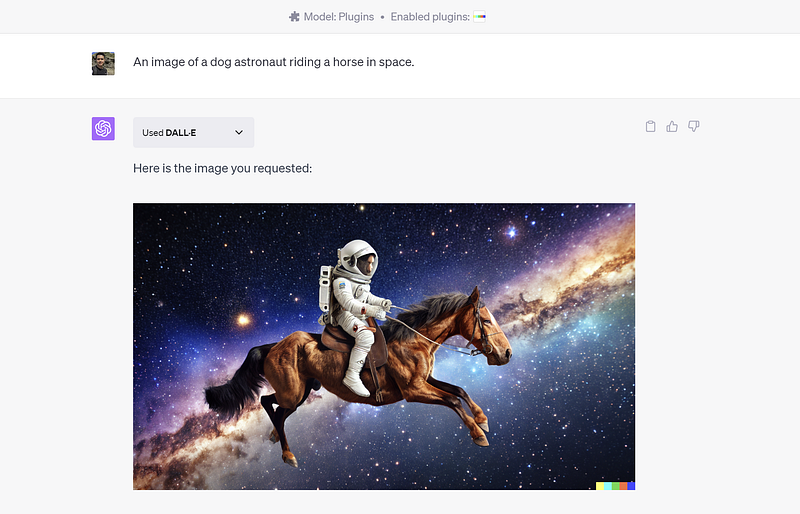
What’s even cooler is that, if you expand the Dall-E dropdown above the image, you’ll notice that the plugin creates a custom text prompt for us.
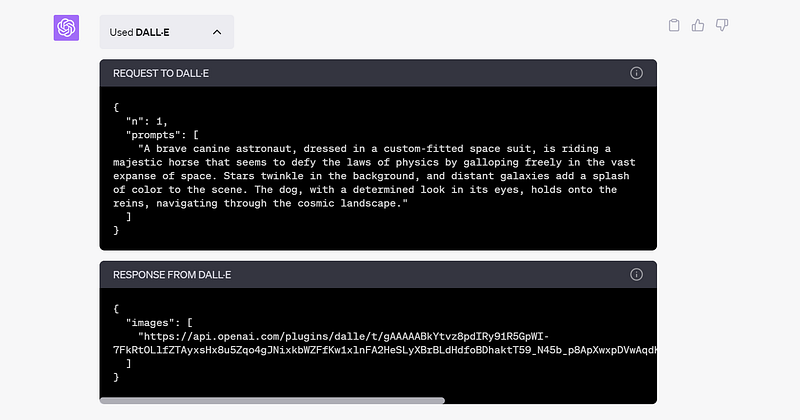
Here’s the full text:

{
  "n": 1,
  "prompts": [
    "A brave canine astronaut, dressed in a custom-fitted space suit, 
is riding a majestic horse that seems to defy the laws of physics 
by galloping freely in the vast expanse of space. 
Stars twinkle in the background, and distant galaxies add a splash of color 
to the scene. The dog, with a determined look in its eyes, holds onto the 
reins, navigating through the cosmic landscape."
  ]
}

Now that’s incredibly useful.

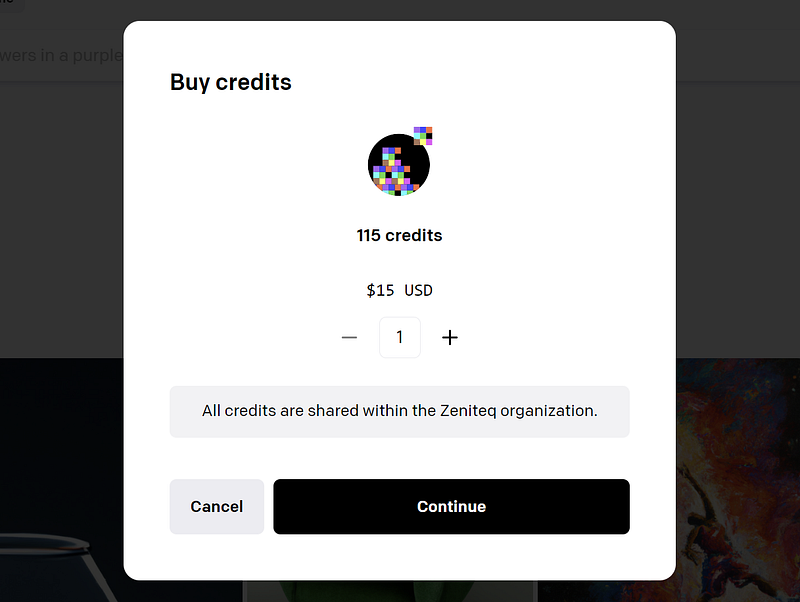
I wonder if there’s any sort of limitation on the number of images you can generate with this plugin. In case you’re wondering about the cost of Dall-E2, it’s $15 for 115 generation credits.
So there you have it, friends. Dall-E2 and ChatGPT, together at last, are ready to bring your wildest ideas to life. Any questions or thoughts you want to share? Drop them in the comments.

Please support my work on Medium and get unlimited access by becoming a member using my referral link here. Have a nice day!”

This story is published on Generative AI. Connect with us on LinkedIn to get the latest AI stories and insights right in your feed. Let’s shape the future of AI together!

Technology
Artificial Intelligence
Generative Ai
Dalle 2
Chatgpt Plugins
Recommended from ReadMedium