avatarLiu Zuo Lin

Free AI web copilot to create summaries, insights and extended knowledge, download it at here

8977

Abstract

r">4</span><span class="hljs-operator">=</span> <span class="hljs-number">5</span></pre></div><div id="6b24"><pre><span class="hljs-keyword">print</span>(我 + 你) <span class="hljs-meta"># 9</span></pre></div><p id="2a4a">We can use emojis too, or nearly any unicode character. Cool and interesting fact, but don’t use this in production.</p><h1 id="b0ee">9) Python has a backspace character</h1><div id="e2a2"><pre><span class="hljs-function"><span class="hljs-title">print</span><span class="hljs-params">(<span class="hljs-string">"abc"</span> + <span class="hljs-string">"\b"</span> + <span class="hljs-string">"d"</span>)</span></span></pre></div><div id="1f70"><pre><span class="hljs-meta"># abd</span></pre></div><p id="1ff4">The backspace character <code>\b</code> backspaces the stuff that we print.</p><h1 id="46d9">10) Making a bell sound with Python</h1><div id="2e01"><pre><span class="hljs-function"><span class="hljs-title">print</span><span class="hljs-params">(<span class="hljs-string">"\a"</span>)</span></span></pre></div><p id="80cc">The <code>\a</code> is the bell character, and printing it makes a bell sound. (Try it in terminal/cmd)</p><h1 id="ee7b">11) We can use classes as decorators</h1><p id="6214">This is possible due the the <code>call</code> magic method.</p><div id="1a6c"><pre><span class="hljs-keyword">class</span> <span class="hljs-title class_">add</span>(): def init(self, <span class="hljs-built_in">char</span>): self.<span class="hljs-built_in">char</span> = <span class="hljs-built_in">char</span></pre></div><div id="135d"><pre> <span class="hljs-keyword">def</span> <span class="hljs-title function_">call</span>(<span class="hljs-params"><span class="hljs-variable language_">self</span>, function</span>): <span class="hljs-keyword">def</span> <span class="hljs-title function_">inner</span>(<span class="hljs-params">*args</span>): <span class="hljs-keyword">return</span> function(args) + <span class="hljs-variable language_">self</span>.char <span class="hljs-keyword">return</span> inner</pre></div><div id="1ad8"><pre><span class="hljs-meta">@add(<span class="hljs-params"><span class="hljs-string">"!"</span></span>)</span> <span class="hljs-keyword">def</span> <span class="hljs-title function_">greet</span>(<span class="hljs-params">name</span>): <span class="hljs-keyword">return</span> <span class="hljs-string">"hello "</span> + name</pre></div><div id="285a"><pre><span class="hljs-function"><span class="hljs-title">print</span>(<span class="hljs-title">greet</span>(<span class="hljs-string">"jerry"</span>))</span></pre></div><div id="a2e6"><pre><span class="hljs-meta"># hello jerry!</span></pre></div><p id="0fd3">Here, the <code>add</code> decorator takes in a character, and simply adds this character to the back of whatever the function returns.</p><h1 id="c956">12) Functions can have variables</h1><div id="d9cf"><pre><span class="hljs-function">def <span class="hljs-title">hello</span><span class="hljs-params">()</span>: hello.hi =</span> <span class="hljs-string">"hi world"</span> <span class="hljs-keyword">return</span> <span class="hljs-string">"hello world"</span></pre></div><div id="5902"><pre><span class="hljs-keyword">print</span>(hello()) <span class="hljs-meta"># hello world </span> <span class="hljs-keyword">print</span>(hello.hi) <span class="hljs-meta"># hi world</span></pre></div><p id="88fc">Not the most useful feature, but it’s interesting!</p><h1 id="c53d">13) Aligning strings using ljust, rjust, center</h1><p id="16af">The methods <code>.ljust</code>, <code>.rjust</code> and <code>.center</code> allow us to align our strings and pad them using whitespace characters.</p><div id="08c4"><pre><span class="hljs-function"><span class="hljs-title">print</span><span class="hljs-params">(<span class="hljs-string">">"</span> + <span class="hljs-string">"hello"</span>.ljust(<span class="hljs-number">20</span>)</span></span> + <span class="hljs-string">"<"</span>) <span class="hljs-function"><span class="hljs-title">print</span><span class="hljs-params">(<span class="hljs-string">">"</span> + <span class="hljs-string">"hello"</span>.rjust(<span class="hljs-number">20</span>)</span></span> + <span class="hljs-string">"<"</span>) <span class="hljs-function"><span class="hljs-title">print</span><span class="hljs-params">(<span class="hljs-string">">"</span> + <span class="hljs-string">"hello"</span>.center(<span class="hljs-number">20</span>)</span></span> + <span class="hljs-string">"<"</span>)</pre></div><figure id="74f8"><img src="https://cdn-images-1.readmedium.com/v2/resize:fit:800/1*wG1KdRsD99lgkf96U95PzA.png"><figcaption></figcaption></figure><p id="530c">The formatted string (f-string) version:</p><div id="6bbe"><pre>hello = <span class="hljs-string">"hello"</span> <span class="hljs-function"><span class="hljs-title">print</span><span class="hljs-params">(f<span class="hljs-string">">{hello:<20}<"</span>)</span></span> <span class="hljs-function"><span class="hljs-title">print</span><span class="hljs-params">(f<span class="hljs-string">">{hello:>20}<"</span>)</span></span> <span class="hljs-function"><span class="hljs-title">print</span><span class="hljs-params">(f<span class="hljs-string">">{hello:^20}<"</span>)</span></span></pre></div><figure id="c8ba"><img src="https://cdn-images-1.readmedium.com/v2/resize:fit:800/1*wG1KdRsD99lgkf96U95PzA.png"><figcaption></figcaption></figure><h1 id="04b6">14) I added a list to itself and got this</h1><div id="05e1"><pre><span class="hljs-keyword">lis</span> = [1, 2] <span class="hljs-keyword">lis</span>.<span class="hljs-keyword">append</span>(<span class="hljs-keyword">lis</span>) <span class="hljs-keyword">print</span>(<span class="hljs-keyword">lis</span>)</pre></div><div id="d3dd"><pre># <span class="hljs-comment">[1, 2, <span class="hljs-comment">[...]</span>]</span></pre></div><p id="ad3a">The <code>...</code> here is known as an <i>ellipsis </i>in Python, and can be used in place of the <code>pass</code> keyword, which tells Python to do absolutely nothing.</p><h1 id="b287">15) we can use eval() to run Python code in strings</h1><div id="191c"><pre><span class="hljs-attribute">x</span> <span class="hljs-operator">=</span> eval(<span class="hljs-string">"1+23-4"</span>)</pre></div><div id="11db"><pre><span class="hljs-meta"># x is 3</span></pre></div><p id="54df">Here, the built-in <code>eval()</code> function can be used to execute Python code inside strings. Another example:</p><div id="7ad8"><pre><span class="hljs-attribute">n</span> <span class="hljs-operator">=</span> <span class="hljs-number">4</span> <span class="hljs-attribute">x</span> <span class="hljs-operator">=</span> eval(<span class="hljs-string">"n + 10"</span>)</pre></div><div id="0910"><pre><span class="hljs-meta"># x is 14</span></pre></div><h1 id="0de4">16) The round() function accepts negative decimal places</h1><p id="62cf">We probably knew early on the the <code>round</code> function can be used to round numbers to a certain number of decimal places. But did you know that we can also use it to round off to the nearest 10, 100, 1000 and so on?</p><div id="7a31"><pre>x = <span class="hljs-number">12345</span> <span class="hljs-keyword">print</span>(<span class="hljs-built_in">round</span>(x, <span class="hljs-number">-1</span>)) <span class="hljs-meta"># 12340</span> <span class="hljs-keyword">print</span>(<span class="hljs-built_in">round</span>(x, <span class="hljs-number">-2</span>)) <span class="hljs-meta"># 12300</span> <span class="hljs-keyword">print</span>(<span class="hljs-built_in">round</span>(x, <span class="hljs-number">-3</span>)) <span class="hljs-meta"># 12000</span> <span class="hljs-keyword">print</span>(<span class="hljs-built_in">round</span>(x, <span class="hljs-number">-4</span>)) <span class="hljs-meta"># 10000</span> <span class="hljs-keyword">print</span>(<span class="hljs-built_in">round</span>(x, <span class="hljs-number">-5</span>)) <span class="hljs-meta"># 0</span></pre></div><p id="1021">I should probably have known this much earlier, but somehow didn’t so yeah</p><h1 id="28d5">17) The walrus operator</h1><p id="ec7e">The walrus operator <code>:=</code> was introduced in Python 3.8. It’s basically the same as the assignment operator <code>=</code>, but it also returns the value itself. We can thus save one line of code when writing conditional statements.</p><div id="7b4b"><pre><span class="hljs-attribute">x</span> = <span class="hljs-number">5</span> <span class="hljs-attribute">if</span> x > <span class="hljs-number">3</span>: <span class="hljs-attribute">print</span>(<span class="hljs-string">"x is more than 3"</span>)</pre></div><p id="c4d9">This is the same as:</p><div id="4301"><pre><span class="hljs-attribute">if</span> (x := <span class="hljs-number">5</span>) > <span class="hljs-n

Options

umber">3</span>: <span class="hljs-attribute">print</span>(<span class="hljs-string">"x is more than 3"</span>)</pre></div><h1 id="44c0">18) We can pickle multiple objects into the same file</h1><p id="0937">The built-in <code>pickle</code> library allows us to save (serialize) Python data structures into pickle files. Pickling (saving) multiple objects:</p><div id="a118"><pre><span class="hljs-attr">a</span> = [<span class="hljs-string">"apple"</span>, <span class="hljs-string">"orange"</span>, <span class="hljs-string">"pear"</span>] <span class="hljs-attr">b</span> = [<span class="hljs-string">"pineapple"</span>, <span class="hljs-string">"banana"</span>, <span class="hljs-string">"durian"</span>] <span class="hljs-attr">c</span> = [<span class="hljs-string">"grape"</span>, <span class="hljs-string">"jackfruit"</span>, <span class="hljs-string">"mango"</span>]</pre></div><div id="ee45"><pre><span class="hljs-keyword">import</span> pickle</pre></div><div id="937a"><pre><span class="hljs-keyword">with</span> <span class="hljs-built_in">open</span>(<span class="hljs-string">"test.pckl"</span>, <span class="hljs-string">"wb"</span>) <span class="hljs-keyword">as</span> f: pickle.dump(<span class="hljs-keyword">a</span>, f) <span class="hljs-comment"># saving a into test.pckl</span> pickle.dump(b, f) <span class="hljs-comment"># saving b into test.pckl</span> pickle.dump(c, f) <span class="hljs-comment"># saving c into test.pckl</span></pre></div><p id="d648">Unpickling (reading) them from the pickle file:</p><div id="eabb"><pre><span class="hljs-keyword">import</span> pickle</pre></div><div id="4fe1"><pre><span class="hljs-keyword">with</span> <span class="hljs-built_in">open</span>(<span class="hljs-string">"test.pckl"</span>, <span class="hljs-string">"rb"</span>) <span class="hljs-keyword">as</span> f: <span class="hljs-keyword">a</span> = pickle.<span class="hljs-built_in">load</span>(f) b = pickle.<span class="hljs-built_in">load</span>(f) c = pickle.<span class="hljs-built_in">load</span>(f)</pre></div><div id="d0ff"><pre><span class="hljs-function"><span class="hljs-title">print</span><span class="hljs-params">(a)</span></span> <span class="hljs-function"><span class="hljs-title">print</span><span class="hljs-params">(b)</span></span> <span class="hljs-function"><span class="hljs-title">print</span><span class="hljs-params">(c)</span></span></pre></div><figure id="ad62"><img src="https://cdn-images-1.readmedium.com/v2/resize:fit:800/1*BYwdjwdtV2shV4lun6bhQw.png"><figcaption></figcaption></figure><h1 id="1b9a">19) The -O flag allows us to ignore assert statements</h1><div id="021c"><pre><span class="hljs-meta"># run.py</span></pre></div><div id="a0ff"><pre>assert <span class="hljs-attribute">1</span>==2 <span class="hljs-built_in">print</span>(<span class="hljs-string">"hello"</span>)</pre></div><p id="69d5">If we run this code above normally, we get an AssertionError, as <code>1==2</code> evaluates to a False. However, we can bypass the assert statement if we use the <code>-O</code> flag when running our Python script.</p><div id="c288"><pre><span class="hljs-keyword">python3</span> -O run.<span class="hljs-keyword">py</span></pre></div><div id="fcc4"><pre><span class="hljs-meta"># hello</span></pre></div><p id="fd6b">Adding the <code>-O</code> flag tells Python to ignore any assert statements!</p><h1 id="c400">20) Creating dictionaries easily using dict.fromkeys</h1><p id="ec7d">If we wish to create a dictionary with default values quickly, we can consider using the <code>dict.fromkeys</code> method instead of a comprehension.</p><div id="6a91"><pre><span class="hljs-attr">fruits</span> = [<span class="hljs-string">"apple"</span>, <span class="hljs-string">"orange"</span>, <span class="hljs-string">"pear"</span>]</pre></div><div id="7857"><pre><span class="hljs-attribute">d</span> <span class="hljs-operator">=</span> dict.fromkeys(fruits)</pre></div><div id="38f8"><pre># d <span class="hljs-keyword">is</span> {<span class="hljs-string">'apple'</span>: <span class="hljs-keyword">None</span>, <span class="hljs-string">'orange'</span>: <span class="hljs-keyword">None</span>, <span class="hljs-string">'pear'</span>: <span class="hljs-keyword">None</span>}</pre></div><p id="9890">We can modify the default value by passing in another argument. Here, we pass in an empty list <code>[]</code> as the second argument to <code>dict.fromkeys</code>, so all values in the new dictionary will be <code>[]</code>.</p><div id="c713"><pre><span class="hljs-attr">fruits</span> = [<span class="hljs-string">"apple"</span>, <span class="hljs-string">"orange"</span>, <span class="hljs-string">"pear"</span>]</pre></div><div id="d658"><pre><span class="hljs-attr">d</span> = dict.fromkeys(fruits, [])</pre></div><div id="e289"><pre># d is {<span class="hljs-string">'apple'</span>: [], <span class="hljs-string">'orange'</span>: [], <span class="hljs-string">'pear'</span>: []}</pre></div><h1 id="cf6e">21) Frozensets in Python</h1><p id="eedd">A frozenset is a built-in data structure in Python — it is essentially an immutable set. This means that we cannot change it in any way AFTER we’ve created it.</p><div id="f824"><pre><span class="hljs-attribute">fs</span> = frozenset({<span class="hljs-number">1</span>, <span class="hljs-number">2</span>, <span class="hljs-number">3</span>})</pre></div><p id="9a62">Cons of using frozensets:</p><ul><li>We cannot change it after we create it (immutability) — we cannot add or remove anything from a frozenset.</li></ul><p id="00c1">Pros of using frozensets:</p><ul><li>We can use frozensets as dictionary keys</li><li>We can add frozensets as values into another set.</li><li>Checking if a frozenset contains a value still takes constant O(1) time.</li></ul><h1 id="16e9">22) We can force a classes to accept only certain attributes using slots</h1><div id="d945"><pre><span class="hljs-keyword">class</span> <span class="hljs-symbol">Dog: <span class="hljs-symbol">slots</span></span> = ["<span class="hljs-symbol">name</span>", "<span class="hljs-symbol">age</span>"]</pre></div><div id="28aa"><pre><span class="hljs-attr">dog</span> = Dog() <span class="hljs-attr">dog.name</span> = <span class="hljs-string">"fifi"</span> <span class="hljs-comment"># no problem</span> <span class="hljs-attr">dog.age</span> = <span class="hljs-number">5</span> <span class="hljs-comment"># no problem</span> <span class="hljs-attr">dog.breed</span> = <span class="hljs-string">"german shepherd"</span> <span class="hljs-comment"># ERROR</span></pre></div><p id="d471">Here in the Dog class, we define <code>slots</code> to only take in <code>name</code> and <code>age</code>. Our Dog class can thus only accept <code>name</code> and <code>age</code> attributes! If we try to assign something else eg. <code>breed</code> to our Dog object, we get an error.</p><h1 id="9c80">Conclusion</h1><p id="7428">Hopefully you learnt at least one new thing about Python after reading this!</p><h1 id="206e">Some Final words</h1><p id="ea0d"><i>If this article provided value and you wish to support me, do consider signing up for a Medium membership — It’s $5 a month, and you get unlimited access to articles on Medium. If you sign up using my link below, I’ll earn a tiny commission at zero additional cost to you.</i></p><p id="b023"><a href="https://zlliu.medium.com/membership"><b><i>Sign up using my link here to read unlimited Medium articles.</i></b></a></p><p id="b77e"><b>Get my free Ebooks: <a href="https://zlliu.co/books">https://zlliu.co/books</a></b></p><p id="e072"><i>I write programming articles (mainly Python) that would have probably helped the younger me a lot. Do join my email list to get notified whenever I publish.</i></p><div id="13da" class="link-block"> <a href="https://zlliu.medium.com/subscribe"> <div> <div> <h2>Get an email whenever Liu Zuo Lin publishes.</h2> <div><h3>Get an email whenever Liu Zuo Lin publishes. By signing up, you will create a Medium account if you don't already have…</h3></div> <div><p>zlliu.medium.com</p></div> </div> <div> <div style="background-image: url(https://miro.readmedium.com/v2/resize:fit:320/0*Or2XlMUKRoasg80s)"></div> </div> </div> </a> </div><p id="da14"><i>More content at <a href="https://plainenglish.io/"><b>PlainEnglish.io</b></a>. Sign up for our <a href="http://newsletter.plainenglish.io/"><b>free weekly newsletter</b></a>. Follow us on <a href="https://twitter.com/inPlainEngHQ"><b>Twitter</b></a></i>, <a href="https://www.linkedin.com/company/inplainenglish/"><b><i>LinkedIn</i></b></a><i>, <a href="https://www.youtube.com/channel/UCtipWUghju290NWcn8jhyAw"><b>YouTube</b></a>, and <a href="https://discord.gg/GtDtUAvyhW"><b>Discord</b></a>.</i></p></article></body>

22 Things I Never Knew About Python Until Recently (Compilation)

# Despite working with Python since 2017

Cool art

1) Infinity values in Python

a = float("inf")
b = float("-inf")

We can define infinity values in Python (above). Positive infinity is larger than all numbers, while negative infinity is smaller than all numbers.

2) Using ‘pprint’ to print stuff nicely

We can use pprint to nicely print out complicated data structures without having to write any loops.

from pprint import pprint
d = {"A":{"apple":1, "orange":2, "pear":3}, "B":{"apple":4, "orange":5, "pear":6}, "C":{"apple":7, "orange":8, "pear":9}}
pprint(d)

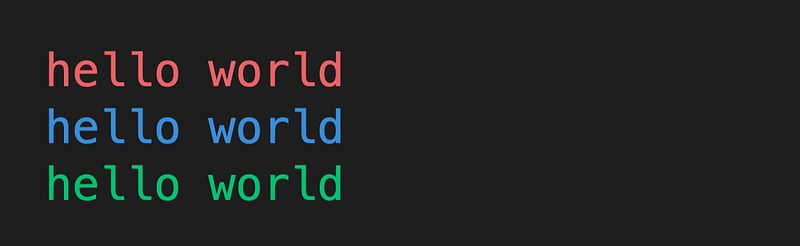
3) Printing coloured output using ‘colorama’

from colorama import Fore
print(Fore.RED + "hello world")
print(Fore.BLUE + "hello world")
print(Fore.GREEN + "hello world")
4) A less annoying way to create dictionaries

d1 = {"apple":"pie", "orange":"juice", "pear":"cake"}
d2 = dict(apple="pie", orange="juice", pear="cake")

Here, d1 and d2 contain the exact same key-value pairs. For d2, we use dict() to create the dictionary so we don’t have to deal with too many inverted commas.

5) Unprinting stuff in Python

CURSOR_UP = "\033[1A"
CLEAR = "\x1b[2K"

The "\033[1A" escape character moves our cursor up by 1 line, and the "\x1b[2K" character clears the entire current line. If we print them together, we can essentially ‘unprint’ an entire line in our terminal

print("apple")
print("orange")
print("pear")
print((CURSOR_UP + CLEAR)*2, end="") # UNPRINTS 2 LINES
print("pineapple")

Note — remember to use the end="" option in the print function.

6) Private variables in classes are not really private

class Dog:
    def __init__(self, name):
        self.__name = name     # Supposed private variable
    @property
    def name(self):
        return self.__name

Here the __name attribute in the Dog class is supposed to be a private attribute (we shouldn’t be able to access it directly). But except it’s not really private.

dog = Dog("fifi")
print(dog.__dict__)   # {'_Dog__name': 'fifi'}

We can use the __dict__ attribute to access it directly (and even change it)!

7) We can use type() to create classes without using ‘class’ keyword

classname = type(name, bases, dict)
  • name is the name of the class
  • bases is a tuple that contains other classes that this inherits from
  • dict is a dictionary containing its attributes and methods

Normal way of creating a class:

class Dog:
    def __init__(self, name):
        self.name = name
    def bark(self):
        print("woof")

Creating the same class using type():

def init(self, name):
    self.name = name
def bark(self):
    print("woof")
Dog = type("Dog", (), {"__init__":init, "bark":bark})

8) We can use Chinese characters as variable names

= 4= 5
print(我 + 你)    # 9

We can use emojis too, or nearly any unicode character. Cool and interesting fact, but don’t use this in production.

9) Python has a backspace character

print("abc" + "\b" + "d")
# abd

The backspace character \b backspaces the stuff that we print.

10) Making a bell sound with Python

print("\a")

The \a is the bell character, and printing it makes a bell sound. (Try it in terminal/cmd)

11) We can use classes as decorators

This is possible due the the __call__ magic method.

class add():
    def __init__(self, char):
        self.char = char
    def __call__(self, function):
        def inner(*args):
            return function(*args) + self.char
        return inner
@add("!")
def greet(name):
    return "hello " + name
print(greet("jerry"))
# hello jerry!

Here, the add decorator takes in a character, and simply adds this character to the back of whatever the function returns.

12) Functions can have variables

def hello():
    hello.hi = "hi world"
    return "hello world"
print(hello())   # hello world   
print(hello.hi)  # hi world

Not the most useful feature, but it’s interesting!

13) Aligning strings using ljust, rjust, center

The methods .ljust, .rjust and .center allow us to align our strings and pad them using whitespace characters.

print(">" + "hello".ljust(20) + "<")
print(">" + "hello".rjust(20) + "<")
print(">" + "hello".center(20) + "<")
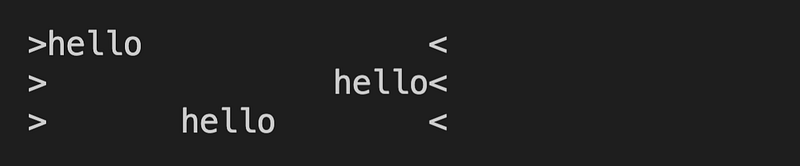
The formatted string (f-string) version:

hello = "hello"
print(f">{hello:<20}<")
print(f">{hello:>20}<")
print(f">{hello:^20}<")

14) I added a list to itself and got this

lis = [1, 2]
lis.append(lis)
print(lis)
# [1, 2, [...]]

The ... here is known as an ellipsis in Python, and can be used in place of the pass keyword, which tells Python to do absolutely nothing.

15) we can use eval() to run Python code in strings

x = eval("1+2*3-4")
# x is 3

Here, the built-in eval() function can be used to execute Python code inside strings. Another example:

n = 4
x = eval("n + 10")
# x is 14

16) The round() function accepts negative decimal places

We probably knew early on the the round function can be used to round numbers to a certain number of decimal places. But did you know that we can also use it to round off to the nearest 10, 100, 1000 and so on?

x = 12345
print(round(x, -1))   # 12340
print(round(x, -2))   # 12300
print(round(x, -3))   # 12000
print(round(x, -4))   # 10000
print(round(x, -5))   # 0

I should probably have known this much earlier, but somehow didn’t so yeah

17) The walrus operator

The walrus operator := was introduced in Python 3.8. It’s basically the same as the assignment operator =, but it also returns the value itself. We can thus save one line of code when writing conditional statements.

x = 5
if x > 3:
    print("x is more than 3")

This is the same as:

if (x := 5) > 3:
    print("x is more than 3")

18) We can pickle multiple objects into the same file

The built-in pickle library allows us to save (serialize) Python data structures into pickle files. Pickling (saving) multiple objects:

a = ["apple", "orange", "pear"]
b = ["pineapple", "banana", "durian"]
c = ["grape", "jackfruit", "mango"]
import pickle
with open("test.pckl", "wb") as f:
    pickle.dump(a, f)   # saving a into test.pckl
    pickle.dump(b, f)   # saving b into test.pckl
    pickle.dump(c, f)   # saving c into test.pckl

Unpickling (reading) them from the pickle file:

import pickle
with open("test.pckl", "rb") as f:
    a = pickle.load(f)
    b = pickle.load(f)
    c = pickle.load(f)
print(a)
print(b)
print(c)

19) The -O flag allows us to ignore assert statements

# run.py
assert 1==2
print("hello")

If we run this code above normally, we get an AssertionError, as 1==2 evaluates to a False. However, we can bypass the assert statement if we use the -O flag when running our Python script.

python3 -O run.py
# hello

Adding the -O flag tells Python to ignore any assert statements!

20) Creating dictionaries easily using dict.fromkeys

If we wish to create a dictionary with default values quickly, we can consider using the dict.fromkeys method instead of a comprehension.

fruits = ["apple", "orange", "pear"]
d = dict.fromkeys(fruits)
# d is {'apple': None, 'orange': None, 'pear': None}

We can modify the default value by passing in another argument. Here, we pass in an empty list [] as the second argument to dict.fromkeys, so all values in the new dictionary will be [].

fruits = ["apple", "orange", "pear"]
d = dict.fromkeys(fruits, [])
# d is {'apple': [], 'orange': [], 'pear': []}

21) Frozensets in Python

A frozenset is a built-in data structure in Python — it is essentially an immutable set. This means that we cannot change it in any way AFTER we’ve created it.

fs = frozenset({1, 2, 3})

Cons of using frozensets:

  • We cannot change it after we create it (immutability) — we cannot add or remove anything from a frozenset.

Pros of using frozensets:

  • We can use frozensets as dictionary keys
  • We can add frozensets as values into another set.
  • Checking if a frozenset contains a value still takes constant O(1) time.

22) We can force a classes to accept only certain attributes using __slots__

class Dog:
    __slots__ = ["name", "age"]
dog = Dog()
dog.name = "fifi"   # no problem
dog.age = 5         # no problem
dog.breed = "german shepherd"   # ERROR

Here in the Dog class, we define __slots__ to only take in name and age. Our Dog class can thus only accept name and age attributes! If we try to assign something else eg. breed to our Dog object, we get an error.

Conclusion

Hopefully you learnt at least one new thing about Python after reading this!

Some Final words

If this article provided value and you wish to support me, do consider signing up for a Medium membership — It’s $5 a month, and you get unlimited access to articles on Medium. If you sign up using my link below, I’ll earn a tiny commission at zero additional cost to you.

Sign up using my link here to read unlimited Medium articles.

Get my free Ebooks: https://zlliu.co/books

I write programming articles (mainly Python) that would have probably helped the younger me a lot. Do join my email list to get notified whenever I publish.

More content at PlainEnglish.io. Sign up for our free weekly newsletter. Follow us on Twitter, LinkedIn, YouTube, and Discord.

Python
Python3
Python Programming
Recommended from ReadMedium

