
[2022]How to show Typescript error with ESLint and VScode.
ESLint is a very powerful and useful tool that notifies you of errors and other problems as you are editing code. However, the default settings of VScode do not notify us of errors regarding TypeScript, and there are problems such as a large number of errors only when we do a build. In this article, I will share the solution to this problem.
<Problem>
There are no apparent errors when editing Code.

But if I build the project
npm run buildTS2345: Argument of type ‘{ [x: string]: string | number; id: number; }’ is not assignable to parameter of type ‘{ id: number; priceTitle1: string; price1: string; }’.
Type ‘{ [x: string]: string | number; id: number; }’ is missing the following properties from type ‘{ id: number; priceTitle1: string; price1: string; }’: priceTitle1, price1
dynamicValidateForm.priceItems.push({ id: nextId, [`priceTitle${nextId}`]: ‘’, [`price${nextId}`]: ‘’ });
^^^^^^^^^^^^^^^^^^^^^^^^^^^^^^^^^^^^^^^^^^^^^^^^^^^^^^^^^^^^^^^^^
<Solution>
Press Cmd + Shift + P
Enter setting

Click Open Settings
Change the contents of eslint.validate
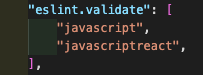
- Before
{
~ "eslint.validate": [ "javascript", "javascriptreact",],
  ~
}
- After
{
~ "eslint.validate": [ "javascript", "javascriptreact", "typescript", "typescriptreact"],
  ~
}
Errors will be displayed at the time of editing, so errors can be identified in advance, increasing development efficiency!

I hope that this article will be of some help to you!
Happy Developing!
KASATA