
20 Awesome Self-Hosted Ideas from GitHub’s Awesome-Selfhosted Repository
In the digital era, cloud computing has revolutionized the way we interact with technology. The convenience of Software as a Service (SaaS) platforms — like Google Drive, Dropbox, and Zoom — has made them ubiquitous in both personal and professional settings. However, these platforms often come with trade-offs, particularly concerning privacy, data ownership, and cost. Self-hosting offers a compelling alternative, allowing you to run your own services on your own hardware, giving you full control over your data and infrastructure.
GitHub’s “awesome-selfhosted/awesome-selfhosted” repository is a curated list of free software network services and web applications that you can host on your own server. This list has become a go-to resource for enthusiasts and professionals looking to set up their own homelab. In this post, we’ll explore 20 awesome self-hosted ideas that you can implement, each with its unique benefits and applications.

1. Nextcloud: Your Personal Cloud Storage
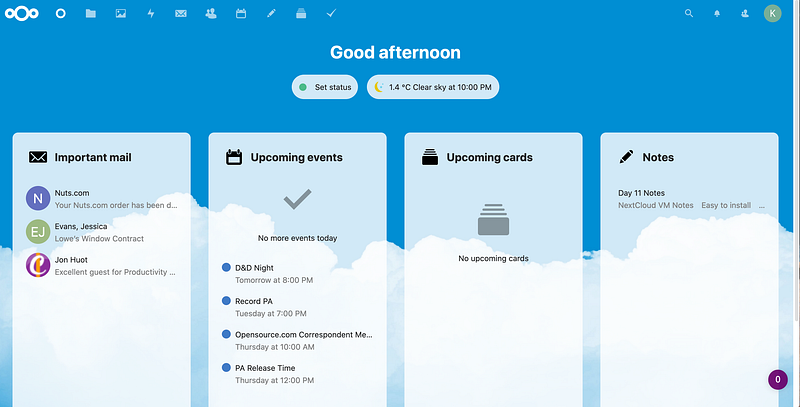
Nextcloud is a powerful open-source cloud storage solution that allows you to create your own Dropbox-like service. It’s not just about file storage; Nextcloud comes with a range of features like file synchronization, sharing, and collaboration tools. With Nextcloud, you can host your own office suite, enabling real-time document editing similar to Google Docs. It also supports a wide array of plugins that can extend its functionality — think calendars, contacts, and even video conferencing.
By self-hosting Nextcloud, you gain complete control over your data, ensuring it remains private and secure. You also avoid subscription fees associated with proprietary cloud services, making it a cost-effective solution for individuals and small businesses alike.
2. Pi-hole: Network-Wide Ad Blocking
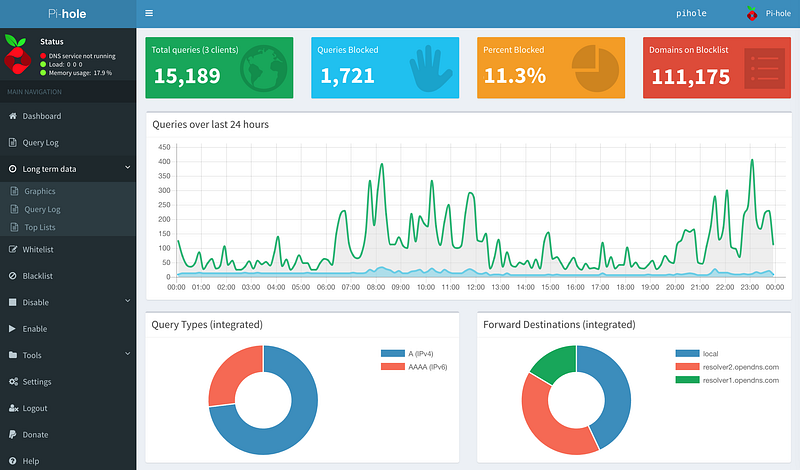
In an age where online tracking and advertising are pervasive, Pi-hole offers a robust solution for enhancing your digital privacy. Pi-hole acts as a DNS sinkhole, blocking ads and trackers at the network level. Once set up, it automatically filters out unwanted content for every device connected to your network, including smartphones, laptops, and smart TVs.
Pi-hole runs efficiently on a Raspberry Pi, but it can also be deployed on any Linux-based system. It provides a detailed dashboard where you can monitor blocked requests, and it even allows you to whitelist or blacklist domains manually. For those looking to minimize online distractions and protect their privacy, Pi-hole is an indispensable tool.
3. Home Assistant: Smart Home Control without the Cloud
Home Assistant is an open-source home automation platform that prioritizes local control and privacy. Unlike many commercial smart home systems that rely on cloud services, Home Assistant runs entirely on your local network. It supports a vast range of devices — from lights and thermostats to security cameras and speakers — allowing you to integrate and automate your entire home environment.
The platform is highly customizable, offering a user-friendly interface and advanced automation capabilities. Whether you want to set up simple routines like turning off the lights when you leave home or complex automation involving multiple devices and conditions, Home Assistant provides the tools to do so. By self-hosting your smart home, you retain full control over your data and avoid potential vulnerabilities associated with cloud-based systems.

4. Passbolt: Team-Based Password Management
Passbolt is an open-source password manager designed specifically for teams, but it can also be used by individuals. It’s built with security in mind, featuring end-to-end encryption and a user-friendly interface that makes it easy to share passwords and manage access to credentials.
Passbolt integrates seamlessly with your existing infrastructure, offering features like LDAP/Active Directory integration, API access, and two-factor authentication (2FA). It also provides detailed user activity logs and customizable roles, making it a great tool for collaborative environments where multiple users need to share access to sensitive information.
By self-hosting Passbolt, you can ensure that your team’s passwords are stored securely on your own server, with full control over access and encryption. This makes Passbolt an excellent alternative to cloud-based password managers, especially for organizations concerned about data privacy and security.

5. Ghost: Create a Professional Online Publication
For those looking to start a blog, news site, or any online publication, Ghost is an ideal platform. Ghost is an open-source content management system (CMS) designed specifically for professional publishing. It’s known for its clean design, user-friendly interface, and powerful content creation tools.
One of Ghost’s standout features is its support for Markdown, which allows for quick and easy content formatting. It also includes built-in SEO tools, membership and subscription options, and a variety of themes to customize the look and feel of your site. Hosting Ghost on your own server means you retain full ownership of your content and can scale your publication as needed without being constrained by third-party platforms.
6. Matomo: Take Control of Your Web Analytics
Web analytics are crucial for understanding how visitors interact with your site, but relying on services like Google Analytics comes with privacy concerns. Matomo (formerly Piwik) is a self-hosted alternative that offers comprehensive web analytics while keeping your data private.
Matomo provides detailed insights into your website’s traffic, including visitor behavior, conversion rates, and search engine rankings. It also includes features like heatmaps, A/B testing, and goal tracking, making it a powerful tool for optimizing your site. By hosting Matomo yourself, you ensure that all collected data stays within your control, protecting your visitors’ privacy and complying with data protection regulations like GDPR.
7. BookStack: Simple Documentation and Knowledge Management
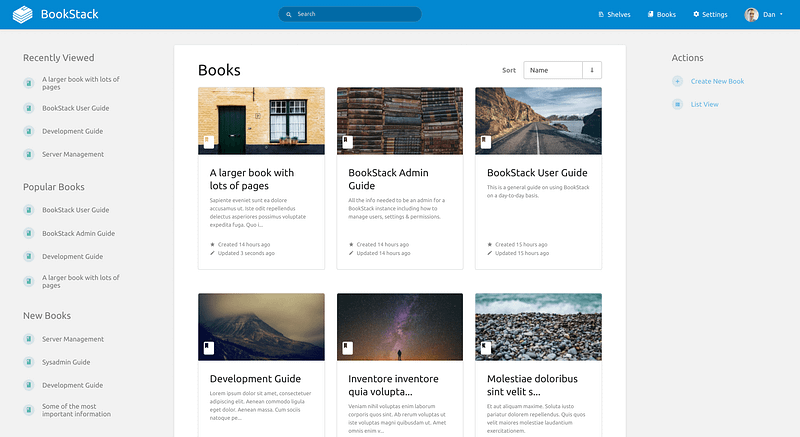
BookStack is an open-source, self-hosted wiki platform designed to make documentation easy and organized. Whether you need to create user manuals, technical documentation, or personal knowledge bases, BookStack provides an intuitive interface for structuring and managing content.
BookStack uses a book-like hierarchy, where you can organize information into books, chapters, and pages. It also supports Markdown and WYSIWYG editors, making content creation flexible and user-friendly. With features like role-based access control, search functionality, and version history, BookStack is an excellent tool for teams and individuals who need a reliable documentation platform.
8. Jitsi Meet: Private Video Conferencing
With the rise of remote work and online meetings, video conferencing has become a daily necessity. Jitsi Meet is a free, open-source video conferencing solution that you can host on your own server. It offers many of the same features as commercial platforms like Zoom, including screen sharing, recording, and chat, but with the added benefit of full privacy and no data tracking.
Jitsi Meet requires minimal setup and runs efficiently on a variety of servers. It’s also highly scalable, capable of supporting large meetings with many participants. By hosting Jitsi Meet yourself, you can create a secure communication environment for your team, clients, or community without relying on third-party services.
9. Paperless-ngx: Go Paperless with Document Management
Managing physical documents can be a hassle, especially in a world that’s increasingly digital. Paperless-ngx is an open-source document management system that helps you scan, archive, and retrieve your documents electronically. It’s designed to be simple and user-friendly, making it easy to organize your digital files.
Paperless-ngx supports OCR (Optical Character Recognition), allowing you to search the contents of scanned documents. It also offers features like automated document sorting, tagging, and version control. Whether you’re looking to go paperless at home or need a document management solution for your small business, Paperless-ngx provides a powerful and flexible tool.
10. Gitea: Lightweight Git Hosting
Git is the backbone of modern software development, and Gitea offers a lightweight, self-hosted Git service that’s perfect for small teams or personal projects. Gitea provides a user-friendly interface for managing Git repositories, code reviews, issue tracking, and CI/CD pipelines.
One of Gitea’s strengths is its low resource footprint, making it ideal for deployment on modest hardware. Despite its simplicity, Gitea offers robust features, including integrations with popular DevOps tools and support for multiple authentication methods. By hosting Gitea yourself, you can manage your codebase with full control and without relying on external services like GitHub or GitLab.

11. Uptime Kuma: Monitor Your Websites
Keeping track of your websites’ uptime and performance is crucial, especially if you run critical services. Uptime Kuma is an open-source monitoring tool that allows you to track the status of your websites, servers, and APIs. It offers detailed reporting and notifications, helping you respond quickly to any issues.
Uptime Kuma’s dashboard is intuitive, displaying the status of all your monitored services at a glance. You can set up multiple monitoring types, including HTTP, TCP, and Ping, and configure custom alerts via email, Slack, or other messaging platforms. By self-hosting Uptime Kuma, you gain real-time insights into your infrastructure’s health without relying on third-party monitoring services.

12. Plex: Your Personal Media Server
For media enthusiasts, Plex offers a fantastic way to organize and stream your personal video, music, and photo collections. Plex is a media server that you can install on your own hardware, allowing you to create your own Netflix-style streaming service at home.
Plex automatically organizes your media with metadata, including cover art, descriptions, and ratings. It supports streaming to a wide range of devices, including smart TVs, mobile devices, and web browsers. With Plex, you can also share your media library with friends and family, making it a great solution for anyone looking to manage their digital media collection.
13. Wallabag: Save Web Pages for Later
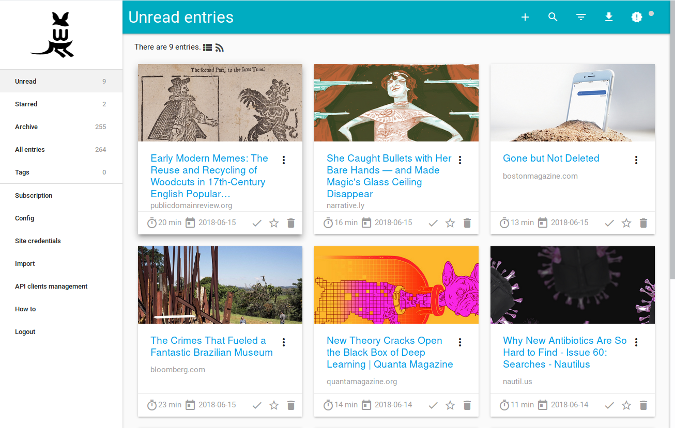
Wallabag is an open-source read-it-later app that lets you save web pages to read later. It’s a self-hosted alternative to services like Pocket, giving you full control over your reading list.
Wallabag supports a wide range of content formats, including articles, PDFs, and e-books. It also offers features like tagging, full-text search, and offline reading, making it easy to organize and access your saved content. By hosting Wallabag yourself, you can ensure that your reading habits and preferences remain private.
14. Netdata: Real-Time Server Monitoring
Netdata is a powerful monitoring tool that provides real-time insights into your server’s performance and health. It offers detailed charts and graphs for a wide range of metrics, including CPU usage, memory, disk I/O, and network traffic.
Netdata is designed to be lightweight and efficient, making it suitable for monitoring even on low-end hardware. It also supports a wide range of plugins and integrations, allowing you to customize it to your specific needs. Whether you’re running a single server or managing a complex infrastructure, Netdata provides the tools to monitor and optimize your systems effectively.
15. Kanboard: Visual Project Management
Kanboard is a project management tool that uses a Kanban board to visualize tasks and workflows. It’s a simple yet powerful tool for managing personal projects or small teams.
Kanboard allows you to create tasks, assign them to team members, and track progress visually. It supports drag-and-drop task management, custom workflows, and real-time collaboration. By self-hosting Kanboard, you can keep your project data secure and customize the platform to fit your specific needs.
16. Photoprism: Manage Your Photo Collection
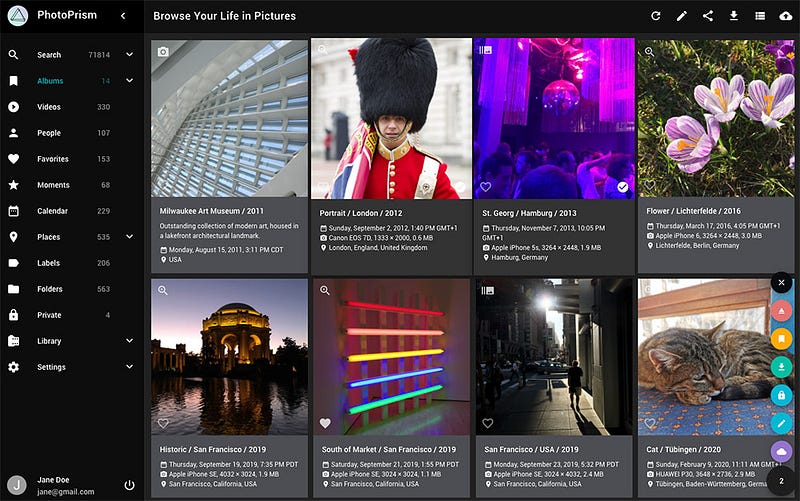
Photoprism is a self-hosted platform for managing and organizing your photos. It includes AI-based tagging, powerful search capabilities, and support for a wide range of image formats, including RAW files.
Photoprism automatically categorizes your photos based on content, location, and other metadata, making it easy to find specific images. It also offers a clean and modern interface for browsing and sharing your photos. Hosting Photoprism yourself gives you complete control over your photo library, ensuring your memories are stored securely and privately.
17. Owncast: Stream Your Own Content
Owncast is a self-hosted live video and web chat server that allows you to stream content without relying on platforms like Twitch or YouTube. It’s a great option for anyone looking to create a custom streaming experience with full control over their content and audience.
Owncast supports a wide range of streaming formats and offers features like real-time chat, custom overlays, and integration with various broadcasting tools. Whether you’re streaming gaming sessions, live events, or educational content, Owncast provides a flexible and secure platform.
18. Vaultwarden: Lightweight Password Management
Vaultwarden (formerly Bitwarden_RS) is a lightweight, self-hosted implementation of Bitwarden. It offers the same robust password management features but with a reduced resource footprint, making it ideal for deployment on minimal hardware.
Vaultwarden supports all the key features of Bitwarden, including secure password storage, two-factor authentication, and cross-platform synchronization. It’s an excellent choice for users who want the security and convenience of Bitwarden but with the added benefit of full control over their data.
19. Firefly III: Personal Finance Management
Managing personal finances can be complex, but Firefly III simplifies the process by offering a self-hosted personal finance manager. It helps you keep track of expenses, income, budgets, and investments, all while ensuring your financial data remains private.
Firefly III provides detailed reports and visualizations, helping you understand your financial habits and make informed decisions. It also supports multiple currencies, bank account reconciliation, and automated transaction imports. Hosting Firefly III yourself gives you full control over your financial information, making it a great tool for budgeting and financial planning.
20. HedgeDoc: Collaborative Document Editing
HedgeDoc is a collaborative markdown editor that lets you create and share documents in real-time. It’s perfect for notes, documentation, and collaborative writing, offering live previews and a variety of export options.
HedgeDoc supports a wide range of markdown features, including tables, code blocks, and LaTeX math. It also integrates with other tools like GitHub, allowing you to easily share and collaborate on documents. By hosting HedgeDoc yourself, you can create a secure environment for collaborative writing and documentation, free from the limitations of third-party services.
Conclusion
Self-hosting is more than just a hobby; it’s a way to take control of your digital life. The projects listed above offer a wide range of possibilities, from enhancing your privacy and security to managing your media and projects. By leveraging the power of self-hosted solutions, you can create a customized digital environment that meets your specific needs and preferences.
Each of these projects represents a step toward greater autonomy, allowing you to move away from reliance on third-party services and toward a more self-sufficient, secure, and private digital experience. Whether you’re a seasoned sysadmin or a curious beginner, there’s something in the awesome-selfhosted repository for everyone. So why wait? Dive into the world of self-hosting and start building your homelab today!


