
2 Years of GraphQL in Production
Common pitfalls that you should avoid
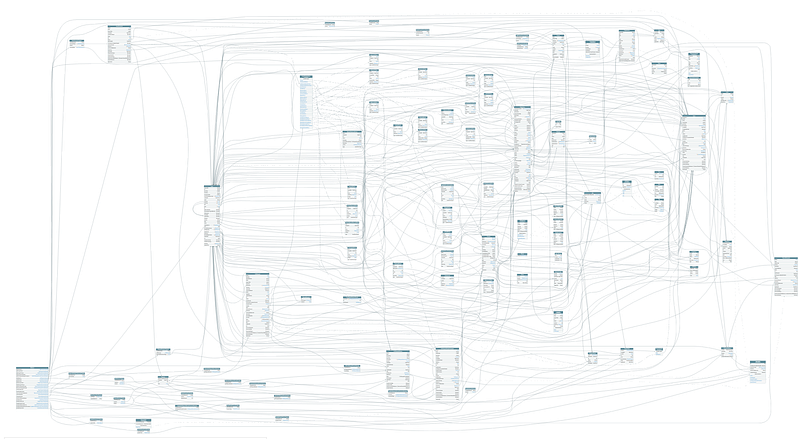
GraphQL is getting more and more popular for some very good reasons. Some of the issues that we have encountered were challenging, but it was all worth it. I will use an example setup in this article to demonstrate the issues that we have encountered and how those issues can be solved.
Let’s start at the beginning. Why did we choose GraphQL?
- No need to worry about updating documentation. All queries and mutations are automatically documented.
- Instead of fetching the whole data set, we can write queries that will only return the requested data.
- One access point for our front end. It wouldn’t be very fun to fetch all the required data from 20 different APIs. With GraphQL, we have the option to stitch all these APIs into one.
Stitching
Being able to fetch all the data from one endpoint sounds nice, but stitching can also lead to some very nasty issues. Let’s take a look at the following example:
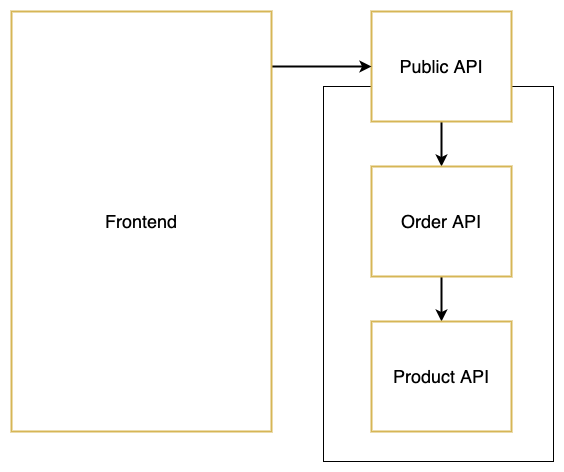
We have a front end that communicates with the Public API. The Public API stitches the Order API, which stitches the Product API. The Public API is the only API that can be accessed by the front end. This chaining of stitching might not seem like a very big issue, but if you have something like 20 APIs with multiple layers, releasing can become a nightmare.
Why? Because when you update the schema of the Product API, you will need to restart the Order API and the Public API (in that sequence), as the schemas need to be reloaded. Having to restart a dozen APIs every time you update the GraphQL schema will definitely not be very fun.
Another issue that we can encounter is when we want to query up instead of down — so from a product to its parent order. This won’t work because the Order API will only start when the Product API is running, as it needs to load its schema.
That means that we can fetch the products that belong to an order:
order {
    identifier
    products {
        identifier
    }
}
But we can’t fetch the order that belongs to a certain product:
products {
    identifier
    order {
        identifier
    }
}
To solve these issues, we can rearrange how we stitch our APIs. By making the Public API responsible for loading in all the schemas, we only need to restart one API when a schema is updated.
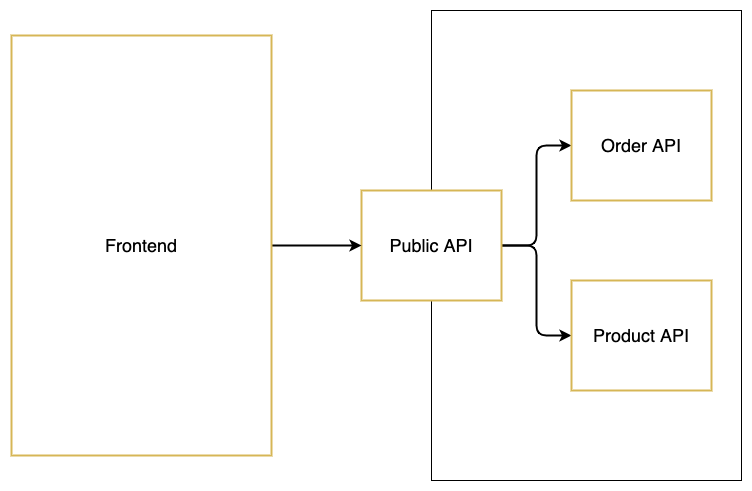
Because the Public API now fetches all schemas, we can add some code that will extend the product schema with the order property. This will make it possible to fetch the order through the product query. Check out the Apollo documentation for more information about extending schemas.
Now, not all queries and mutations should be accessible through our Public API. For example, we don’t want to give our customers the possibility to trigger a mutation that will change the payment status. One way to solve this is by filtering out certain queries and mutations. We could loop over all the queries and mutations in the schemas and compare them with a list. If the queries are on the list, they will be visible. If not, they will be removed from the schema. Another option would be to add a middleware that checks if the current user has the right access to trigger certain queries and mutations.
We chose a combination of those two options. But now we have another issue. Because not all of our mutations are accessible through the Public API anymore, we will need to call the Payment API directly when updating the payment status. This will work for mutations, but it won’t work for all of our queries, as the child and parent objects are only stitched in the Public API. To solve this, we have to rearrange our setup one more time.
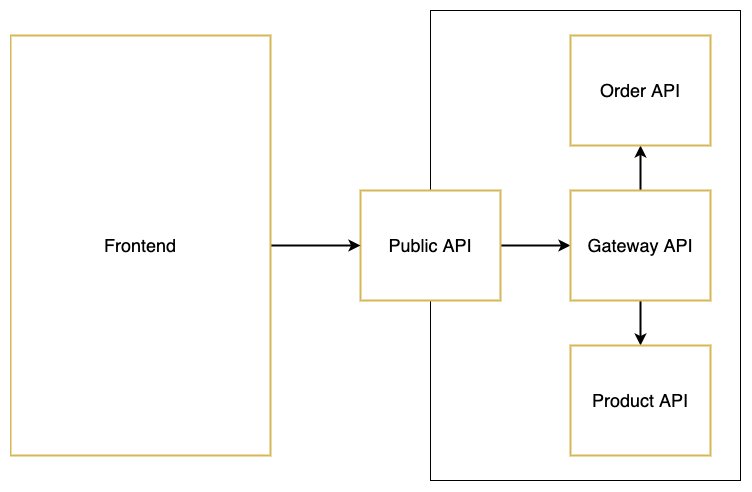
We will create a Gateway API and make it responsible for stitching all the schemas. The Public API will stitch the Gateway API and remove all queries and mutations that should not be accessible through the front end. We can now use the Gateway API when we need to do queries or mutations in the back end, as our back-end services are located in the same network.
Paginated Queries
Implementing pagination for some queries is definitely a good idea. We chose the cursor-based approach, and it’s working very well. When we want to fetch products, we can now use the following query:
products(first: 5, after: "cursor") {
    edges {
        node {
            identifier
        }
    }
}
However, because we changed the schema, we now have a paginated structure when fetching the order with its products:
order {
    products(first: 5, after: "cursor") {
        edges {
            node {
                identifier
            }
        }
    }
}
In this case, we don’t want to have a paginated structure, as there are only a couple of products for a specific order. To solve this, we could choose to write two queries — one with pagination and one without pagination. Or we could use schema wrapping to strip the pagination when we stitch products into an order. Wrapping schemas is a very powerful option, especially when you are stitching all your remote schemas into one API. For more information, see the documentation about schema wrapping.
Tips
Those were the biggest but not the only issues that we have encountered. Here are some tips that can help you build a maintainable GraphQL API.
- Types and enums should always have a unique name. For example, if you want to add a status to a product, name it
ProductStatusinstead ofStatusto prevent issues with conflicting types. - Add filters to queries instead of writing separate queries. This API is a good example of how you could implement filters (check out the docs tab and search for
assetFilter). - Define a naming convention for your queries and mutations. This will make it easier to find the query or mutation that you are looking for.
- When using paginated queries, set a default and maximum limit. You don’t want your APIs to crash when someone runs a query.
- You can use GraphQL Voyager to generate an overview of all the queries, mutations, and relations of your schema.