
2 Simple Ways to Get More 5-Star Reviews on Your Gumroad Ebooks
Positive reviews are powerful social proof that can boost sales and increase trust. Getting more of them is easier than you think.

As any copywriter will tell you, having social proof is one of the most important elements of a sales page.
For newbies, getting good reviews can be tough. But even with a few sales, you can try these easy methods to increase them.
Ask for a Review
This is the simplest method.
You don’t know if someone will give you a 5-star review unless you ask them.
There are a few ways you can do this. One is to add a call to action at the end of your ebook, telling people that if they found it helpful, they can leave a 5-star review. It’s not very effective, but it’s worth trying.
The better way to do this is by using the content section on your product page.
Add a message like this:
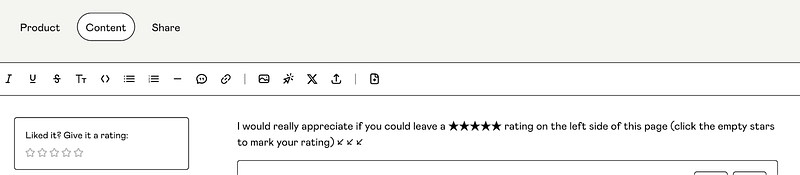
This gets seen before downloading the ebook, and it’s easy to just click the five stars to the left to leave a review.
Not everybody will care to leave a review, but you might find a few people who will. It’s always worth it to ask them.
Workflows
This is what advanced marketers do. It’s a bit more work, but it can boost your reviews.
Gumroad has this amazing feature called Workflows. Here, you can schedule the emails customers get after a purchase. I send my customers three emails, one after each day.
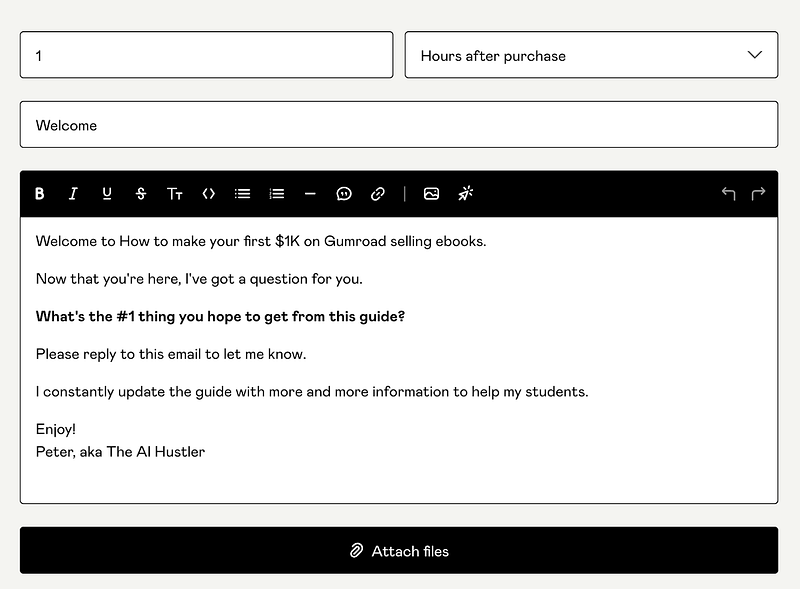
The first email just asks for feedback on the ebook, the second asks for the review, and the third is a reminder to leave a positive review. They are short emails with just a few sentences and a link to the product, which makes it easier for customers to find the product page.
Here’s an example of the first email:
If you want to improve your chances of getting a good review, you can also send them a freebie in exchange. For example, you can send them a checklist or cheatsheet that complements the product they bought.
People will consider helping if you help them first.
These tactics help you get more 5-star reviews on your Gumroad ebooks.
Bonus: How to Remove a Bad Review
Dealing with bad reviews is unpleasant, but there is a way to remove them. I wouldn’t use it every time, though. It’s better to have a mix of reviews.
To remove a customer’s rating, you can refund the customer for their purchase. That’s all you have to do.
The rating will still appear on the Customer dashboard, but it won’t count in the average rating calculation anymore.
👉 If you want to start selling ebooks on Gumroad, check out my guide:


