
Python
19 Sweet Python Syntax Sugar for Improving Your Coding Experience
Do more by less code

Making a function work is one thing.
Implementing it with precise and elegant code is another.
As the Zen of Python mentioned, “beautiful is better than ugly.” A good programming language like Python will always provide appropriate syntax sugar to help developers write elegant code easily.
This article highlights 19 crucial syntax sugar in Python. The journey to mastery involves understanding and utilizing them skillfully.
Talk is cheap, let’s see the code.
1. Union Operators: The Most Elegant Way To Merge Python Dictionaries
There are many approaches to merging multiple dictionaries in Python, but none of them can be described as elegant until Python 3.9 was released.
For example, how can we merge the following three dictionaries before Python 3.9?
One of the methods is using for loops:
cities_us = {'New York City': 'US', 'Los Angeles': 'US'}
cities_uk = {'London': 'UK', 'Birmingham': 'UK'}
cities_jp = {'Tokyo': 'JP'}

cities = {}

for city_dict in [cities_us, cities_uk, cities_jp]:
    for city, country in city_dict.items():
        cities[city] = country

print(cities)
# {'New York City': 'US', 'Los Angeles': 'US', 'London': 'UK', 'Birmingham': 'UK', 'Tokyo': 'JP'}
It’s decent, but far from elegant and Pythonic.
Python 3.9 introduced the union operators, a syntax sugar that has made merging tasks super straightforward:
cities_us = {'New York City': 'US', 'Los Angeles': 'US'}
cities_uk = {'London': 'UK', 'Birmingham': 'UK'}
cities_jp = {'Tokyo': 'JP'}

cities = cities_us | cities_uk | cities_jp

print(cities)
# {'New York City': 'US', 'Los Angeles': 'US', 'London': 'UK', 'Birmingham': 'UK', 'Tokyo': 'JP'}
As the above program shows, we can just use a few pipe symbols, so-called union operators in this context, to merge as many Python dictionaries as we like.
Is that possible to do an in-place merging through the union operators?
cities_us = {'New York City': 'US', 'Los Angeles': 'US'}
cities_uk = {'London': 'UK', 'Birmingham': 'UK'}
cities_jp = {'Tokyo': 'JP'}

cities_us |= cities_uk | cities_jp
print(cities_us)
# {'New York City': 'US', 'Los Angeles': 'US', 'London': 'UK', 'Birmingham': 'UK', 'Tokyo': 'JP'}
Of course, just move the union operators to the left of the equals sign, as shown in the code above.
2. Type Hints: Make Your Python Programs Type Safe
Dynamic typing, which means determining the type of a variable during runtime, is a key feature that makes Python flexible and convenient. However, it can also lead to hidden bugs and errors if variables are not typed properly.
To address this issue, Python introduced the typing hint feature in version 3.5. It provides a way to annotate variable types in code, and modern IDE can catch type errors early for developers during the development process.
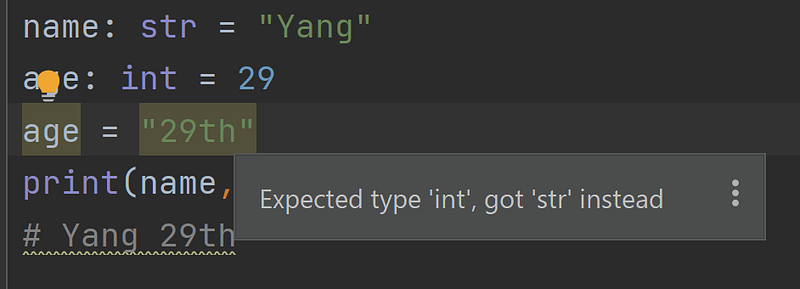
For example, if we define a variable as an integer but change it to a string as follows, the IDE (PyCharm in this case) will highlight the unexpected code for us:
Besides the primitive types, there are some advanced type hint tricks as well.
For instance, it is a common convention to define constants using all capital letters in Python.
DATABASE = 'MySQL'However, it’s just a convention and no one can stop you from assigning new values to this “constant”.
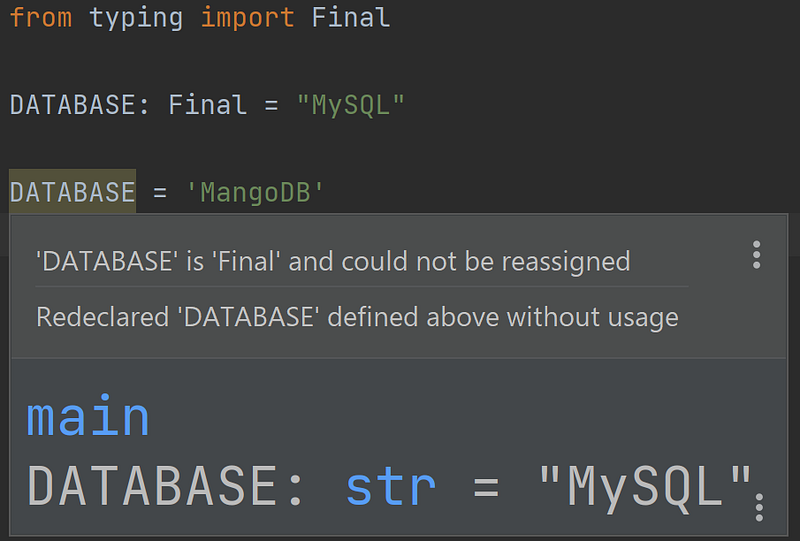
To improve it, we can use the Final type hint, which indicates that a variable is intended to be a constant value and should not be reassigned:
from typing import Final
DATABASE: Final = "MySQL"
If we really change the “constant”, the IDE will remind us for sure:
3. F-Strings: A Pythonic String Formatting Approach
Python supports a few different string formatting techniques, such as the C style formatting using % symbols, the built-in format() function and f-strings.
Unless you are still using older versions than Python 3.6, the f-strings are definitely the most Pythonic way to do string formatting. Because they can do all formatting tasks with minimum code, and even run expressions inside strings.
from datetime import datetime

today = datetime.today()

print(f"Today is {today}")
# Today is 2023-03-22 21:52:29.623619

print(f"Today is {today:%B %d, %Y}")
# Today is March 22, 2023

print(f"Today is {today:%m-%d-%Y}")
# Today is 03-22-2023
As demonstrated in the above code, there are only two things to do for using f-strings:
- Add the letter “f” before the string to indicate that it is an f-string.
- Use curly braces with the variable name and an optional format specifier inside the string (
{variable_name:format}) to interpolate the variable’s value in a specific format.
“Simple is better than complex.” The f-strings are a good reflection of this quote from the Zen of Python.
Even more, we can directly execute an expression inside an f-string:
from datetime import datetime

print(f"Today is {datetime.today()}")
# Today is 2023-03-22 22:00:32.405462
4. Use An Ellipsis as a Placeholder for Unwritten Code
In Python, we usually put the pass keyword as a placeholder for unwritten code. But we can also use an ellipsis for this purpose.
def write_an_article():
    ...


class Author:
    ...
Guido van Rossum, the father of Python, added this syntax sugar into Python because he thought it’s cute.
5. Decorators in Python: A Way To Modularize Functionalities and Separate Concerns
The idea of decorators of Python is to allow a developer to add new functionality to an existing object without modifying its original logic.
We can define decorators by ourselves. And there are also many wonderful built-in decorators ready for use.
For example, static methods in a Python class are not bound to an instance or a class. They are included in a class simply because they logically belong there.
To define a static method, we just need to use the @staticmethod decorator as follows:
class Student:
    def __init__(self, first_name, last_name):
        self.first_name = first_name
        self.last_name = last_name
        self.nickname = None

    def set_nickname(self, name):
        self.nickname = name

    @staticmethod
    def suitable_age(age):
        return 6 <= age <= 70


print(Student.suitable_age(99)) # False
print(Student.suitable_age(27)) # True
print(Student('yang', 'zhou').suitable_age(27)) # True
6. List Comprehension: Make a List in One Line of Code
Python is renowned for its conciseness, which is largely attributed to its well-designed syntax sugar such as list comprehension.
With list comprehension, we can put for loops and if conditions all in one line of code to generate a Python list:
Genius = ["Yang", "Tom", "Jerry", "Jack", "tom", "yang"]
L1 = [name for name in Genius if name.startswith('Y')]
L2 = [name for name in Genius if name.startswith('Y') or len(name) < 4]
L3 = [name for name in Genius if len(name) < 4 and name.islower()]
print(L1, L2, L3)
# ['Yang'] ['Yang', 'Tom', 'tom'] ['tom']
Furthermore, there are also set, dictionary, and generator comprehensions in Python. Their syntax is similar to list comprehension.
For example, the following program generates a dict based on certain conditions with the help of dict comprehension:
Entrepreneurs = ["Yang", "Mark", "steve", "jack", "tom"]
D1 = {id: name for id, name in enumerate(Entrepreneurs) if name[0].isupper()}
print(D1)
# {0: 'Yang', 1: 'Mark'}
7. Lambda Functions for Defining Small Anonymous Functions
The lambda function, or called the anonymous function, is syntax sugar to easily define a small function in Python to make your code neater and shorter.
A common application of lambda functions is to use it to define the comparison method for the built-in sort() function:
leaders = ["Warren Buffett", "Yang Zhou", "Tim Cook", "Elon Musk"]
leaders.sort(key=lambda x: len(x))
print(leaders)
# ['Tim Cook', 'Yang Zhou', 'Elon Musk', 'Warren Buffett']
In the example above, a lambda function, which receives a variable and returns its length, is defined to be used as the comparison method for sorting a list. Of course, we can write a full function here in the normal way. But given that this function is very simple, writing it as a lambda function is definitely shorter and neater.
8. Ternary Conditional Operators: Put If and Else Into One Line of Code
Many programming languages have ternary conditional operators. Python’s syntax for this is just putting if and else into the same line:
short_one = a if len(a) < len(b) else bIf we implement the same logic as the above without ternary condition syntax, there are a few lines of code needed:
short_one = ''
if len(a) < len(b):
    short_one=a
else:
    short_one=b
9. Use the “Enumerate” Method To Iterate Lists Elegantly
In some cases, we need to use both the index and values of elements in a list when iterating it.
A classic C-style approach for this will look like the follows:
for (int i = 0; i < len_of_list; i++) {
        printf("%d %s\n", i, my_list[i]);
    }
We can write a similar logic in Python, but the my_list[i] seems a bit ugly especially when we need to call the value of the element many times.
The real Pythonic way to do this is using the enumerate() function to get both index and values directly:
leaders = ["Warren", "Yang", "Tim", "Elon"]
for i,v in enumerate(leaders):
    print(i, v)
# 0 Warren
# 1 Yang
# 2 Tim
# 3 Elon
10. Context Manager: Close Resources Automatically
As we know, once a file has been opened and processed, it is significant to close it promptly to free up memory resources. Neglecting to do so can result in memory leaks or even crashing our system.
f = open("test.txt", 'w')
f.write("Hi,Yang!")
# some logic here
f.close()
It’s fairly easy to handle files in Python. As the above code shows, we just need to always remember to call the f.close() method to free up memory.
However, no one can always remember something when the program becomes more and more complex and large. This is why Python provides the context manager syntax sugar.
with open("test.txt", 'w') as f:
    f.write("Hi, Yang!")
As illustrated above, the “with” statement is the key for context managers of Python. As long as we open a file through it and handle the file under it, the file will be closed automatically after processing.
11. Fancy Slicing Tricks for Python Lists
Getting a part of items from a list is a common requirement. In Python, the slice operator consists of three components:
a_list[start:end:step]
- “start”: The starting index (default value is 0).
- “end”: The ending index (default value is the length of the list).
- “step”: Defines the step size when iterating over the list (default value is 1).
Based on these, there are a few tricks that can make our code so neat.
Reverse a list with a slicing trick
Since the slicing operators can be negative numbers (-1 is the last item, and so on), we can leverage this feature to reverse a list this way:
a = [1,2,3,4]
print(a[::-1])
# [4, 3, 2, 1]
Get a shallow copy of a list
>>> a = [1, 2, 3, 4, 5, 6]
>>> b = a[:]
>>> b[0]=100
>>> b
[100, 2, 3, 4, 5, 6]
>>> a
[1, 2, 3, 4, 5, 6]
The b=a[:] is different with b=a, cause it assigns a shallow copy of a rather than the a itself. So the changes of b will not affect a at all as demonstrated above.
12. Walrus Operator: Assignments within Expressions
The walrus operator, also known as the assignment expression operator, was introduced in Python 3.8 and is represented by the := symbol.
It is used to assign values to variables within an expression, rather than assigning them separately.
For example, consider the following code:
while (line := input()) != "stop":
    print(line)
In this code, the walrus operator is used to assign the value of the user input to the variable line, while also checking whether the input is “stop”. The while loop will continue to run as long as the user input is not “stop”.
By the way, the walrus operator, :=, got its cute name from the eyes and tusks of a walrus:

13. Continuous Comparisons: A More Natural Way To Write If Conditions
In languages like Java or C, you sometimes need to write if conditions like this:
if (a > 1 && a < 10){
  //do somthing
}
However, you can’t write it as elegantly as the following if you are not using Python:
if 1 < a < 10:
    ...
Yes, Python allows us to write continuous comparisons. It makes our code seem as natural as how we write it in mathematics.
14. Zip Function: Combine Multiple Iterables Easily
Python has a built-in zip() function that takes two or more iterables as arguments and returns an iterator that aggregates elements from the iterables.
For example, with the help of the zip() function, the following code aggregates 3 lists into one without any loops:
id = [1, 2, 3, 4]
leaders = ['Elon Mask', 'Tim Cook', 'Bill Gates', 'Yang Zhou']
sex = ['male', 'male', 'male', 'male']
record = zip(id, leaders, sex)

print(list(record))
# [(1, 'Elon Mask', 'male'), (2, 'Tim Cook', 'male'), (3, 'Bill Gates', 'male'), (4, 'Yang Zhou', 'male')]
15. Swapping Two Variables Directly
Swapping two variables is usually the first program a beginner will write after printing “Hello world!”.
The classic way to do this in many programming languages needs a temporary variable to store the value of one of the variables.
For example, you can swap two integers in Java as follows:
int a = 5;
int b = 10;
int temp = a;
a = b;
b = temp;
System.out.println("a = " + a); // Output: a = 10
System.out.println("b = " + b); // Output: b = 5
In Python, the syntax is so intuitive and elegant:
a = 10
b = 5
a, b = b, a
print(a, b)
# 5 10
16. Destructuring Assignments Tricks
Destructuring assignments in Python is a way to assign the elements of an iterator or a dictionary to individual variables. It allows you to write shorter, more readable code by avoiding the need to access individual elements using indexes or keys.
person = {'name': 'Yang', 'age': 30, 'location': 'Mars'}
name, age, loc = person.values()
print(name, age, loc)
# Yang 30 Mars
As the example above, we can directly assign the values of a dictionary to 3 individual variables in one line of code.
However, if there are only two variables on the left side, how to receive the assignments?
Python provides another syntax sugar for this:
person = {'name': 'Yang', 'age': 30, 'location': 'Mars'}
name, *others = person.values()
print(name, others)
# Yang [30, 'Mars']
As shown above, we can just add an asterisk before a variable to let it receive all remaining variables from the person.values().
Simple and elegant, isn’t it?
17. Iterables Unpacking with Asterisks
Besides destructuring assignments, asterisks in Python are keys for iterable unpacking as well.
A = [1, 2, 3]
B = (4, 5, 6)
C = {7, 8, 9}
L = [*A, *B, *C]
print(L)
# [1, 2, 3, 4, 5, 6, 8, 9, 7]
As illustrated above, the simplest way to combine a list, a set, and a tuple into one list is by unpacking them through asterisks within the new list.
18. Any() and All() Functions
In some cases, we need to check whether any or all elements in an iterable (such as a list, tuple, or set) are true.
Of course, we can use for loops to check them one by one. But Python provides two built-in functions any() and all() to simplify the code of these two operations.
For instance, the following program uses all() to determine if all elements of a list are odd numbers:
my_list = [3, 5, 7, 8, 11]
all_odd = all(num % 2 == 1 for num in my_list)
print(all_odd)
# False
The following code uses the any() function to check if there is a leader whose name starts with “Y”:
leaders = ['Yang', 'Elon', 'Sam', 'Tim']
starts_with_Y = any(name.startswith('Y') for name in leaders)
print(starts_with_Y)
# True
19. Underscores in Numbers
It’s a headache to count how many zeros there are in a large number.
Fortunately, Python allows underscores to be included in numbers to improve readability.
For instance, instead of writing 10000000000, we can write 10_000_000_000 in Python which is much easier to read.
Thanks for reading. ❤️
If you like it, please follow me to enjoy more articles about programming and technologies.
Further reading:


.jpg)