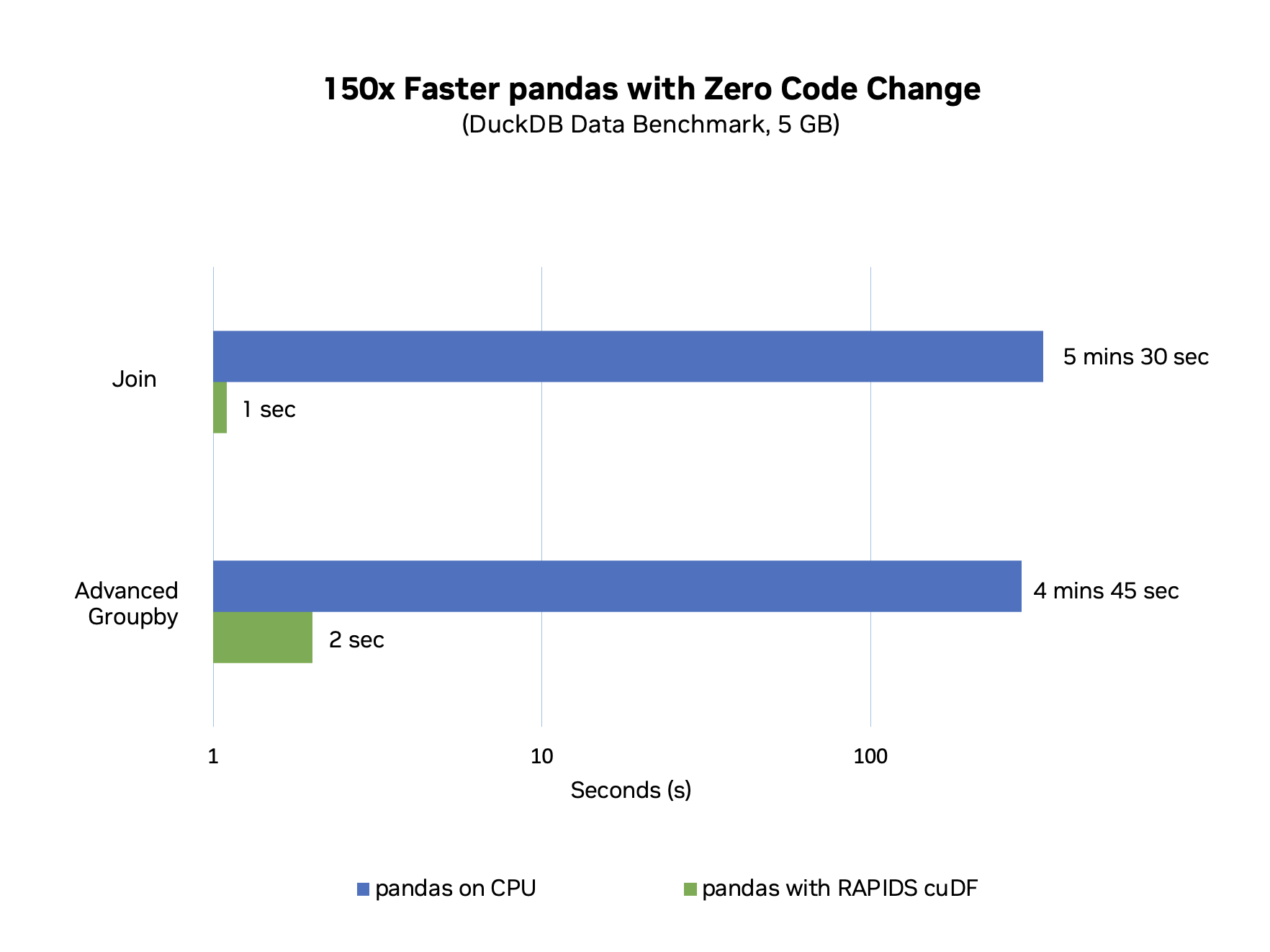
150x faster Pandas with NVIDIA’s RAPIDS cuDF
I have no doubt that if you are related to Data Science or AI, you would have used Pandas library at least once. Pandas is one of the most used libraries in the Data Science community, rivaling the popularity of giants like TensorFlow, PyTorch, Numpy, and Scikit. Pandas greatness is well known in the community; it makes processing various kinds of data extremely smooth, especially tabular data. But despite all of its greatness, even Pandas has its own limitations.
When working with Terabytes of data, handling Pandas data frame becomes quite tricky. Pandas operates in-memory, meaning it loads the entire dataset into the local memory (RAM) of the machine it is running on. This design choice limits its ability to handle very large datasets, such as those in the terabyte range, as the data size can exceed the available memory, leading to performance degradation or failure to process the data at all.
Through this blog, we’ll try to see how memory is used in Pandas and What Nvidia did to create this massive performance improvement of 150x .
RAPIDS cuDF not only made the Pandas faster, but also made it possible to load and process Terabytes of data in Pandas Dataframe.
Table of Content
- How does Pandas memory work?
- What has been done in the past to improve Pandas?
- What are RAPIDS and cuDF?
- How does NVIDIA cuDF achieve 150x faster speeds?
How does Pandas memory work?
Pandas utilizes system memory (RAM) to hold its data structures entirely in-memory. This approach has implications for performance and scalability:
Data Structures and Allocation:
- It uses
DataFrameandSeries, which allocate contiguous blocks of memory, typically from the heap space managed by Python's memory allocator.
Memory Usage:
- The memory consumed is directly related to the data types of the columns; for example,
int32columns will use 4 bytes per element, andfloat64columns use 8 bytes per element.
Access Patterns and Performance:
- Memory access is often columnar, which is efficient for vectorized operations but can be less efficient for row-wise access due to cache misses.
Overheads:
- Additional memory is consumed for metadata, and the
objectdtype incurs significant overhead since each object is a full Python object.
Memory Pressure:
- Operations that create copies of data can increase memory usage temporarily, and the garbage collector cleans up unused objects, which can add overhead in memory management.
Limitations with Large Datasets:
- As the size of data approaches the size of available memory, pandas can experience slowdowns due to memory swapping to disk. It doesn’t natively support parallel processing across multiple cores, which limits its ability to handle large data efficiently.
In contrast, cuDF offloads data storage and computation to the GPU, which has a higher bandwidth and allows for parallel processing. This design enables cuDF to handle larger datasets more efficiently, overcoming the limitations of pandas’ in-memory, single-core processing architecture.
What has been done in the past to improve Pandas?
A lot of things have been done in the past to improve Pandas Performance, but they were largely focused on optimizing its core capabilities and usage practices
Vectorization:
- Instead of operating on individual elements, vectorization applies operations across entire arrays. For example,
dataframe['column'] * 2will multiply every element in 'column' by 2 in one operation, leveraging NumPy's optimized C-based computations.

Efficient Indexing:
- Indexing allows for rapid lookups and data alignment. Using
dataframe.set_index('key')and then performing operations likejoin,merge, orloccan be significantly faster compared to searching through rows or columns without an index.
Data Types Optimization:
- Data types greatly affect memory usage. For instance, switching from
float64tofloat32can halve the memory used. Pandas supportscategorydata types for columns with a limited number of unique values, which is much more memory-efficient thanobjectdtype for strings.
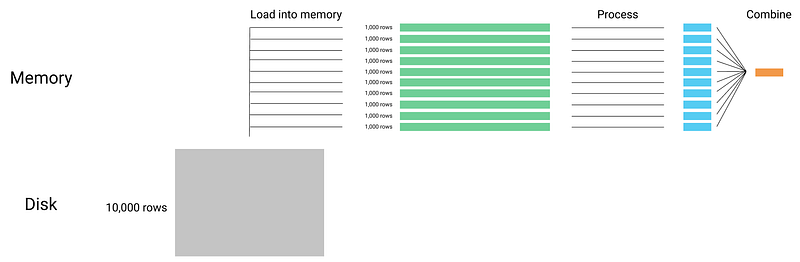
Chunking:
- For files too large to fit into memory,
pandas.read_csv()allows reading in chunks with thechunksizeparameter. You can process each chunk separately and append results to a file or reduce each chunk and combine at the end.
Cython:
- Cython can be used to write functions that are compiled into C. For example, you can write a Cython function to process data row-wise, which is then compiled into C code for performance close to what you would get if you had written the function directly in C.
Numba:
- Numba translates Python functions to optimized machine code at runtime. For example, a slow Python loop that operates on pandas data can be annotated with
@numba.jit, which compiles the loop into fast machine code the first time it runs.
eval() and query():
- These functions can speed up chained operations. For example, instead of writing
df[(df['A'] > 0) & (df['B'] < 0)], you could usedf.query('A > 0 & B < 0')which under the hood usesnumexprto evaluate expressions faster and with less memory.
Third-party Libraries:
- Dask: Works by breaking a large pandas DataFrame into many smaller pandas DataFrames. This allows for data that doesn’t fit into memory to be processed in parallel.
- PySpark: Transfers pandas code into Spark DataFrame operations that can be distributed across a Spark cluster.
Apache Arrow:
- Apache Arrow provides a columnar memory format that is optimized for analytics. It can be used with pandas through libraries like
pyarrow. For example,pyarrowcan convert a large DataFrame to an Arrow table and then to a parquet file, which can be much faster than using pandas alone to write to a CSV file.
Each of these methods enhances pandas’ performance by addressing different aspects of computation and memory management, leveraging both software techniques and hardware capabilities.
What are RAPIDS and cuDF?
RAPIDS is an open-source suite of data processing and machine learning libraries that enables GPU acceleration for the entire data science pipeline. It’s designed to provide a seamless GPU acceleration for data science workflows, leveraging the power of the GPU to speed up computation.
cuDF, which is a part of RAPIDS, is a Python library that provides a pandas-like DataFrame object for data manipulation but is implemented to utilize GPUs for its operations. It enables users to perform typical data preparation tasks (like join, merge, sort, filter, etc.) on large datasets much faster than with traditional CPU-bound libraries like pandas. cuDF achieves this by leveraging the parallel processing capability of GPUs, which can process multiple data elements simultaneously, leading to substantial performance improvements.
cuDF’s API mirrors pandas closely, which means that for many DataFrame operations, the code can be ported to cuDF with minimal changes. The intent is to make the transition from CPU to GPU as smooth as possible, allowing data scientists and developers to benefit from GPU acceleration without having to learn a new library from scratch.
Despite its advantages, cuDF initially supported only about 60% of the pandas API and required a GPU for execution, limiting its adoption. To address this, NVIDIA introduced the ‘pandas accelerator mode’ with cuDF v23.10, which allows pandas code to run on GPUs without changes. This mode executes operations on the GPU when possible and falls back to the CPU as needed, offering a seamless transition between the two.
This integration significantly speeds up pandas, as demonstrated by the DuckDB Database-like Ops Benchmark, where pandas with cuDF’s accelerator mode outperformed standard pandas by nearly 150x for tasks like joins and groupby operations. This mode ensures data scientists can utilize their existing pandas codebase and benefit from GPU acceleration, solving earlier compatibility and development environment issues.
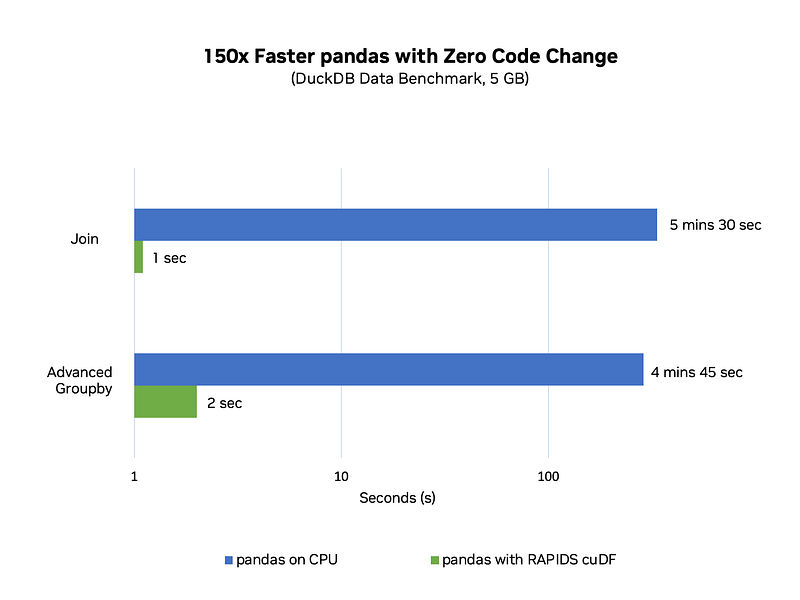
Look at the benchmarks here:
How does NVIDIA cuDF achieve 150x faster speeds?

- Parallel Processing on GPUs: GPUs are designed for parallel processing, allowing many computations to occur simultaneously, compared to the sequential processing of CPUs. cuDF is built to harness this parallelism for data operations, which is inherently more efficient for tasks common in data manipulation and analysis.
- Unified Memory Access: The pandas accelerator mode in cuDF allows for operations to execute on the GPU and fall back to the CPU when necessary. This is managed by a unified memory system that ensures data is accessible by both the CPU and GPU without the need for complex data transfers.
- Optimized GPU Kernels: NVIDIA designed specialized GPU kernels that are optimized for the types of data operations common in pandas workflows. These kernels are fine-tuned to run efficiently on the GPU architecture.
- Compatibility with Pandas API: cuDF mirrors the pandas API, making it possible to run pandas code directly on GPUs. This compatibility layer means that the transition to GPU acceleration does not require rewriting code, thus lowering the barrier to achieving performance gains.
- Intelligent Execution Planning: The accelerator mode intelligently determines which operations to offload to the GPU. It profiles the operations and executes them where they will run fastest, whether that’s on the GPU or CPU.
- Streamlining Data Operations: By combining these processes, NVIDIA’s cuDF minimizes the time-consuming data operations in pandas, such as joins and groupby computations, which can be parallelized effectively on a GPU.
Through these strategies, NVIDIA’s implementation allows data scientists to continue using the pandas API they are familiar with, while cuDF’s accelerator mode transparently and efficiently distributes the workload across the CPU and GPU to maximize performance.
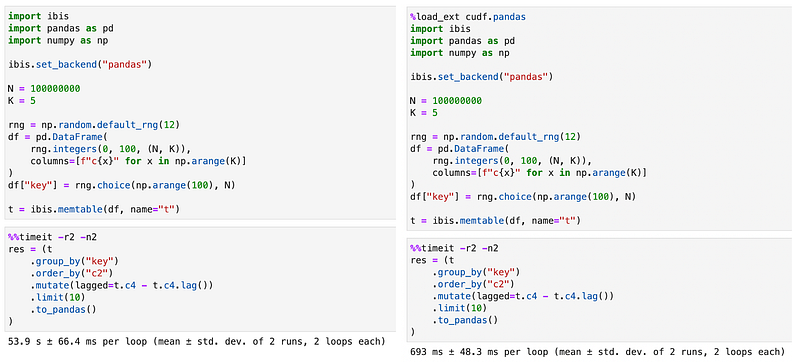
In the task where regular pandas take 54 seconds, cuDF Pandas finishes that off in 693 ms, much…much faster.
If you want to play with new cuDF Pandas, go and check out the new Google collab:
Writing such articles is very time-consuming; show some love and respect by clapping and sharing the article. Happy learning ❤ I Hope you had fun. Don’t forget to check out other awesome AI articles by clicking my profile.
And if you want to up your AI game, please check my new book on AI, which covers a lot of AI optimizations and hands-on code: