avatarYancy Dennis

Free AI web copilot to create summaries, insights and extended knowledge, download it at here

2097

Abstract

ese are the matches that he needs.</p><h2 id="5c1f">My Approach</h2><p id="9506">So, the first step to complete this gig is to load pandas and rapidfuzz.</p><div id="2273"><pre><span class="hljs-keyword">import</span> pandas <span class="hljs-keyword">as</span> pd <span class="hljs-title">from</span> rapidfuzz <span class="hljs-keyword">import</span> fuzz</pre></div><p id="dd90">The next step is to load the two lists:</p><div id="a588"><pre><span class="hljs-attr">df</span> = pd.read_excel(<span class="hljs-string">'CompanyNamesLookup.xlsx'</span>, sheet_name = <span class="hljs-string">'List 1'</span>) <span class="hljs-attr">ef</span> = pd.read_excel(<span class="hljs-string">'CompanyNamesLookup.xlsx'</span>, sheet_name = <span class="hljs-string">'List 2'</span>)</pre></div><figure id="127e"><img src="https://cdn-images-1.readmedium.com/v2/resize:fit:800/1*SNbURMVV7ogF9iUCxoyQOA.png"><figcaption>Sample from List 1</figcaption></figure><figure id="2ab6"><img src="https://cdn-images-1.readmedium.com/v2/resize:fit:800/1*YCMzZaBiL7iDzKXc91Eyhg.png"><figcaption>Sample from List 2</figcaption></figure><p id="5039">Then, I just needed to loop through the first list as the outer loop, and then the loop through the second list as the inner loop. Perhaps, there was a faster way to get this done but since this will work while I sleep, I really don’t care.</p><p id="b423">I want all matches that give me a fuzz ratio of 90.0 or more. Fuzz.ratio first compares the customer_name in list 1 to each company name in list 2. If the score is greater than to equal to 90, then the score along with the Account ID is appended to matches. After each cycle matches is added to the dataframe in List 1. Then, I repeat, each time I must re-initialize matches.</p><div id="0350"><pre><span class="hljs-meta">%</span><span class="hljs-meta">%</span>time</pre></div><div id="a70d"><pre><span class="hljs-built_in">df</span>[<span class="hljs-string">'Match'</span>] = <span class="hljs-string">''</span></pre></div><div id="f3c6"><pre><span class="hljs-keyword">for</span> index, row <span class="hl

Options

js-keyword">in</span> df<span class="hljs-selector-class">.iterrows</span>(): matches = <span class="hljs-selector-attr">[]</span> <span class="hljs-keyword">for</span> <span class="hljs-selector-tag">i</span>, r <span class="hljs-keyword">in</span> ef<span class="hljs-selector-class">.iterrows</span>(): score = fuzz<span class="hljs-selector-class">.ratio</span>(row<span class="hljs-selector-attr">[<span class="hljs-string">'Customer_Name'</span>]</span>, r<span class="hljs-selector-attr">[<span class="hljs-string">'Company Name'</span>]</span>) <span class="hljs-keyword">if</span> score >= <span class="hljs-number">90</span>: matches<span class="hljs-selector-class">.append</span>(<span class="hljs-selector-attr">[r[<span class="hljs-string">'Company Name'</span>]</span>, r<span class="hljs-selector-attr">[<span class="hljs-string">'CaseSafe ACCT ID'</span>]</span>]) df<span class="hljs-selector-class">.at</span><span class="hljs-selector-attr">[index, <span class="hljs-string">'Match'</span>]</span> = matches <span class="hljs-keyword">if</span> matches: <span class="hljs-built_in">print</span>(index, row<span class="hljs-selector-attr">[<span class="hljs-string">'Customer_Name'</span>]</span>, <span class="hljs-string">': '</span>, matches)</pre></div><p id="4b00">Here is a screenshot of the code for a better view:</p><figure id="f30b"><img src="https://cdn-images-1.readmedium.com/v2/resize:fit:800/1*CDkanyFVkkJM3U23zZBOlw.png"><figcaption>Coding Screenshot</figcaption></figure><p id="4119"><i>More content at <a href="https://plainenglish.io/"><b>PlainEnglish.io</b></a>. Sign up for our <a href="http://newsletter.plainenglish.io/"><b>free weekly newsletter</b></a>. Follow us on <a href="https://twitter.com/inPlainEngHQ"><b>Twitter</b></a></i>, <a href="https://www.linkedin.com/company/inplainenglish/"><b><i>LinkedIn</i></b></a><i>, <a href="https://www.youtube.com/channel/UCtipWUghju290NWcn8jhyAw"><b>YouTube</b></a>, and <a href="https://discord.gg/GtDtUAvyhW"><b>Discord</b></a>.</i></p></article></body>

How I made $150 in 5 minute Data Matching w/ Python

A simple Python Script using RapidFuzz

I have a very good repeat customer who needs a job done every few months or so. His gigs almost always pay around $150 but they are quite easy to perform with a Python as you will see in this article. It only took me around 5 minutes to write the code for this gig. It will actually take me longer than that to write this article. The code itself will take some hours to run but I will let it run while I sleep.

Actual runtime for the code was 5 hours 40 minutes and 57 seconds.

Shows run time for gig

TIP

Use rapidfuzz because it performs much better than fuzzwuzzy. To learn more read my other article on rapidfuzz.

The Problem

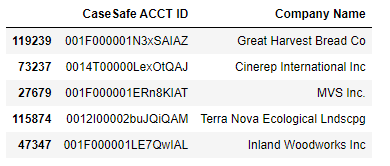
The customer sent me two lists. The second list is much longer than the first list. The first list contains a list of companies and so does the second list. However, the second list contains almost 120,000 names more than the first list. He is looking for companies with similar names in the second list to the first list. For example, the first list might have ‘ABC Company’ and the second list might have ‘ABC Company LLC’. These are the matches that he needs.

My Approach

So, the first step to complete this gig is to load pandas and rapidfuzz.

import pandas as pd
from rapidfuzz import fuzz

The next step is to load the two lists:

df = pd.read_excel('CompanyNamesLookup.xlsx', sheet_name = 'List 1')
ef = pd.read_excel('CompanyNamesLookup.xlsx', sheet_name = 'List 2')
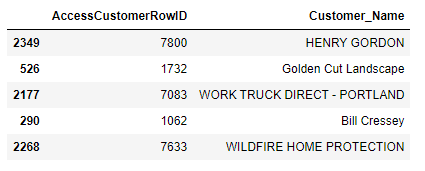
Sample from List 1
Sample from List 2

Then, I just needed to loop through the first list as the outer loop, and then the loop through the second list as the inner loop. Perhaps, there was a faster way to get this done but since this will work while I sleep, I really don’t care.

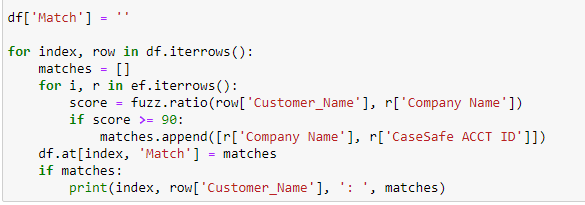
I want all matches that give me a fuzz ratio of 90.0 or more. Fuzz.ratio first compares the customer_name in list 1 to each company name in list 2. If the score is greater than to equal to 90, then the score along with the Account ID is appended to matches. After each cycle matches is added to the dataframe in List 1. Then, I repeat, each time I must re-initialize matches.

%%time
df['Match'] = ''
for index, row in df.iterrows():
    matches = []
    for i, r in ef.iterrows():
        score = fuzz.ratio(row['Customer_Name'], r['Company Name'])
        if score >= 90:
            matches.append([r['Company Name'], r['CaseSafe ACCT ID']])
    df.at[index, 'Match'] = matches
    if matches:
        print(index, row['Customer_Name'], ': ', matches)

Here is a screenshot of the code for a better view:
Coding Screenshot

More content at PlainEnglish.io. Sign up for our free weekly newsletter. Follow us on Twitter, LinkedIn, YouTube, and Discord.

Technology
Entrepreneurship
Data Science
Programming
Artificial Intelligence
Recommended from ReadMedium