avatarYancy Dennis

Free AI web copilot to create summaries, insights and extended knowledge, download it at here

1810

Abstract

ce results in the way that my client wanted.</p><div id="70b9"><pre><span class="hljs-keyword">for</span> index, row <span class="hljs-keyword">in</span> dfa<span class="hljs-selector-class">.iterrows</span>(): df<span class="hljs-selector-class">.at</span><span class="hljs-selector-attr">[index, <span class="hljs-string">'Street'</span>]</span> = (<span class="hljs-built_in">str</span>(row<span class="hljs-selector-attr">[<span class="hljs-string">'AddressNumber'</span>]</span>) + <span class="hljs-string">' '</span> + <span class="hljs-built_in">str</span>(row<span class="hljs-selector-attr">[<span class="hljs-string">'StreetTag'</span>]</span>))<span class="hljs-selector-class">.upper</span>() df<span class="hljs-selector-class">.at</span><span class="hljs-selector-attr">[index, <span class="hljs-string">'City'</span>]</span> = <span class="hljs-built_in">str</span>(row<span class="hljs-selector-attr">[<span class="hljs-string">'PlaceName'</span>]</span>)<span class="hljs-selector-class">.upper</span>() df<span class="hljs-selector-class">.at</span><span class="hljs-selector-attr">[index, <span class="hljs-string">'State'</span>]</span> = <span class="hljs-built_in">str</span>(row<span class="hljs-selector-attr">[<span class="hljs-string">'StateName'</span>]</span>)<span class="hljs-selector-class">.upper</span>() try: df<span class="hljs-selector-class">.at</span><span class="hljs-selector-attr">[index, <span class="hljs-string">'Zip Code'</span>]</span> = <span class="hljs-built_in">str</span>(row<span class="hljs-selector-attr">[<span class="hljs-string">'Address'</span>]</span>)<span class="hljs-selector-class">.split</span>(<span class="hljs-built_in">str</span>(row<span class="hljs-selector-attr">[<span class="hljs-string">'StateName'</span>]</spa

Options

n>)<span class="hljs-selector-class">.upper</span>())<span class="hljs-selector-attr">[1]</span><span class="hljs-selector-class">.split</span>()<span class="hljs-selector-attr">[0]</span> except: <span class="hljs-built_in">print</span>(row<span class="hljs-selector-attr">[<span class="hljs-string">'Address'</span>]</span>) pass</pre></div><p id="ad2e">Here is a picture of the code to make it a little clearer:</p><figure id="6db4"><img src="https://cdn-images-1.readmedium.com/v2/resize:fit:800/1*8q-5WHLcpv5yxObPJXf4Wg.png"><figcaption>Picture to clean up address code</figcaption></figure><p id="5334">Then, I eliminated the extra columns:</p><div id="469e"><pre>dfb = dfa<span class="hljs-selector-attr">[[<span class="hljs-string">'Business'</span>, <span class="hljs-string">'Street'</span>, <span class="hljs-string">'City'</span>, <span class="hljs-string">'Zip Code'</span>]</span>]<span class="hljs-selector-class">.copy</span>() dfb<span class="hljs-selector-class">.head</span>()</pre></div><p id="9c9b">To produce the following result:</p><figure id="95d8"><img src="https://cdn-images-1.readmedium.com/v2/resize:fit:800/1*MU-El7TtlSyvZVAWHJ2CBA.png"><figcaption>Final Output for the Customer</figcaption></figure><p id="94e7"><i>More content at <a href="https://plainenglish.io/"><b>PlainEnglish.io</b></a>. Sign up for our <a href="http://newsletter.plainenglish.io/"><b>free weekly newsletter</b></a>. Follow us on <a href="https://twitter.com/inPlainEngHQ"><b>Twitter</b></a> and <a href="https://www.linkedin.com/company/inplainenglish/"><b>LinkedIn</b></a>. Check out our <a href="https://discord.gg/GtDtUAvyhW"><b>Community Discord</b></a> and join our <a href="https://inplainenglish.pallet.com/talent/welcome"><b>Talent Collective</b></a>.</i></p></article></body>

$150 (1 hour) to Parse Addresses with Python

I recently answered an ad on Craigslist from an accounting firm that had about 2500 addresses that needed parsing. Of course, python was the tool that came immediately to mind. After a little research, I found that the pandas_usaddress was the perfect package to handle this particular gig.

The customer provided the list in Excel and I offered to parse them for $100 — thinking that it would take about an hour as I knew that I would have to clean up a few manually. When I completed the job the customer agreed to pay $150 and also took my information for future jobs — so hopefully this will be a long-term relationship.

So, to get this done, I imported this package:

import pandas as pd
import pandas_usaddress as pda
df = pd.read_csv(filename)

I then used the pda package to parse the address as follows:

dfa = pda.tag(df, ['Address'], granularity='low', standardize=True)
dfa.head()

The package produced output as such:
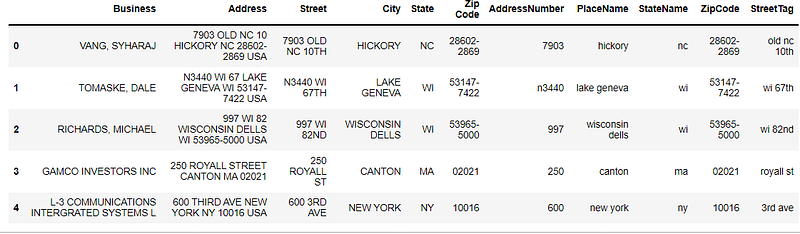
Output from pandas_usaddress

Finally, I added a little code to join the address so I could produce results in the way that my client wanted.

for index, row in dfa.iterrows():
    df.at[index, 'Street'] = (str(row['AddressNumber']) + ' ' + str(row['StreetTag'])).upper()
    df.at[index, 'City'] = str(row['PlaceName']).upper()
    df.at[index, 'State'] = str(row['StateName']).upper()
    try:
        df.at[index, 'Zip Code'] = str(row['Address']).split(str(row['StateName']).upper())[1].split()[0]
    except:
        print(row['Address'])
        pass

Here is a picture of the code to make it a little clearer:

Picture to clean up address code

Then, I eliminated the extra columns:

dfb = dfa[['Business', 'Street', 'City', 'Zip Code']].copy()
dfb.head()

To produce the following result:
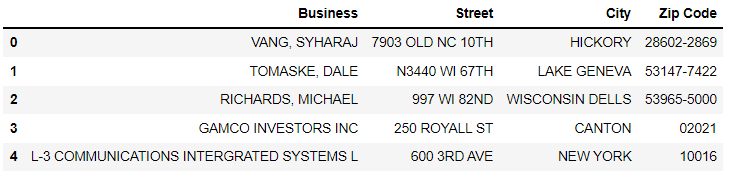
Final Output for the Customer

More content at PlainEnglish.io. Sign up for our free weekly newsletter. Follow us on Twitter and LinkedIn. Check out our Community Discord and join our Talent Collective.

Technology
Python
Parsing
Data Science
Programming
Recommended from ReadMedium