avatarDenis Matsenko

Free AI web copilot to create summaries, insights and extended knowledge, download it at here

3016

Abstract

window when inspirating your (or not) code form another project? With <a href="https://github.com/johnpapa/vscode-peacock">Peacock</a> you can set window (or its parts as in my example) colour to easest navigation.</p><p id="fb29">Tired of trying to find the right VS Code window when drawing inspiration from another project? With <a href="https://github.com/johnpapa/vscode-peacock">Peacock</a>, you can set the window color or its parts, as in my example, for easier navigation.</p><figure id="d34e"><img src="https://cdn-images-1.readmedium.com/v2/resize:fit:800/1*4m_eJPlm0cO5kbZodaF_rQ.png"><figcaption>Example of Peacock extension</figcaption></figure><p id="b60a">It works really well and has saved me a lot of time and nerve cells.</p><h1 id="20a6">6. Snippet Creator</h1><p id="17fe"><a href="https://github.com/abulka/vscode-snippet-creator">Snippet Creator</a> allows you to create custom snippets without the pain of configuration.</p><figure id="27ab"><img src="https://cdn-images-1.readmedium.com/v2/resize:fit:800/1*tgh2BWU-NqTrxExEpygzfA.gif"><figcaption>Example of Snippet Creator extension</figcaption></figure><p id="f1b5">To create a new one, you need:</p><ol><li><code>select the code</code></li><li><code>cmd: create snippet</code></li><li><code>select language</code></li><li><code>enter name</code></li><li><code>enter prefix</code></li></ol><h1 id="6298">7. Material Icon Theme</h1><p id="7c0d"><a href="https://github.com/PKief/vscode-material-icon-theme">Material Icon Theme</a> will add cool icons to your files:</p><figure id="d8fb"><img src="https://cdn-images-1.readmedium.com/v2/resize:fit:800/1*c9pXzNwl1ei1Me6t9XMkmw.jpeg"><figcaption>Example of Material Icon Theme extension</figcaption></figure><p id="8ea7">To use them, you need:</p><ol><li>Download extension.</li><li>Set it up: <code>settings > extensions > Workbench: Icon Theme</code></li></ol><p id="5f30">You can check all icons in <a href="https://github.com/PKief/vscode-material-icon-theme">extension repo</a>.</p><h1 id="5aba">8. Rainbow CSV</h1><p id="3b64"><a href="https://github.com/mechatroner/vscode_rainbow_csv">Rainbow CSV</a> will make your CSVs more readable by adding some colours:</p><figure id="e070"><img src="https://cdn-images-1.readmedium.com/v2/resize:fit:800/1*6mnN1ffNa9LLowKdP_ZJVw.jpeg"><figcaption>Example of Rainbow CSV extension</figcaption></figure><h1 id="4cf9">9. Git Graph</h1><p id="c221"><a href="https://github.com/mhutchie/vscode-git-graph">Git Graph</a> can add development tree to your vscode:</p><figure id="a89e"><img src="https://cdn-images-1.readmedium.com/v2/resize:fit:800/1*d4mcbkIrtkkdnGsoiaUsAw.gif"><figcaption>Example of Git Graph extension</figcaption></figure><p id="5cf4">Type command <code>View Git Graph</code> to open current project tree.</p><h1 id="9279">10. Tabnine: AI Autocomplete</h1><p id="3790">If you’re broke and can’t use <a href="https://marketplace.visualstudio.com/publishers/GitHub">GitHub Copilot</a>, <a href="https://marketplace.visualstudio

Options

.com/publishers/GitHub">Tabnine</a> is the best option.</p><p id="7764">Tabnine is a free alternative to <a href="https://marketplace.visualstudio.com/publishers/GitHub">Copilot</a>, although it won’t do your job for you. However, it can certainly speed up the process of writing similar code pieces.</p><figure id="9981"><img src="https://cdn-images-1.readmedium.com/v2/resize:fit:800/1*sFj-h0YmOdmzd_Lddjyg8Q.gif"><figcaption>Example of Tabnine extension</figcaption></figure><h1 id="2219">11. Tailwind Fold</h1><p id="b850">With <a href="https://github.com/stivoat/tailwind-fold">Tailwind Fold</a>, you can bid farewell to messy and hard-to-read HTML code. This extension will help you enhance the readability of your code by automatically “folding” long class attributes.</p><figure id="02dc"><img src="https://cdn-images-1.readmedium.com/v2/resize:fit:800/1*g5CepeO_duPAg4jzsdCiqQ.gif"><figcaption>Example of Tailwind Fold extension</figcaption></figure><p id="59d7">I really like and use this one every day. You can set your key bindings by editing:</p><p id="e4f9"><code>settings > keyboard shortcuts > Toggles automatic class attribute folding</code></p><h1 id="dc9d">12. Svg Preview</h1><p id="ea55">I don’t know why this feature isn’t built into VSCode…</p><p id="10af"><a href="https://github.com/SimonSiefke/vscode-svg-preview">SVG Preview</a> allows you to see SVG images instead of code.</p><figure id="bcb4"><img src="https://cdn-images-1.readmedium.com/v2/resize:fit:800/1*FmEzn8xgTat9nLMcobOPrw.jpeg"><figcaption>Example of CSV Preview extension</figcaption></figure><h1 id="6e25">13. Image Preview</h1><p id="da9f">This is a pretty cool one. <a href="https://github.com/kisstkondoros/gutter-preview">Image Preview</a> will show a little image preview for every line of HTML code where you have an image path. Also, hovering over the image path will display a card with the image, metadata, and a link to open it in folders.</p><figure id="878b"><img src="https://cdn-images-1.readmedium.com/v2/resize:fit:800/1*2CPNYVw-dq6qe8OJ54G5_w.jpeg"><figcaption>Example of Image Preview extension</figcaption></figure><p id="2d1c">By the way, this silly black gato is named Jinx. Here’s her <a href="https://www.instagram.com/bigfootjinx/">Instagram</a>. 🐈‍⬛</p><h1 id="7be4">14. Toggle Quotes</h1><p id="0aa9">Extension <a href="https://github.com/BriteSnow/vscode-toggle-quotes">Toggle Quotes</a> allows you quickly switch between quotes:</p><p id="e187"><code>" > ' > `</code></p><figure id="62a7"><img src="https://cdn-images-1.readmedium.com/v2/resize:fit:800/1*M7pJ2AKmT2cK-zUwxYpgZQ.gif"><figcaption>Example of Toggle Quotes extension</figcaption></figure><blockquote id="2311"><p>Thanks for reading! Questions or need more info? Just ask. Your suggestions to improve the article are welcome in the comments. Thanks for your input!</p></blockquote><p id="8a3e">Links section:</p><p id="0198"><a href="https://www.buymeacoffee.com/matsenkodenis">☕️ By me a coffee.</a></p></article></body>

14 Must-Have VSCode Extensions I’m in Love With!
Article preview

Hello! Below is a list of useful Visual Studio Code extensions that I use every day. I would appreciate it if you could share any extensions you use to make this list more comprehensive for other readers. Thanks for contributing!

1. Code Spell Checker

I can’t even imagine how many social points I’ve lost due to spelling mistakes in my PRs. Recently, I found Code Spell Checker. Everything it does is simply underline spelling mistakes.
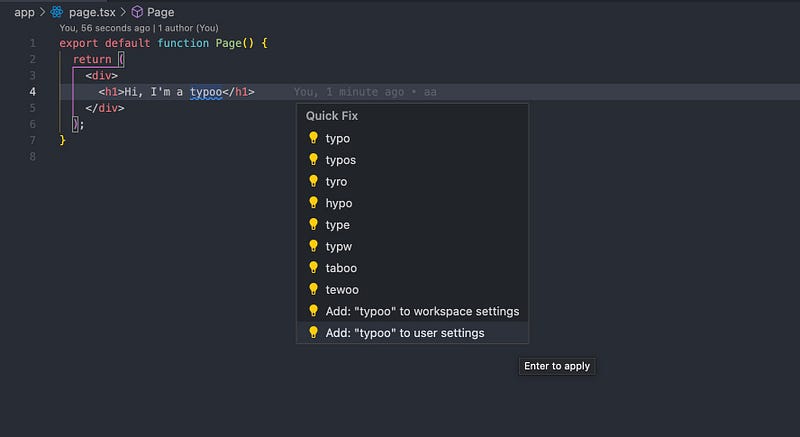
Example of Code Spell Checker extension

It has a large library of words. Additionally, you can easily add your own words to the library with just two clicks:

Hover on word > Quick fix > Add to user settings

2. Error Lens

Do you struggle to read errors? Error Lens simplifies the process by showing error messages right at the end of the line, helping you quickly spot and fix issues:
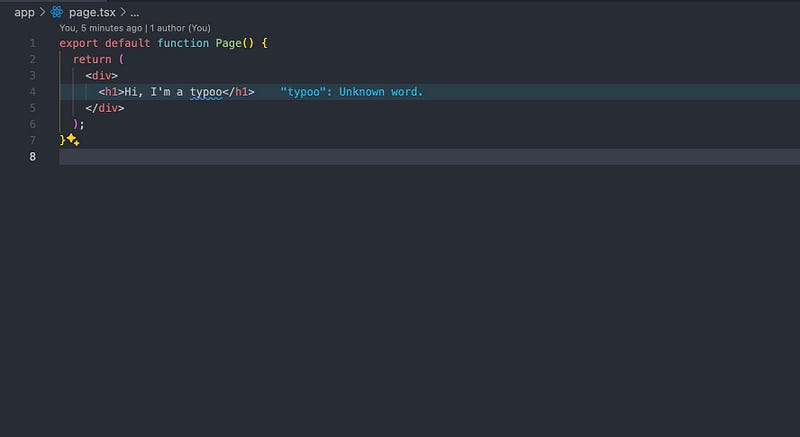
Example of Error Lens extension

3. Code Snap

Want to showcase your cool code snippets even if you don’t have a Mac? CodeSnap can help you with that.

Simply select the code you want to highlight and enter the command CodeSnap📸to create snaps like this:
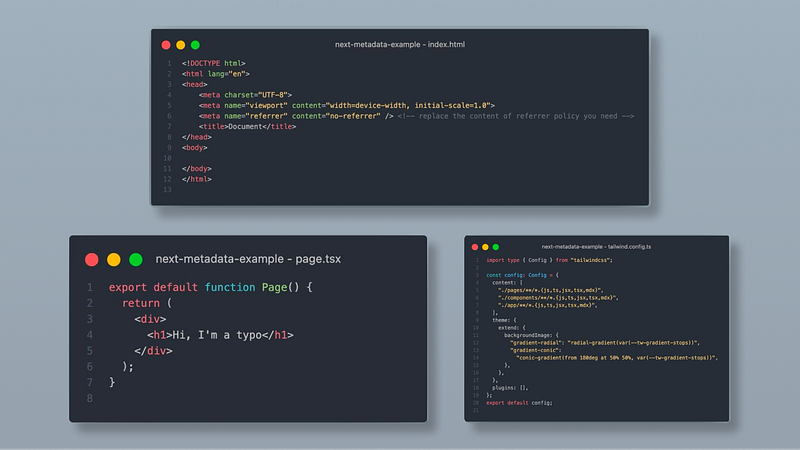
Example of Code Snap extension

You can even customize various aspects such as background color, title, line numbers, Mac window buttons, and more by going to: settings > extensions > CodeSnap

4. Better Comments

Better Comments is actually my favorite one from this list. With this extension, you can:
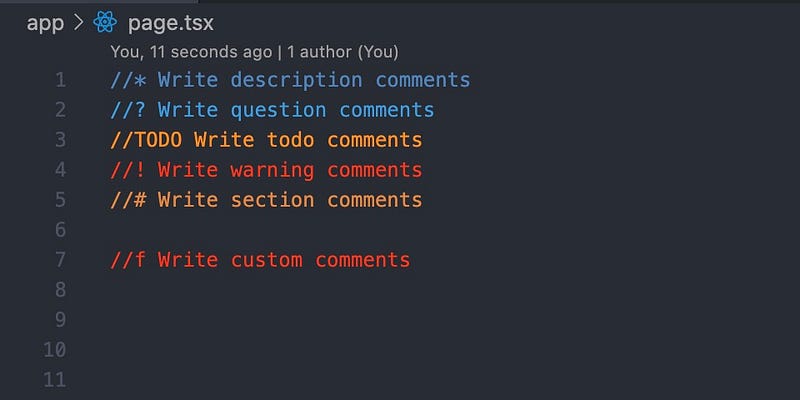
Example of Better Comments extension

To edit default or add custom comment types, go to:

settings > extensions > Better Comments > Tags

5. Peacock

Tired of trying to find right vscode window when inspirating your (or not) code form another project? With Peacock you can set window (or its parts as in my example) colour to easest navigation.

Tired of trying to find the right VS Code window when drawing inspiration from another project? With Peacock, you can set the window color or its parts, as in my example, for easier navigation.
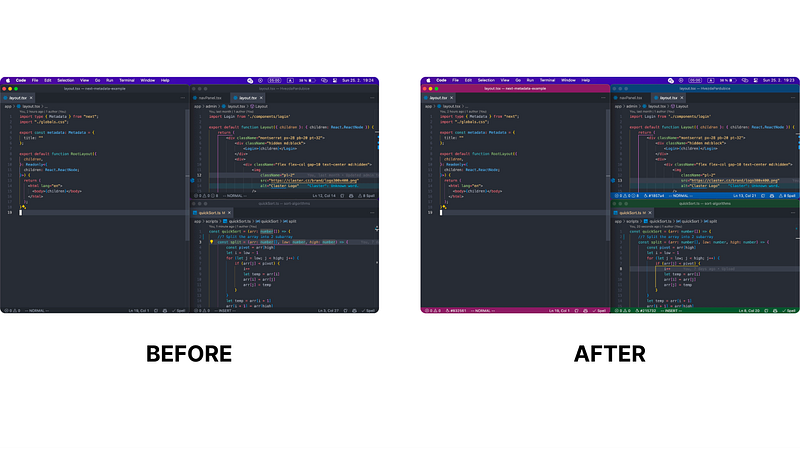
Example of Peacock extension

It works really well and has saved me a lot of time and nerve cells.

6. Snippet Creator

Snippet Creator allows you to create custom snippets without the pain of configuration.
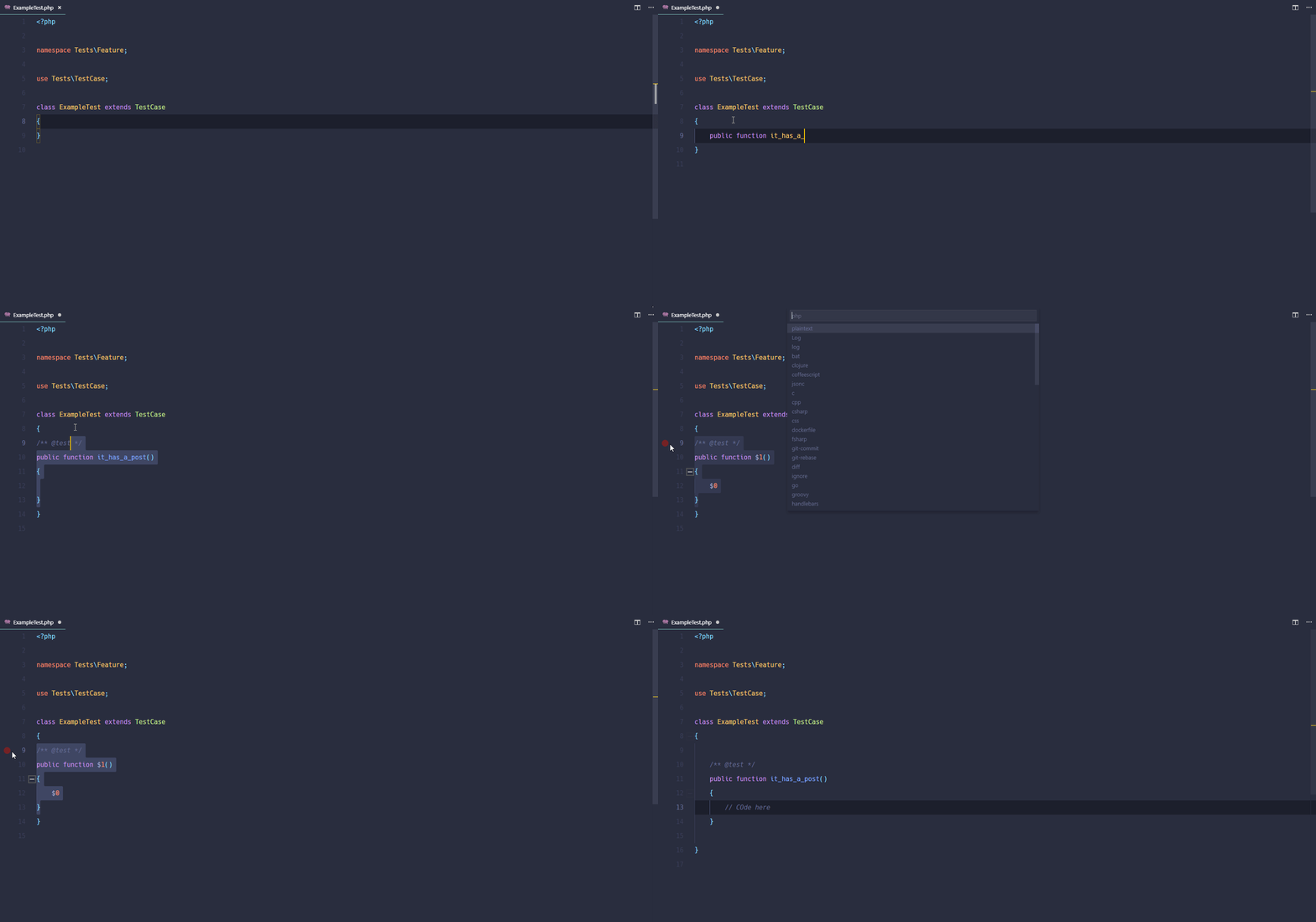
Example of Snippet Creator extension

To create a new one, you need:

  1. select the code
  2. cmd: create snippet
  3. select language
  4. enter name
  5. enter prefix

7. Material Icon Theme

Material Icon Theme will add cool icons to your files:
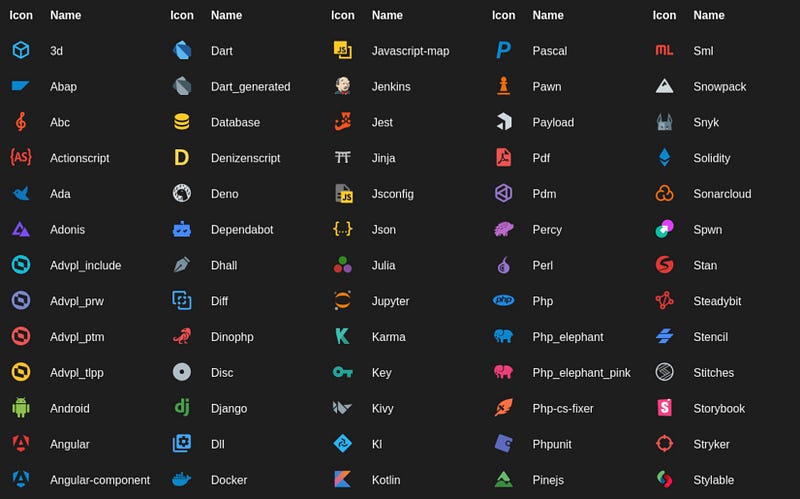
Example of Material Icon Theme extension

To use them, you need:

  1. Download extension.
  2. Set it up: settings > extensions > Workbench: Icon Theme

You can check all icons in extension repo.

8. Rainbow CSV

Rainbow CSV will make your CSVs more readable by adding some colours:
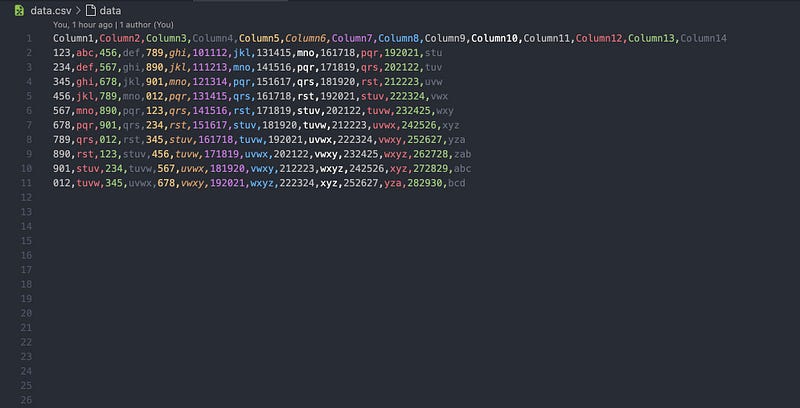
Example of Rainbow CSV extension

9. Git Graph

Git Graph can add development tree to your vscode:
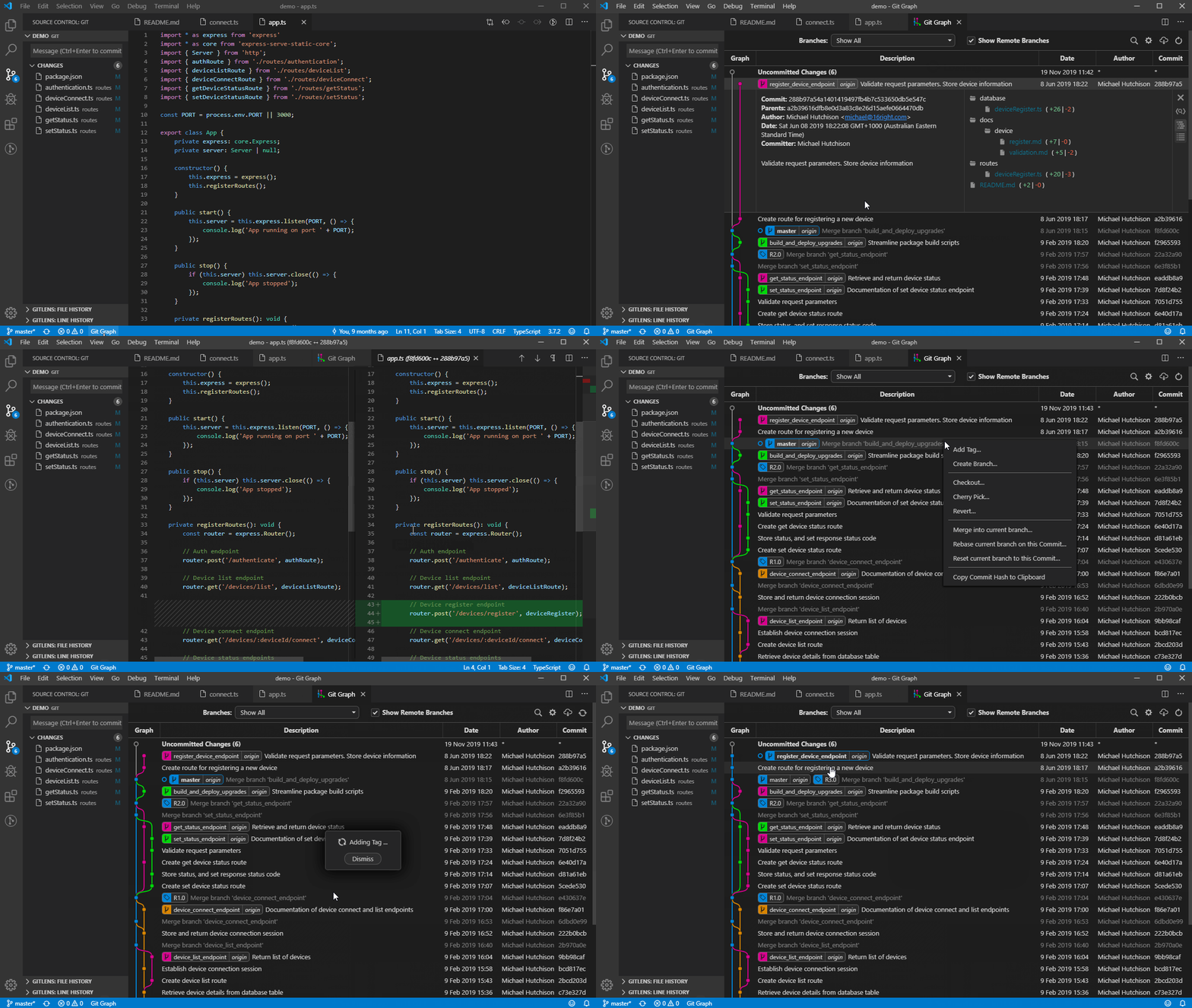
Example of Git Graph extension

Type command View Git Graph to open current project tree.

10. Tabnine: AI Autocomplete

If you’re broke and can’t use GitHub Copilot, Tabnine is the best option.

Tabnine is a free alternative to Copilot, although it won’t do your job for you. However, it can certainly speed up the process of writing similar code pieces.
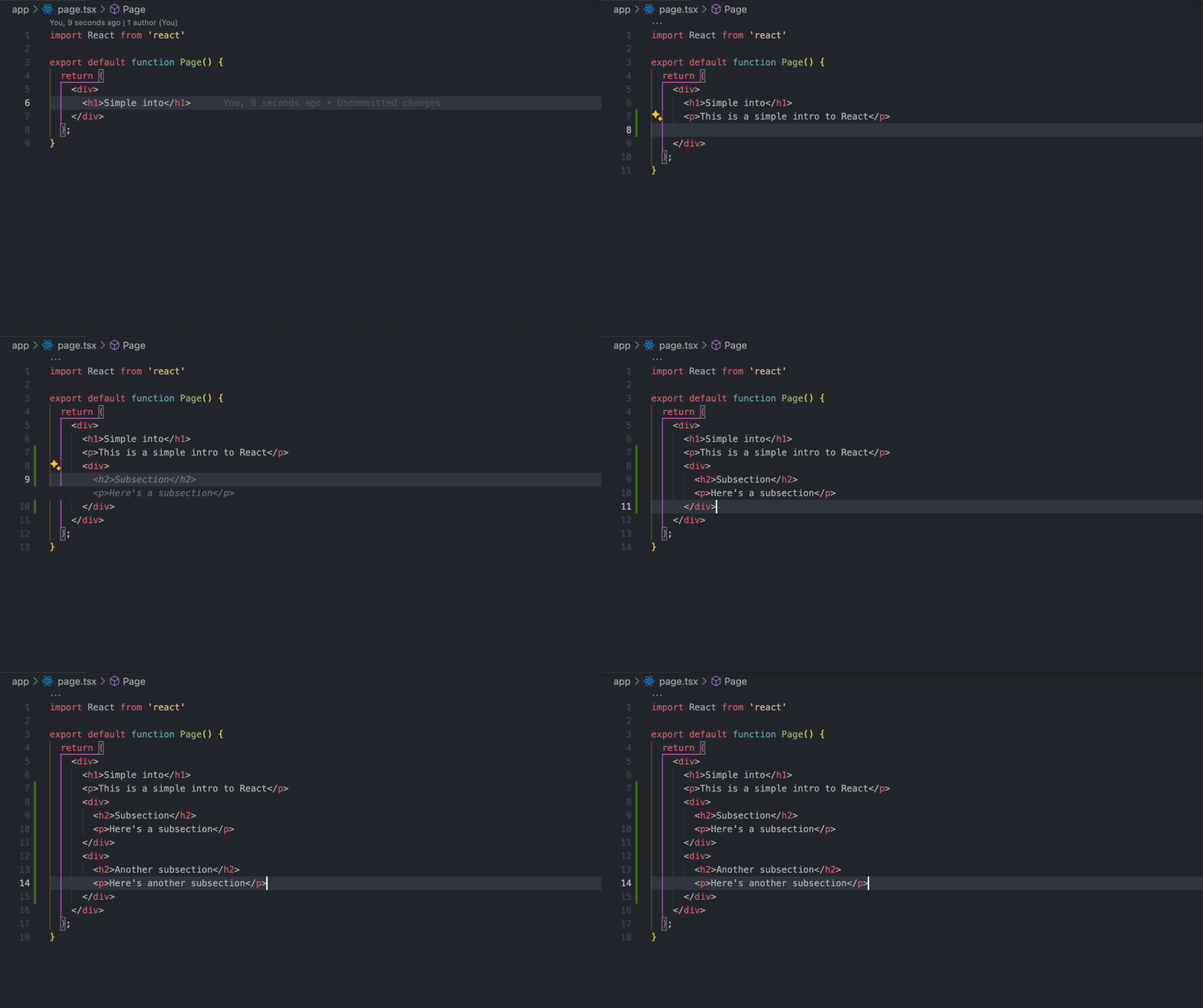
Example of Tabnine extension

11. Tailwind Fold

With Tailwind Fold, you can bid farewell to messy and hard-to-read HTML code. This extension will help you enhance the readability of your code by automatically “folding” long class attributes.
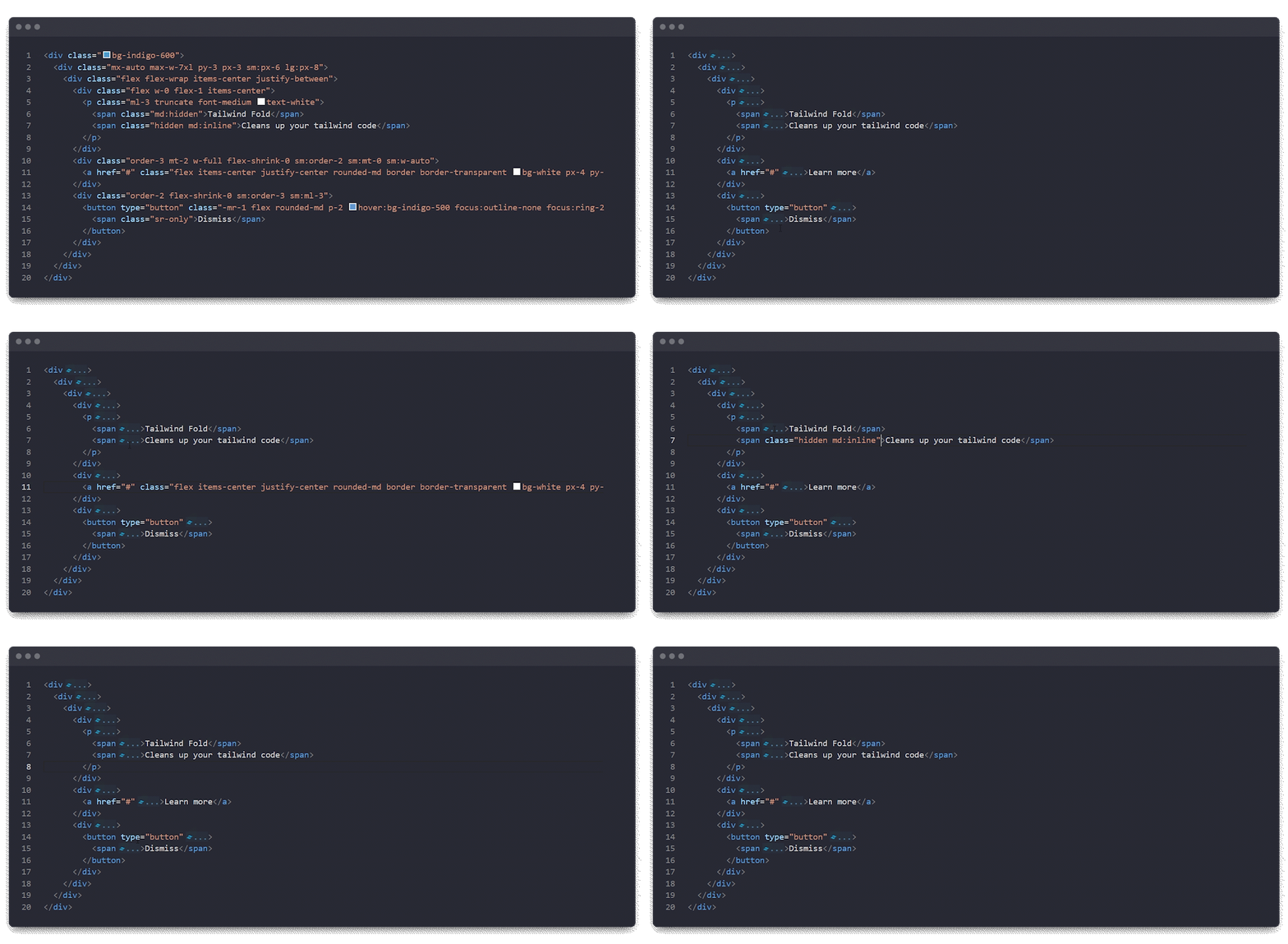
Example of Tailwind Fold extension

I really like and use this one every day. You can set your key bindings by editing:

settings > keyboard shortcuts > Toggles automatic class attribute folding

12. Svg Preview

I don’t know why this feature isn’t built into VSCode…

SVG Preview allows you to see SVG images instead of code.
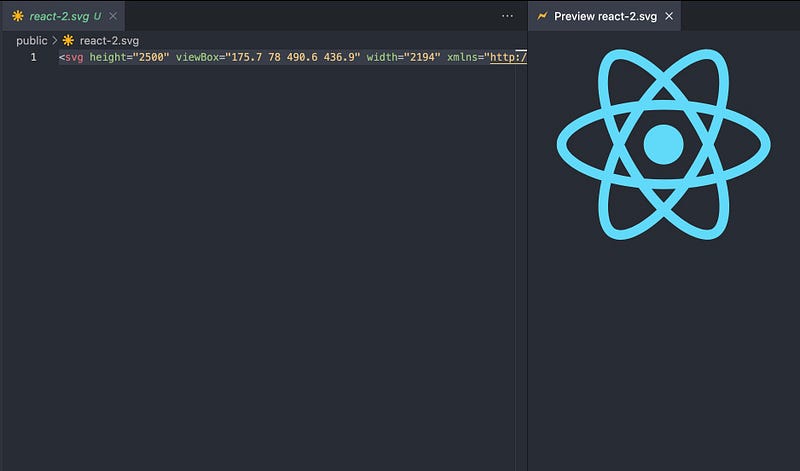
Example of CSV Preview extension

13. Image Preview

This is a pretty cool one. Image Preview will show a little image preview for every line of HTML code where you have an image path. Also, hovering over the image path will display a card with the image, metadata, and a link to open it in folders.
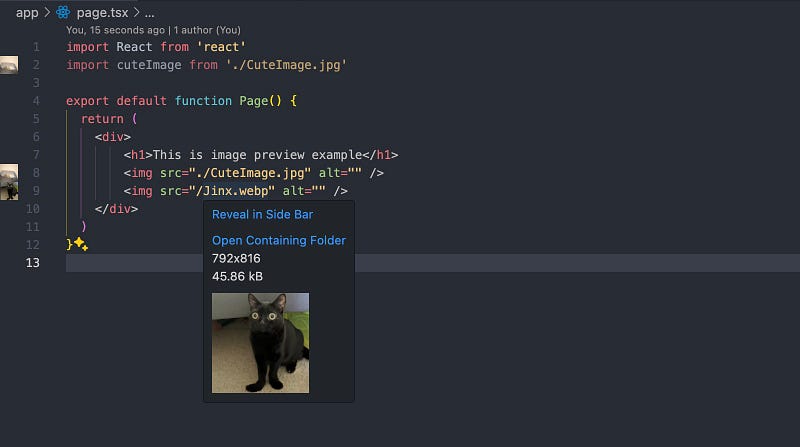
Example of Image Preview extension

By the way, this silly black gato is named Jinx. Here’s her Instagram. 🐈‍⬛

14. Toggle Quotes

Extension Toggle Quotes allows you quickly switch between quotes:

" > ' > `
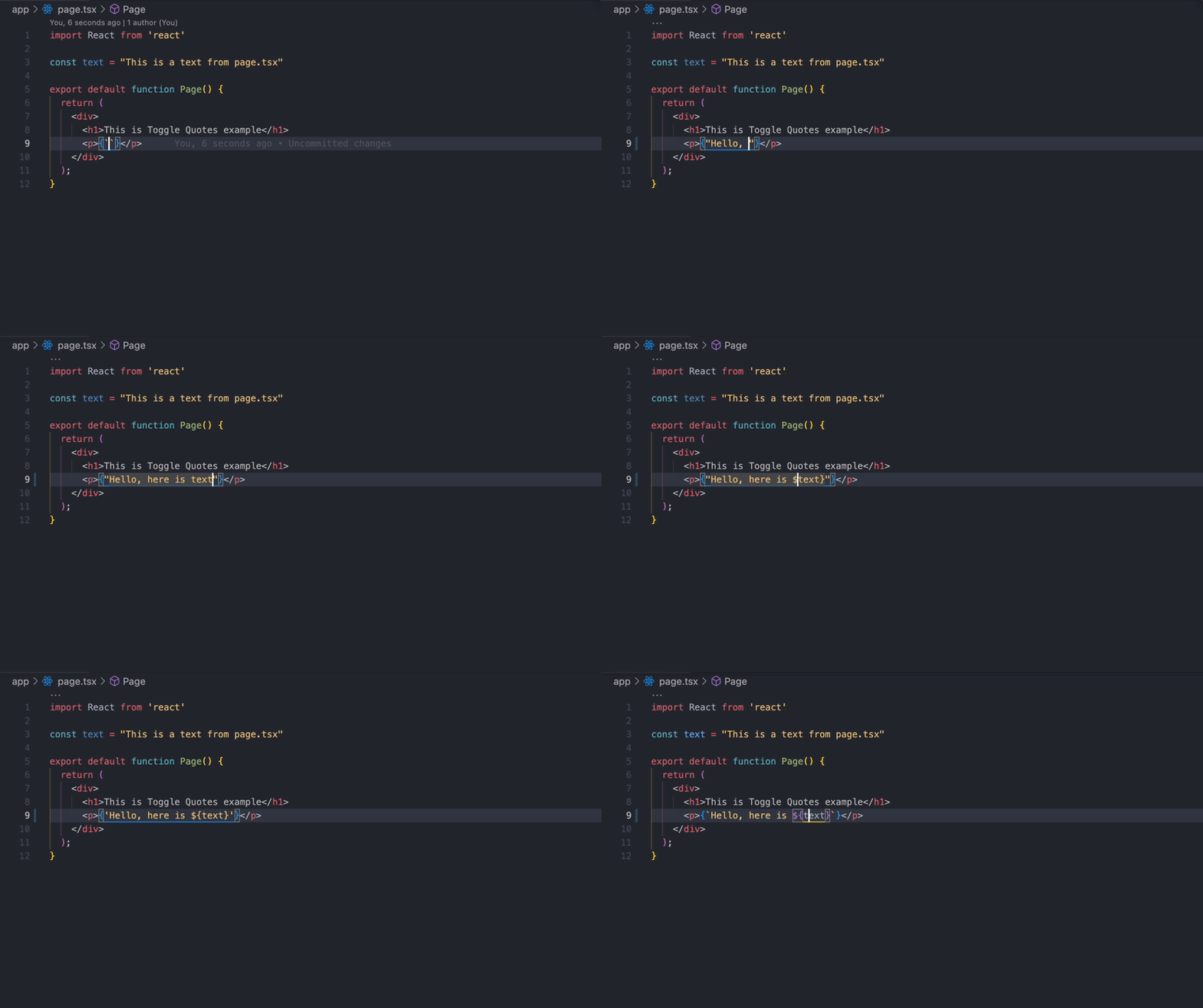
Example of Toggle Quotes extension

Thanks for reading! Questions or need more info? Just ask. Your suggestions to improve the article are welcome in the comments. Thanks for your input!

Links section:

☕️ By me a coffee.

Vscode
Development
Programming
Productivity
Extension
Recommended from ReadMedium