
12 Simple Steps To Boost SEO For Content Creators
Here’s how to best set up your website for search engines.
This article features 12 “must-do” action items for any website that wants to improve its search ranking.
It’s intended for any small business, but it’s especially relevant for content creators, bloggers, solo service providers, and freelancers who don’t have an in-house digital marketing team or budget to hire an SEO strategist.
The goal of this guide is to provide:
- Easy, practical steps that you can implement on your own to boost SEO for increased organic traffic.
- Best practices on formatting your blog posts and content pages on your website for search engines.
I like to call these the “easy wins of SEO.”
Keep in mind:
- To get the most out of this article, it’s important you know which keywords you are looking to rank for before implementing most of these steps.
- This article is not meant to be anywhere near a complete guide on SEO, nor will it delve into advanced topics.
Let’s get started.
1. Put your main keyword phrase in the URL of the page.
- Keep your URL short and concise. Short URLs perform better, ideally a max of 50 characters. Typically, the longer your URL length, the lower your rankings are.
- Google has stated the first 3–5 words in URLs are given more weight.
- Avoid using dates in URLs.
- Use a max of 2 folders/directories.

- Always use hyphens to break up words. Never use spaces or underscores.
2. Make your page title extremely appealing and include the target keyword phrase you want to rank for.
- Your page title is the HTML
tag</a> and is what gets displayed on the search engine results page (SERP) and within the browser tab when your page is being viewed.</li>
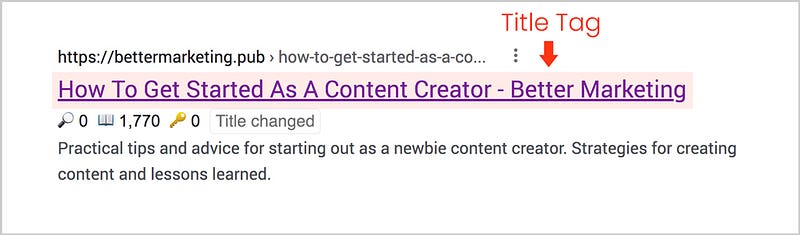

- Keep it somewhat short and descriptive. Too long of a title will cause it to get cut off the search results page.
- Because of the limited space, keep your keywords as close to the beginning as possible of the title.
- Add words that act as modifiers such as Buy, Guide, Review, Online, Offers, Cheap, Year, etc.
- Treat your title as a way to entice users to click on the link when it appears as a search result.
- WordPress plugins such as Rank Math or Yoast will help you visualize how your page title will appear on the results page.
3. Write an enticing meta description that includes your keywords and related keywords.
- This is the description that appears below the page title on the search results page.
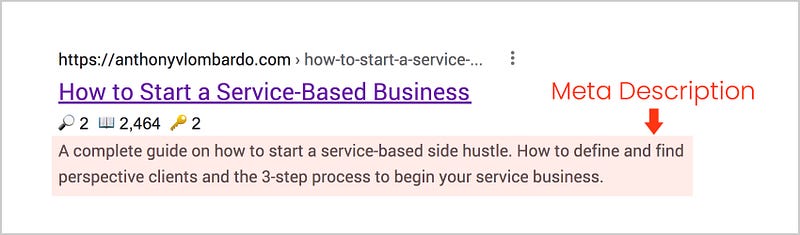
- It should be between 150–165 words.
- Generally speaking, it doesn’t improve your actual SEO ranking but its real value is helping sell your page so people click on it when it appears as a search result.
- Use keywords in the description to help reassure users that this is exactly the information they are looking for.
- Experiment with your meta descriptions by tweaking them to see what will increase the click-through rate and help drive engagement.
Keep in mind that both the meta description and page title have a big impact on click-through rate. They sell your webpage to users when they are looking through search results on Google. Make sure they are relevant to the search query and entice users to click.
4. Put your target keywords in the page’s main headline
This should always be set as your
tag.
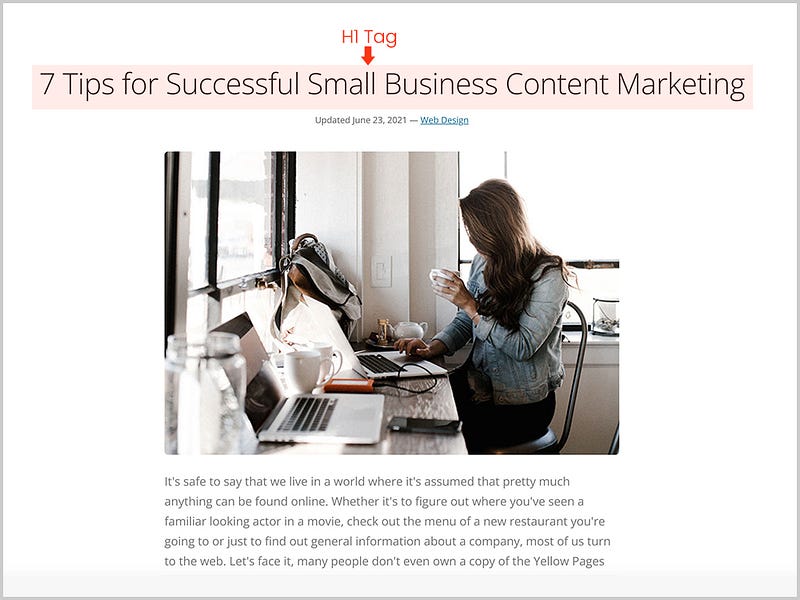
- Avoid having multiple
tags on a single page. This can potentially confuse search engines.
- Ideally a max of 60–70 characters. Aim for 6–10 words. It’s more effective to be concise and to the point rather than bloating your headlines.
- You can use The Headline Analyzer which will score your overall headline quality and rate its ability to result in increased traffic and overall SEO value.
- Create subheadings using
and
tags within the body of your content. If possible, try incorporating some of your targeted keywords into these headings but don’t force them.
Tips for writing page headlines:
- Write headlines that answer a question or solve a problem.
- Use words that will entice people to engage with your content and share it on social media.
- Use numbers and interesting adjectives.
- Consider using “How To” in your headline which generates more shares than any other 2-word phrase.
- “X Amount of Ways” also does well. For example, “10 Ways To Effortlessly Sell Your Home”
- A list of 5 and 10 items typically does the best.
5. Add a featured image to your pages.
This is a page’s main image and should appear at the top of the page near the headline. (
)
Place the target keywords in the image filename. For example if one of your target keywords was “Toronto meditation teacher”, you could name the images that appear on the page:
- toronto-meditation-teacher.jpg
- meditation-teacher-toronto.jpg
- meditation-teacher-in-toronto.jpg
Keep in mind, that some publishing platforms like Medium change the image filename once you upload them. This strategy is best used on your own website where you have the most control of the naming conventions.
6. Add your target keywords within the first 100 words of your page.
- This should be natural — you shouldn’t have to force them in.
- Google will use the first 100 words to get a good gauge of what the page is about.
7. Ensure proper interlinking between all pages throughout your website.
- Ensure your website has a clear, consistent, and easy-to-use navigation that appears on every page.
- Google uses this to determine the structure and hierarchy of your website.
8. Create internal links within the body content of your page.
- This allows you to send users to somewhere else on your site to a related piece of content.
- Aim for 1 link per 500 words (on average 3–4 links per article).
- The link text should contain some of the target keywords.
- Tip: Head over to any random page on Wikipedia and observe how they do this. They are masters at interlinking.
9. Create external links by linking to another site of high authority that is trustworthy.
- External links tell Google that your site is similar to the website you are linking to.
- If a competitor’s website features high-value content related to a piece of content on your website and it adds value to your visitors, don’t be afraid to link to them. It can only help your website’s authority in the long run.
10. Add a YouTube video to your page.
- Visitors to your webpage are much more likely to stay engaged with your content and spend more time browsing your website when it features video.
- Stats also show viewers retain 95% of a message when they watch it in a video, compared to 10% when reading it in the text
- Google likes when you “place your content with your content”. In other words, YouTube is the 2nd biggest search engine and since Google owns YouTube, adding videos to your website is a way to leverage that synergy.
11. Resolve any technical issues with your website.
- Performance and speed play a big part in how search engines view your website, especially on mobile devices. It is important your site loads as fast as possible.
- Always optimize your images so they are displayed at the smallest file size possible without reducing quality. Images are typically the biggest culprit for slow page speed. Ideally, aim to keep most images less than 100kb. For bigger images, try to keep them under 200kb.
- Google prioritizes HTTPS over HTTP. So make sure you have an SSL for your website. An SSL can not only boost your site rank but shows visitors your site is a safe place to make purchases too.
- Security is critical too. If your site gets hacked, hit with malware, or is a haven for spam comments and messages, this can cause Google to flag your website in the search results as potentially unsafe. If you are using WordPress, install All In One WP Security & Firewall or WordFence. These are the two best security plugins and include tons of features to ramp up the security on your site.
12. Ensure your website is mobile-friendly.
- Google has a mobile-first index — meaning the way your website displays on a mobile device becomes the starting point for what Google includes in its index. It is the baseline for how they determine rankings.
- So if your site has a poor user experience or lacks content on mobile, it will negatively impact your rankings for the entire site.
- Conversely, a site with a better mobile experience can potentially receive a rankings boost.
- To ensure your website is mobile-friendly, ideally, it should be using responsive design so it displays nicely on all screen sizes. The unpractical option is to have a separate mobile-optimized website, but this entails maintaining two separate websites which you don’t want to do.
Next Steps
Now that you know the “easy wins of SEO” to optimize the content on your site for organic search results, get started by implementing some of these things.
Yes, it requires a little bit of work, but these are simple, small tasks that can be broken down over time.
If you have a question about implementing any of these steps, please feel free to reach out in the comments.
If you need hands-on support, you might be interested in receiving my SEO Recommendations Report that’s tailored to your website.
Also, if you are a content creator, coach, freelancer, or solopreneur and need help with your website, join me for a complimentary one-on-one consulting call.