avatarSatyam Kumar

Free AI web copilot to create summaries, insights and extended knowledge, download it at here

2493

Abstract

small size dataset Swifter may choose to execute with Pandas apply() function.</p><h2 id="edfc">Installation:</h2><p id="989f">The swifter package can be installed from PyPl using <code><b>pip install swifter</b></code><b> </b>and import it using<b> <code>import swifter</code>.</b></p><h2 id="2efc">Implementation and Usage:</h2><p id="e709">I have created a function that performs some random operations on the Pandas Series. Firstly, we will execute the function using apply():</p><div id="736f"><pre># <span class="hljs-keyword">Call</span> random_function <span class="hljs-keyword">for</span> col1 <span class="hljs-keyword">and</span> col2 <span class="hljs-keyword">columns</span> <span class="hljs-keyword">using</span> apply()</pre></div><div id="99b5"><pre>df<span class="hljs-selector-attr">[<span class="hljs-string">'new_col'</span>]</span> = df<span class="hljs-selector-class">.apply</span>(lambda x: <span class="hljs-built_in">random_func</span>(x<span class="hljs-selector-attr">[<span class="hljs-string">'col1'</span>]</span>, x<span class="hljs-selector-attr">[<span class="hljs-string">'col2'</span>]</span>))</pre></div><p id="e7b3">Now to parallelize the function execution we can integrate the swifter package with Pandas data frame object:</p><div id="1425"><pre><span class="hljs-comment"># Call random_function for col1 and col2 columns for parallel execution</span></pre></div><div id="c529"><pre>df<span class="hljs-selector-attr">[<span class="hljs-string">'new_col'</span>]</span> = df<span class="hljs-selector-class">.swifter</span><span class="hljs-selector-class">.apply</span>(lambda x: <span class="hljs-built_in">random_func</span>(x<span class="hljs-selector-attr">[<span class="hljs-string">'col1'</span>]</span>, x<span class="hljs-selector-attr">[<span class="hljs-string">'col2'</span>]</span>))</pre></div><p id="f8ea">Just by integrating the keyword swifter, one can parallelize the execution of the function.</p><h1 id="3293">Benchmarking:</h1><p id="4063">I have compared the benchmark time numbers for the execution of the function using apply() and by integrating the swifter package with Pandas data frame object then calling apply(). Now let's observe the improvements in the execution speed.</p><blockquote id="452b"><p><i>The performance is recorded on a system with <b>RAM: 64GB</b> with <b>10 CPU cores</b>.</i></p></blockquote><figure id="2232"><img src="https://cdn-images-1.readmedium.com/v2/resize:fit:800/1*lErcRPKlS8aRy6MKpUEyNQ.p

Options

ng"><figcaption>(Image by Author), Benchmarking time of execution of apply() and swifter</figcaption></figure><p id="3dc1">We can observe from the above plot that after using the swifter package for parallelism, speed-up the workflow by almost <b>10x</b> times for<b> 65 million</b> data samples.</p><h1 id="381c">Conclusion:</h1><p id="d788">Swifter is a great tool to parallelize the execution of your Python function. It automatically chooses the fastest way to execute your function by either vectorizing or using Dask in the backend.</p><p id="58db">We are getting a 10x faster execution time for 65 million records, which will increase further as sample size increases.</p><p id="83a8">It can be a handy tool to optimize the function execution with just one work of code change. One can also use the Python multiprocessing library to execute your custom in parallel, but it will require few lines of change in the code.</p><blockquote id="4077"><p><b>Read my previous article related to parallelization of optimization of the code:</b></p></blockquote><ul><li><a href="https://towardsdatascience.com/4-libraries-that-can-parallelize-the-existing-pandas-ecosystem-f46e5a257809">4 Libraries that can parallelize the existing Pandas ecosystem</a></li><li><a href="https://towardsdatascience.com/speed-up-your-pandas-workflow-by-changing-a-single-line-of-code-11dfd85efcfb">Speed up your Pandas Workflow with Modin</a></li><li><a href="https://towardsdatascience.com/25x-times-faster-python-function-execution-in-a-few-lines-of-code-4c82bdd0f64c">30 times Faster Python Function Execution with Multiprocessing module</a></li><li><a href="https://towardsdatascience.com/400x-time-faster-pandas-data-frame-iteration-16fb47871a0a">400x times faster Pandas Data Frame Iteration</a></li><li><a href="https://towardsdatascience.com/3x-times-faster-pandas-with-pypolars-7550e605805e">3x times faster Pandas with PyPolars</a></li><li><a href="https://towardsdatascience.com/optimize-pandas-memory-usage-while-reading-large-datasets-1b047c762c9b">Optimize Pandas Memory Usage for Large Datasets</a></li><li><a href="https://towardsdatascience.com/20x-times-faster-grid-search-cross-validation-19ef01409b7c">20x times faster Grid Search Cross-Validation</a></li></ul><h1 id="aaae">References:</h1><p id="5f6f">[1] Swifter GitHub Repository: <a href="https://github.com/jmcarpenter2/swifter">https://github.com/jmcarpenter2/swifter</a></p><p id="b5cc" type="7">Thank You for Reading</p></article></body>

10x times faster Pandas Apply in a single line change of code

Speed-up Pandas processing workflow with Swifter Package
(Image by Author)

Pandas is one of the popular Python packages among the data science community, as it offers a vast API and flexible data structures for data explorations and visualization. When it comes to handling and processing large-size datasets, it fails.

One can load and process a large-size dataset in chunks or use distributed parallel-computing libraries like Dask, Pandarallel, Vaex, etc. Modin library or multiprocessing package can be used to execute the Python functions in parallel and speed up the workflow. In my previous articles, I have discussed the hands-on implementation of Dask, Vaex, Modin, multiprocessing libraries.

Sometimes we are not willing to use Dask or Vaex library instead of Pandas, or one does not want to write all that extraneous code just to execute few functions in parallel.

Can we parallelize the execution of the Python function without much code change? Yes for sure

apply() function in Pandas library allows developers to pass a function and apply it on every single value of the series. The function's execution apply() comes with a huge improvement as it segregates the data according to the conditions required.

Usage of apply() function is preferred for Pandas Series rather than the custom calling of the function. In this article, we will discuss how to further parallelize the execution of the apply() function and optimize the time constraints using the Swifter package.

Swifter:

Swifter is an open-source package that speeds up the function execution. It can be integrated with Pandas objects for ease of usage. The parallel execution of any function in Python can be done with a single line change of code by integrating the swifter package.

How does it work?

Swifter automatically picks the best way to implement the apply() function by either vectorizing or using Dask implementation in the backend to parallelize the execution. For a small size dataset Swifter may choose to execute with Pandas apply() function.

Installation:

The swifter package can be installed from PyPl using pip install swifter and import it using import swifter.

Implementation and Usage:

I have created a function that performs some random operations on the Pandas Series. Firstly, we will execute the function using apply():

# Call random_function for col1 and col2 columns using apply()
df['new_col'] = df.apply(lambda x: random_func(x['col1'], x['col2']))

Now to parallelize the function execution we can integrate the swifter package with Pandas data frame object:

# Call random_function for col1 and col2 columns for parallel execution
df['new_col'] = df.swifter.apply(lambda x: random_func(x['col1'], x['col2']))

Just by integrating the keyword swifter, one can parallelize the execution of the function.

Benchmarking:

I have compared the benchmark time numbers for the execution of the function using apply() and by integrating the swifter package with Pandas data frame object then calling apply(). Now let's observe the improvements in the execution speed.

The performance is recorded on a system with RAM: 64GB with 10 CPU cores.
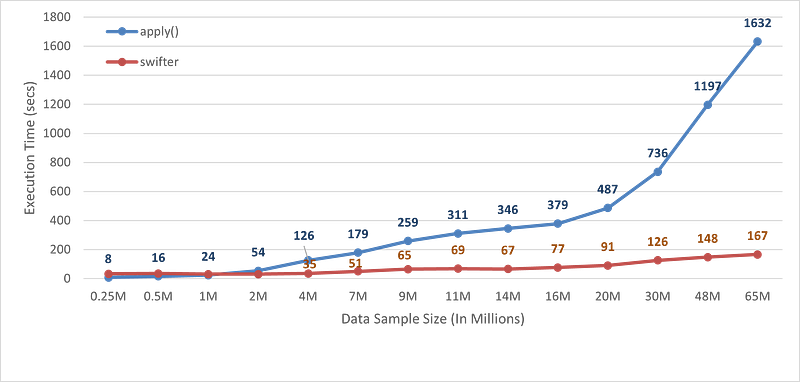
(Image by Author), Benchmarking time of execution of apply() and swifter

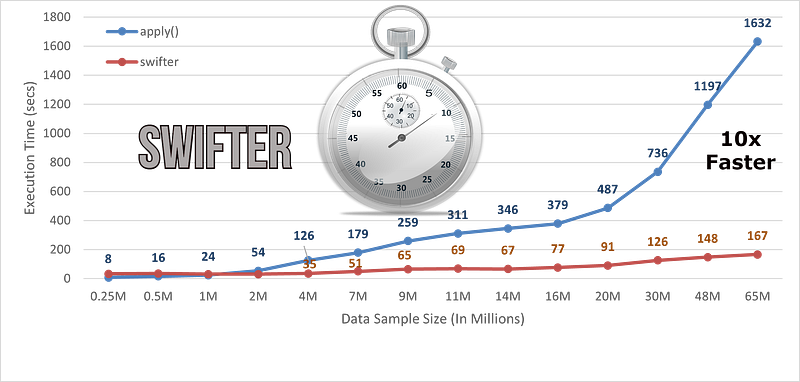
We can observe from the above plot that after using the swifter package for parallelism, speed-up the workflow by almost 10x times for 65 million data samples.

Conclusion:

Swifter is a great tool to parallelize the execution of your Python function. It automatically chooses the fastest way to execute your function by either vectorizing or using Dask in the backend.

We are getting a 10x faster execution time for 65 million records, which will increase further as sample size increases.

It can be a handy tool to optimize the function execution with just one work of code change. One can also use the Python multiprocessing library to execute your custom in parallel, but it will require few lines of change in the code.

Read my previous article related to parallelization of optimization of the code:

References:

[1] Swifter GitHub Repository: https://github.com/jmcarpenter2/swifter

Thank You for Reading

Artificial Intelligence
Machine Learning
Data Science
Pandas
Education
Recommended from ReadMedium