avatarJim McAulay🍁 I'm nobody. Are you a nobody too?

Free AI web copilot to create summaries, insights and extended knowledge, download it at here

2239

Abstract

ected integer into a string and add it to grey Then we do it again to select the second shade of grey.</p><p id="be32">We make a circle of a random size with one shade of grey and fill it with a different shade. We repeat this 10 times then do it twice more making 3 grey circle designs.</p><div id="b6d7"><pre>import turtle as T import random T<span class="hljs-selector-class">.width</span> (<span class="hljs-number">10</span>) <span class="hljs-keyword">for</span> <span class="hljs-selector-tag">i</span> <span class="hljs-keyword">in</span> range (<span class="hljs-number">10</span>): grey_num = str (random<span class="hljs-selector-class">.randrange</span>(<span class="hljs-number">60</span>,<span class="hljs-number">80</span>)) grey_num2 = str (random<span class="hljs-selector-class">.randrange</span>(<span class="hljs-number">60</span>,<span class="hljs-number">80</span>)) grey_col = <span class="hljs-string">"grey"</span>+grey_num grey_col2 = <span class="hljs-string">"grey"</span>+grey_num2 circ_siz = random<span class="hljs-selector-class">.randrange</span> (<span class="hljs-number">20</span>,<span class="hljs-number">75</span>) T<span class="hljs-selector-class">.color</span> (grey_col,grey_col2) T<span class="hljs-selector-class">.begin_fill</span>() T<span class="hljs-selector-class">.circle</span> (circ_siz) T<span class="hljs-selector-class">.end_fill</span>() T<span class="hljs-selector-class">.penup</span>() T<span class="hljs-selector-class">.goto</span> (-<span class="hljs-number">200</span>,-<span class="hljs-number">200</span>) T<span class="hljs-selector-class">.pendown</span>() <span class="hljs-keyword">for</span> <span class="hljs-selector-tag">i</span> <span class="hljs-keyword">in</span> range (<span class="hljs-number">10</span>): grey_num = str (random<span class="hljs-selector-class">.randrange</span>(<span class="hljs-number">60</span>,<span class="hljs-number">80</span>)) grey_num2 = str (random<span class="hljs-selector-class">.randrange</span>(<span class="hljs-number">60</span>,<span class="hljs-number">80</span>)) grey_col = <span class="hljs-string">"grey"</span>+grey_num grey_col2 = <span class="hljs-string">"grey"

Options

</span>+grey_num2 circ_siz = random<span class="hljs-selector-class">.randrange</span> (<span class="hljs-number">20</span>,<span class="hljs-number">75</span>) T<span class="hljs-selector-class">.color</span> (grey_col,grey_col2) T<span class="hljs-selector-class">.begin_fill</span>() T<span class="hljs-selector-class">.circle</span> (circ_siz) T<span class="hljs-selector-class">.end_fill</span>() T<span class="hljs-selector-class">.penup</span>() T<span class="hljs-selector-class">.goto</span> (<span class="hljs-number">200</span>,-<span class="hljs-number">200</span>) T<span class="hljs-selector-class">.pendown</span>() <span class="hljs-keyword">for</span> <span class="hljs-selector-tag">i</span> <span class="hljs-keyword">in</span> range (<span class="hljs-number">10</span>): grey_num = str (random<span class="hljs-selector-class">.randrange</span>(<span class="hljs-number">60</span>,<span class="hljs-number">80</span>)) grey_num2 = str (random<span class="hljs-selector-class">.randrange</span>(<span class="hljs-number">60</span>,<span class="hljs-number">80</span>)) grey_col = <span class="hljs-string">"grey"</span>+grey_num grey_col2 = <span class="hljs-string">"grey"</span>+grey_num2 circ_siz = random<span class="hljs-selector-class">.randrange</span> (<span class="hljs-number">20</span>,<span class="hljs-number">75</span>) T<span class="hljs-selector-class">.color</span> (grey_col,grey_col2) T<span class="hljs-selector-class">.begin_fill</span>() T<span class="hljs-selector-class">.circle</span> (circ_siz) T<span class="hljs-selector-class">.end_fill</span>()</pre></div><p id="b841"><a href="https://readmedium.com/c4d5fe0b9b6c?source=post_page-----acf8106ab83d----------------------">Jim McAulay🍁</a> “I generally avoid temptation unless I can’t resist it “ — Mae West</p><figure id="2673"><img src="https://cdn-images-1.readmedium.com/v2/resize:fit:800/0*6xjqR1L6zqDrVQH7"><figcaption>Don’t touch this it’s a panic button</figcaption></figure><figure id="1384"><img src="https://cdn-images-1.readmedium.com/v2/resize:fit:800/0*_BA-1fvJzEERY_X1.jpeg"><figcaption>buy me a coffee</figcaption></figure><p id="6ec4">59–58 27–28</p></article></body>

101 Shades Of Grey In Python Turtle

Shades of color are numbered in Python turtle
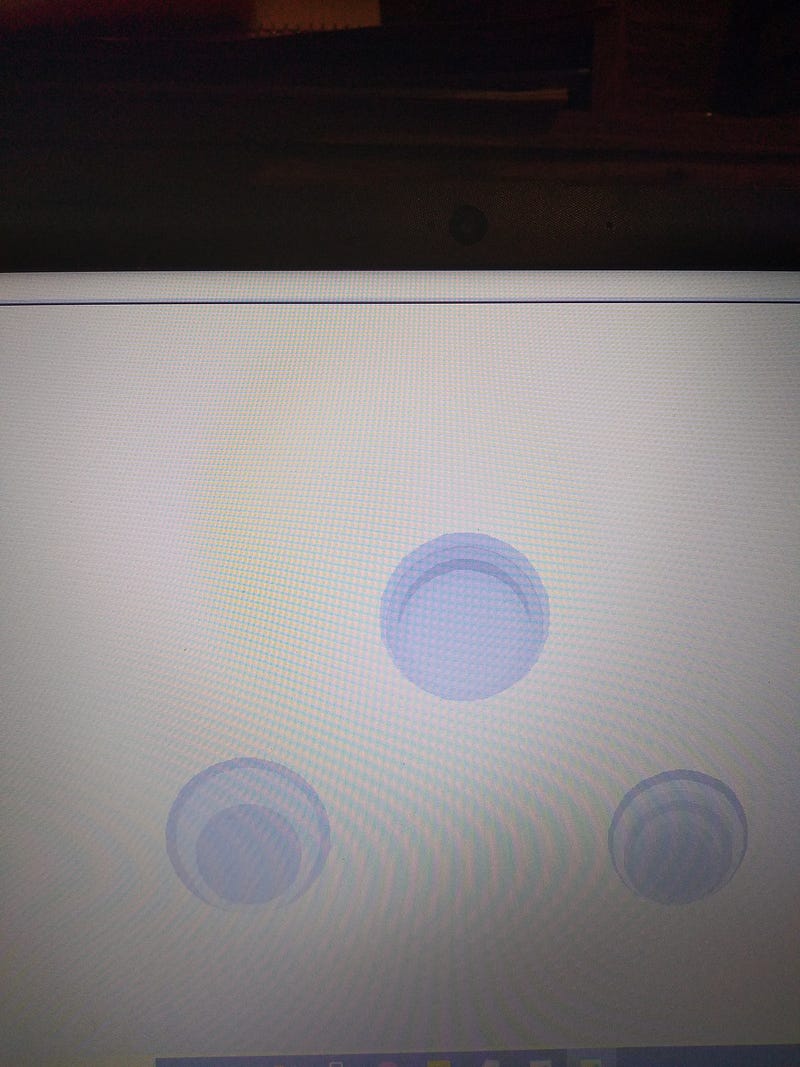
screen shot my computer

In this article we learn about the 101 shades of grey in Python turtle and create a fun module that makes interesting designs incorporating random grey circles.

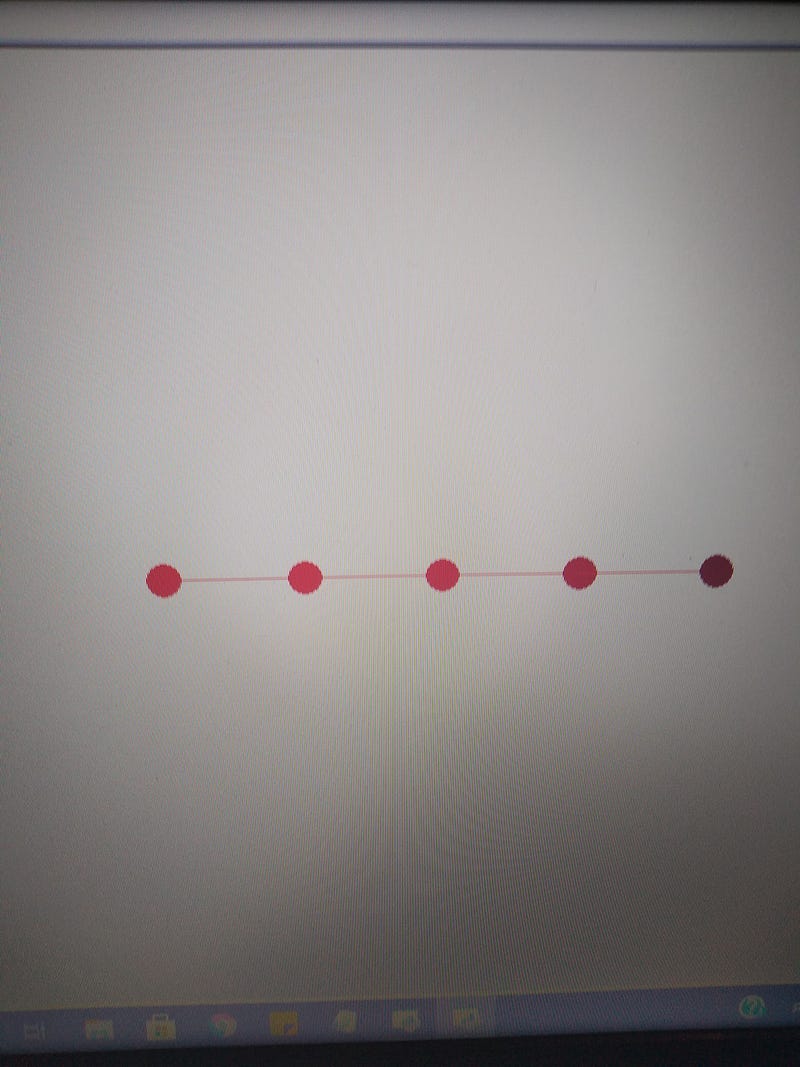
Many of the colors available in turtle have numbered shades. Often the shades do not correspond to the color itself but rather produce what you with get with more of the color. For example red is produced by mixing full red with no blue or green ( 255,0,0).

Red and red1 (255,0,0) Red2 (238,0,0) Red3 (205,0,9) Red4 (138,0,0)

When you get to red4 it is more brown than red.

The result is:
The color grey or gray (turtle accepts both spellings as well as Gray and Grey) is formed by mixing equal amounts of each color. grey0 is (0,0,0) which is black and grey100 is (255,255,255) which is white. So strarting at 0 and going to 100 gives you 101 shades of grey (with the colors at either end black and white)

Remember from previous lessons you start with a black screen and the more color you add the lighter it gets and the less color you add the darker it gets. This is a bit counter intuitive and takes a bit of getting used to.

The object of this course is to play around with things and have fun making different designs.

Here is a fun module that uses some of the things we have been learning. It creates different designs every time it is run.

We use the randrange function from the random module to select a shade of grey. We don’t want white or black or the really light or dark shades so we choose between 60 and 79. Remember in a range it is up to but not including the last number. 80 will not be selected.

We turn the selected integer into a string and add it to grey Then we do it again to select the second shade of grey.

We make a circle of a random size with one shade of grey and fill it with a different shade. We repeat this 10 times then do it twice more making 3 grey circle designs.

import turtle as T
import random
T.width (10)
for i in range (10):
    grey_num = str (random.randrange(60,80))
    grey_num2 = str (random.randrange(60,80))
    grey_col = "grey"+grey_num
    grey_col2 = "grey"+grey_num2
    circ_siz = random.randrange (20,75)
    T.color (grey_col,grey_col2)
    T.begin_fill()
    T.circle (circ_siz)
    T.end_fill()
T.penup()
T.goto (-200,-200)
T.pendown()
for i in range (10):
    grey_num = str (random.randrange(60,80))
    grey_num2 = str (random.randrange(60,80))
    grey_col = "grey"+grey_num
    grey_col2 = "grey"+grey_num2
    circ_siz = random.randrange (20,75)
    T.color (grey_col,grey_col2)
    T.begin_fill()
    T.circle (circ_siz)
    T.end_fill()
T.penup()
T.goto (200,-200)
T.pendown()
for i in range (10):
    grey_num = str (random.randrange(60,80))
    grey_num2 = str (random.randrange(60,80))
    grey_col = "grey"+grey_num
    grey_col2 = "grey"+grey_num2
    circ_siz = random.randrange (20,75)
    T.color (grey_col,grey_col2)
    T.begin_fill()
    T.circle (circ_siz)
    T.end_fill()

Jim McAulay🍁 “I generally avoid temptation unless I can’t resist it “ — Mae West

Don’t touch this it’s a panic button
buy me a coffee

59–58 27–28

Technology
Python
Python Turtle
Jim Mcaulay
Illumination
Recommended from ReadMedium