aster.</p><p id="c218">Follow one of my <a href="https://towardsdatascience.com/400x-time-faster-pandas-data-frame-iteration-16fb47871a0a">previous articles</a>, to know more about how to make Pandas iteration 400x times faster.</p><div id="e339" class="link-block">
<a href="https://towardsdatascience.com/400x-time-faster-pandas-data-frame-iteration-16fb47871a0a">
<div>
<div>
<h2>400x times faster Pandas Data Frame Iteration</h2>
<div><h3>Avoid using iterrows() function</h3></div>
<div><p>towardsdatascience.com</p></div>
</div>
<div>
<div style="background-image: url(https://miro.readmedium.com/v2/resize:fit:320/1*YuyJvayQyKgTk5woZJW23g.jpeg)"></div>
</div>
</div>
</a>
</div><h1 id="f064">4.) Multiprocessing:</h1><p id="dc7e">Python is comparatively slower compared to other programming languages as the code is interpreted at runtime instead of being compiled to native code at compile time. Execution of functions for data preprocessing is comparatively slower even after vectorizing the feature vectors.</p><p id="95ce">The idea is to utilize all the cores of the CPU and scale up the computations across all the cores to speed up the workflow. Python comes up with a <a href="https://docs.python.org/3/library/multiprocessing.html">multiprocessing module</a>, that allows such functionalities.</p><p id="969e">Follow one of my <a href="https://towardsdatascience.com/25x-times-faster-python-function-execution-in-a-few-lines-of-code-4c82bdd0f64c">previous articles</a>, on how to scale Python functions using a multiprocessing module.</p><div id="e2ed" class="link-block">
<a href="https://towardsdatascience.com/25x-times-faster-python-function-execution-in-a-few-lines-of-code-4c82bdd0f64c">
<div>
<div>
<h2>30 times faster Python Function Execution in a few lines of code</h2>
<div><h3>Essential guide to multiprocessing in Python</h3></div>
<div><p>towardsdatascience.com</p></div>
</div>
<div>
<div style="background-image: url(https://miro.readmedium.com/v2/resize:fit:320/1*rfWcN0koMjOWIFS1kTnOTg.png)"></div>
</div>
</div>
</a>
</div><h1 id="412b">5.) Incremental Learning:</h1><p id="231e">Scikit-learn provides an efficient implementation of various <a href="https://en.wikipedia.org/wiki/Statistical_classification">classification</a>, <a href="https://en.wikipedia.org/wiki/Regression_analysis">regression</a>, and <a href="https://en.wikipedia.org/wiki/Cluster_analysis">clustering</a> machine learning algorithms. For machine learning tasks where a new batch of learning data comes with time, and re-training the model is not time efficient. Also for out-of-memory datasets, training the entire dataset at once is not feasible, as it’s not possible to load the entire data into the RAM at once</p><p id="9d69">Incremental learning can be employed for such tasks, where the past learning of the model will be restored and the same model will be trained with the new batch of data. Scikit-learn provides <a href="https://scikit-learn.org/0.15/modules/scaling_strategies.html"><co<b>de>partial_fit()</co<b></a> function that offers <a href="https://scikit-learn.org/0.15/modules/scaling_strategies.html">incremental learning for out-of-core datasets</a>.</p><h1 id="f8b8">6.) Warm Start:</h1><p id="76c7">Scikit-learn comes up with the API <code>warm_start</code> to reuse the aspects of the model learned from the previous parameter value. When <code>warm_start</code> is true then the assigned model hyperparameters are used to fit the model. For example, warm_state can be used to increase the number of trees (n_estimators) in a Random Forest Model. While working with the <code>warm_start</code> parameter, the hyperparameter values only change keeping the training dataset more or less constant.</p><div id="a833"><pre>rf = RandomForestClassifier(<span class="hljs-attribute">n_estimators</span>=10, <span class="hljs-attribute">warm_start</span>=<span class="hljs-literal">True</span>)
rf.fit(X_train, y_train)
rf.n_estimators += 5
rf.fit(X_train, y_train)</pre></div><p id="ac68">From the above sample code, the initial model is trained with <code><b>n_estimator=10</b></code> for <code><b>X_train</b></code><b> </b>sample data. Then we further add 5 more trees <code><b>n_estimator=5</b></code><b> </b>and retrain the same model.</p><blockquote id="78c6"><p>Follow one of my <a href="https://towardsdatascience.com/strategies-to-train-out-of-memory-data-with-scikit-learn-7b2ed15b9a80">previous articles on incremental learning</a> to get a better understanding of incremental learning and warm_state functionalities.</p></blockquote><div id="17b1" class="link-block">
<a href="https://towardsdatascience.com/strategies-to-train-out-of-memory-data-with-scikit-learn-7b2ed15b9a80">
<div>
<div>
<h2>How to train an Out-of-Memory Data with Scikit-learn</h2>
<div><h3>Essential guide to incremental learning using the partial_fit API</h3></div>
<div><p>towardsdatascience.com</p></div>
</div>
<div>
<div style="background-image: url(https://miro.readmedium.com/v2/resize:fit:320/1*NPtp8dlu6ZUgyzouBj-2_Q.png)"></div>
</div>
</div>
</a>
</div><h1 id="cd19">7.) Distributed Libraries:</h1><p id="346a">Python packages such as Pandas, Numpy, Scikit-Learn provides high-level usable and flexible API but largely ignore performance and scalability. These libraries may cause memory issues while working with out-of-memory datasets.</p><p id="920a">The idea is to use distributed libraries such as Dask, Vaex, Modin, and many more, that are built on top of Pandas, Numpy, and Scikit-learn libraries and specially designed to scale up the workflow by paralle
Options
lizing the operations across all the CPU cores.</p><blockquote id="2eff"><p>Please find below the list of my previous articles on distributed libraries such as <a href="https://towardsdatascience.com/how-dask-accelerates-pandas-ecosystem-9c175062f409">Dask</a>, <a href="https://towardsdatascience.com/process-dataset-with-200-million-rows-using-vaex-ad4839710d3b">Vaex</a>, and <a href="https://towardsdatascience.com/modin-speed-up-your-pandas-notebooks-scripts-and-libraries-c2ac7de45b75">Modin</a>:</p></blockquote><div id="dc81" class="link-block">
<a href="https://towardsdatascience.com/how-dask-accelerates-pandas-ecosystem-9c175062f409">
<div>
<div>
<h2>How Dask accelerates Pandas Ecosystem?</h2>
<div><h3>Deep dive understanding of Dask data frame, and how it works under the hood</h3></div>
<div><p>towardsdatascience.com</p></div>
</div>
<div>
<div style="background-image: url(https://miro.readmedium.com/v2/resize:fit:320/0*j7cg7oY5KPu682tv)"></div>
</div>
</div>
</a>
</div><div id="7f31" class="link-block">
<a href="https://towardsdatascience.com/process-dataset-with-200-million-rows-using-vaex-ad4839710d3b">
<div>
<div>
<h2>Process Dataset with 200 Million Rows using Vaex</h2>
<div><h3>Perform Operations on a large dataset using vaex data frame</h3></div>
<div><p>towardsdatascience.com</p></div>
</div>
<div>
<div style="background-image: url(https://miro.readmedium.com/v2/resize:fit:320/1*kiNDA38d3tXbezfsmEKByQ.jpeg)"></div>
</div>
</div>
</a>
</div><div id="2de2" class="link-block">
<a href="https://towardsdatascience.com/modin-speed-up-your-pandas-notebooks-scripts-and-libraries-c2ac7de45b75">
<div>
<div>
<h2>Modin — Speed up your Pandas Notebooks, Scripts, and Libraries</h2>
<div><h3>Scaling Pandas workflow using Modin with a change in one line of code</h3></div>
<div><p>towardsdatascience.com</p></div>
</div>
<div>
<div style="background-image: url(https://miro.readmedium.com/v2/resize:fit:320/0*g5bM4CN3TQyW4qgL)"></div>
</div>
</div>
</a>
</div><h1 id="b8c0">8.) Save Objects as Pickle Files:</h1><p id="eac8">Reading and saving data or temporary files become tedious tasks while working with large datasets. Reading and writing operations for CSV, TXT, or excel data formats are computationally expensive.</p><p id="1b96">There are other data formats that have comparatively faster read and write operations, that can be preferred while working with large-size datasets.</p><figure id="c88c"><img src="https://cdn-images-1.readmedium.com/v2/resize:fit:800/1*ac70Yd3qJoq8RtS_sKac7g.png"><figcaption></figcaption></figure><figure id="7608"><img src="https://cdn-images-1.readmedium.com/v2/resize:fit:800/1*ZnjPhHAyxbs7YD8mSPET8Q.png"><figcaption>(Image by Author),<b> Left: </b>Reading and Saving Time Comparison (seconds), <b>Right: </b>Memory Consumption (MB)</figcaption></figure><p id="63e5">The above image shows benchmark numbers for reading, write operations and memory consumption for the sample dataset having 1,458,644 records and 12 features<i>.</i></p><p id="2359">Pickle files can be preferred for saving and reading datasets or temporary files. Pickling can store python objects such as lists, dictionaries, class objects, and more.</p><blockquote id="96ba"><p>Read one of my <a href="https://towardsdatascience.com/stop-saving-your-data-frame-in-csv-format-7823d3873ba2">previous articles</a>, to observe the benchmark time comparison of using various data formats for reading and saving operations</p></blockquote><div id="11ea" class="link-block">
<a href="https://towardsdatascience.com/stop-saving-your-data-frame-in-csv-format-7823d3873ba2">
<div>
<div>
<h2>Stop saving your Data frame in CSV format</h2>
<div><h3>Benchmark time comparison of using various data formats for reading and saving operations</h3></div>
<div><p>towardsdatascience.com</p></div>
</div>
<div>
<div style="background-image: url(https://miro.readmedium.com/v2/resize:fit:320/1*ad-bfbBQPGoRB6z2wn5Tug.jpeg)"></div>
</div>
</div>
</a>
</div><h1 id="440d">Conclusion:</h1><p id="d47f">In this article, we have discussed 8 various techniques or hacks that can be used while working with out-of-memory or large-size datasets. These techniques can speed up the workflow and avoid memory issues.</p><h1 id="b606">References:</h1><p id="14bb">[1] Scikit-learn Documentation: <a href="https://scikit-learn.org/0.15/modules/scaling_strategies.html">https://scikit-learn.org/0.15/modules/scaling_strategies.html</a></p><p id="d6a1"><i>Loved the article? Become a <a href="https://satyam-kumar.medium.com/membership">Medium member</a> to continue learning without limits. I’ll receive a small portion of your membership fee if you use the following link, with no extra cost to you.</i></p><div id="7b48" class="link-block">
<a href="https://satyam-kumar.medium.com/membership">
<div>
<div>
<h2>Join Medium with my referral link - Satyam Kumar</h2>
<div><h3>As a Medium member, a portion of your membership fee goes to writers you read, and you get full access to every story…</h3></div>
<div><p>satyam-kumar.medium.com</p></div>
</div>
<div>
<div style="background-image: url(https://miro.readmedium.com/v2/resize:fit:320/0*sp1Stkiu2tDeRpx8)"></div>
</div>
</div>
</a>
</div><p id="4cba" type="7">Thank You for Reading</p></article></body>
8 Tips and Tricks for Working with Large Datasets in Machine Learning
Pandas and Scikit-learn are popular libraries among the data science community, as they come with high performance, and easy-to-use data structures and functions. Pandas provide data analytics tools for data preparation and analysis. These libraries work well working with the in-memory datasets (data that fits into RAM), but when it comes to handling large-size datasets or out-of-memory datasets, it fails and may cause memory issues.
In this article, I will discuss 10 such tips and tricks that one can use while working with a large-size dataset. These tricks will help them to avoid memory overflow issues while working with out-of-memory or large datasets and also speed up their workflow.
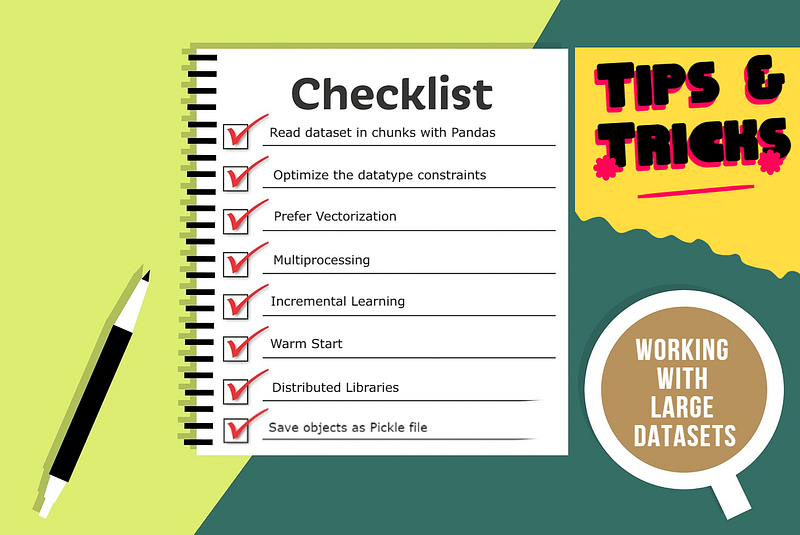
Checklist:
1) Read dataset in chunks with Pandas
2) Optimize the datatype constraints
3) Prefer Vectorization
4) Multiprocessing of Functions
5) Incremental Learning
6) Warm Start
7) Distributed Libraries8) Save objects as Pickle file
1.) Read Data in Chunks with Pandas:
Pandas provide API to read CSV, txt, excel, pickle, and other file formats in a single line of Python code. It loads the entire data into the RAM memory at once and may cause memory issues while working with out-of-memory datasets.
The idea is to read/load and process the large dataset in chunks or small samples of datasets.
The above code sample reads the large dataset in chunks (line 14) and performs processing for each of the chunks (line 15) and further saves the processed chunk of data (line 17).
2.) Optimize the Datatype Constraints:
Pandas assign default datatypes to each feature of the dataset by observing the feature values. For features with integral values are assigned int64 datatype and features with decimal values are assigned float64 data type. Find the list below the default list of datatype assigned to each of the features.
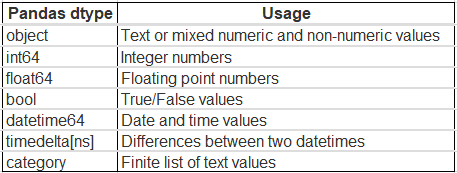
(Image by Author), Default data type by Pandas
The int64 values range between -9,223,372,036,854,775,808 to 9,223,372,036,854,775,807.For most of the dataset, the integral feature values do not exceed that limit. The idea is to downgrade the feature datatype by observing the maximum and minimum feature values.
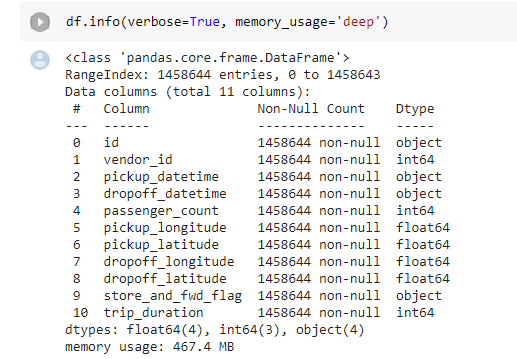
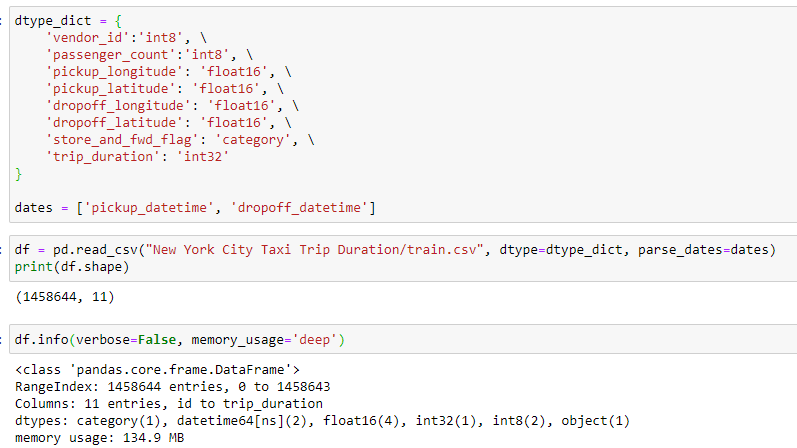
(Image by Author), Left: (Image by Author), Default data types assigned and memory usage, Right: Memory Usage after downgrading the datatype
The sample dataset was taking 467.4 MB of memory with the default set of datatype constraints. After typecasting the datatypes the memory usage reduced by ~70% to 134.9 MB.
Read one of my previous articles to get a better understanding of datatype downgrading by typecasting.
For data processing tasks, one always encounters various situations where it requires to iterate through the dataset. Pandas provide various functions to loop their the instances using iterrows(), itertuples(), iteritems(), where iterrows() being the slowest.
Vectorization of features speeds up the iteration process. iterrows() iterates through the Pandas Series, and hence being the slowest. itertuples() iterates through the list of tuples and hence comparatively faster.
Follow one of my previous articles, to know more about how to make Pandas iteration 400x times faster.
Python is comparatively slower compared to other programming languages as the code is interpreted at runtime instead of being compiled to native code at compile time. Execution of functions for data preprocessing is comparatively slower even after vectorizing the feature vectors.
The idea is to utilize all the cores of the CPU and scale up the computations across all the cores to speed up the workflow. Python comes up with a multiprocessing module, that allows such functionalities.
Follow one of my previous articles, on how to scale Python functions using a multiprocessing module.
Scikit-learn provides an efficient implementation of various classification, regression, and clustering machine learning algorithms. For machine learning tasks where a new batch of learning data comes with time, and re-training the model is not time efficient. Also for out-of-memory datasets, training the entire dataset at once is not feasible, as it’s not possible to load the entire data into the RAM at once
Incremental learning can be employed for such tasks, where the past learning of the model will be restored and the same model will be trained with the new batch of data. Scikit-learn provides de>partial_fit() function that offers incremental learning for out-of-core datasets.
6.) Warm Start:
Scikit-learn comes up with the API warm_start to reuse the aspects of the model learned from the previous parameter value. When warm_start is true then the assigned model hyperparameters are used to fit the model. For example, warm_state can be used to increase the number of trees (n_estimators) in a Random Forest Model. While working with the warm_start parameter, the hyperparameter values only change keeping the training dataset more or less constant.
From the above sample code, the initial model is trained with n_estimator=10 for X_trainsample data. Then we further add 5 more trees n_estimator=5and retrain the same model.
Python packages such as Pandas, Numpy, Scikit-Learn provides high-level usable and flexible API but largely ignore performance and scalability. These libraries may cause memory issues while working with out-of-memory datasets.
The idea is to use distributed libraries such as Dask, Vaex, Modin, and many more, that are built on top of Pandas, Numpy, and Scikit-learn libraries and specially designed to scale up the workflow by parallelizing the operations across all the CPU cores.
Please find below the list of my previous articles on distributed libraries such as Dask, Vaex, and Modin:
Reading and saving data or temporary files become tedious tasks while working with large datasets. Reading and writing operations for CSV, TXT, or excel data formats are computationally expensive.
There are other data formats that have comparatively faster read and write operations, that can be preferred while working with large-size datasets.
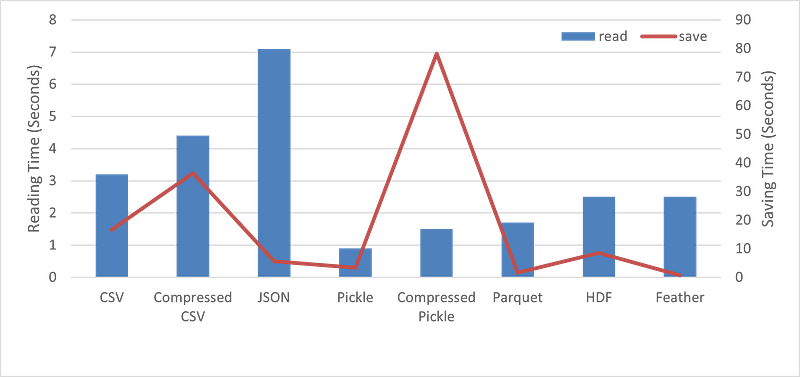
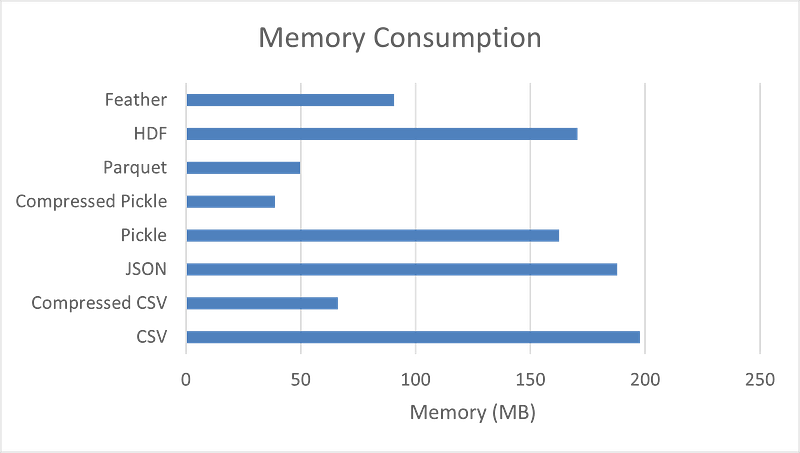
(Image by Author), Left: Reading and Saving Time Comparison (seconds), Right: Memory Consumption (MB)
The above image shows benchmark numbers for reading, write operations and memory consumption for the sample dataset having 1,458,644 records and 12 features.
Pickle files can be preferred for saving and reading datasets or temporary files. Pickling can store python objects such as lists, dictionaries, class objects, and more.
Read one of my previous articles, to observe the benchmark time comparison of using various data formats for reading and saving operations
In this article, we have discussed 8 various techniques or hacks that can be used while working with out-of-memory or large-size datasets. These techniques can speed up the workflow and avoid memory issues.
Loved the article? Become a Medium member to continue learning without limits. I’ll receive a small portion of your membership fee if you use the following link, with no extra cost to you.