
10 Things I’m Planning to Use Apple’s New AirTags On
And the emerging battle of smart trackers
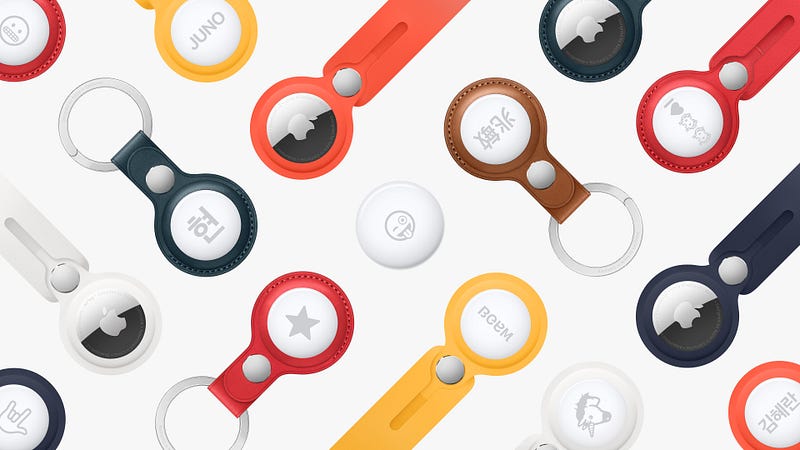
Apple finally launched its new AirTag at its Spring Loaded event on April 20, 2021. The AirTag was the only brand-new item launched at the event; the other announcements (iMac, iPad Pro, iPhone 12, and AppleTV 4K) were upgrades of existing products.
Apple has certainly taken its time to hopefully perfect the Air Tag. Tile and a bevy of other smart trackers have been on the market for almost a decade. Apple nevertheless enjoys a significant advantage despite being a late entrant. It can after all leverage its apps ecosystem as well as the large universe of Apple device users. We may soon witness Apple’s edge in action through its upgraded “Find My” network and app.
FEATURES
Dimensions
The AirTags are small and light. Each AirTag measures 1.26" (31.9mm) in diameter and 0.31" (8mm) in height and weighs 0.39 oz (11 grams). It is round, possibly to distinguish it from its chief competitor, the Tile Mate which is square.
Precision Finding
The AirTag uses Ultra Wideband (UWB) technology, which was earlier deployed in the iPhone 11, iPhone 12, and AppleWatch Series 6. UWB enables the AirTag to guide you straight to the tagged object by displaying both distance and direction on your iPhone. Apple did not announce the range of the AirTag but I imagine it will compare favorably to the Tile Mate (which has a 150-foot range) and possibly even the Tile Pro (which has a 190-foot range).
Ping It. Find It
Once the AirTag is set up, you can check its current or last known location on a map displayed on the phone. If it is misplaced and within Bluetooth range, the Find My app will play a sound from the AirTag’s built-in speaker to help locate it. You can also use Siri to find the item (“Hey Siri, find my dog!”).
“Find My” Network
Apple will be able to leverage the entire universe of nearly 1 billion Apple users to help find your lost item. The AirTag works by sending out a secure Bluetooth signal that can be picked up by nearby devices in the Find My network. These devices then send the location of your missing AirTag to the iCloud, which you can see on the map in the Find My app. Apple ensures that the entire process is anonymous and encrypted to protect your privacy.
This is the feature that could help Apple show its superiority to rival products in the market. Tile also has a crowd-sourcing function that relies on users who have the Tile app on their phones. Although Tile has the largest of such a network so far, it will be quickly surpassed by Apple, given the far larger number of Apple device users.
Lost Mode
Activate this if you lose the Air Tag. When it is detected by a device in the network, you will receive a notification. It is also possible to set it such that the person who finds the AirTag can receive your contact information by tapping it with an NFC-equipped smartphone.
Privacy
To prevent unwanted tracking, your iPhone will send an alert if an unknown AirTag finds its way into your belongings. If you have difficulty locating the unwanted AirTag, it will start pinging to let you know its location.
Set-Up
Like AirPods and other Apple devices, the AirTag can be easily set up with little more than one tap.
Battery Life
The CR2032 coin cell battery will last for one year. You can replace it yourself. Your iPhone will alert you when it’s time for a change. (Note: CR2032 batteries retail for $3–$6 for a pack of 4 on Amazon.)
Resistance
It is dust, splash, and water-resistant. Water-resistance is up to 1 meter for 30 minutes.
Personalization
Free laser-engraving of initials or emojis if you purchase your AirTags from Apple.com or the Apple Store app. Please note, however, that the family-friendly Apple Inc. will not engrave rude words and emojis (including, apparently, the combined emojis for horseshit).
Price
The AirTags retail at $29 per piece or $99 for a set of 4. This is more expensive than the Tile Mate, which retails at $25 for one or $70 for 4. One consideration, however, is that the full functionality of AirTags can be enjoyed without any subscription service. In contrast, Tile users need to subscribe to Tile Premium ($2.99 a month or $29.99 a year) to enjoy features such as Smart Alerts, location history, unlimited sharing.
THINGS TO AIRTAG
The list of items that people are likely to use their AirTags on will probably not be too different from how we have been using the AirTag’s predecessors. Some of the items are already suggested in Apple’s launch video for the AirTag (below).
These are 10 items I will likely use my AirTags on:
- KEYS. The most obvious use for the AirTag, as illustrated by the accessories already designed for it.
- WALLET. It would seem logical to put an AirTag in the wallet. We do misplace it around the house. However, the AirTag is less useful in cases of theft. As the AirTag cannot be easily disguised or concealed, a thief can easily find the AirTag and throw it away.
- BAG. Hiding an AirTag in a backpack, briefcase, handbag, or purse can make it easier to find or recover the item in the event it is misplaced, lost, or stolen.
- REMOTE. Another item that tends to mysteriously disappear around the house. (This need might diminish with the new Siri remote, which will hopefully be the only remote we need in the future.)
- UMBRELLA. I lose a lot of umbrellas, especially the nicer ones. The AirTag will hopefully put an end to that.
- LUGGAGE. First, I can avoid situations whereby a stranger accidentally (or deliberately) walks off with my luggage. Second, I can make better use of my time at the airport, for example by picking up some souvenirs from the duty-free shops until my luggage is ready to be collected from the carousel.
- BICYCLE. The AirTag can be easily concealed on the underside of the seat. If stolen, I can turn on the Find My app to track it.
- CAR. Gone will be the days of wandering around a parking lot looking for my car, or of taking a photo of the car and parking space.
- DOG. This really should be at the top of my list. There are few things as heartbreaking as a lost pet. I might also train the dog to run to me whenever it hears the ping.
- MY PARTNER. Apple is clearly concerned about the potential abuse of privacy, as the lengthy explanation of the AirTag’s privacy features in its press statement demonstrates. I certainly don’t plan to stalk anyone. However, I do think it would be useful to have my partner carry — with his consent — an AirTag with him when we go to places where we might get separated, like an amusement park, museum, or supermarket.
THE BATTLE OF SMART TRACKERS
The AirTags versus Tile battle is not just over market share. Apple is certain to significantly cut Tile’s dominance, seeing as the latter currently occupies around 90% of the market for smart trackers. The question is whether Apple can dethrone Tile altogether.
Potentially more significant is the looming fight over anti-trust/competition policy. In the US, Tile has been urging the government and Congress to investigate Apple over anti-trust concerns. Like other members of the Coalition for App Fairness such as Spotify and Match, Tile has focused its criticism on Apple for using its platform advantage to unfairly limit competition. In the European Union, Tile filed a complaint last year that its app was not activated on Apple devices whereas Apple’s Find My service was automatically activated.
Apple appears to be trying to head off the issue. Earlier this month (i.e. before the Spring Event where the AirTags were launched), Apple opened up access to its “Find My” app to third-party products and accessories. It also partnered with Chipolo on the latter’s new ONE Spot item tracker, in an ostensible bid to demonstrate that Apple is willing and able to work with rivals that compete with the AirTag.
Tile is however not backing down. In response to the launch of the AirTag and ahead of his testimony to Congress on April 21, Tile CEO CJ Pounder issued a statement saying that Tile “welcome(s) competition, as long as it is fair competition… Unfortunately, given Apple’s well-documented history of using its platform advantage to unfairly limit competition for its products, we’re skeptical.”
The fight is far from over; it is just beginning.