
10 RxJS operators which I use daily as an Angular developer
In this story I am going to show you some of the main operators that an Angular developer should know in my opinion.
To choose them, I used the codebase of a project where I and my colleagues have been working for more than one year, and there I counted operators’ occurrencies. The results are:
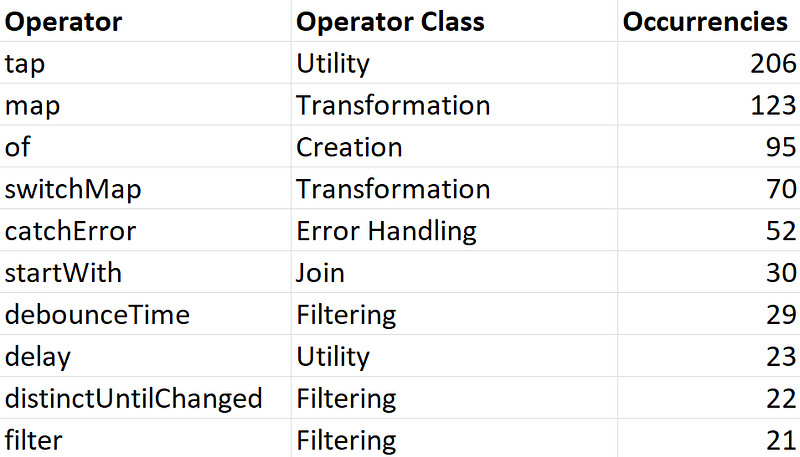
For each of them I am going to present an example of how you can use it.
Let’s begin!
1. tap operator
Even if the classification is subjective, this probably is the most used operator for every RxJS developer.
Let’s see what official documentation says about it:
Used to perform side-effects for notifications from the source observable.
In other words, we can execute some operations as soon as the Observable emits a next, error or complete event, and we will do it without altering the result of the Observable to which is chained.
Let’s see an example:
this.getDataFromServer()
  .pipe(
    tap((response) => this.originalResponse = response),
    map(response => this.doSomethingWithResponse(response)),
    tap(responseAfterMap => console.debug("transformed response", responseAfterMap))
  )
  .subscribe();
Here we are using tap to save the original response first (because we need it for some reason in our component), and to see how it has been transformed by map later. This second use clarifies why this operator is so much used for debugging purposes; this line of code infact, will be probably removed by the developer as soon as he will have finished debugging this section.
2. map operator
The purpose of this operator is to transform the result emitted by the Observable to which is attached. It’s very similar to the Array’s map function.
Again, let’s see an example:
getVehicleInfo(vehiclePlate: string): Observable<CarInfo> {
  return this.http.get<CarInfo>(`https://someexampledomain.com/details/${vehiclePlate}`)
  .pipe(
    map(vehicleData => {
      return { model: vehicleData.model, color: vehicleData.color, isCar: vehicleData.type === 'CAR' };
    })
  );
}
Our beautiful web service returns a lot of properties and metadata about the vehicle having vehiclePlate plate; however, our frontend doesn’t need those such detailed info because it shows just model, color and if the vehicle is a car or not.
3. of operator
We use this operator to make an Observable which immediately emits the value (or values) that we passed as input.
It can be used for many purposes; probably the most common one is to mock a web service response. Let me show you:
getVehicleInfo(vehiclePlate: string): Observable<CarInfo> {
  return of({ model: "Ford Puma" , color: "Desert Island Blue", isCar: true });
}
4. switchMap operator
Let’s talk about one of my favorite operators! Its purpose is to “switch” an Observable with another.
A typical use case is a Search Bar, which has to perform an API call everytime the user types something in it.
Let’s see some code:
export class CarComponent {
  form = new FormGroup({
    search: new FormControls('')
  });
  carsList:CarInfo[] = [];

  constructor(private searchService:SearchService) {
    this.form.controls['search'].valueChanges.pipe(
      switchMap(term => this.searchService.search(term))
     )
     .subscribe(list => this.carsList = list);
  }

}
There are 2 more operators that make a similar job: concatMap and mergeMap; by the way, switchMap differs from them because of its cancelling effect, which avoid race conditions.
In our case, this means that if the user continues typing in the Search Bar (and so to perform further APIs calls) just the last result will be shown.
5. catchError operator
This operator is essential whenever we want to handle Observable errors.
Normally whenever an error arrives, the connection between the Observable and the Subscriber is closed: as just said it’s normal and it’s exactly the behaviour that Observables are meant to have.
We can avoid closing connection using catchError! The way it works is really simple: it receives as input an error and it returns another Observable.
Let’s edit the previous example to understand better:
export class CarComponent {
  form = new FormGroup({
    search: new FormControls('')
  });
  carsList:CarInfo[] = [];

  constructor(private searchService:SearchService) {
    this.form.controls['search'].valueChanges.pipe(
      switchMap(term => this.searchService.search(term)),
      catchError(err => {
        this.showErrorMessage(err);
        return of([]);
      })
     )
     .subscribe(list => this.carsList = list);
  }

}
From now on, if an error will occur (i.e. an API error), it will be shown to the user and the Subscription won’t be closed; this means that the Search Bar will continue working as if nothing happened, doing an API call everytime the user types something in it.
6. startWith operator
This operator can be appreciated especially with Hot Observables.
It emits a given value immediately after a Subscription.
Let’s edit (again) the previous example to see what it does:
export class CarComponent {
  form = new FormGroup({
    search: new FormControls('')
  });
  carsList:CarInfo[] = [];

  constructor(private searchService:SearchService) {
    this.form.controls['search'].valueChanges.pipe(
      startWith(''),
      switchMap(term => this.searchService.search(term)),
      catchError(err => {
        this.showErrorMessage(err);
        return of([]);
      })
     )
     .subscribe(list => this.carsList = list);
  }

}
Why a so tiny line of code is so important?
If the reader has been paying attention, he will have noticed that there is a small problem with our search bar: even if the component has been initialized, the user will not see any car in the list until he types something in the search bar.
Using this line of code we overcome the problem since, as soon as the component will be mounted, it will perform a web service call allowing us to obtain the unfiltered list of the cars at the beginning.
7. debounceTime operator
This is another of my favorite operators. Let’s read what the official documentation says about it:
Discard emitted values that take less than the specified time between output
What does it mean? Let’s take in consideration the Search Bar example once again.
There is infact another problem: everytime the user types some input, even just a character, the API gets called. As you can imagine, the server is not so happy about it. Imagine every user doing it at the same time… (if it’s not a DDoS attack we are very close :D).
Using debouceTime(n) the value of the search field will be emitted only after n milliseconds; moreover, if in the meanwhile the user typed another character, another n milliseconds will pass before the value emission.
This should significantly reduce the number of API calls made by our web app and make our server happier.
Here, the final result:
export class CarComponent {
  form = new FormGroup({
    search: new FormControls('')
  });
  carsList:CarInfo[] = [];

  constructor(private searchService:SearchService) {
    this.form.controls['search'].valueChanges.pipe(
      startWith(''),
      debounceTime(300),
      switchMap(term => this.searchService.search(term)),
      catchError(err => {
        this.showErrorMessage(err);
        return of([]);
      })
     )
     .subscribe(list => this.carsList = list);
  }

}
8. delay operator
This is one of the simplest operators: as the name says it just delays the emission of a value.
A typical use case is, in conjunction with of operator, to make a mock API call more “realistic” .
getVehicleInfo(vehiclePlate: string): Observable<CarInfo> {
  return of({ model: "Ford Puma" , color: "Desert Island Blue", isCar: true })
    .pipe(delay(500));
}
9. distinctUntilChanged operator
This operator emits a value only if it’s different from the last emitted.
Don’t hate me for this, but I need to edit once again our wonderful Search Bar to show you how this operator can help us. (last time I promise :D)
export class CarComponent {
  form = new FormGroup({
    search: new FormControls('')
  });
  carsList:CarInfo[] = [];

  constructor(private searchService:SearchService) {
    this.form.controls['search'].valueChanges.pipe(
      startWith(''),
      distinctUntilChanged(),
      debounceTime(300),
      switchMap(term => this.searchService.search(term)),
      catchError(err => {
        this.showErrorMessage(err);
        return of([]);
      })
     )
     .subscribe(list => this.carsList = list);
  }

}
Now… A user typed something in the search bar; since 300ms passed the component refreshed the cars’ list. After that, the user accidentally typed another letter, so he pressed backspace to delete it. Another 300ms passed; this time, however, the API has not been called since distinctUntilChanged recognized that the value was the same of the last emission. Once again we saved our server from another useless call! :)
Now the question is:
How did this operator recognize that no change occurred?
Well, by default distinctUntilChanged uses === comparison operator (so by object reference), which is ok for strings.
If needed, by the way, it’s possible to create a custom comparison function and to pass it as an input parameter to the operator:
distinctUntilChanged((prev, curr) => prev.toLowerCase() === curr.toLowerCase())10. filter operator
The last (but not least) operator we will see here is filter operator. Just as in the case of map operator, this operator does basically the same of what Array’s filter function does for Arrays. In other words:
Emit values that pass the provided condition
Let’s see how it works with an example:
export class CarComponent {
  vehicles = [
    { model: "Ford Puma" , color: "Desert Island Blue", isCar: true },
    { model: "Iveco S-WAY" , color: "Polar White", isCar: false},
    { model: "Fiat 500" , color: "Gelato White", isCar: true }
  ]

  // returns only the vehicles which are cars.
  getCarsList(): Observable<CarListItem[]> {
    from(vehicles).pipe(
      filter(vehicle => vehicle.isCar)
    );
  }
}
What’s Next
These are the 10 RxJS operators I use the most; I am sure that many of them are in your list too. If not it’s a good moment to add them ;)
Of course there are many other RxJS operators that deserve to be explored. I invite you to take a look at them since they can really make your developer’s life easier (also, some of them are nice!)
Stay tuned!