avatarSuraj Gurav

Free AI web copilot to create summaries, insights and extended knowledge, download it at here

9233

Abstract

<p id="5a9c">To extract the required dataset, you write —</p><div id="3ea9"><pre>df.<span class="hljs-keyword">query</span>(<span class="hljs-string">"Quantity == 95 and UnitPrice(USD) == 182"</span>)</pre></div><p id="10be">However, instead of output, you get a <b>KeyError</b> on <i>‘UnitPrice’</i> as below. 🚨🚨</p><figure id="7d2a"><img src="https://cdn-images-1.readmedium.com/v2/resize:fit:800/1*F1mhQxhSvioIuP9psdIKhg.png"><figcaption>Key Error on inconsistent column name | Image by Author</figcaption></figure><blockquote id="43f0"><p>But why did you get this error??</p></blockquote><p id="331d">It is because, query() function has some limitations on the column names. And the column name <i>UnitPrice(USD)</i> is invalid to use in query().</p><p id="0ca0">The query() expression, interprets<i> UnitPric</i>e from the column name<i> UnitPrice(USD</i>) as a function to be operated on variable USD.</p><p id="053f">📌 The <a href="https://pandas.pydata.org/docs/reference/api/pandas.DataFrame.query.html"><b>query() guidelines</b></a> provide a quick alternative on this problem as mentioning invalid column names in back ticks as —<code><b> `UnitPrice(USD)`</b></code></p><p id="e1c3">So the correct expression you should write is —</p><div id="1048"><pre>df.query(<span class="hljs-string">"Quantity == 95 and `UnitPrice(USD)` == 182"</span>)</pre></div><figure id="3a7a"><img src="https://cdn-images-1.readmedium.com/v2/resize:fit:800/1*kKJPIM7_cDNaDrRox5rRYQ.png"><figcaption>Filtering on multiple conditions in query() AND logic | Image by Author</figcaption></figure><p id="31f3">As you can see, there are only 3 records when these both conditions are satisfied.</p><p id="0400">However, again there is a chance that you forgot to mention one of the back tick and program will throw an another <i>Syntax Error</i>. Hence, one of the simplest solution is to <a href="https://towardsdatascience.com/how-to-rename-columns-in-pandas-with-examples-24c983fcc3b8"><b>change the column name</b></a> as below —</p><div id="2aac"><pre>df.<span class="hljs-keyword">rename</span>(<span class="hljs-keyword">columns</span>={<span class="hljs-string">'UnitPrice(USD)'</span>:<span class="hljs-string">'UnitPrice'</span>, <span class="hljs-string">'Shipping_Cost(USD)'</span>:<span class="hljs-string">'Shipping_Cost'</span>, <span class="hljs-string">'Delivery_Time(Days)'</span>:<span class="hljs-string">'Delivery_Time'</span>}, inplace=<span class="hljs-keyword">True</span>)</pre></div><p id="43bf">So, you can now get the same output using the new column name as —</p><div id="f0c7"><pre>df.<span class="hljs-keyword">query</span>(<span class="hljs-string">"Quantity == 95 and UnitPrice == 182"</span>)</pre></div><p id="374d">Alternatively, you can also get the same output using <i>Ampersand operator</i> <code><b>&amp;</b></code><b> </b>as —</p><div id="8ee8"><pre>df.<span class="hljs-keyword">query</span>(<span class="hljs-string">"Quantity == 95 &amp; UnitPrice == 182"</span>)</pre></div><p id="4d81">You can see how simple it is — you can write expression as if you are writing it on paper in simple English.</p><p id="e21b">Now, let’s see how you can implement <code><b>OR</b></code> logic.</p><h2 id="67af">Example 2</h2><p id="e88b">Suppose you want to get all the rows where at least one of the conditions mentioned above is satisfied.</p><p id="cdc4">All you need to do is use the keyword <code><b>or</b></code> between two conditions as below —</p><div id="b258"><pre>df.<span class="hljs-keyword">query</span>(<span class="hljs-string">"Quantity == 95 or UnitPrice == 182"</span>)</pre></div><figure id="2cc5"><img src="https://cdn-images-1.readmedium.com/v2/resize:fit:800/1*PIsT3PODRrPuicD5WbhmYg.png"><figcaption>Filter on multiple conditions OR logic | Image by Author</figcaption></figure><p id="b6e1">It returned all the rows where either of the two condition True (<i>see rows 2 to 5 in above picture</i>) and also the rows where both conditions are True (<i>row 1</i>)</p><p id="05ae">Here also, you can use bitwise operator <code><b>|</b></code> instead of the <code><b>or</b></code> keyword. ✅</p><p id="57f3">Going a step ahead, you can also use <code><b>NOT</b></code> logic in query() which returns all the records when the specified condition within query is evaluated to <code>FALSE</code>.</p><h2 id="685e">Example 3</h2><p id="93dd">Suppose you want to get all the rows where Quantity is not equal to 95.</p><p id="7b1f">The simplest answer is to use <code><b>not</b></code> keyword or negation operator <code><b>~</b></code> in the expression before the condition as shown below.</p><div id="4765"><pre>df.<span class="hljs-keyword">query</span>(<span class="hljs-string">"not (Quantity == 95)"</span>)</pre></div><figure id="f229"><img src="https://cdn-images-1.readmedium.com/v2/resize:fit:800/1*bmIopIRzqUC4zlZ6_VJ10Q.png"><figcaption>Filtering using NOT logic in query | Image by Author</figcaption></figure><p id="4fb1">As you can see in the output, it contains all the rows where Quantity is not 95.</p><p id="7300">Moreover, condition need not be always an equality operator, rather you can choose anything from <code><b>==</b></code>, <code><b>!=</b></code>,<code> <b>&gt;</b></code>, <code><b>&lt;</b></code>, <code><b>≥</b></code>, <b>≤ </b>while defining the condition.</p><p id="9876">So, you can get same output as <code>NOT</code> logic, using non-equality operator <code><b>!=</b></code> in the condition as below</p><div id="3ce8"><pre>df.<span class="hljs-keyword">query</span>(<span class="hljs-string">"Quantity != 95"</span>)</pre></div><p id="c74a">This will further save your efforts in writing (and may be forgetting to close) additional round brackets! And thus simplifying <code>query()</code> expression.</p><p id="02c0">Well, the conditions are not always need to be on numerical columns. You can always filter the data points based on non-numerical, text columns.</p><h1 id="7968">Filtering based on Text Columns</h1><p id="c6bb">While filtering based on text columns, your condition should be comparing column name with a string.</p><blockquote id="6829"><p>Remember, your <code>query()</code> expression is already a String. Then how to write a String within another String??</p></blockquote><p id="eff8">📌 Simply enclose the Text value which you want to use in condition, in single quotes as <code><b>‘ ’</b></code><b> </b>. Let’s see an example on how to do this.</p><h2 id="1c2d">Example 1</h2><p id="e110">Suppose, you want to get all the records where Status is ‘<i>Not Shipped</i>’. You can write this in <code>query()</code> expression as —</p><div id="857c"><pre>df.<span class="hljs-keyword">query</span>(<span class="hljs-string">"Status == 'Not Shipped'"</span>)</pre></div><figure id="0d04"><img src="https://cdn-images-1.readmedium.com/v2/resize:fit:800/1*dCNISNb2hjaFFfdbzVxJBg.png"><figcaption>Filtering on Text column | Image by Author</figcaption></figure><p id="759f">It returns all the records, where Status column contains value — ‘<i>Not Shipped</i>’.</p><p id="9cad">Again you can use multiple conditions on same column or different column and it can be combination of conditions on numerical as well as non numerical columns. 💯</p><p id="c068">In real world, most of the times, the conditions which you use for filtering the DataFrame include certain calculations. Pandas query() gives you freedom to use mathematics within query expression.</p><h1 id="5d7e">Simple Math Operation in Pandas Query</h1><p id="97cf">The math operation can be anything such as addition, subtraction, multiplication, division or even square or cube of a value in the column.</p><p id="34d1">As mathematical operations are meant to be used on numerical values, you can use them on the numerical columns only in the query expression as seen in examples below.</p><h2 id="4280">Example 1</h2><p id="db03">For an instance, suppose you want to fetch all the rows from the dataset when double of shipping cost is less than 50.</p><p id="ca09">This is as simple as writing the expression in plain English, as below</p><div id="79b9"><pre>df.<span class="hljs-keyword">query</span>(<span class="hljs-string">"Shipping_Cost*2 &lt; 50"</span>)</pre></div><figure id="30eb"><img src="https://cdn-images-1.readmedium.com/v2/resize:fit:800/1*Qb3-dWPkNFT5pHwYvttPXA.png"><figcaption>Math operation within query() function | Image by Author</figcaption></figure><p id="e687">Boom! It returned all the required rows.</p><p id="6fbc">You can also include even a bit complex calculations on one or multiple columns. 💯</p><h2 id="4b75">Example 2</h2><p id="28e0">Suppose, you wish to get all the rows where <i>summation of square of quantity and square of shipping cost is less than 500</i>.</p><div id="26eb"><pre>df.<span class="hljs-keyword">query</span>(<span class="hljs-string">"Quantity**2 + Shipping_Cost**2 &lt; 500"</span>)</pre></div><figure id="e206"><img src="https://cdn-images-1.readmedium.com/v2/resize:fit:800/1*4sEQ0vpts9TahUzRjWdCUQ.png"><figcaption>Complex mathematical operations in query() function | Image by Author</figcaption></figure><p id="9093">You might have noticed, how simple it is to use even # Options the complex calculations using query() functions.</p><p id="e475">However, you are not limited to use only different mathematical operations, rather you can use built-in functions within the query expressions.</p><h1 id="1821">Built-In Functions in Pandas Query</h1><p id="0457">The Python built-in functions such as <code>sqrt()</code>, <code>abs()</code>, <code>factorial()</code>, <code>exp()</code> and many others can be easily used within query expression. You can use it directly as you might have used it in normal use-cases.</p><h2 id="2c05">Example 1</h2><p id="dfc9">Retrieving all the rows where square root of unit price is more than 15. So the built-in function — <code>sqrt()</code> — will be used here.</p><div id="b6ec"><pre>df.<span class="hljs-keyword">query</span>(<span class="hljs-string">"sqrt(UnitPrice) &gt; 15"</span>)</pre></div><figure id="9be0"><img src="https://cdn-images-1.readmedium.com/v2/resize:fit:800/1*8oPqPZm8gpkP2EIwDbtiGw.png"><figcaption>Using built-in functions in Pandas query() | Image by Author</figcaption></figure><p id="8ce6">Easy it is! All the rows with unit price more than 225 are returned through this query.</p><p id="6d58">Further, query() function is so flexible that, you can also use built-in functions and math functions within the same query expression.</p><h2 id="3165">Example 2</h2><p id="1fcc">Getting all the records where ‘<i>square root of unit price is less than half of the shipping cost</i>’ is so easy that, you can get it with —</p><div id="4cd0"><pre>df.<span class="hljs-keyword">query</span>(<span class="hljs-string">"sqrt(UnitPrice) &lt; Shipping_Cost/2"</span>)</pre></div><figure id="6525"><img src="https://cdn-images-1.readmedium.com/v2/resize:fit:800/1*0j_acyTAAaEaI1eEZ7jpbg.png"><figcaption>Combination of math and built-in function in query expression | Image by Author</figcaption></figure><p id="0ca5">In this way, you can filter the dataset using multiple conditions with different complexity levels. And that too using a simple query. ✅</p><p id="6254">All the query examples which you observed so far, were about numerical and text columns. However, the usage of query() is not limited to only these data types.</p><p id="6607">Often you need to filter the DataFrame based on Date-time values. And query() function is so flexible, that you can easily filter the dataset based on date and time values, as you can explore in the below section.</p><h1 id="e832">Filtering based on Date-Time Columns</h1><p id="a1b3">The only requirement for using query() function to filter DataFrame on date-time values is, the column containing these values should be of data type <code><b>datetime64[ns]</b></code><b> </b>✅</p><p id="2ba5">In our example DataSet, the column OrderDate contains Date-time values, but it is parsed as String values. You can easily <a href="https://towardsdatascience.com/change-column-data-type-in-pandas-954d7acdef1d">convert this column into required data type</a> using —</p><div id="3b63"><pre>df[<span class="hljs-string">"OrderDate"</span>] = pd.to_datetime(df[<span class="hljs-string">"OrderDate"</span>], <span class="hljs-keyword">format</span>=<span class="hljs-string">"%Y-%m-%d"</span>)</pre></div><p id="edb0">Now, you are all set to filter the DataFrame using date-time column in <code>query()</code>. To extract useful information about dates and to use them in query() function, <code><b>dt</b></code> accessor is quite handy.</p><blockquote id="8812"><p>📌 <b>dt</b> is a accessor object which is used to extract Date-time like properties of datetime series.</p></blockquote><p id="0ff5">Let’s explore in what different ways you can filter the dataset based on Date-time values.</p><h2 id="224c">Example 1</h2><p id="2342">Suppose you want to get all the records where order date is in August. All you need to do is —</p><div id="5589"><pre>df.<span class="hljs-keyword">query</span>(<span class="hljs-string">"OrderDate.dt.month == 8"</span>)</pre></div><figure id="1622"><img src="https://cdn-images-1.readmedium.com/v2/resize:fit:800/1*xgzAwssT51ew5qSKruM9bg.png"><figcaption>Filter dataset using Dates in query() | Image by Author</figcaption></figure><p id="e2ef">As you can see, all the records have OrderDate in August. And <code><b>OrderDate.dt.month</b></code><b> </b>shows how you can use <code><b>dt</b></code> accessor to extract only month out of entire date value.</p><p id="9dc8">Filtering even further, suppose you want to get all the orders in August 2021 where order day is 15 or more. You can achieve it with —</p><div id="9b57"><pre>df.<span class="hljs-keyword">query</span>(<span class="hljs-string">"OrderDate.dt.month == 8 and OrderDate.dt.year == 2021 and OrderDate.dt.day &gt;=15"</span>)</pre></div><figure id="86b1"><img src="https://cdn-images-1.readmedium.com/v2/resize:fit:800/1*_30mWdu1l5zVtm3_DBGqGQ.png"><figcaption>Filter on multiple conditions on Date-time variables | Image by Author</figcaption></figure><p id="c88f">Although, this is the classic example of <code><b>dt</b></code> accessor and combining multiple conditions on same column, the expression seems to be too long and hence not a good practice.</p><p id="cd8b">It is written only to demonstrate, how to use <code><b>dt</b></code> operator to extract different parts of date and how to combine multiple conditions.</p><p id="2c3f">However, you can get exactly same output by writing extremely simple expression as —</p><div id="8d6f"><pre>df.query("OrderDate &gt;= '2021<span class="hljs-string">-08</span><span class="hljs-string">-15</span>' and OrderDate &lt;= '2021<span class="hljs-string">-08</span><span class="hljs-string">-31</span>'")</pre></div><p id="f077">Moreover, you can also combine the condition on Date-time column and a condition on any other column in single expression. 💯</p><h2 id="d651">Example 2</h2><p id="79c0">For an instance, retrieving all the records where order date as previous example and Status Delivered, is super-easy with query expression as —</p><div id="5bed"><pre>df.query("OrderDate &gt;= '2021<span class="hljs-string">-08</span><span class="hljs-string">-15</span>' and OrderDate &lt;= '2021<span class="hljs-string">-08</span><span class="hljs-string">-31</span>' and Status == 'Delivered'")</pre></div><figure id="e6a3"><img src="https://cdn-images-1.readmedium.com/v2/resize:fit:800/1*x5ldljKtmEinLSW4_XTsGw.png"><figcaption>Filtering on multiple conditions on different columns | Image by Author</figcaption></figure><p id="de30">It returned all the records where the expression is evaluated True. Again this just an example to demonstrate how you can combine Date-time and Text column conditions in single query.</p><p id="8f92">So far you specified only the expression to be evaluated in the query() function. However, this function also takes another optional parameter — <code><b>inplace</b></code></p><h1 id="ebb0">Inplace in Pandas Query Function</h1><p id="252d">In all the examples you see that df.query() generates a new DataFrame. And it is due to the fact that, the 2nd parameter of query() —<code><b> inplace</b></code> — is set to False by default.</p><p id="ce8d">So, even after filtering DataFrame on multiple conditions, if you check what is the size of DataFrame, it will show the original size of 9999 x 12</p><div id="fb33"><pre>df.<span class="hljs-built_in">shape</span></pre></div><div id="8ed4"><pre><span class="hljs-meta"># output</span> (<span class="hljs-number">9999</span>, <span class="hljs-number">12</span>)</pre></div><p id="da76">So, with <code><b>inplace=False</b></code>, the query did not modify the original data set. When you want to make the changes in original DataFrame, the simply make <code>inplace=True</code>.</p><p id="b10a">🚨 But be careful with<code> inplace=True</code>, as it overwrites the original DataFrame. So there is no chance to get back the original DataFrame once the query with this option is executed.</p><p id="a958">That’s all about filtering the data points using query()!</p><p id="cdb9">I hope you found this article super-useful, refreshing and you learned some really cool tricks to filter pandas DataFrame. I am certain that, after this read you can use pandas query() function more frequently and fluently.</p><p id="dd69">I am using Python for Data Analysis since past 4+ years and found query() function most handy to filter the dataset. Most of these tricks, I use in my work everyday.</p><p id="2705" type="7">Interested in reading more stories on Medium??</p><p id="c48c">💡 Consider <a href="https://medium.com/@17.rsuraj/membership"><b>Becoming a Medium Member</b></a> to <b>access unlimited</b> stories on medium and daily interesting Medium digest. I will get a small portion of your fee and No additional cost to you.</p><p id="0793">💡 Be sure to <a href="https://medium.com/subscribe/@17.rsuraj"><b>Sign-up to my Email list</b></a> to never miss another article on data science guides, tricks and tips, SQL and Python.</p><p id="879b">💡 Here is a complete <a href="https://github.com/17rsuraj/data-curious/blob/master/TowardsDataScience/pandas_query_deep_dive.ipynb"><b>Notebook</b></a> with all the examples.</p><p id="9114"><b>Thank you for reading!</b></p></article></body>

Data Science

10 Pandas Query Examples That Will Make You Use Pandas Query Easily

Start filtering your data easily using pandas query function

Drip coffee photo created by cookie_studiowww.freepik.com

Master dataset filtering using pandas query function!

Data analysis in Python is made easy with Pandas library. While doing data analysis task, often you need to select a subset of data to dive deep. And this can be easily achieved using pandas.DataFrame.query() function.

Therefore, it is important to understand how efficiently and effectively you can leverage it.

I have listed 10 examples explaining almost all the use-cases when you can use the query function to filter data points. At the end, you will be able to use pandas query function as and when needed without any struggle.

You can quickly jump to your favorite use-case with below index.

· Filtering using Single Condition
  ∘ Example 1
· Filtering on Multiple Conditions
  ∘ Example 1
  ∘ Example 2
  ∘ Example 3
· Filtering based on Text Columns
  ∘ Example 1
· Simple Math Operation in Pandas Query
  ∘ Example 1
  ∘ Example 2
· Built-In Functions in Pandas Query
  ∘ Example 1
  ∘ Example 2
· Filtering based on Date-Time Columns
  ∘ Example 1
  ∘ Example 2
· Inplace in Pandas Query Function

📍 Note: I’m using a self created Dummy_Sales_Data which you can get on my Github repo for Free under MIT License!!

Let’s import the dataset into pandas DataFrame — df

import pandas as pd
df = pd.read_csv("Dummy_Sales_Data_v1.csv")
df.head()

Dummy sales data | Image by Author

It is a simple 9999 x 12 Dataset which I created using Faker in Python 📚

You can download a complete notebook with all these examples at the end of this read!

Before going into the examples, a quick recap of query function in pandas —

Query function is used to extract the records based on the expression specified and returns a new DataFrame. The expression is the condition or combination of conditions written in the form of string.

In the backend, this expression is evaluated using eval() function in pandas and returns the subset of the data or the records where the expression is evaluated as TRUE.

Therefore, to filter pandas DataFrame all you need to do is specify the condition within query function as you will see in subsequent examples.

Why you should use query() over pandas DataFrame .loc, .iloc and bracket [ ] notation

  • The pandas DataFrame properties — .loc and .iloc — are specifically used to extract the subset of dataset based on row and column labels and indices. So it does not really offer you the flexibility to filter DataFrame based on a condition.
  • The bracket notation [ ] gives you the flexibility to filter DataFrame based on condition but it is syntactically bulky to write with multiple pairs of square brackets

On the other hand, pandas query() function gives you the flexibility to extract subset of the DataFrame based on one or more conditions which are written as an absolutely easy-going expression. You really don’t need to think about or check for any missed brackets! 💯

Now, as you are aware about why you should prefer query() function to filter the dataset, let’s get started with the examples.

Beginning with the simplest use-case — filtering the DataFrame based on a single condition i.e. condition on one column only.

Filtering using Single Condition

When filtering on single condition, the expression to be evaluated in the query() function will contain only one condition. And output returned will contain all the rows where this expression evaluates to be TRUE.

Example 1

Suppose you want to extract all the rows where Quantity is 95. So the condition in the logical form can be written as —

Quantity == 95

📌 Remember, you need to write this condition as a string i.e. enclose it within double quotes “ ” .

So you can filter the DataFrame based on this condition as below —

df.query("Quantity == 95")

Filtering using single condition in pandas query() | Image by Author

As simple as it looks. It returned all the rows where the Quantity is 95.

Well, this was quite simple and even you can even use bracket notation like this — df[df[“Quantity”]==95] .

But what if you want to include one more condition on the same column??

It certainly adds one more pairs of square brackets in the bracket notation making it bulky and unmanageable in the long run. And that’s when effectiveness of query() comes into the picture.

Filtering on Multiple Conditions

Whether you filter on one or multiple conditions, the syntax of query() remains same — write the conditions as string by enclosing them in “ ” .

However, you must specify how you want to do filtering based on two or more conditions and accordingly you can choose from two logics between the conditions as below,

  • AND: It returns all the records from the DataFrame only where both the conditions are satisfied
  • OR: It returns all the records from the DataFrame where either or both the conditions are satisfied.

Let’s see how it works using below two examples.

Example 1

Suppose, you want to select all the rows where both conditions — Quantity is 95 & unit price is 182 — are TRUE.

So, you should go for AND logic. In query() expression, it is implemented using the keyword and. 💯

Note that, the column containing unit price is named as UnitPrice(USD)

So, conditions are —

Quantity == 95
UnitPrice(USD) == 182

And the expression will become —

"Quantity == 95 and UnitPrice(USD) == 182"

To extract the required dataset, you write —

df.query("Quantity == 95 and UnitPrice(USD) == 182")

However, instead of output, you get a KeyError on ‘UnitPrice’ as below. 🚨🚨
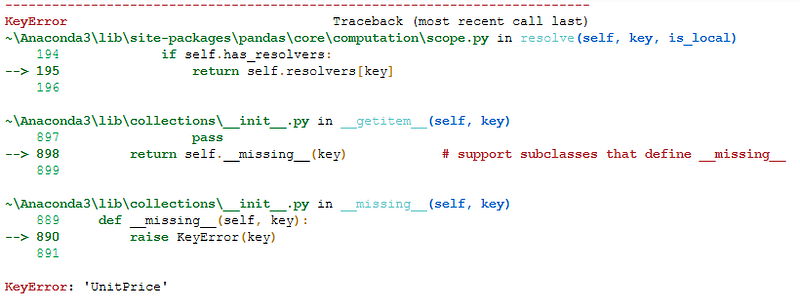
Key Error on inconsistent column name | Image by Author

But why did you get this error??

It is because, query() function has some limitations on the column names. And the column name UnitPrice(USD) is invalid to use in query().

The query() expression, interprets UnitPrice from the column name UnitPrice(USD) as a function to be operated on variable USD.

📌 The query() guidelines provide a quick alternative on this problem as mentioning invalid column names in back ticks as — `UnitPrice(USD)`

So the correct expression you should write is —

df.query("Quantity == 95 and `UnitPrice(USD)` == 182")

Filtering on multiple conditions in query() AND logic | Image by Author

As you can see, there are only 3 records when these both conditions are satisfied.

However, again there is a chance that you forgot to mention one of the back tick and program will throw an another Syntax Error. Hence, one of the simplest solution is to change the column name as below —

df.rename(columns={'UnitPrice(USD)':'UnitPrice', 
                   'Shipping_Cost(USD)':'Shipping_Cost',
                   'Delivery_Time(Days)':'Delivery_Time'},
          inplace=True)

So, you can now get the same output using the new column name as —

df.query("Quantity == 95 and UnitPrice == 182")

Alternatively, you can also get the same output using Ampersand operator & as —

df.query("Quantity == 95 & UnitPrice == 182")

You can see how simple it is — you can write expression as if you are writing it on paper in simple English.

Now, let’s see how you can implement OR logic.

Example 2

Suppose you want to get all the rows where at least one of the conditions mentioned above is satisfied.

All you need to do is use the keyword or between two conditions as below —

df.query("Quantity == 95 or UnitPrice == 182")

Filter on multiple conditions OR logic | Image by Author

It returned all the rows where either of the two condition True (see rows 2 to 5 in above picture) and also the rows where both conditions are True (row 1)

Here also, you can use bitwise operator | instead of the or keyword. ✅

Going a step ahead, you can also use NOT logic in query() which returns all the records when the specified condition within query is evaluated to FALSE.

Example 3

Suppose you want to get all the rows where Quantity is not equal to 95.

The simplest answer is to use not keyword or negation operator ~ in the expression before the condition as shown below.

df.query("not (Quantity == 95)")

Filtering using NOT logic in query | Image by Author

As you can see in the output, it contains all the rows where Quantity is not 95.

Moreover, condition need not be always an equality operator, rather you can choose anything from ==, !=, >, <, , while defining the condition.

So, you can get same output as NOT logic, using non-equality operator != in the condition as below

df.query("Quantity != 95")

This will further save your efforts in writing (and may be forgetting to close) additional round brackets! And thus simplifying query() expression.

Well, the conditions are not always need to be on numerical columns. You can always filter the data points based on non-numerical, text columns.

Filtering based on Text Columns

While filtering based on text columns, your condition should be comparing column name with a string.

Remember, your query() expression is already a String. Then how to write a String within another String??

📌 Simply enclose the Text value which you want to use in condition, in single quotes as ‘ ’ . Let’s see an example on how to do this.

Example 1

Suppose, you want to get all the records where Status is ‘Not Shipped’. You can write this in query() expression as —

df.query("Status == 'Not Shipped'")

Filtering on Text column | Image by Author

It returns all the records, where Status column contains value — ‘Not Shipped’.

Again you can use multiple conditions on same column or different column and it can be combination of conditions on numerical as well as non numerical columns. 💯

In real world, most of the times, the conditions which you use for filtering the DataFrame include certain calculations. Pandas query() gives you freedom to use mathematics within query expression.

Simple Math Operation in Pandas Query

The math operation can be anything such as addition, subtraction, multiplication, division or even square or cube of a value in the column.

As mathematical operations are meant to be used on numerical values, you can use them on the numerical columns only in the query expression as seen in examples below.

Example 1

For an instance, suppose you want to fetch all the rows from the dataset when double of shipping cost is less than 50.

This is as simple as writing the expression in plain English, as below

df.query("Shipping_Cost*2 < 50")

Math operation within query() function | Image by Author

Boom! It returned all the required rows.

You can also include even a bit complex calculations on one or multiple columns. 💯

Example 2

Suppose, you wish to get all the rows where summation of square of quantity and square of shipping cost is less than 500.

df.query("Quantity**2 + Shipping_Cost**2 < 500")

Complex mathematical operations in query() function | Image by Author

You might have noticed, how simple it is to use even the complex calculations using query() functions.

However, you are not limited to use only different mathematical operations, rather you can use built-in functions within the query expressions.

Built-In Functions in Pandas Query

The Python built-in functions such as sqrt(), abs(), factorial(), exp() and many others can be easily used within query expression. You can use it directly as you might have used it in normal use-cases.

Example 1

Retrieving all the rows where square root of unit price is more than 15. So the built-in function — sqrt() — will be used here.

df.query("sqrt(UnitPrice) > 15")

Using built-in functions in Pandas query() | Image by Author

Easy it is! All the rows with unit price more than 225 are returned through this query.

Further, query() function is so flexible that, you can also use built-in functions and math functions within the same query expression.

Example 2

Getting all the records where ‘square root of unit price is less than half of the shipping cost’ is so easy that, you can get it with —

df.query("sqrt(UnitPrice) < Shipping_Cost/2")

Combination of math and built-in function in query expression | Image by Author

In this way, you can filter the dataset using multiple conditions with different complexity levels. And that too using a simple query. ✅

All the query examples which you observed so far, were about numerical and text columns. However, the usage of query() is not limited to only these data types.

Often you need to filter the DataFrame based on Date-time values. And query() function is so flexible, that you can easily filter the dataset based on date and time values, as you can explore in the below section.

Filtering based on Date-Time Columns

The only requirement for using query() function to filter DataFrame on date-time values is, the column containing these values should be of data type datetime64[ns]

In our example DataSet, the column OrderDate contains Date-time values, but it is parsed as String values. You can easily convert this column into required data type using —

df["OrderDate"] = pd.to_datetime(df["OrderDate"], format="%Y-%m-%d")

Now, you are all set to filter the DataFrame using date-time column in query(). To extract useful information about dates and to use them in query() function, dt accessor is quite handy.

📌 dt is a accessor object which is used to extract Date-time like properties of datetime series.

Let’s explore in what different ways you can filter the dataset based on Date-time values.

Example 1

Suppose you want to get all the records where order date is in August. All you need to do is —

df.query("OrderDate.dt.month == 8")

Filter dataset using Dates in query() | Image by Author

As you can see, all the records have OrderDate in August. And OrderDate.dt.month shows how you can use dt accessor to extract only month out of entire date value.

Filtering even further, suppose you want to get all the orders in August 2021 where order day is 15 or more. You can achieve it with —

df.query("OrderDate.dt.month == 8 and OrderDate.dt.year == 2021 and OrderDate.dt.day >=15")

Filter on multiple conditions on Date-time variables | Image by Author

Although, this is the classic example of dt accessor and combining multiple conditions on same column, the expression seems to be too long and hence not a good practice.

It is written only to demonstrate, how to use dt operator to extract different parts of date and how to combine multiple conditions.

However, you can get exactly same output by writing extremely simple expression as —

df.query("OrderDate >= '2021-08-15' and OrderDate <= '2021-08-31'")

Moreover, you can also combine the condition on Date-time column and a condition on any other column in single expression. 💯

Example 2

For an instance, retrieving all the records where order date as previous example and Status Delivered, is super-easy with query expression as —

df.query("OrderDate >= '2021-08-15' and OrderDate <= '2021-08-31' and Status == 'Delivered'")

Filtering on multiple conditions on different columns | Image by Author

It returned all the records where the expression is evaluated True. Again this just an example to demonstrate how you can combine Date-time and Text column conditions in single query.

So far you specified only the expression to be evaluated in the query() function. However, this function also takes another optional parameter — inplace

Inplace in Pandas Query Function

In all the examples you see that df.query() generates a new DataFrame. And it is due to the fact that, the 2nd parameter of query() — inplace — is set to False by default.

So, even after filtering DataFrame on multiple conditions, if you check what is the size of DataFrame, it will show the original size of 9999 x 12

df.shape
# output
(9999, 12)

So, with inplace=False, the query did not modify the original data set. When you want to make the changes in original DataFrame, the simply make inplace=True.

🚨 But be careful with inplace=True, as it overwrites the original DataFrame. So there is no chance to get back the original DataFrame once the query with this option is executed.

That’s all about filtering the data points using query()!

I hope you found this article super-useful, refreshing and you learned some really cool tricks to filter pandas DataFrame. I am certain that, after this read you can use pandas query() function more frequently and fluently.

I am using Python for Data Analysis since past 4+ years and found query() function most handy to filter the dataset. Most of these tricks, I use in my work everyday.

Interested in reading more stories on Medium??

💡 Consider Becoming a Medium Member to access unlimited stories on medium and daily interesting Medium digest. I will get a small portion of your fee and No additional cost to you.

💡 Be sure to Sign-up to my Email list to never miss another article on data science guides, tricks and tips, SQL and Python.

💡 Here is a complete Notebook with all the examples.

Thank you for reading!

Data Science
Programming
Writing
Side Hustle
Pandas
Recommended from ReadMedium