avatarSundas Khalid

Free AI web copilot to create summaries, insights and extended knowledge, download it at here

2854

Abstract

"51b3">4. Canva</h2><p id="6b08">I use <b>Canva</b> for creating graphic designs and learning content. It has many pre-built templates to get started. I love that I can edit designs on my laptop using a web browser or on my phone. It also allows collaboration so you can add editors. <a href="https://www.instagram.com/p/CATOMACAuV4/">This post</a> is is created on my laptop in Canva.</p><p id="81b3">Download <a href="https://apps.apple.com/us/app/canva-graphic-design-video/id897446215">iOS</a> & <a href="https://play.google.com/store/apps/details?id=com.canva.editor&amp;hl=en_US">Android</a></p> <figure id="bf40"> <div> <div> <img class="ratio" src="http://placehold.it/16x9"> <iframe class="" src="https://www.instagram.com/p/CATOMACAuV4/embed/?cr=1&amp;rd=https%3A%2F%2Fwww.instagram.com" allowfullscreen="" frameborder="0" height="882" width="658"> </div> </div> </figure></iframe></div></div></figure><h1 id="e667">Feed Layout & Curation</h1><h2 id="afd5">5. Preview</h2><p id="538a">Have you seen those aesthetically pleasing Instagram feeds and wonder how it’s possible? Well, those Instagrammers are using feed layout and curation apps like Preview. I use it for arranging feed aesthetic to figure out which colors and photos go well together. Preview also allows scheduling. I haven’t tried it so can’t speak to it.</p><p id="970e">Download <a href="https://apps.apple.com/us/app/preview-planner-for-instagram/id1126609754">iOS</a> & <a href="https://play.google.com/store/apps/details?id=com.sensio.instapreview&amp;hl=en_US">Android</a></p><figure id="8ee4"><img src="https://cdn-images-1.readmedium.com/v2/resize:fit:800/1*2C3QqZDIX95n9Nlx1GVWMg.png"><figcaption>This is how my feed looks — not the prettiest but decent enough for someone like me with limited time.</figcaption></figure><h1 id="eddd">Repost & Layout</h1><h2 id="b93d">6. Repost</h2><p id="1d7e">This app is good for reposting from other public accounts. I don’t do many reposts on my Instagram but have the app installed and sometimes use it for saving pictures from others accounts.</p><p id="eae3">Download <a href="https://apps.apple.com/us/app/repost-for-instagram/id1477820240">iOS</a> & <a href="https://play.google.com/store/apps/details?id=com.kimcy929.repost&amp;hl=en_US">Android</a></p><h2 id="81f7">7. Layout</h2><p id="5634">Layout for creating posts with multiple pictures in one frame. Similar to Repost, I don’t use this very often but I have used in the past and like it for its simplicity. Earlier picture in blue dress was compiled using Layout app.</p><p id="2f1e">Download <a href="https://apps.apple.com/us/app/layout-from-instagram/id967351793">iOS</a> & <a href="https://play.google.com/store/apps/details?id=com.instagram

Options

.layout&hl=en_US">Android</a></p><h1 id="a7c7">Caption Editing</h1><h2 id="1e97">8. Caption Writer</h2><p id="1832">Have you seen those beautifully edited captions with perfect line breaks and wonder how they do it? They are probably using Caption Writer or similar apps. I recently came across this app and haven’t used it much. But it seems to promise everything I need for caption writing, dedicated space, clean line breaks, and more.</p><p id="7060">Download <a href="https://apps.apple.com/us/app/caption-writer-for-instagram/id1449717499">iOS</a> & <a href="https://play.google.com/store/apps/details?id=com.usespaces.spaces&amp;hl=en_US">Android</a></p><h2 id="0855">9. linebreaks.igrm.me</h2><p id="34dc">Although not an app, it’s good tool for adding invisible line-breaks. Before Caption Writer, I was writing my captions in Notes app and using this tool to line-break.</p><figure id="4aa3"><img src="https://cdn-images-1.readmedium.com/v2/resize:fit:800/1*KJFYx4ieLCHEZr92s6zDBA.png"><figcaption>Caption written using <a href="http://linebreaks.igrm.me">linebreaks.igrm.me</a></figcaption></figure><h1 id="f87f">Instagram Analytics</h1><h2 id="b641">10. Insights</h2><p id="1d21">Insights is not an app but a feature within<b> </b>Instagram that provides decent insights. I use these insights frequently to decide time of the day to post, which posts and stories my audience likes, and more. E.g. from below chart I learned that 9am is when most of my followers are active.</p><p id="a159">Insights feature is available in <a href="http://instagram.com">Instagram</a> for <i>Creator</i> and <i>Business</i> accounts.</p><figure id="d657"><img src="https://cdn-images-1.readmedium.com/v2/resize:fit:800/0*Qoqa7m7hL5QNCgIg"><figcaption>Shows what time of the day most followers are active. 9am is popular.</figcaption></figure><h1 id="e0a3">Final thoughts</h1><p id="10c4">There are many apps out there and it’s hard to choose. I shared top 10 favorite <b>FREE</b> apps and utilities I personally use. These apps are all you need in your <b>Instagram tool-box</b> and create a feed that stands out.</p><h1 id="4616">Thanks for Reading!</h1><p id="5937">If you like my work and want to support me…</p><ol><li>The BEST way to support me is by following me on <b>Medium</b> <a href="https://medium.com/@sundaskhalid">here</a>.</li><li>Follow me on <b>Instagram</b> <a href="https://www.instagram.com/sundaskhalidd/">here</a>. <i>I post lots of updates and interesting stuff here!</i></li><li>Also, be one of the FIRST to subscribe to my new <b>YouTube channel</b> <a href="https://www.youtube.com/sundaskhalid/">here</a>!</li><li>Follow me on <b>LinkedIn</b> <a href="https://www.linkedin.com/in/sundaskhalid/">here</a>.</li><li>Check out my website, <a href="http://sundaskhalid.com"><b>sundaskhalid.com</b></a>.</li></ol></article></body>

Influencer Marketing | Social Media

10 free apps to make your Instagram standout

I am a newbie on Instagram, what apps do I use to get started.
created in Canva in under 5 min

In the new age of social media, Instagram has definitely set a mark for itself with a billion monthly active users. I personally enjoy Instagram for micro-blogging and reaching a global audience.

Millions of new user join Instagram daily. If you are new to Instagram and wondering how to make your feed standout, you are at the right place. Luckily, there are hundreds of free apps to help you get creative. Here are my top 10 favorites. Note all opinions are my own and I am not sponsored by anyone.

Photo Editing

1. Lightroom

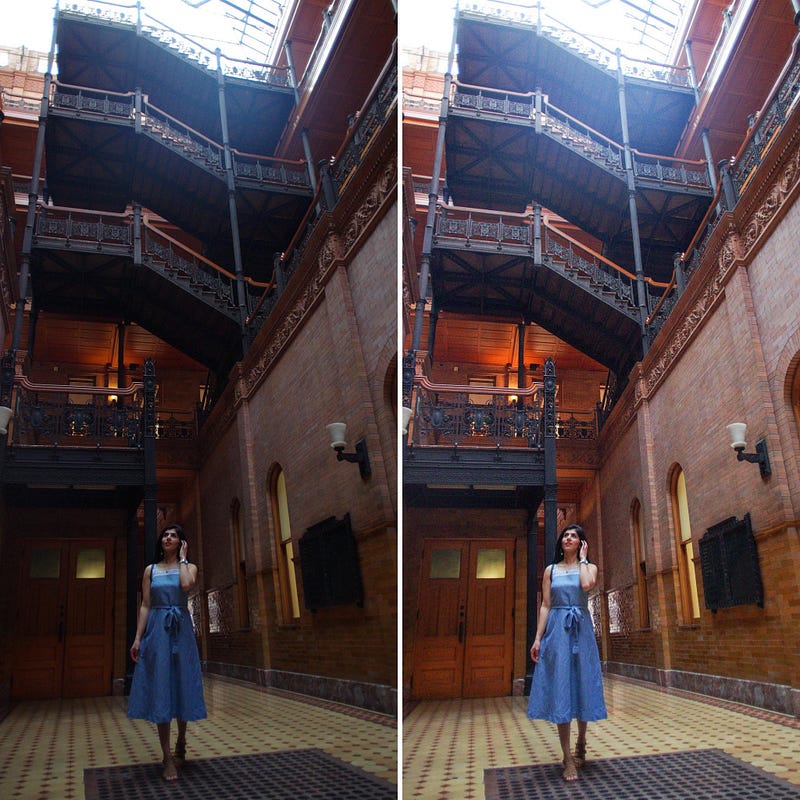
This is my main app I use for editing photos, especially great for tuning dull, dark pictures into bright and color corrected versions.

Download iOS & Android

2. Facetune

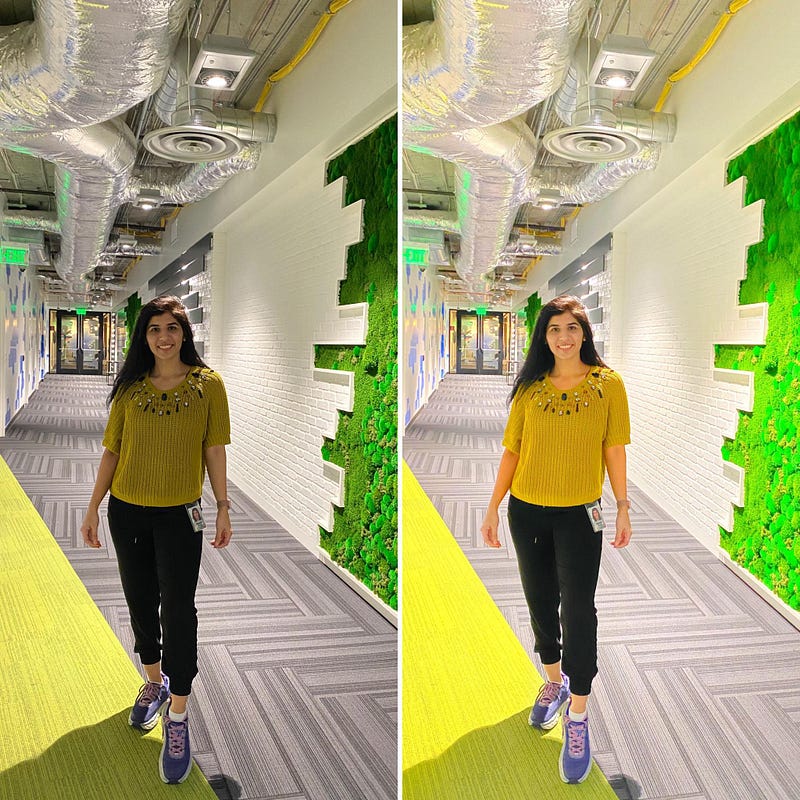
Although Facetune is mainly famous for its reshape feature and has a slightly bad rep, I really like its other editing options, ‘Light FX’ and ‘Edit’ tabs.
Download iOS & Android

Left: Edited in Lightroom. Right: Edited in Facetune with light and vibrance.

Story Editing

3. Storychic

Storychic is great for creating pretty & professional looking stories. I use it periodically for special occasions, e.g. Mother’s Day, birthday stories, etc. That being said, I wouldn’t recommend you to edit all stories; It’s not worth the time.

Download iOS & Android

Graphic Design

4. Canva

I use Canva for creating graphic designs and learning content. It has many pre-built templates to get started. I love that I can edit designs on my laptop using a web browser or on my phone. It also allows collaboration so you can add editors. This post is is created on my laptop in Canva.

Download iOS & Android

Feed Layout & Curation

5. Preview

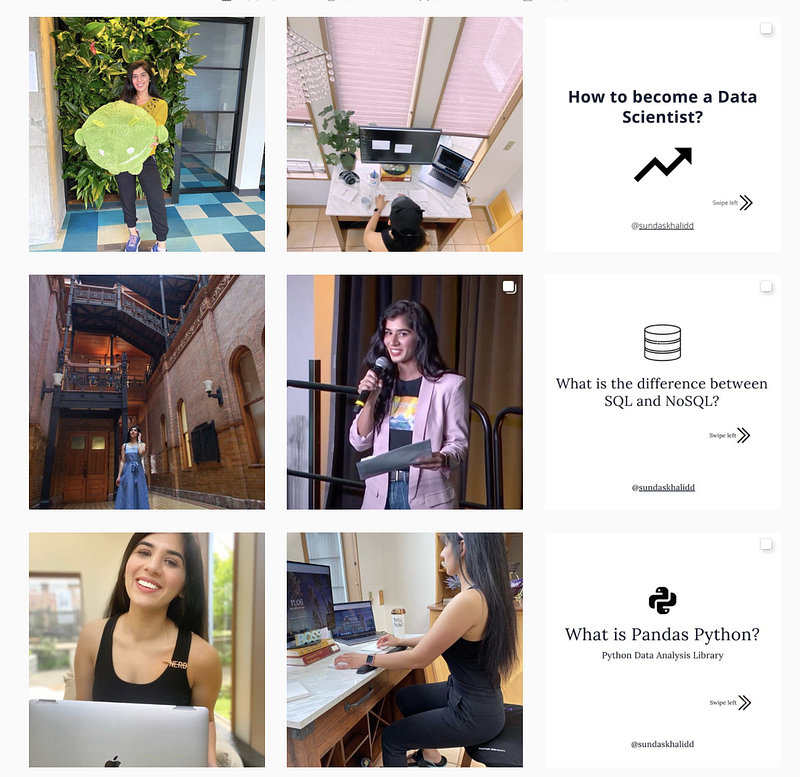
Have you seen those aesthetically pleasing Instagram feeds and wonder how it’s possible? Well, those Instagrammers are using feed layout and curation apps like Preview. I use it for arranging feed aesthetic to figure out which colors and photos go well together. Preview also allows scheduling. I haven’t tried it so can’t speak to it.
Download iOS & Android

This is how my feed looks — not the prettiest but decent enough for someone like me with limited time.

Repost & Layout

6. Repost

This app is good for reposting from other public accounts. I don’t do many reposts on my Instagram but have the app installed and sometimes use it for saving pictures from others accounts.

Download iOS & Android

7. Layout

Layout for creating posts with multiple pictures in one frame. Similar to Repost, I don’t use this very often but I have used in the past and like it for its simplicity. Earlier picture in blue dress was compiled using Layout app.

Download iOS & Android

Caption Editing

8. Caption Writer

Have you seen those beautifully edited captions with perfect line breaks and wonder how they do it? They are probably using Caption Writer or similar apps. I recently came across this app and haven’t used it much. But it seems to promise everything I need for caption writing, dedicated space, clean line breaks, and more.

Download iOS & Android

9. linebreaks.igrm.me

Although not an app, it’s good tool for adding invisible line-breaks. Before Caption Writer, I was writing my captions in Notes app and using this tool to line-break.
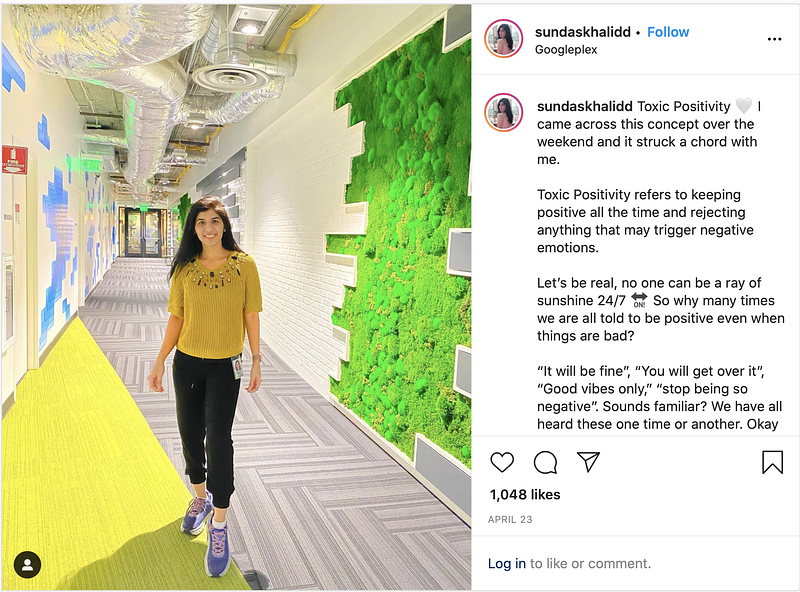
Caption written using linebreaks.igrm.me

Instagram Analytics

10. Insights

Insights is not an app but a feature within Instagram that provides decent insights. I use these insights frequently to decide time of the day to post, which posts and stories my audience likes, and more. E.g. from below chart I learned that 9am is when most of my followers are active.

Insights feature is available in Instagram for Creator and Business accounts.
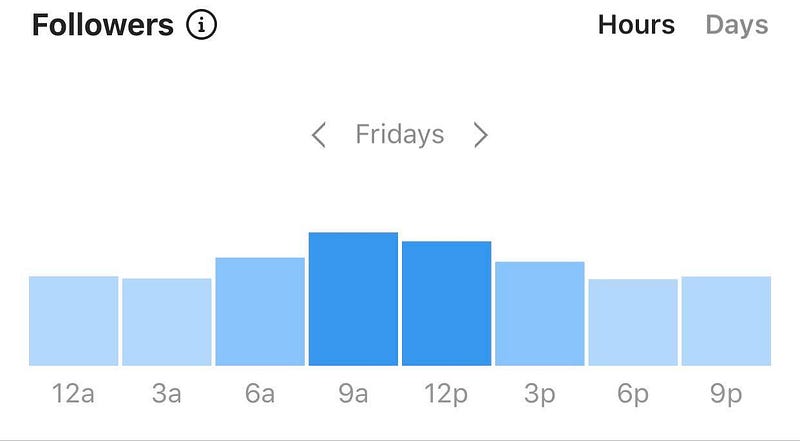
Shows what time of the day most followers are active. 9am is popular.

Final thoughts

There are many apps out there and it’s hard to choose. I shared top 10 favorite FREE apps and utilities I personally use. These apps are all you need in your Instagram tool-box and create a feed that stands out.

Thanks for Reading!

If you like my work and want to support me…

  1. The BEST way to support me is by following me on Medium here.
  2. Follow me on Instagram here. I post lots of updates and interesting stuff here!
  3. Also, be one of the FIRST to subscribe to my new YouTube channel here!
  4. Follow me on LinkedIn here.
  5. Check out my website, sundaskhalid.com.
Instagram
Growth Hacking
Social Media
Influencer Marketing
Women In Tech
Recommended from ReadMedium