avatarTom Smykowski

Free AI web copilot to create summaries, insights and extended knowledge, download it at here

1845

Abstract

id="ea57"><p>Subscribe!</p></blockquote><p id="8f24">In the parent component you can bind to that model with v-model.</p><p id="36ca">That’s actually very impressive. Two way binding is usually handled on the native form element level and once you try to use it in your components, things get tricky.</p><p id="f19c">Vue.js offers an easy solution to actually use two way binding across your app.</p><p id="5652">You can also define if it’s required and what’s the default value.</p><p id="808a">What’s extremely important you can actually define attributes on the model just like you’d define various props. So you can have many two way bound props.</p><p id="e9ef">For component libraries and bigger composition trees it means less boilerplate and encouragement to build more modular projects rather than stacking everything in one component.</p><p id="6557">The data will at last flow through the veins of an app 😊</p><blockquote id="54a9"><p>Like!</p></blockquote><h1 id="ff7c">Short Prop Binding</h1><figure id="9ddc"><img src="https://cdn-images-1.readmedium.com/v2/resize:fit:800/1*F9RA05FPq1mHXIGN6JJQbA.jpeg"><figcaption>source: https://vuejs.org/guide/components/v-model.html</figcaption></figure><p id="f00f">What happens here is that you bind three attributes of img element to three states of your component.</p><p id="c415">When the names are the same, you don’t have to write it per se. You just indicate your binding with, for example “:src”.</p><p id="6564">Again, it will be very helpful for component libraries and light components where you usually only pass stuff from up to down and vice versa.</p><blockquote id="d72a"><p>Share the article!</p></blockquote><p id="985c">It has some limits of course. For example when your component library has a component called image with <i>src</i> prop, and you use it in a profile co

Options

mponent, you rather want to have a semantic prop. It means you want to have a <i>avatar</i> prop rather than <i>src</i>.</p><p id="6904">So, you can’t always just use the same name, hence, the shortcut. But it’s great to be able to use the shortcut when you don’t need to rename props.</p><blockquote id="5c1d"><p>Become a member!</p></blockquote><p id="7224">Vue 3.4 is really nice, the two way binding and shortcuts for props will change how we build apps. Especially the first one will account to improvements in the clarity and save time to build user experience based on fantastic reactivity.</p><blockquote id="b7e3"><p>At last we’ll have time to learn CSS 😊</p></blockquote><h1 id="d88f">💎 Bonus</h1><p id="a9f1">Check out my previous Vue.js articles: <a href="https://medium.com/@tomaszs2/list/139d64989593">https://medium.com/@tomaszs2/list/139d64989593</a></p><p id="fade">Only 1% of people read such long articles to the end. Congrats! It must be a pleasure to talk with you about coding. You are my favorite people, I hope you will connect by subscribing!</p><p id="e644">BTW. WOW. You are really interested in Vue.js! I’ve designed a <a href="https://summonthejson.com/products/vue-flashcards">Vue.js card game</a> called Summon The JSON: Vue.js. What a coincidence! You can order them now!</p><p id="2cd3">Do you like Vue.js? Clap, subscribe, like and share in your social media!</p><p id="9261">Join 11 000 developers who follow Tom Smykowski! For $5 per month you will have access to all Medium articles and Tom will get a part of it, so he will write more about Vue.js!<a href="https://medium.com/membership/@tomaszs2"> Become a member now</a>!</p><h1 id="a8cd">Happy New Year!</h1><p id="2a3f"><a href="https://blog.vuejs.org/posts/vue-3-4#_2x-faster-parser-and-improved-sfc-build-performance">source</a></p></article></body>

✌️ Vue.js 3.4 Released: 20% Faster Parsing, Two Way Binding And More

The title image

Vue.js 3.4 surprises with performance improvements and really tasty two-way binding tied with reactivity.

The 2024 year is just around the corner, and Vue team through the voice of the legendary Evan You announced the release of Vue.js 3.4.

Interestingly enought it’s not only a bugfixing release. It actually delivers several extremely useful improvements. Let’s go through them:

20% Faster Parser

Faster parsing means the 44% SFC parsing when building source map from template and script. Overall, it shouldn’t have a big impact on total times.

Here 2%, there 2% and you have 4% ☺️

Clap!

Less Overheat From Computed Values

Currently, when a computed value doesn’t change, reactive code is fired anyways. Now it won’t meaning less calculations, and better responsiveness.

If it didn’t change, it didn’t change. No need to dig into 😊

Two Way Binding Is Now Operational

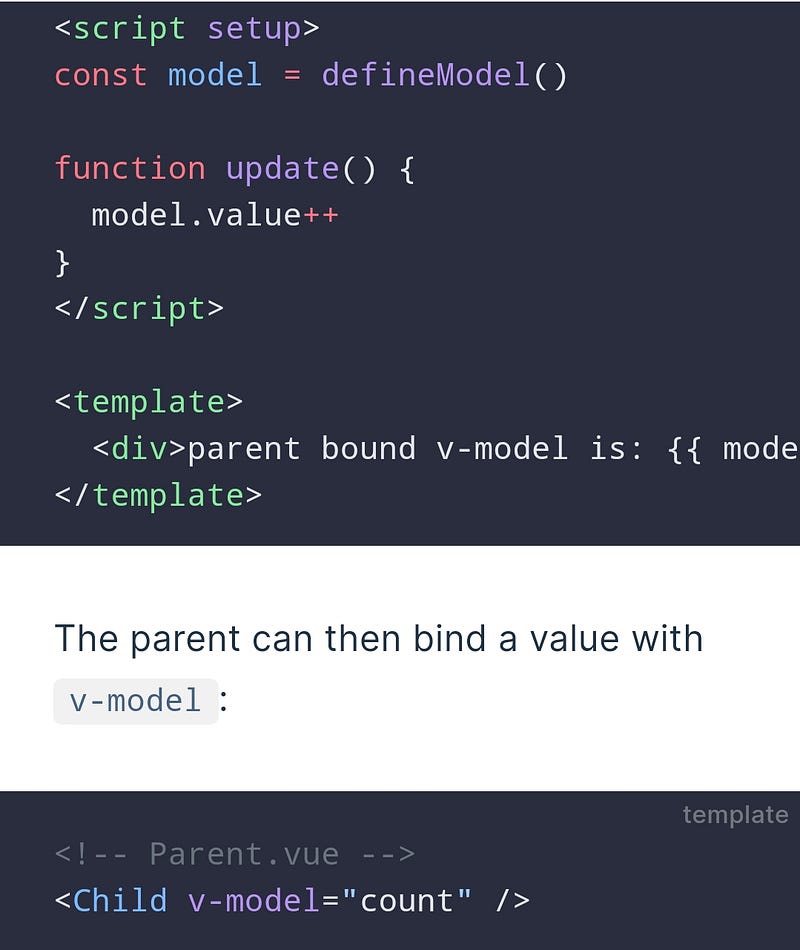
Tge defineModel was introduced experimentally in the previous relese and now it’s live meaning easier and default two way binding:
source: https://vuejs.org/guide/components/v-model.html

Let’s see what happens here. We’re defining a model with the defineModel() macro. The name of the model will be “model”.

Subscribe!

In the parent component you can bind to that model with v-model.

That’s actually very impressive. Two way binding is usually handled on the native form element level and once you try to use it in your components, things get tricky.

Vue.js offers an easy solution to actually use two way binding across your app.

You can also define if it’s required and what’s the default value.

What’s extremely important you can actually define attributes on the model just like you’d define various props. So you can have many two way bound props.

For component libraries and bigger composition trees it means less boilerplate and encouragement to build more modular projects rather than stacking everything in one component.

The data will at last flow through the veins of an app 😊

Like!

Short Prop Binding
source: https://vuejs.org/guide/components/v-model.html

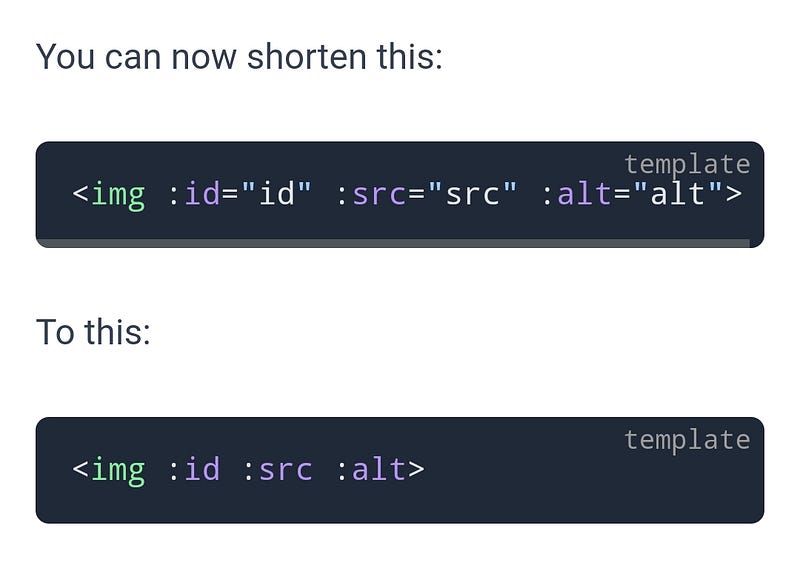
What happens here is that you bind three attributes of img element to three states of your component.

When the names are the same, you don’t have to write it per se. You just indicate your binding with, for example “:src”.

Again, it will be very helpful for component libraries and light components where you usually only pass stuff from up to down and vice versa.

Share the article!

It has some limits of course. For example when your component library has a component called image with src prop, and you use it in a profile component, you rather want to have a semantic prop. It means you want to have a avatar prop rather than src.

So, you can’t always just use the same name, hence, the shortcut. But it’s great to be able to use the shortcut when you don’t need to rename props.

Become a member!

Vue 3.4 is really nice, the two way binding and shortcuts for props will change how we build apps. Especially the first one will account to improvements in the clarity and save time to build user experience based on fantastic reactivity.

At last we’ll have time to learn CSS 😊

💎 Bonus

Check out my previous Vue.js articles: https://medium.com/@tomaszs2/list/139d64989593

Only 1% of people read such long articles to the end. Congrats! It must be a pleasure to talk with you about coding. You are my favorite people, I hope you will connect by subscribing!

BTW. WOW. You are really interested in Vue.js! I’ve designed a Vue.js card game called Summon The JSON: Vue.js. What a coincidence! You can order them now!

Do you like Vue.js? Clap, subscribe, like and share in your social media!

Join 11 000 developers who follow Tom Smykowski! For $5 per month you will have access to all Medium articles and Tom will get a part of it, so he will write more about Vue.js! Become a member now!

Happy New Year!

source

Programming
Vuejs
JavaScript
Typescript
Web Development
Recommended from ReadMedium