Free AI web copilot to create summaries, insights and extended knowledge, download it at here
773
Abstract
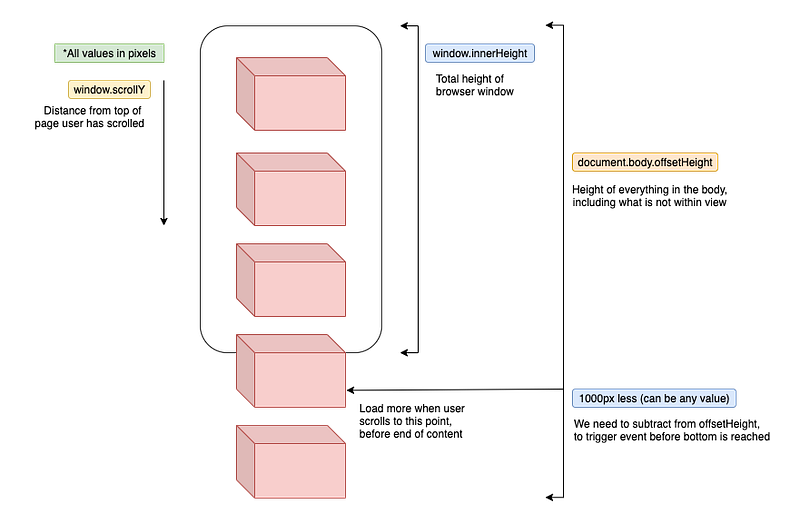
ojects to Build Your Portfolio</figcaption></figure><p id="9a77">A. window.scrollY: 從頁面上方已經捲/滑了多少距離 (px)</p><p id="7725">B. window.innerHeight: 視窗可視範圍的高度 (px)</p><p id="1f3f">C. document.body.offsetHeight: 整個頁面的高度,包括還沒看到的內容 (px)</p><p id="aef2">D. 調整項 (e.g. 1000px): 在到達頁面底部前多少距離要觸發無限捲動</p><div id="f37d"><pre><span class="hljs-section">實作步驟:</span></pre></div><div id="5089"><pre><span class="hljs-bullet">1.</span> 監聽捲動 (scroll) 的事件</pre></div><div id="8d36"><pre><span class="hljs-number">2.</span> 當 A <span class="hljs-comment">(已滑距離)</span> + B <span class="hljs-comment">(可視範圍)</span> >= C <span class="hljs-comment">(整頁高度)</span> - D <span class="hljs-comment">(調整項)</span>,
就觸發無限捲動載入新的內容 getPhotos<span class="hljs-comment">()</span> <span class="hljs-comment
Options
">(自定義函數抓取資料)</span></pre></div><p id="bea5">提供簡單範例如下:</p>
<figure id="682a">
<div>
<div>
            <iframe class="gist-iframe" src="/gist/tingchun0113/6b63e548936ac161f6109f787d90f719.js" allowfullscreen="" frameborder="0" height="undefined" width="undefined">
          </div>
        </div>
    </figure></iframe></div></div></figure><p id="dcc4">完整程式碼可以參考 👉 <a href="https://github.com/tingchun0113/infinite-scroll-unsplash-api/blob/main/script.js">這裡</a></p><h2 id="9834">結語</h2><p id="7bb6">當然還有其他工具可以實作無限滾動,比如 <a href="https://developer.mozilla.org/en-US/docs/Web/API/Intersection_Observer_API">Intersection Observer API</a>。但這篇文章試著用一張圖 (+簡單的公式) 解釋無限滾動原理。歡迎讀到這裡的大家追蹤/拍手/給任何建議。</p></article></body>